Single-region global product: fixes that buy more time
A single-region global product can feel slow and fragile. Learn how caching, queue isolation, and careful deploys can steady service before bigger changes.
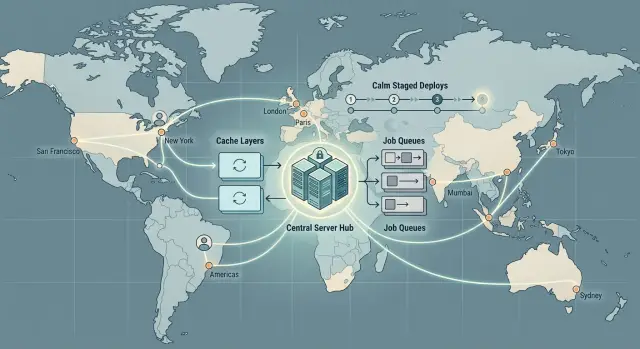
Table of Contents
Why one region starts to hurt
A product can run happily from one region for quite a while. Then growth changes the feel of it. Users who are far from your servers pay for every network round trip, and the wait adds up faster than most teams expect.
If your app lives in one US region and someone in Singapore opens a dashboard, the page may need several requests before it becomes usable. A few hundred milliseconds per request does not look scary on a chart. Stack five or six of them together and the product feels slow.
Distance is only part of it. Shared infrastructure often hurts more than raw latency. One crowded queue can delay emails, imports, reports, webhooks, and other jobs that should never fight each other. Users see that as random slowness, stale screens, or actions that finish minutes later.
Releases get riskier too. When one region serves the whole world, a bad deploy lands everywhere at once. A broken login, a long migration, or bad cache data becomes a global problem in minutes.
That is why teams start thinking about more regions. The catch is simple: extra regions solve one set of problems and create another. Data consistency gets harder. Failover needs real testing. Support gets messier because a bug may appear in one place and not another. Costs rise, and so does day to day operational work.
For many products, the first move should be boring. Cut repeat work, split queues, and make releases easy to reverse. Those steps do not remove distance, but they often buy months of stable growth before multi-region work is worth it.
What to measure before you change architecture
Before you change architecture, find what is actually slow. Complaints from Europe or Asia do not always mean geography is the whole issue. Sometimes one bad query or one chatty third-party API causes most of the pain.
Test page load from cities that match real traffic, not just from your own office. If your app runs in the US, check places like London, Singapore, and Sydney. Measure time to first byte, full page load, and the slowest API calls behind the screen. If complaints cluster around checkout, search, or dashboards, measure those paths directly.
Then break slow requests into parts: app time, database time, and third-party time. That split changes the discussion. If your app spends 50 ms, the database spends 800 ms, and an outside service spends 600 ms, a new region will not fix much. Better queries, fewer round trips, and sane fallbacks will.
Background work needs its own view. Most teams only track how long a job takes once a worker starts it. Users feel queue wait time first. A job that runs in four seconds but waits three minutes still feels broken. Measure wait time by queue, because one noisy batch task can bury live user work while overall worker numbers still look fine.
A small dashboard is enough if it answers four questions:
- How fast do pages and APIs load from distant cities?
- Where does each slow request spend its time?
- How long do jobs wait before workers start them?
- Which deploy happened right before latency or errors jumped?
Put deploy markers next to error and latency graphs. Teams skip this and waste hours guessing. Oleg Sotnikov often tells teams to line up deploys with spikes first, because that simple habit can reveal a rollback issue, a bad query, or a missing cache before anyone touches multi-region design.
Cut repeat work with caching
For a product that still runs from one region, caching is often the cheapest way to cut delay without redesigning the whole system. Many slow requests are not slow because the code is awful. They are slow because the app keeps doing the same work again and again.
Start with responses that barely change. Pricing pages, public catalog data, feature flags, country lists, help content, and search filters are common wins. If an answer stays the same for even 30 to 120 seconds, that is often enough to remove a lot of repeat load.
Popular reads should not hit the database every time. Serve them from a fast cache first and fall back to the database when needed. Users get quicker responses, and the database gets room to breathe during spikes.
In practice, teams usually start by caching public pages that do not change every minute, shared reference data in API responses, and the hottest reads in memory or a fast cache. Static files deserve special attention too. Images, scripts, styles, fonts, and app bundles should sit close to users instead of crossing the world on every visit.
Live user data needs more care. Account balances, permissions, current inventory, recent messages, and payment state can break trust if they lag behind reality. In those places, use small targeted caches around safe pieces of data instead of caching the whole screen.
Short cache times are the safer starting point. A 60 second cache is easier to trust than a one hour cache, and it still cuts a lot of repeated work. Once you see the results, you can extend cache times where the data stays stable.
A good caching plan buys time because it removes waste before you add complexity. One team can cut a large share of database reads in a few days. A multi-region move can take months and introduce new failure modes.
Keep background work from blocking users
When one queue handles every job, the loudest workload wins. A burst of image processing, imports, or webhook retries can keep workers busy for minutes and make login, checkout, or billing feel slow even when the app itself is fine.
The fix is straightforward. Split work by urgency. Live user actions need their own queues, workers, and limits. Slow or noisy tasks should wait elsewhere so they cannot swallow all capacity.
In practice, that usually means keeping login, checkout, billing, and account updates in a high priority queue, while imports, emails, image resizing, and report generation run in lower priority lanes. Webhooks deserve their own queue because outside services slow down and fail more often than you would like. Worker caps matter too. Without them, one flood can still eat every process.
This matters even more when users are already far from your servers. They already pay a latency penalty. If background jobs start competing with live requests, the product feels worse fast.
Retries need restraint. Teams sometimes create their own outage by retrying failed jobs every second. Use backoff instead: wait a little, then longer, then longer again. Many failures clear on their own within 30 seconds or a few minutes.
Duplicate jobs cause quieter damage. The same event can fire twice after a timeout, a client retry, or a webhook resend. If both copies run, you can send two emails, import the same file twice, or charge the same card twice. Idempotency keys or a short deduplication window stop that.
A plain example makes the point. One customer uploads 50,000 contacts while another tries to log in and pay an invoice. If both actions share one queue, the import can crowd out billing. Separate lanes keep the import moving without making the second customer wait.
Make deploys calm and reversible
Teams often lose more time to rough releases than to raw latency. When one region serves everyone, one bad deploy hits the whole customer base at once. Error rates rise, retries pile up, queues swell, and the team starts guessing.
Smaller releases cut that risk. A short diff is easier to review, easier to understand, and easier to roll back. If something breaks, you can usually find the cause faster.
Riskier changes should go to a small slice first. Put new behavior behind a feature flag, send a small share of traffic to it, or turn it on for staff before a wider rollout. If latency jumps or errors rise, stop there. That pause is much cheaper than a full outage.
A release is not ready until rollback is ready. Pick the version you will restore, make sure the old image still exists, and check whether any schema change blocks a quick return. If the release changes data, decide in advance whether you can roll back or whether you need a forward fix.
Database work needs extra care. Long migrations during busy hours can freeze requests for users everywhere, even when the app code is fine. Break large changes into smaller steps, run heavy work when traffic is low, and test timing on production-like data before release day.
A short runbook beats a long policy document. One person should watch errors, latency, and queue depth during rollout. One person should decide whether to roll back. The team should agree on a stop line before deployment, such as errors doubling for five minutes. Rollback commands and feature flags should be ready before traffic moves, and database steps should stay separate from app deploys when possible.
This is close to how Oleg Sotnikov runs high uptime systems on lean infrastructure: keep changes small, keep ownership clear, and make reversals boring. Users should barely notice that you shipped.
A rescue plan in order
When a global product starts to feel slow, resist the urge to redesign everything. Most teams get more relief from one careful week of measurement and a few boring fixes than from rushing into a multi-region project.
Start with a week of numbers. Track p95 latency, queue wait time, and error rate by hour. Watch normal days, busy hours, and at least one deploy. If you skip this, you will treat symptoms and miss the bottleneck.
Then cut repeat work. Cache static assets first, then cache the reads people ask for again and again. Public pages, settings, catalog data, and common lookups are good early targets. If a page loads 10,000 times and changes twice a day, your app should not rebuild it 10,000 times.
Next, pull slow third-party calls out of user requests. Email sends, analytics writes, CRM syncs, fraud checks, and AI calls often do not need to finish before the page loads. Queue them or run them after the response. This alone can shave painful seconds for distant users.
After that, split background jobs by business priority. Keep login, checkout, and other urgent work away from report generation, imports, exports, and batch cleanup. One noisy job can make the whole product feel broken.
Then tighten release discipline. Ship smaller changes, avoid risky deployments during peak hours, add health checks, and practice one rollback. Teams that rehearse rollback once recover much faster when something goes wrong.
Finally, test the far-away user experience again and compare it with the first week. If latency, queue delay, and errors are down enough, you bought time without taking on multi-region complexity.
A simple example
A SaaS company ran everything from one US region. Customers in Europe, Asia, and South America could still log in and use the app, but the same problem appeared every morning. Large customer imports hit the default queue at the start of the US day, which overlapped with active hours in other markets.
The site never fully went down. The pain showed up a step later.
When imports filled the queue, report jobs waited. Webhooks waited too. A manager in Berlin opened a dashboard and saw stale numbers. A team in Sao Paulo requested a report and got it much later than expected. Support tickets piled up with the same complaint: "The app works, but everything important is delayed."
The team skipped the big architecture change and fixed the traffic jam first.
They split background work into separate queues. Imports went to one queue, reports to another, and webhooks to a third. That stopped one heavy job type from blocking everything else.
Then they changed report caching. If several people asked for the same report with the same filters, the app reused the recent result for a short time instead of rebuilding it every time. That cut repeat database work and made common report screens feel much faster, even for users far from the US region.
They also tightened release discipline. Instead of shipping large batches a couple of times a week, they shipped smaller releases with a clear rollback plan. That cut surprises and kept workers from getting stuck after changes.
Nothing about this was glamorous. It was just careful work on the parts users felt every day.
Support volume fell because reports arrived on time, webhooks cleared faster, and fewer releases caused side effects. The team bought enough time to postpone multi-region work and plan it properly.
Mistakes that make things worse
When users complain about latency, teams often reach for the biggest fix first. That usually means more cost, more moving parts, and no clear win. One region can carry a product much longer if you avoid a few common mistakes.
The first is careless caching. A team sees a slow page, adds a cache, and moves on. Then users open an order page, a billing screen, or a support dashboard and see stale data that should have changed seconds ago. Fast and wrong damages trust. Cache repeat reads, public pages, and expensive queries. Keep user-critical data fresh, or give it a very short TTL and a clear refresh path.
The next mistake is queue design. Many apps start with one default queue for everything: emails, imports, image processing, webhooks, cleanup jobs, and account events. That works until one noisy job takes over. A large CSV import should never delay password reset emails or payment confirmations. Split queues by urgency and by blast radius. If one queue jams, the whole product should not feel it.
Retries cause trouble too. If a third-party API breaks and your workers retry every few seconds with no cap, you create your own spike. Logs grow, workers stay busy, and real work waits. Exponential backoff, retry limits, and dead-letter queues are boring tools, but they save teams from self-inflicted outages.
Deploys fail for the same basic reason: too many changes at once. If you ship app code, database changes, config edits, and infrastructure updates in one deployment, nobody can tell which part caused the issue. Rollbacks get messy fast. Small, reversible releases look slower on paper and move faster in real life because you can stop the damage early.
The last mistake is treating multi-region as the first answer instead of the last resort. Extra regions add replication problems, more release paths, harder debugging, and higher bills. Oleg Sotnikov often advises teams to fix architecture waste first for exactly this reason. Better caching rules, isolated queues, calmer retries, and cleaner releases often buy months of breathing room before extra regions make sense.
Quick checks before multi-region
Multi-region costs time and attention. If the product still feels shaky, check whether the simpler fixes changed the numbers. Many teams move too early and end up with harder routing, trickier data sync, and more ways to break production.
One region will always have one obvious weakness: distance. But after better caching, queue isolation, and calmer releases, that distance should hurt less than it did a month ago. Compare recent data with your own baseline, not with a perfect system.
- Test the product from far-away locations and compare the results with last month. Faster pages, APIs, and static assets usually mean caching bought you time.
- Watch queue wait time during imports, backfills, or traffic spikes. If the queue stays steady instead of growing for hours, background work no longer controls the whole app.
- Practice a rollback during a controlled release. If the team can return to the previous version in minutes, release discipline is working.
- Check what happens when one job fails hard. A broken import, report, or webhook should not slow search, login, checkout, or other unrelated paths.
- Read recent support tickets. Fewer complaints about timeouts, stale screens, and pages that never finish loading matter just as much as graphs.
If most of those checks look better, wait on extra regions. A calmer product often gives you several more months to improve the product itself instead of rebuilding the foundation. If distant users still wait too long after these fixes, or if one region still creates a business risk you cannot accept, then the added complexity starts to make sense.
What to do next
Start with the user actions people notice right away: sign in, open the main dashboard, run a search, save a change, and complete checkout or another critical form.
Check how those actions perform for users in different parts of the world. If one action takes 800 ms in your main market and three seconds elsewhere, you have a clear target. You do not need to speed up everything at once.
For many teams, the next question is cost, not prestige. Price out extra regions, replicas, new databases, failover work, and the team time needed to run all of it. Then compare that with what you can gain from better caching, queue isolation, and calmer releases.
Those simpler fixes often buy months, sometimes years. A cached dashboard can cut repeat queries sharply. Isolating background jobs can stop imports, emails, or report generation from slowing live user requests. Safer releases can keep a small change from turning into a global problem.
Before you add regions, schedule a short architecture review. One meeting is often enough if the team comes prepared with latency numbers, error rates, queue delays, rollback time, and monthly infrastructure cost. The question is plain: have you outgrown one region, or are you still paying for avoidable waste?
If you want an outside view, Oleg Sotnikov reviews this kind of setup through oleg.is. His work as a Fractional CTO and startup advisor covers infrastructure, release flow, queue design, AI assisted development, and cost control, which is often exactly where teams get stuck before a multi-region move.
If the fastest user paths are still too slow after those changes, extra regions may be the right next step. If they improve enough, you bought time without turning the system into something much harder to run.
Frequently Asked Questions
When should I move from one region to multiple regions?
Add regions after you measure the slow paths and remove obvious waste. If caching, queue splits, smaller deploys, and moving third-party calls out of user requests still leave distant users waiting too long, extra regions start to make sense.
What should I measure before I change the architecture?
Start with p95 latency, queue wait time, error rate, and deploy timing. Check those numbers from cities where real users live so you can see whether distance, slow queries, or outside services cause the pain.
Can caching buy real time if my app still runs in one region?
Yes, often faster than people expect. Short caches for static assets, shared reference data, and common reads can cut repeat database work and make pages feel quicker without a full redesign.
What should I avoid caching?
Do not cache data that users expect to be exact right now, like balances, payment state, recent messages, permissions, or live inventory. If you cache any part of that flow, keep it narrow and use a very short TTL.
How do I know my queues are causing the slowdown?
Look at wait time, not only run time. If jobs finish quickly once workers pick them up but users still wait minutes, one queue probably mixes urgent work with noisy batch tasks.
Which jobs need separate queues first?
Give live user actions their own lane first. Login, checkout, billing, and account updates should not compete with imports, emails, image work, reports, or webhook retries.
How should I retry failed jobs without making things worse?
Use backoff instead of retrying every few seconds. Wait a bit, then longer, and cap the total retries so a failing service does not keep workers busy and block real user work.
Can third-party APIs make a one-region app feel slower than distance does?
Move anything non-essential out of the request path. Email sends, analytics writes, CRM syncs, some fraud checks, and many AI calls can run after the response or in a queue.
What makes deploys safer when one region serves everyone?
Ship smaller changes, put risky behavior behind flags, and decide the rollback plan before release. Keep database changes separate when you can, and have one person watch errors and latency during rollout.
What is a practical rescue plan before I pay for more regions?
Spend one week getting clean numbers, then fix the biggest bottlenecks in order. Most teams get solid relief from caching repeat reads, splitting queues, pulling slow outside calls out of requests, and practicing rollback before they touch multi-region design.


