Signed file delivery with Cloudflare for private files
Learn how signed file delivery with Cloudflare works with object storage, cache rules, expiry windows, and audit checks for private customer files.
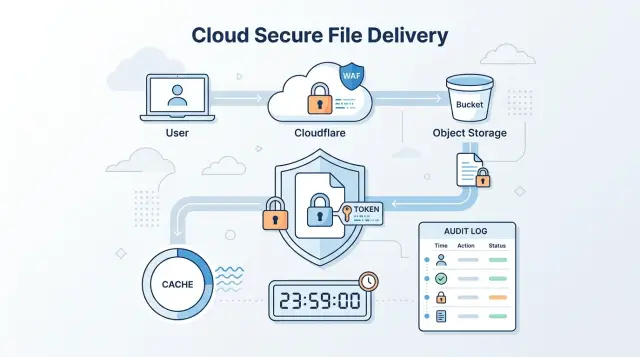
Table of Contents
Why this setup gets tricky
Cloudflare and object storage are great at sending the same file quickly, over and over. That's perfect for public assets. It gets harder when the file is a customer invoice, a private report, or a contract that only one account should open.
With signed file delivery, you're asking a public CDN to behave like a private gate. You want edge speed, but you also need strict access control. If cache rules are too loose, the CDN can keep serving a file after the signed URL should have expired. If the cache ignores part of the signature, two requests that should be different can look the same.
A lot of teams avoid that risk by putting an app proxy in front of storage. The app checks the user, fetches the file, and sends it back. That's easy to understand, but it adds load, code, and extra failure points. Large downloads can hit your servers hard. A busy billing day or a batch of export downloads can turn a small feature into an infrastructure problem.
Private file access only works when four rules stay in sync: the right person gets the file, the link stops working on time, the cache does not keep old access alive, and you can see who tried to open what. Miss one, and you get either a leak or a support ticket.
Generating a signed URL is not the hard part. Most teams can do that in an afternoon. The hard part is agreeing on the rules around it. How long should a link live if a customer opens email on mobile and desktop? What happens if they forward it? Should a repeat download use the cache, or force a new check? When a customer says "I never got that file," which log do you check first?
Lean teams usually want to skip the app proxy for a good reason. It keeps the app smaller and avoids pushing file bandwidth through your own servers. That approach works well, but only if access, expiry, caching, and audit rules are planned together instead of patched in later.
What the signed request should control
A signed request should answer one question: "Can this person fetch this exact file right now?" If the token says less than that, gaps appear fast. If it says too much, support gets messy and mistakes become easier.
Start with the file path. The token should match one object path, not a folder or a broad pattern, unless you truly need that range. If a customer buys invoice-1842.pdf, the token should open only that file. A token that works for /invoices/* turns one small bug into a much bigger leak.
Time matters just as much. Set the expiry to fit the file and the way people use it. A one-time invoice download can expire in a few minutes. A private video or large ZIP file may need longer because real people have slow networks, pause downloads, and switch devices.
The token should also carry a reference you can trace later, such as a user ID, account ID, or order number. Keep it simple. You do not need personal details in the URL if your logs can map that reference back to the right customer.
In practice, a good signed request usually controls four things: the exact object path, the expiry time, who the request belongs to, and whether the request matches the allowed path and action.
That last check is where teams often slip. Do not accept a token for one path and then let the browser request a different filename with the same signature. Your edge rule or storage check should compare the signed path to the requested path every time. If they do not match, reject it.
A small example makes it clear. Suppose order 5831 includes a private warranty PDF. The token can encode /orders/5831/warranty.pdf, expire in 15 minutes, and include account 2049 as the reference. If someone copies that token and tries /orders/5831/invoice.pdf, or uses it tomorrow, the request should fail.
That is the whole point of the signature. It grants one narrow permission for one file, for a short time, tied to one customer record you can audit later.
How to set it up step by step
The clean setup is simple: your app decides who can download a file, and Cloudflare plus object storage handle the transfer. That gives you signed file delivery without turning your app into a file proxy.
Keep the files in private object storage. Do not make the bucket public. Use a storage endpoint that only Cloudflare or signed requests can reach, so a guessed file path does not become a working download.
Put Cloudflare in front of that storage on a dedicated hostname. The browser should request files from your Cloudflare domain, not from the raw storage URL. That gives you one place to control cache behavior, response headers, and access checks.
When a logged-in user asks for a file, your app should do one job: verify that this person can have that file. If the check passes, create a signed URL with a short expiry and include the exact file path in the signature. Then return that URL to the browser.
Do not stream the file through your app unless you have a specific reason. Your app server does not need to spend CPU time or bandwidth on a 200 MB download. A customer clicks "download," your app returns a signed URL, and the browser fetches the file from Cloudflare.
The request flow is short:
- The user signs in and requests a file.
- Your app checks account access, file ownership, and any plan limits.
- Your app creates a signed URL that expires soon.
- The browser downloads the file from Cloudflare.
Before launch, set cache and header rules. This is where many setups go wrong. Shared cache can save money, but only if it cannot keep old access alive.
For user-specific files, send Cache-Control that matches the file type and risk level, bypass shared cache when needed, set Content-Disposition so the filename is clear, make sure Cloudflare evaluates the signature as part of the request, and test an expired URL twice: once in a fresh browser and once after a successful download.
If you deliver invoices, contracts, or export files, this setup keeps the app lean. The app makes the access decision. Cloudflare and storage do the heavy lifting.
Set cache rules that do not keep old access alive
A signed URL should approve one request, not unlock a file for anyone who asks for the same path later. Cache rules go wrong when Cloudflare stores a private file before the request passes signature checks. If that happens, an expired or unsigned request may still get cached bytes.
The safe pattern is simple: validate first, cache second. Cloudflare should only keep file bytes after the request passes your signature, expiry, and path checks. If a request fails, Cloudflare should return the error and stop there. A past valid request should never act like a permanent pass.
Short edge cache times help too. Private documents usually do not need a long TTL at the edge because the audience is small and the risk of stale access is higher than the speed gain. For many customer files, a few minutes is enough.
A practical policy is straightforward. Cache successful private responses for 1 to 5 minutes when the file is sensitive. Stretch that only for lower-risk files that people download often. Cache 403, 404, and 410 responses briefly, around 30 to 60 seconds, so denials clear fast after you issue a fresh link. And recheck the signature on every new request, even if the file bytes already sit at the edge.
That short error cache matters. If someone opens an expired link, you want the denial to disappear quickly after you generate a new signed URL. A long cache on 403 responses creates support tickets that feel random to the customer.
Replacing files needs the same care. If you upload a corrected PDF to the same object path, Cloudflare may keep the old copy until the TTL ends. The clean fix is versioned filenames such as report-2025-04-v2.pdf. If you must keep the same path, purge that object right away when you replace it.
Take an invoice portal as an example. A customer downloads invoice-847.pdf with a signed link that expires in 10 minutes. Cloudflare can cache the file briefly after validation succeeds. Later, if you replace that invoice with a corrected copy, purge the cached object or change the filename. Otherwise the customer may still get the old PDF even though storage already has the new one.
Choose expiry times people can live with
Expiry time is a user experience choice as much as a security choice. If links are too short, support gets angry emails. If they are too long, old messages and forwarded links stay useful far longer than they should.
Email links need the shortest life. People forward emails, leave them in inboxes for months, and open them on the wrong device. For most private file access, 10 to 30 minutes is enough for a link sent by email.
Portal users usually need more room. They already signed in, and they may start a large download, switch networks, or come back after a few minutes. A signed URL expiry of 30 to 120 minutes is often easier to live with for files opened inside a customer portal.
Different file types deserve different limits because the risk is not the same. Invoices can sometimes live longer if customers often reopen them from email. Contracts usually need shorter windows because people forward them inside a company. Data exports should stay short, especially when they contain user data. One-time support files can stay active a bit longer if someone needs time to fetch them from a help desk message.
A simple rule works well: the more sensitive the file, the shorter the link life. Large files need a second rule: the bigger the file, the more forgiving the timing should be.
Decide early what happens if a link expires during a download. In most cases, check the signature when the download starts and let that transfer finish. Do not cut off an active stream halfway through or people will retry again and again.
New requests after expiry should fail. That includes refreshes, resumed downloads, and new range requests unless your portal can mint a fresh link after the user signs in again. This matters a lot for exports and video files, where resume support often decides whether the setup feels smooth or broken.
If you are building signed file delivery with Cloudflare, test expiry with slow connections, mobile handoffs, and resumed downloads. A link that looks fine on office Wi-Fi can still fail for a real customer on a train.
Write audit records you can actually use
If a customer says "my link expired before I downloaded the file," a plain 403 entry will not settle the issue. You need two records: one when your app creates the signed URL, and one when the file request hits the edge.
Those records answer different questions. The app log shows who got access, which file they were allowed to fetch, and how long that access lasted. The edge log shows whether the request succeeded, failed, or arrived after the expiry time.
Log the access grant, not just the download
When your app issues a signed URL, write an audit entry right away. Do not wait for the file request. If the customer never clicks the link, that still matters.
Keep the record small and easy to scan. Store the file ID, user ID or account ID, issued time, expiry time, a request ID tied to that signed URL, and the actor that created it, such as the app user or a support admin.
That request ID is especially useful. Add it to the signed URL flow so your app log and edge log can point to the same access grant. Without it, support ends up matching events by timestamp and guessing.
When the file request reaches Cloudflare, log the edge timestamp, file ID, request ID, result, and HTTP status. If your storage layer also writes access logs, keep the same IDs there too. Three separate logs are fine. Three naming schemes are not.
Make denials easy to search
Most support tickets come from failures, not successes. Store denied requests in the same place as allowed ones, and give each denial a plain reason code such as "expired," "bad-signature," "missing-file," or "policy-blocked."
Do not bury expiry failures inside a generic 403 bucket. If a link expired at 14:00 and the customer clicked at 14:07, your team should see that in seconds. The same goes for repeat access after a file was replaced or a user lost access.
A simple example helps. If a customer tries to download invoice-4821 and gets denied, support should be able to search by file ID or user ID and see that the app issued a URL at 09:12, it expired at 09:27, and the edge rejected a request at 09:31 with reason "expired." That is enough to fix the case fast and spot patterns if the same problem keeps happening.
A simple customer portal example
Picture a billing portal. A customer signs in and clicks last month's invoice. The file sits in object storage, but the portal does not expose a public file path that anyone can reuse later.
The app checks the account first. It confirms that the signed-in user belongs to the customer account, that the invoice ID matches that account, and that the file path points to the right document. If any of those checks fail, the app returns an error and stops there.
When the checks pass, the app creates a signed URL that lasts 10 minutes. That short window usually gives people enough time to open or download the file, even on a slow connection, without leaving the door open for hours.
This is where Cloudflare helps. The browser gets a temporary URL, then Cloudflare fetches and serves the invoice directly if the token, path, and expiry all match. Your app stays out of the file transfer, so it does less work and avoids becoming a file proxy.
The audit trail matters here too. Support does not need a giant forensic system. They need a clean record that answers basic questions fast: who asked for the link, which invoice they requested, when the app issued the link, when Cloudflare served the file, and whether the request failed because the link expired or the path did not match.
That record turns support from guesswork into a quick lookup. If a customer says, "I never opened that invoice," support can see that the app issued the link at 2:14 PM and Cloudflare served the file at 2:16 PM for that same account. If the customer waited too long, support can see that the link expired and issue a fresh one instead of treating it like a storage problem.
Common mistakes that cause leaks or support tickets
Most leaks do not start with a dramatic breach. They start with a shortcut that felt harmless during setup.
One common mistake is signing a whole path instead of one file. If a token covers /customer/acme/*, a shared link can open every file in that folder, not just the invoice or report the customer asked for. Sign the exact object key whenever you can. A narrow token is easier to reason about and much safer when a URL gets copied into email or chat.
Long expiry times cause a different problem. Teams often pick one setting, like seven days, for every document because it is easy to manage. That works until an old link gets forwarded, a contractor keeps access after a project ends, or support has to explain why a revoked document still opens. Short expiries for normal downloads and longer ones only for special cases are usually a better trade.
Cached copies create confusion fast. If you replace a file at the same object key and forget to purge Cloudflare or update the filename, people may download the old version for hours. That is annoying for a price sheet. It is much worse for a contract, medical record, or customer export. If a file changes, purge it or version the object name.
Audit trouble often starts with what teams do not log. They store successful downloads but ignore denied requests. That leaves a blind spot. When a customer says, "your link never worked," you need more than a timestamp. You need the file ID, customer ID, request ID, reason for denial, and the status code the user actually saw.
Status codes deserve more care than they usually get. If object storage times out and your edge still returns 403, your logs will say "permission denied" even though the real issue was an origin failure. Support will chase the wrong problem and your audit trail will be messy.
A safe default is simple: sign one file, not a folder; match expiry time to document sensitivity; purge or version files after replacement; log both allowed and denied requests; and return the real status code for storage failures.
If a customer downloads invoice-1042.pdf, the token should open only that file, expire soon, and leave a record whether the request passed or failed. If you later replace the invoice, purge the old cached copy before anyone clicks the old link again.
Quick checks before launch
A private file flow can look fine in staging and still break for real customers. Run a few blunt tests before you ship, especially if you use signed file delivery with Cloudflare and object storage.
Start with a clean browser session. Open a fresh private window, sign in as a normal user, and open one valid file link. You want to see the same path a customer sees, without admin cookies or old cache hiding a problem.
Then test the failure path on purpose. Open a valid link in a clean session and confirm the file loads at normal speed. Wait until the link should expire, then try the exact same URL again. Replace the file in storage, request it again, and make sure the old copy does not appear. Ask support to find that access event by customer name, email, order ID, or file ID.
The expiry check matters a lot. If the file still opens after expiry, your cache rules probably keep a previously approved response alive. That creates quiet leaks. A customer can keep sharing an old URL and nobody notices until support gets a strange complaint.
The file replacement test catches another common miss. Upload a new version of a PDF, image, or invoice, then fetch it again from a different browser or device. If you still see the old file, fix your cache key, object versioning, or purge rule before launch.
Your audit trail should answer basic questions in under a minute: who opened the file, which file they requested, when they requested it, whether access succeeded, and why it failed if it failed. If support has to grep raw logs across three systems, the audit record is not usable yet.
It also helps to keep a small test table with the link creation time, expected expiry time, customer ID, file name, and result for each check. That gives you a clean baseline when the first support ticket lands.
What to do next
Do not roll this out across every private file on day one. Pick one document type first, such as invoices, signed reports, or customer exports. A narrow pilot is easier to verify and limits the damage if you missed a rule.
Write the rules down before you ship. Teams often keep the logic in code and never agree on the exact token shape, how long a link lasts, what event revokes access, or which cache purge action they use when a file changes. That works right up until support gets the first "this link still opens" complaint.
The launch note can stay short. Document the token format and which claims you trust, the TTL for each file type, the purge rule when a file is replaced or revoked, and the audit fields you store for every request.
Keep the audit record plain and useful. File ID, customer ID, token ID, issued time, expiry time, request result, and IP address usually give support and security enough to answer real questions fast. If a customer says a link died too early, you can check the record in minutes instead of guessing.
Then ask someone outside the build team to try to break it. Give them fresh links, expired links, revoked links, and links for the wrong account. People who did not write the code usually find the rough edges first, especially around time zones, browser retry behavior, and cached responses.
If that pilot works, repeat the same pattern for the next file type instead of redesigning everything.
If you want a second review before launch, Oleg Sotnikov at oleg.is works as a fractional CTO and startup advisor and helps teams with Cloudflare, storage, lean infrastructure, and practical AI-assisted engineering setups. A short outside review can catch the sort of expiry, caching, and audit mistakes that are cheap to fix early and annoying to fix later.


