Shorter AI workflows: cut waste before buying more model power
Shorter AI workflows cut token waste by removing repeat prompts, extra steps, and needless tool calls before you pay for more model capacity.
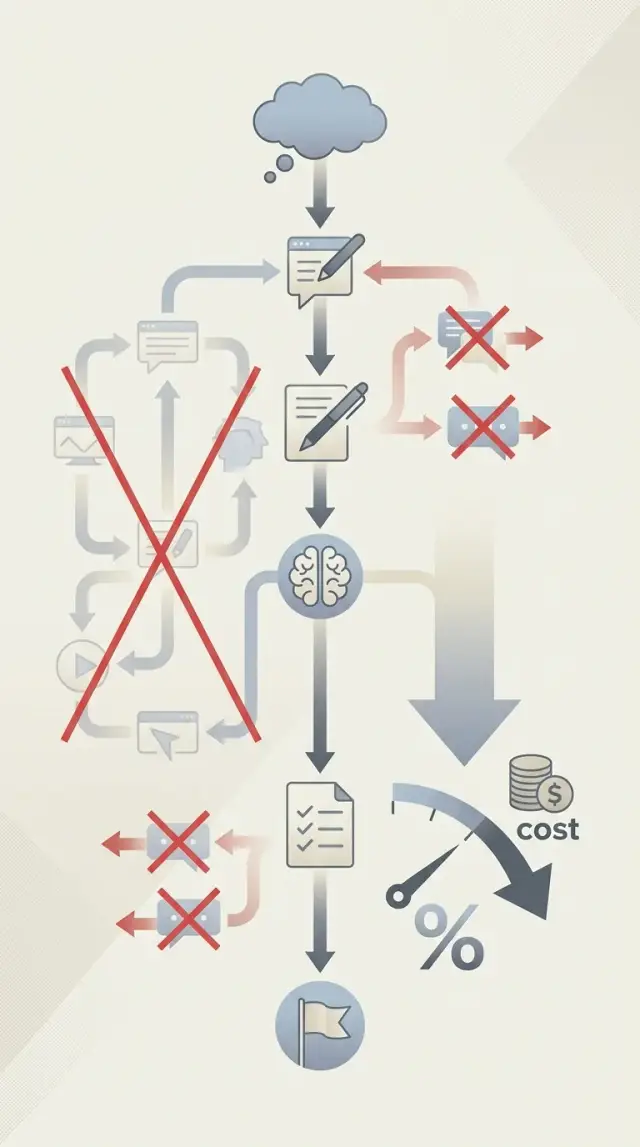
Table of Contents
Why costs rise even when the model stays the same
A team can keep the same model for months and still watch costs climb. The model often is not the problem. The workflow got longer.
Someone adds one extra prompt to improve the output. Then another tool call to clean the format. Then a retry step because the first prompt got too vague. Each change looks small. Together, they turn a cheap task into an expensive one.
Token spend often hides plain process waste. If one support reply takes four steps instead of one, the bill grows before anyone upgrades the model. The same thing happens when teams send the same context again and again, ask for the same summary twice, or call a second model just to fix a weak first prompt.
A larger model can hide that mess for a while. It may give better answers even when the flow is sloppy, so the team feels the issue is solved. It is not. They are paying more to carry extra steps that should not be there.
Short flow vs bloated flow
A short workflow is direct. It sends clear input once, gets a usable answer, and moves on.
A bloated workflow usually drafts a prompt from raw notes, rewrites that prompt in another tool, sends the full context again, asks for a summary of the answer, and then calls a third tool to convert the format. That is five chances to burn tokens, add delay, and introduce errors.
The difference shows up fast in real work. A founder might ask an AI tool to turn a meeting transcript into product tasks. In a clean setup, the tool extracts action items, groups them, and outputs a short task list. In a messy setup, one prompt summarizes the transcript, another rewrites the summary, a third turns it into tasks, and a fourth cleans the wording. The final result may look similar, but the second path costs several times more.
That is why shorter AI workflows matter before any model upgrade. Most teams do not need more model power first. They need fewer handoffs, less repeated context, and prompts that ask for the final output in one shot.
Simple fixes usually beat expensive ones. Remove duplicated prompts. Cut tool calls that only patch earlier steps. Tighten the input. If a task still fails after that, then it makes sense to test a larger model.
Where AI workflows usually get too long
Most bloated workflows do not start that way. A team adds one extra prompt to clean up output, one extra tool call to feel safer, and one manual review step to catch edge cases. A month later, the flow costs twice as much, and nobody can point to the exact moment it happened.
The first source of waste is the "just in case" step. Teams add small actions that feel harmless on their own but do the same job twice. One model cleans text, another rewrites that same text, and a third formats it for the next tool. In many cases, one prompt can do all of that.
The same extras show up again and again: cleaning text before extraction when the extractor can handle raw input, summarizing the same document for each downstream task, rewriting output into the same tone more than once, checking structure with the model after a tool already enforces the format, or asking for a draft and then a "better draft" with almost no new context.
Repeated prompts are another quiet budget leak. Teams paste the same background into classification, summarization, drafting, and review prompts because each step was built by a different person. Customer history, product rules, and style instructions get sent over and over. Token use climbs fast, even when the model itself is not large.
Tool calls grow in the same way. One step calls search, the next step calls the CRM, then another step fetches the same customer record again because the earlier result was not passed forward cleanly. Long chains create second-order waste too. Every tool result gets wrapped, re-explained, and sent back to the model. You do not just pay for the call. You pay for all the text around it.
Human handoffs can make this worse. A support agent asks the model for a case summary. Then a manager copies the ticket into a new prompt and asks for a recommended action. Then an operations person pastes the same material again to draft the customer reply. Three people, three prompts, one set of facts.
This waste is rarely dramatic. It hides in repeated context, duplicate checks, and steps that stayed in the process long after the original reason disappeared.
How to map the workflow you already have
Pick one task that happens often and costs real time when it goes wrong. Do not map the whole system first. One task gives you a clear picture and keeps the exercise honest.
Good examples are simple and specific: turning a sales call transcript into CRM notes, drafting a support reply, or sorting invoices into the right queue. If the task has a clear start and finish, you can measure it.
Write the workflow in plain language, step by step, as if you were teaching a new hire. Skip technical labels when a normal sentence will do. "The model reads the transcript" is better than a diagram box with a vague name.
Include every handoff. That means model steps, human checks, app actions, copy-and-paste work, and any waiting between them. Many teams only write down the smart parts and miss the boring parts where waste hides.
A simple map needs five columns: step name, who does it, what goes in, what comes out, and what often goes wrong.
Once the full path is visible, mark the spots where the model waits, retries, or repeats itself. Those are easy to miss because each extra step looks harmless on its own.
Watch for the same context getting sent more than once. A team might send a transcript to create notes, send the same transcript again to write an email, and send it a third time to make a task list. That feels normal when the system grows piece by piece, but it is still repeated work.
Count the parts that drive spend and delay: prompts per task, tool calls per prompt, retry loops, review loops, and places where people reword the same instruction.
Use rough numbers if exact data is hard to get. A quick estimate still helps. If one task uses six prompts, two web lookups, and three human reviews, you already know where to look before you buy more model capacity.
A small example makes this concrete. Say a support team receives an email, asks the model for a draft reply, asks again because the tone is off, sends the case to a knowledge base search, and then asks for a final version after an agent adds notes. That is not one AI action. It is a chain with repeated context, repeated judgment, and extra waiting.
When your map fits on one page and names every prompt, tool call, and review loop, waste stops hiding in the process.
How to shorten a workflow step by step
Start with the path the work takes, not the model. Most waste comes from extra moves: the same context pasted twice, a tool call nobody reads, or a second prompt that only rewrites what the first one already said.
A shorter flow usually gives you two wins at once. You spend fewer tokens, and the result gets more stable because there are fewer places for the process to drift.
First, look for rewrite-only steps. If one prompt writes a draft and the next says "make this clearer" or "make this sound professional," combine them. Ask for the final tone and structure in the first prompt.
Next, merge prompts that repeat the same background. Teams often send the same customer notes, product details, or policy text into two or three separate steps. If the second step needs the same context, fold the tasks together and send that context once.
Then remove tool calls that do not change the answer. Many workflows pull extra records, search logs, or fetch metadata just because the step was added months ago. Check the final output and ask a simple question: did this data affect the result? If not, cut the call.
Set one output format and keep it fixed. Redo work often starts when one step returns a paragraph, the next expects a table, and a person has to clean it up. Pick a format early, such as a short summary plus three fields, and make every run follow it.
Finally, test the shorter version on a small batch. Use 10 to 20 real items, not one perfect example. Compare cost, speed, and error rate. If the shorter flow gives the same answer quality, keep it.
One small change can remove a lot of waste. A support team might have a flow that classifies a ticket, summarizes it, fetches account details, rewrites the summary, and then drafts a reply. If the account details never affect the draft and the rewrite step only changes tone, that five-step flow can drop to three.
That is the point of shorter AI workflows. You are not asking the model to do less useful work. You are stopping it from doing the same work twice.
A simple example from a real business task
A customer writes, "My order was due yesterday. Where is it?" It looks simple, but many teams turn it into a long AI chain. That chain often costs more than the reply itself.
Picture the slow version. The support system sends the message to one model to classify the issue. Then it calls the order system, sends the results to a second prompt for a summary, asks for a first draft, asks for a warmer rewrite, and runs one more pass to check policy wording.
That is five model calls, two separate order lookups, and one final human review across two or three drafts.
Nothing in that flow is unusual on its own. The waste comes from repetition. The same order number, shipping date, and apology language get pasted into prompt after prompt. An agent then reads several versions of the same answer just to approve one.
A shorter version keeps one lookup and one model call. The system fetches the order status once: delayed in transit, new delivery date Friday, refund not needed yet. It sends that data with the customer message into a single prompt that says: explain the delay in plain English, apologize once, give the new date, and offer next steps if Friday passes.
The draft can be short:
"Sorry about the delay. I checked your order and it is still in transit. The latest carrier update shows delivery by Friday. If it does not arrive by then, reply to this message and we will help with a replacement or refund."
That answer usually needs one fast check from the agent. They confirm the date and send it. No second rewrite. No extra tone pass. No duplicate policy check if the prompt already includes the approved wording.
What changes in practice
Most teams do not save seconds here. They save piles of small delays all day.
The long workflow might use about 1,800 to 2,400 tokens, take 45 to 90 seconds of system time, and need another 30 to 60 seconds of reviewer effort. The short workflow might use 250 to 500 tokens, take 10 to 20 seconds of system time, and need 10 to 15 seconds of review.
The shorter path also makes mistakes easier to catch. When one draft comes from one lookup, the agent can see what happened. When three prompts rewrite each other, bad wording hides in the chain.
Before you buy more capacity, check whether the job itself is bloated. A plain support reply often needs one good prompt, one trusted data pull, and a human who spends ten seconds making sure the message matches the facts.
Mistakes that keep waste in the system
The first mistake is easy to spot once you look for it: costs rise, so the team buys a larger model before cleaning the process. That feels logical, but it usually hides a deeper problem. If the workflow repeats instructions, reuses the same context in every step, or sends rough output to another model for cleanup, a bigger model just burns more money on the same waste.
Teams also add tools for problems that start in the prompt. If replies come back too long, they add a summarizer. If formatting looks messy, they add a parser. If the tone feels off, they add another model pass. A support team might draft a customer reply, shorten it with a second prompt, then run a formatter before sending it. One tighter prompt could handle all three.
Safety checks can grow into clutter. One person adds a policy check inside the app. Another adds the same rule to the system prompt. A third adds a post-generation review tool. Each step looks reasonable on its own, but three overlapping checks cost more, slow the result, and sometimes fight each other.
Review steps create the same problem. When every team member can add approval stages, workflows get longer without anyone noticing. Marketing wants a tone check. Legal wants a review for routine answers. Operations wants a final scan "just in case." Soon a simple task needs four model calls and two people to approve it.
Another trap is local optimization. Teams spend days tuning one prompt while the full chain stays too long. Saving a few tokens in step two does not matter much if the task still triggers six prompts, two tool calls, and duplicate checks. The bigger savings usually come from removing a whole step.
The warning signs are plain once you know what to watch for. The same safety rule appears in more than one place. People keep adding review steps, but nobody removes old ones. A tool call stays in the flow because it once helped, not because the task always needs it. One prompt gets constant edits while the rest of the chain stays bloated.
Oleg applies the same rule when cutting software and infrastructure costs: remove duplicate work before paying for more capacity. AI systems are no different. If a task needs five prompts, three checks, and two tools to produce a plain answer, the process needs cleanup first.
Quick checks before you scale up
More model capacity often hides a messy process. Before you pay for a larger context window, more agents, or more tool runs, check whether the workflow itself is doing extra work.
Start by asking whether two steps do the same job. This happens a lot when one prompt summarizes text and the next rewrites that same summary in slightly different words. If the second step does not add a real decision, merge it or delete it.
Then check whether the model sees the same context twice. Teams often pass the full brief into step one, then pass the same brief plus the first output into step two. That doubles token use fast. Keep only the context each step needs.
Look at every tool call and ask whether it changes the final answer. A database lookup, search step, or formatting tool should earn its place. If the answer looks the same with or without that call, remove it.
Do the same for human review. Review helps when someone approves, rejects, or fixes something specific. It does not help when a person reads the output, feels uncertain, and clicks continue.
Track token use per task, not only per model. Model dashboards can make spending look normal even when one task burns three times more tokens than the rest. Measure the full path for one customer request, one support case, or one report.
A simple test makes waste easy to spot. Take one real task and write down every step in plain language: prompt sent, context attached, tools called, human checks, and final output. Then run the task once with every step, and once with one step removed. If quality stays the same, that step was probably baggage.
Say a sales team uses AI to turn a call transcript into CRM notes. The workflow transcribes the call, summarizes it, rewrites the summary into bullets, sends the bullets to another model for tone cleanup, and then asks a manager to review every entry. In many cases, one prompt can produce clean CRM notes directly from the transcript, and the manager only needs to review edge cases. That cuts time, tokens, and delay.
If you want shorter AI workflows, start with duplication. Repeated prompts, repeated context, and repeated checks are where the quiet waste usually sits.
What to do next
Start with one workflow, not your whole stack. Pick the flow that costs the most, runs the most often, or frustrates people every day. A support reply draft, sales note cleanup, or document summary chain is usually enough to find real waste fast.
Map that workflow this week on one page. Write down every prompt, every tool call, every retry, and every handoff between systems or people. Most teams spot the same problem right away: the model gets asked twice for nearly the same thing, or a tool runs even when nobody uses its output.
Your first pass can stay simple. List the steps in order from input to final output. Mark any repeated prompt that asks for the same summary, rewrite, or check. Mark any tool call that runs by default but rarely changes the answer. Then remove one duplicate prompt and one weak tool call, and test the new version against the old one.
Do not change five things at once. Make one cut, run the workflow, and compare the result. Track three numbers after each change: cost, speed, and output quality. If cost drops but quality slips, roll that change back and try a smaller edit.
A small example makes this easier. Say a team has a customer email workflow that drafts a reply, asks a second prompt to rewrite the tone, and then calls a search tool for company policy on every message. If the first prompt already gives the right tone most of the time, the rewrite step adds cost without helping. If only 10 percent of messages need policy lookup, the search tool should run only on those cases. That is how shorter AI workflows save money without buying more model capacity.
Once you find a better version, document it in plain language. Keep the prompt, the decision rules, and the allowed tool calls in one place. If the team does not write down the shorter flow, extra steps creep back in within a month.
Some teams need a fresh set of eyes. If your workflow grew over time and nobody owns the whole process, an outside review can help. Oleg Sotnikov does this kind of Fractional CTO work through oleg.is, with a practical focus on AI engineering, tool routing, and cost control before a team spends more on capacity.
Set a deadline for the first review. By the end of the week, you should have one before-and-after map, one measured test, and one decision to keep, revise, or drop the change.
Frequently Asked Questions
How can I tell if higher AI costs come from workflow waste?
Look at one task from start to finish instead of staring at the model bill alone. If the task now uses more prompts, more retries, more tool calls, or more copied context than it did before, the workflow grew and the cost followed.
What should I cut first in a long AI workflow?
Start with rewrite-only steps. If one prompt writes a draft and the next prompt only changes tone, wording, or format, merge them into one stronger prompt.
Should I upgrade to a larger model when results feel inconsistent?
No. Clean the flow first. A larger model can hide weak prompts and extra steps, but you still pay for all that extra work every time the task runs.
How do I spot repeated context in my prompts?
Trace one real task and write down every input each step receives. When you see the same transcript, notes, policy text, or customer history appear in more than one prompt, you found repeated context.
When is a tool call actually worth keeping?
Keep a tool call only when it changes the final answer or reduces real risk. If the output stays the same without that search, lookup, or formatter, cut it.
What is the simplest way to map an AI workflow?
Pick one common task with a clear start and finish. Write each step in plain language, including model prompts, tool calls, human checks, retries, and waiting time, so the waste cannot hide between systems.
What should I measure after I simplify a workflow?
Compare cost, speed, and output quality on a small batch of real work. If the shorter version keeps the same quality and lowers cost or delay, keep the change.
Can one prompt replace several rewrite steps?
Often, yes. Ask for the final output in the first prompt with the right tone, structure, and rules, instead of drafting first and polishing later. That usually saves tokens and reduces drift.
How much human review should stay in the process?
Keep human review where someone checks facts, approves risk, or fixes edge cases. Drop review steps where people only skim the answer and click through because that adds delay without much value.
When does it make sense to ask an outside expert to review the workflow?
Bring in outside help when the workflow grew piece by piece and nobody owns the whole chain. A fresh review can uncover duplicate prompts, weak tool routing, and extra approval steps before you spend more on model capacity.


