Shared infrastructure for client products without tool chaos
Build shared infrastructure for client products with one CI setup, one monitoring stack, and one deploy path that cuts setup time and drift.
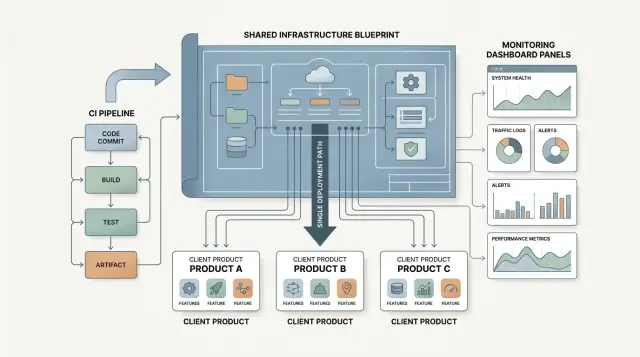
Table of Contents
Why teams end up with a tool mess
Most teams do not choose chaos on purpose. It grows one project at a time.
A new client comes in. Someone picks a repo host they already know. Someone else wants a different CI service. A third person keeps an old deploy script "for now" because it already works. That temporary choice sticks around, then the next project adds another variation.
The cost shows up quickly. The first release takes longer because every repo has its own scripts, secrets, branch rules, and deploy steps. Anyone who works across several products, especially a fractional CTO, can lose hours just tracing how one app reaches production and why another still depends on a manual command.
Monitoring drifts the same way. One product sends alerts to Slack. Another uses email. A third creates tickets that nobody notices after hours. When something breaks, the team wastes time finding the alert, figuring out who owns it, and only then starting the fix.
None of these differences looks serious on its own. Together they create a steady stream of support work. People answer the same setup questions, rewrite the same docs, and patch one-off scripts that only make sense for one client.
A shared base fixes that early. New products start with a known path for CI, monitoring, and deployment. Teams can still make exceptions, but they stop reopening the same tool debate every time a new engagement starts.
What every product should share
Most teams do not need the same codebase. They do need the same operating rules.
When every client product gets its own repo structure, release steps, and access pattern, confusion builds fast. After a few months, nobody remembers which app deploys on merge, which one needs a manual tag, or where to check errors. The shared part should feel boring and familiar.
A good base usually includes the same repo layout, branch rules, CI stages, release path, and approach to secrets. An engineer should be able to open any project and find code, infra files, tests, and docs without hunting around. People should know what goes to main, what needs review, and what starts a release. Build, test, and release should happen in the same order every time.
That does not mean every app must look identical. A mobile app and a backend service will always differ. The goal is consistency around delivery. If one product needs extra security checks or a longer test suite, add that on top of the default flow instead of replacing it.
Monitoring should follow the same rule. Logs, error tracking, and uptime checks should live where one team can see them together. When an alert fires, nobody should ask which dashboard a client uses. They should already know where to look.
Access control causes as many problems as code. Decide early who can read logs, who can deploy, who can change secrets, and how you remove access when work ends. Teams that skip this step usually fix it after the first ugly surprise.
This is often where outside technical leadership helps. Oleg Sotnikov works with companies that need one stable delivery model across several products, not a new setup every time. The job is usually simple on paper: set the rules once, keep them clear, and let each new product start from a clean base.
Pick a small default stack
A standard stack should feel boring in a good way. If your team already knows the tools, they can ship faster, fix issues sooner, and spend less time arguing about setup. That matters more than picking the newest option.
Sameness saves time. When every app starts with the same source control, CI, monitoring, and deploy path, the first week feels calm instead of chaotic.
Most teams do well with one source control system, one CI service, one error tracker, and one place for logs, metrics, and uptime. That does not mean every client needs the same runtime or the same cloud account. It means your team keeps the same habits each time. Developers know where pipelines live, where alerts show up, and where to look when a deploy fails.
A compact stack might use GitLab for source control and CI, Sentry for errors, and Grafana with Prometheus for dashboards. The exact tools matter less than the discipline behind them. Pick a small set, use it everywhere, and resist the urge to keep adding more.
Keep exceptions rare and written down
Most tool sprawl starts with one harmless exception. A client prefers a different repo host. One engineer wants another CI service. A new app gets a separate monitoring tool because it came with a template. Six months later, nobody remembers where anything lives.
Write down the few cases where a team can opt out. Legal or compliance rules might require a different host. A client may already have an internal system you must use. An older product may have unusual scale, runtime, or migration risks that make standardizing a bad trade for now.
If an exception does not fit a real constraint, say no. That sounds strict, but it protects delivery speed. A small default stack gives every new engagement a stable base, and that is what keeps support, hiring, and handoffs manageable.
Build the base step by step
Start with the work your team repeats on every client product. Do not begin with tools. Begin with the routine.
Write down what happens from the first repo commit to the first production release. Create the repo. Add checks. Set up environments. Connect logs. Add alerts. Deploy. Confirm the app is healthy. That simple map shows where time disappears and which parts belong in the shared base.
Then turn the repeated steps into scripts, templates, and short checklists. This matters more than most teams expect. If people still copy commands from an old chat thread or a forgotten wiki page, the process is not standard yet. Put the commands in scripts. Put the config in templates. If every project needs linting, tests, a build step, and one deploy command, make those work on day one.
A starter repo should be plain and easy to use. A new team should clone it, rename a few values, and get a working pipeline right away. Include basic CI checks, environment variable examples, one deploy path, and a short README that explains only what someone needs in the first hour.
Do not leave monitoring until traffic arrives. Add dashboards and alerts before the first release, even if they are basic. Track deploy status, error rate, response time, and uptime. A simple alert that catches a broken release in five minutes saves more time than a fancy dashboard added three months later.
Test the whole path on something small first. An internal admin tool is enough. If the repo, CI flow, monitoring, and deployment process all work there, they are far more likely to hold up when a paying client arrives. That first dry run usually exposes missing secrets, unclear scripts, and alert noise. It is much better to fix those once than to rediscover them in every new project.
Set rules for exceptions
A standard stack only works if people trust it. That trust breaks when teams feel trapped and start adding side tools with no clear rule.
Some exceptions are reasonable. A client may already have a signed vendor agreement. A security team may require a certain log path. An older app may depend on a deploy method you cannot replace this month. Those cases are normal.
What matters is how teams ask. Keep the request short and concrete. "The default CI cannot run our mobile signing step" is enough. "We like this tool better" usually is not.
A good request answers four questions: what problem the default creates, what tool or process the team wants instead, who will own it each week, and what extra cost or risk it adds.
Approve exceptions only when the default blocks real work. If the team can solve the issue with a small tweak to the standard pipeline, monitoring setup, or deploy path, keep the standard path. Every extra tool adds another place to check during an outage.
Ownership is where most teams slip. The moment you allow another service, name one person who owns updates, access, billing, alerts, and cleanup later. If nobody owns it, the team will forget it until a release fails or an invoice shows up.
Keep each exception in one shared log. A short record is enough: date, reason, owner, affected product, and review date. Then revisit old exceptions every quarter. Some only exist because a deadline was tight. Others stay around because nobody asked whether they still make sense.
One exception is normal. Five unmanaged exceptions put you right back in the same mess.
Example: one agency, three client apps
Picture a small agency supporting three very different products. One client has a brochure site that changes twice a month. Another runs a SaaS app with daily fixes and weekly releases. The third uses an internal portal with slower releases and tighter access rules.
The products do not share code, and they do not ship on the same day. Still, the team gives all three the same delivery path. Every repo runs the same CI stages in the same order: checks, tests, build, preview, production approval. The names stay the same across projects, so nobody has to stop and decode a custom setup.
That is what a shared base should do. It removes boring decisions without forcing every app into one mold.
When something breaks, the agency also avoids guesswork. Alerts use one format with the same few fields every time: product name, environment, severity, recent change, and the first place to look. Dashboards follow one layout too. Uptime sits at the top, then error rate, response time, background jobs, and deploy status. A new developer can open any app and find the same map.
Kickoff gets much shorter because the team reuses the base instead of arguing over tools again. For a new client, they create the repo from a template, add environments and secrets, attach monitoring and alert rules, and turn on the standard deploy path. The app still keeps its own release schedule. The brochure site can publish on Tuesday. The SaaS app can push a hotfix on Friday night. The internal portal can wait for a monthly approval window. Shared plumbing does not remove that freedom. It just cuts the time spent wiring tools together.
This is often one of the first things a fractional CTO fixes, because custom CI, custom alerts, and custom deploy scripts burn hours without giving much back.
Mistakes that create drift
Drift rarely starts with a big decision. It starts with shortcuts that feel harmless for one client, one release, or one late Friday deploy.
The fastest way to create problems is to copy an old pipeline and edit it by hand. It feels quick. In practice, each copy picks up small changes, forgotten flags, and different job names. Soon nobody knows which pipeline is the current one, and simple fixes take hours because every client app behaves a little differently.
Another common mistake is letting each client add a new tool without checking the cost. One app wants a different CI service, another wants a separate logging tool, and a third wants its own deploy script. The bill grows, but attention is the bigger cost. Your team now has to remember several ways to do the same job.
Skipping staging causes the same kind of drift. Teams cut it when deadlines feel tight, then add one-off safety checks in production to compensate. After a few rushed launches, every product has a different release path. Staging is cheaper than production surprises, especially when several client apps share the same people.
Secrets create another slow failure. If passwords, tokens, or access notes end up in chat, docs, or old tickets, nobody can trust the source of truth. Rotation gets messy. Offboarding gets risky. A secret store only works if the team treats it as the only place for live credentials.
Noisy alerts may be the most damaging mistake because they train people to ignore the system. If monitoring sends false alarms all day, engineers mute channels or filter messages. Then a real outage looks like one more useless ping. A tight base stack with clear alert rules works better for a simple reason: fewer tools mean fewer places for noise to build up.
If you see hand-edited pipelines, skipped staging, scattered secrets, and muted alerts, drift has already started.
Quick checks before a new engagement
A shared setup only works if the base is easy to start, easy to trust, and easy to explain. If any of that feels fuzzy before kickoff, the team will drift into one-off scripts and custom fixes within weeks.
You do not need a long audit before a new project starts. A short review catches most weak spots.
Check the repo first. A team should be able to create a new project from a template on day one, with the same folder layout, CI file, environment pattern, and deploy path already in place.
Then run one path for build, test, and deploy. The order should stay the same across products. If one client app tests before build, another skips tests, and a third deploys by hand, the shared base is already slipping.
Put errors, logs, and uptime where people can see them together. Nobody should open three tools just to answer one simple question: is the app healthy right now?
Name one owner for the base stack. Shared systems decay fast when everyone can change them and nobody has to clean them up.
Then do a simple reality check: ask a new team to explain the setup back to you after a ten-minute walkthrough. If they cannot tell you where code goes, how releases happen, and where problems show up, the setup is too clever.
That last check matters more than teams expect. A clean setup is not the one with the most automation. It is the one a busy developer can understand before lunch.
If two or more of these checks fail, fix the base before adding another app. New engagements should inherit a working system, not a pile of exceptions.
What to do next
Start with a hard count of what your team already supports. Most teams think they have one CI setup and one monitoring setup, then discover several alerting tools, multiple deploy scripts, and a messy pile of one-off secrets handling. Put it all in one sheet: CI, logs, metrics, uptime checks, deploy method, hosting, and who knows how each part works.
Then cut before you add. If two tools do the same job, pick one and retire the other. Duplicates drain attention every week. A team that checks both Datadog and Grafana, or both GitHub Actions and GitLab CI, pays for that confusion in slower handoffs and missed alerts.
Keep the rollout small at first. Audit active products, mark duplicates and dead tools, choose one shared default for CI, monitoring, and deployment, then test that base on a lower-risk engagement before rolling it out wider. One clean rollout teaches more than six planning meetings.
The goal is not a perfect platform. The goal is a base that new work can inherit without debate. If a new client app needs CI, the answer should already exist. If it needs alerts, dashboards, deploy rules, and rollback steps, those should start from the same template every time.
A simple example makes the point. Say your agency starts a new internal dashboard for a client. Instead of picking tools from scratch, you clone the standard repo, turn on the usual CI checks, send errors to the same tracking system, and deploy through the same path the team already trusts. That can save days in the first month and prevent strange gaps later.
If you need an outside view, Oleg Sotnikov's advisory work at oleg.is is closely focused on this kind of problem: building a lean delivery stack, reducing tool sprawl, and giving small teams a setup they can actually maintain. The best outcome is not a fancier system. It is a calmer one.
Frequently Asked Questions
Why is it a problem if each client product uses different tools?
Because each extra tool adds one more place to check, explain, and maintain. A mixed setup slows releases, confuses ownership, and turns simple fixes into detective work across repos, alerts, secrets, and deploy scripts.
What should every client product share?
Keep the shared part narrow and boring: repo layout, branch rules, CI stages, release flow, secrets handling, logs, error tracking, uptime checks, and access rules. Let the app itself vary, but keep delivery familiar across products.
How small should the default stack be?
Start smaller than you think. One repo host, one CI system, one error tracker, and one place for logs, metrics, and uptime usually covers most teams. If the team already knows the tools, they ship faster and make fewer setup mistakes.
When does an exception make sense?
Allow an exception only when the default blocks real work, such as compliance, client requirements, or a hard technical limit. Personal preference is not enough. Ask who will own the extra tool, what it costs, and when the team will review it again.
What should go into a starter repo?
Put the first-hour setup in it. Include the usual folder layout, CI config, test and build steps, environment variable examples, one deploy path, and a short README. A team should clone it, rename a few values, and get a working pipeline without hunting for old notes.
Do we really need monitoring before launch?
Yes. Add basic dashboards and alerts before the first production release. Track deploy status, error rate, response time, and uptime early so the team catches broken releases fast instead of guessing after users report them.
Who should own the shared infrastructure?
Name one owner for the shared stack. That person keeps templates clean, reviews exceptions, watches costs, and removes old tools when they no longer help. Without a clear owner, the base decays and every project starts to drift again.
How do we stop the setup from drifting over time?
Write the default path down and turn repeated steps into scripts and templates. Review exceptions every quarter, keep them in one shared log, and say no to new tools unless they solve a real constraint. Drift starts when teams keep one-off changes in chat and memory.
How can we tell that our setup is already too messy?
If a new developer cannot explain the repo layout, release path, and monitoring view after a short walkthrough, the setup is too clever. Other warning signs include hand-edited pipelines, skipped staging, scattered secrets, and alerts that people mute.
What should we do first if we already have tool sprawl?
Do a hard count first. Write down every CI service, logging tool, alert path, deploy method, host, and owner across active products. Then cut duplicates, pick one default for each job, and test that base on a lower-risk project before you roll it out wider.