Shared auth flows for React, Swift, and Kotlin apps
Shared auth flows keep token refresh, logout, and device trust consistent across React, Swift, and Kotlin apps without forcing shared code.
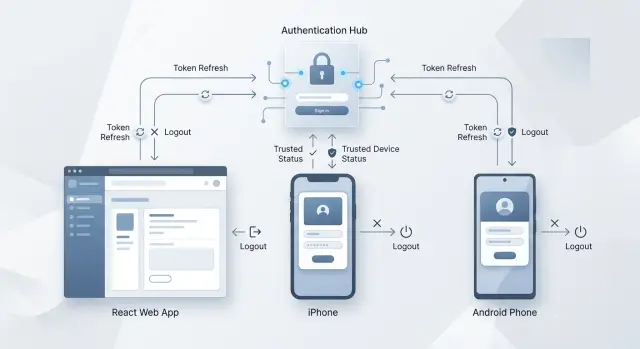
Table of Contents
Why auth drifts between clients
Auth drift starts with timing. Web, iOS, and Android teams rarely ship on the same day, and they do not test the same way. One team fixes a refresh bug this week, another team plans it for next sprint, and the third team does a quick patch because a store release takes longer.
That gap sounds small, but users feel it fast. A person signs in on the web and stays logged in for days, then opens the mobile app and gets asked to sign in again. After that, they stop trusting the app, not the auth rules.
Small rule changes also pile up. One client refreshes a token 2 minutes before expiry. Another waits for a 401 response. A third client clears local data after one failed refresh, while the others retry once more. These are tiny choices in code, but they create different results from the same account.
A common example is a user who logs in on a laptop, an iPhone, and an Android tablet. The browser silently refreshes in the background. The iPhone asks for Face ID again because the device trust timer expired. The Android app logs out after waking from sleep because it treats an old token as invalid right away. To the user, shared auth flows look random.
Support teams usually see the problem before engineering does. Tickets start with "I keep getting logged out" or "Why does one device ask again and the other does not?" Those reports are hard to sort because each client keeps its own little version of the rules.
Auth drifts when teams share goals but not exact behavior. If login, refresh, logout, and device trust rules are only implied, each client fills in the blanks differently. That is how a simple auth system turns into three separate experiences.
What should match across all clients
React, Swift, and Kotlin apps do not need the same code. They do need the same rules. If one app keeps a user signed in for hours after the server has ended the session, people notice fast. That is how shared auth flows break down.
Start with a small contract that every client follows. Keep it simple enough that a frontend engineer, an iOS engineer, an Android engineer, and the backend team all read it the same way.
Match the behavior, not the implementation
A user is signed in when the app can call protected APIs now and has a valid path to stay signed in. In practice, that usually means the access token works and the app still has a refresh token or server session that the backend accepts. Do not let one client treat a cached profile screen as proof of login while another client requires a live token.
Session expiry also needs one meaning. Pick the exact moment when the session ends. A common rule is simple: the session is expired when refresh fails because the refresh token is invalid, revoked, missing, or past its allowed age. Not when the UI feels stale. Not when a background request times out.
Use one forced logout rule too. If the app tries to refresh and the server says the session is gone, every client should do the same thing: clear stored auth data, reset user state, and send the user to sign in. Do not retry five different ways on one platform and log out right away on another. That creates strange bugs and support tickets.
Device trust needs plain names. Fancy labels make teams argue about edge cases. Simple names work better:
- New device - user signed in, but this device needs extra verification
- Trusted device - user passed checks, and normal access is allowed
- Blocked device - this device cannot continue and must sign out
That is enough for most products. If you need more detail, add server fields behind those names, not new labels in every client.
A good rule of thumb is this: the server decides auth truth, and each app follows the same outcomes. The React app may use interceptors, the Swift app may use async tasks, and the Kotlin app may use an OkHttp authenticator. The code can differ. The result should not.
Write the auth contract first
For shared auth flows, the contract matters more than shared code. If React, Swift, and Kotlin clients all follow the same rules on paper, they can behave the same way even when the implementation looks different.
Start with the network rules. Write down every auth endpoint, the request shape, the expected status codes, and what the client should do next. A 401 during a normal API call might trigger one refresh attempt. A 401 from the refresh endpoint should end the session. A 429 should wait and retry within a fixed limit, not loop until the app melts down.
Then name every token clearly. Teams get into trouble when one client treats a session token like an access token, or when mobile stores something the web app never uses. The contract should say which tokens exist, what each one does, how long each one lives, and where each client keeps it. Keep that description general: say "memory", "cookie", or "secure device storage". Do not bake Keychain, Keystore, or browser library choices into the shared contract.
Refresh timing needs the same level of detail. Write the refresh window, the grace period, and the rule for clock drift. For example, if an access token expires in 15 minutes, you might refresh when less than 2 minutes remain, and allow a short grace period for requests already in flight. That small detail prevents random logout bugs.
A good auth contract usually answers four plain questions:
- What does each auth endpoint return on success and on failure?
- Which token does the client send, refresh, store, or delete?
- When does the client retry, and when does it stop?
- Which rules are shared across platforms, and which storage details stay local?
This is the part many teams skip because it feels boring. It is not. A short contract saves days of debugging later, especially when web and mobile teams ship on different schedules.
Standardize refresh logic step by step
Refresh drift usually starts in small places. The web app refreshes only after a 401, the iPhone app refreshes one minute early, and Android retries twice because someone thought it felt safer. A shared auth flows setup works better when every client follows the same rules, even if the code looks different.
Start with one simple number: how close to expiry is too close. For example, if an access token expires in less than 60 seconds, every client should refresh before sending a protected request. That rule is easy to copy into React, Swift, and Kotlin without sharing one codebase.
Then make sure each session runs only one refresh at a time. If five API calls hit at once, the first call starts the refresh and the other four wait. Without that guard, clients can send a burst of refresh requests, race each other, and overwrite good tokens with old ones.
A clean sequence looks like this:
- Check the token expiry before a protected request.
- If the token is still safe, send the request.
- If it is too old, start one refresh call for that session.
- Hold other protected requests until that refresh finishes.
- Resume the waiting requests with the new token, or end the session if refresh cannot continue.
The failure rules matter just as much as the happy path. If the refresh token is revoked, expired, or tied to a device the server no longer trusts, every client should sign the user out the same way: clear stored tokens, reset user state, and send the user to sign-in. If the refresh fails because the network drops for a moment, do not treat that as a logout. Show an error and let the app try again on the next request.
A small example makes the policy clear. A user opens the dashboard in React while the token has 20 seconds left. The browser starts one refresh call. Two more requests for account data wait in a queue. On iOS and Android, the same timing rule applies, but each app uses its own tools - an interceptor, a task, or a request wrapper.
Log the same auth events everywhere. Use the same event names and reasons, such as "refresh_started", "refresh_succeeded", "refresh_failed_invalid_token", and "forced_logout_device_untrusted". When support sees a problem, those logs tell you whether the bug lives in one client or in the auth service itself.
That is the point of a token refresh strategy. Share the rules, not the code.
Set one logout behavior
Users notice logout bugs fast. If the web app keeps showing old profile data, the iPhone app clears everything, and Android waits until the next API call, the product feels broken even when the backend works.
Pick one logout sequence and keep it in every client. The code does not need to match, but the order should:
- stop refresh timers, retries, and background requests
- clear tokens from memory
- remove persisted session data, trusted-device flags, and user identifiers
- wipe user-specific caches
- send the app to the signed-out screen
That order prevents small leaks. A cached profile, open socket, or queued refresh call can make a logged-out user look signed in for a moment. People remember that.
Decide what the server does before you ship. A normal logout should usually revoke the current device session or refresh token. A separate "log out of all devices" action should revoke every active session. Keep those actions separate. If you merge them, users lose control and support gets messy.
The one-device rule should stay the same everywhere. If someone logs out on their phone, their laptop should stay signed in unless they picked the global option. Teams often change this by accident because each client makes a slightly different assumption.
Forced logout needs one plain reason, not a vague error. Show a single message based on the server response, such as "You were signed out because your password changed." That is much better than "Session invalid" or a list of guesses. Use the same reason text in React, Swift, and Kotlin so users and support hear the same story.
A simple example: a person taps "Log out" in the Android app while still signed in on the web. Android revokes only that device session, clears local data in the same order as the other clients, and returns to sign-in. The React app stays active. If the person chooses "Log out everywhere," every client should lose access the next time it checks the session.
Handle device trust without shared code
Device trust should follow one policy, even if each client stores data in a different place. The server decides what "trusted" means. Each app only needs to store the minimum data that lets it ask, "Can this device skip extra checks right now?"
That split keeps things clean. React may rely on secure cookies and a small local marker. iOS may use Keychain. Android may use the Keystore and encrypted storage. Those details can differ without changing the rule set.
Use the same trust states on every client. A simple model is enough:
- New device: ask for full login plus an extra check, such as email code or SMS code
- Trusted device: allow normal sign-in with the saved session
- Sensitive action: ask for a fresh check before payments, account changes, or password updates
- Revoked device: force full login and remove any local trust marker
The names matter more than the code. When product, backend, and mobile teams all use the same states, shared auth flows stop drifting.
Set clear rules for stronger checks. Biometrics work well when the user already has a valid session but wants to open a sensitive screen. A device PIN can work as a fallback on mobile. Re-login makes more sense after password changes, account recovery, suspicious IP changes, or long inactivity.
Web needs a slightly different touch because browsers do not own biometrics the way phones do. That is fine. The rule can stay the same: "ask for step-up auth before sensitive actions." On iPhone that step may be Face ID. On Android it may be fingerprint or device PIN. In React it may be password entry or a one-time code.
Trust should expire on purpose, not by accident. Pick a time window and write it down. Many teams use 30 days for a trusted device, then shorten it for admin actions or financial changes. If a user resets a password, remove trust from all devices unless you have a clear reason not to.
A small example makes this easier. A user signs in on a new Android phone and enters a code from email. The server marks that device as trusted for 30 days. Two weeks later, the same user tries to change billing details in the React app. The session is still valid, but the app asks for a fresh password or code because the action needs a higher trust level. Same policy, different client behavior.
If you want fewer surprises later, store trust state, expiry time, and revoke reason on the server. Store only a device identifier and the last trust result on the client. That keeps the logic consistent and makes cross-platform bugs much easier to spot.
A simple React, Swift, and Kotlin scenario
Mia signs in on the web app during lunch. The server gives her a short-lived access token and a longer refresh token, along with the same session rules every client uses.
That evening, she opens the iPhone app. The access token has already expired, but the phone still holds a valid refresh token and the device still fits the trust policy. The app sends one silent refresh request, gets new tokens, and opens the account screen without interrupting her.
Nothing about that flow requires shared code. React might use a fetch wrapper, Swift might handle it in a URLSession layer, and Kotlin might use an OkHttp authenticator. What matters is that all three clients follow the same contract: when the access token expires, try one refresh request, store the new tokens, then retry the original call once.
Now look at Android the next morning. Mia opens the app on an older phone she has not used in weeks. The app tries the same refresh step, but this time the refresh token has expired. The server returns the same auth error it would return anywhere else. Android clears local session data, stops retrying, and sends her back to sign-in.
The web app should react the same way if it hits that state later. Swift should too. The screen design can differ, but the message should not. A simple line works well: "Your session expired. Please sign in again."
That small detail matters more than many teams expect. If web says "Unauthorized," iPhone says nothing, and Android says "Token error," users think the apps work differently or something broke. They do not care whether the issue came from a cookie, a refresh token, or device trust rules. They want one clear reason and one clear next step.
This is what good shared auth flows look like in practice:
- Web signs in first and creates the session
- iPhone refreshes silently because the session still meets policy
- Android fails refresh because the refresh token is no longer valid
- Every client explains the outcome with the same user-facing reason
The code can stay native to each platform. The auth behavior should not.
Mistakes that cause auth drift
Shared auth flows usually break for boring reasons, not big design flaws. One team adds a retry, another keeps a local flag, and a third maps every auth failure to the same generic error. After a few releases, React, Swift, and Kotlin clients all feel slightly different.
A common mistake starts with every 401 response. Some apps treat every 401 as "refresh now." That sounds safe, but it often creates loops. A token may be expired, revoked, missing a scope, or tied to a session the server already closed. If the client refreshes on every 401, the app can keep trying the same request, fail again, and trap the user in a broken state instead of sending them back to sign-in.
Hidden retries cause another mess. Many teams forget that retries can happen in two places at once: the network layer and the auth layer. Then one failed request gets sent twice. That is annoying for a profile fetch. It is much worse for a payment, a message send, or a form submission. One retry owner per client is enough. Everyone else should stay out of the way.
Logout behavior also drifts when one app clears less state than the others. The obvious items are access and refresh tokens. The less obvious one is device trust. If a mobile app keeps a "trusted device" marker after logout, but the web app removes it, the user gets different MFA behavior on each device. People read that as a security bug, and they are not wrong.
Error messages make drift harder to spot. When the token fails, some clients blame the network. Users see "connection problem" even though Wi-Fi works fine and the session is dead. That sends them in the wrong direction. Auth failures should say the session expired, the account needs sign-in again, or access was denied. Reserve network errors for real offline or timeout cases.
A simple rule set prevents most of this:
- Refresh only for server responses that your contract marks as refreshable.
- Retry a request once after refresh, not forever.
- Let one layer own retries for protected requests.
- Remove trust markers on logout if your server treats logout as full session end.
- Map auth errors and network errors to different user messages.
These bugs look small in code review. In production, they turn into duplicate actions, random sign-outs, and support tickets that are hard to reproduce.
Quick checks before release
Small auth bugs rarely show up in happy-path testing. They show up when a token expires during a slow request, when a user logs out on one device and opens another, or when the app wakes up after hours in the background. That is why the last pass should focus on a few repeatable checks, not just manual clicking.
Run the same checks on React, Swift, and Kotlin clients with the same test account. The code can differ. The user result should not.
Release checklist
- Expire the access token during an API call and confirm the client tries one refresh request, not two or three at once. If several requests fail together, the app should queue them behind a single refresh.
- Revoke the refresh token on the server and check what happens next. Each client should stop retrying, clear auth state, and send the user to the signed-out screen in the same situations.
- Press logout and inspect local state. The app should remove tokens, cached profile data, and any user-specific screens or stored responses that could still appear after sign-out.
- Trigger the trusted device flow on each client with the same account. Prompts should appear at the same moments, such as first login on a new device, after device reset, or after a trust record expires.
One extra test saves a lot of support time: sign in on a laptop, a phone, and a browser tab, then revoke access from the server. Watch how long each client takes to notice. If one app waits until the next full restart, you have a drift problem even if the API rules are correct.
Teams often miss cached data. A user logs out, but their name, account switcher, or last screen still appears for a second. That feels sloppy and can leak private data on shared devices. Check cold start too. After logout, reopen the app and make sure nothing user-specific comes back from disk.
If you want one simple release gate, use this: any tester should get the same auth result on all three clients within a minute, even when tokens expire, refresh fails, or device trust changes.
What to do next
Put your web, iOS, and Android auth flows side by side and look for mismatches. Do not start with code. Start with behavior. When does each app refresh a token, when does it give up, what message does the user see, and what exactly counts as a trusted device?
A short spec usually fixes more than another rewrite. Keep it plain and specific so product, backend, and client teams can all use it. If your team cannot answer a rule in one sentence, that rule is still too fuzzy.
Write down these decisions first:
- when access tokens refresh, and how many retries each client gets
- which server responses force logout right away
- how trusted devices are marked, checked, and revoked
- what happens if the app is offline during refresh
- what the user sees after a session expires
Then test the ugly cases before you change production behavior. Expired refresh tokens matter more than the happy path. So do revoked sessions, app resumes after hours in the background, and users signed in on two devices at once. A small test table catches auth drift early and saves support time later.
A simple way to roll this out is to pick one backend contract, update one client first, and watch real sessions closely. After that, bring the other two clients into line. Teams often try to update React, Swift, and Kotlin at the same time. That sounds neat, but it usually makes debugging slower.
If you already have shared auth flows in place, review them every time you change session length, MFA, or device trust rules. Those are the changes that quietly break parity.
If you want an outside review before rollout, Oleg Sotnikov can audit the contract, failure cases, and rollout order as a fractional CTO. That is often enough to spot the one inconsistency that keeps web, iOS, and Android out of sync.


