Shared AI infrastructure for teams with multiple workflows
Shared AI infrastructure helps teams run several workflows on one queue, storage, and tracing setup before tools and costs start piling up.
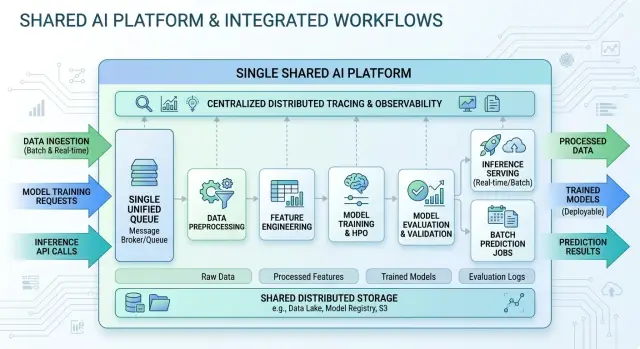
Table of Contents
Why service sprawl starts so fast
Most teams do not set out to build a messy stack. It happens one workflow at a time.
A support bot gets its own queue, file store, and logs. Then a document parser arrives and gets another set. A week later, someone adds an internal coding assistant and repeats the same pattern because it feels faster than fitting it into what already exists.
At first, each choice looks cheap. One more managed service, one more bucket, one more dashboard. The problem is that the bill keeps growing even when usage stays modest. You pay again and again for the same basics: minimum service charges, copied data, retained logs, extra secrets, idle workers, and services that sit there all day whether anyone uses them or not.
The larger cost is the team's time. Every new queue needs permissions. Every bucket needs naming rules, retention settings, and cleanup. Every dashboard needs alerts, ownership, and someone who still remembers what the graphs mean.
Small teams feel this early. One engineer can add a workflow in an afternoon, then spend the next two weeks fixing access errors, updating deployment scripts, and chasing alerts from tools nobody checks often. The workflow itself may be fine. The stack around it starts eating the team's attention.
Picture three common AI workflows: customer support summaries, invoice extraction, and internal code review comments. If each one gets its own queue, storage, tracing, and monitoring, you now have three places to inspect jobs, three places to check failed files, and three different rule sets for access. None of that sounds huge on its own. Together, it becomes noise.
That is why shared AI infrastructure pays off early. When teams share queues, storage patterns, tracing, and basic access rules, they cut duplicate work before it turns into habit. It is far easier to split one busy workflow later than to untangle six separate stacks that grew by accident.
What a shared base includes
A shared base is the common plumbing under several AI workflows. It is not one giant app that forces every team into the same process. The idea is simpler than that: reuse the boring parts almost every workflow needs, and let each workflow keep its own logic.
The easiest part to picture is the queue. Think of it as one job line. A workflow drops in a task, workers pick it up, and the queue handles ordering, retries, and backpressure when a model API is slow or expensive. Jobs do not need to look the same to share the same queue system. You can keep clear job types such as support-summary, document-extract, and code-review. The shared part is the transport and the operating rules. The workflow-specific part is the payload, timeout, retry count, and priority.
Storage works the same way. Trouble starts when every workflow invents its own bucket, naming style, and cleanup rule. That feels quick for a few days, then nobody knows where anything lives. A cleaner setup uses one storage layer with clear boundaries. One workflow might write to support/raw/ and support/final/, while another uses contracts/raw/ and contracts/final/. The storage is shared, but the separation stays obvious.
Tracing is the piece teams often skip and later regret. You want one place to follow a request across the queue, the worker, the model call, and the final write to storage or a database. When a job fails, one trace or request ID should answer the simple questions fast: Did it wait too long? Did the model call fail? Did the worker write the wrong file?
The behavior of each workflow can still stay separate. Prompts, prompt versions, model choices, temperature settings, output schemas, validation rules, fallback logic, and approval steps do not need to be shared. That split matters. Share infrastructure, not behavior.
A startup team running several AI-assisted processes might use the same queue, storage, and tracing for all of them while keeping code review prompts completely different from document extraction settings. That line keeps growth tidy without turning every workflow into its own little empire.
What to share first and what to split later
Start with one base for almost everything. Most teams do not need a different queue, storage bucket, and tracing tool for each new workflow. That pattern feels neat for a week and then turns into service sprawl.
For most teams, the first shared layer should include one queue system, one storage layer, and one tracing setup. Those three solve the same problems across support triage, document parsing, internal copilots, and background automations.
Use one queue unless a workflow behaves very differently from the rest. If two jobs can wait a few seconds and retry a few times, they can live on the same queue system. Split only when the difference is real: one workflow needs near real-time response, one has much stricter delivery rules, one has hard data separation, or one creates enough load to hurt the others.
Storage should stay shared too. The trick is not separate tools. The trick is clear rules. Name data by workflow, define access early, and set retention limits before the pile grows. If one pipeline keeps prompts for 7 days and another keeps outputs for 90, that is fine. You do not need a new storage product to do that.
Tracing should stay centralized from day one. When a request touches an API, a queue, a model call, and a worker, one trace shows the whole path. If every workflow logs differently, debugging slows down fast. Centralized observability keeps guesswork low when several AI workflows run on the same production stack.
A good rule is simple: share by default, split when a real constraint shows up. The usual reasons are security boundaries, latency targets, compliance rules, or load that clearly interferes with other jobs. Anything weaker than that is often just preference dressed up as architecture.
How to set it up step by step
Start with an inventory, not a migration plan. Write down every workflow you run now, even the messy ones people avoid talking about. For each one, note what starts it, what it reads, what it writes, and every service or model it calls. Keep the language plain. If a workflow sends a prompt, stores a file, and writes a result to a database, say exactly that.
Once you can see the whole picture, choose one shared base. Pick one queue, one storage pattern, and one tracing format for every workflow that can reasonably use them. Do not design the base around the loudest or strangest workflow first. That choice often creates a complicated default for everyone else.
Set naming rules before moving anything. Good names cut debugging time faster than most teams expect. Keep them boring and consistent. Job names should say what they do and which version runs. Files should include the workflow name, date, and run ID. Errors should use short repeatable labels instead of free text. invoice_extract.v2 says much more than processor_new, and model_timeout is easier to track than five slightly different error messages that mean the same thing.
Move the smallest workflow first. Pick one with low risk, clear inputs, and an easy rollback path. Run it on the shared base for a full week. Watch failed jobs, retry counts, storage growth, trace coverage, and how long it takes someone to explain a problem to another person. That last test is underrated. If nobody can explain a failure clearly, the setup is still too messy.
After that, move the next workflows one at a time. Do not migrate three at once just because the first move went well. Each workflow will expose a gap you missed: odd file names, missing trace fields, retry rules that make sense for one job but not another. Fix those gaps as they appear. By the time the third workflow lands on the same base, you should have fewer moving parts, cleaner traces, and much less clutter.
A simple example with three workflows
Picture a small team with three AI jobs running every day. One replies to support tickets, one parses uploaded documents, and one builds weekly reports. If the team gives each job its own queue, storage, logs, and dashboard, the mess starts early.
A shared setup keeps the base simple. All three workflows can use the same queue system, with tags such as support_bot, document_parser, and report_generator. They do not need separate stacks just to stay organized.
Their data still stays apart where it matters. The support bot writes under support/, the document parser uses documents/, and the report generator writes to reports/. One storage system is enough because the paths keep files separate. Access rules can still be strict, but the team only manages one bucket policy, one backup approach, and one alerting setup.
Tracing follows the same idea. All three workflows send traces to one place, tagged with workflow name, customer or tenant if needed, model, and job ID. When something breaks, the team does not jump between tools to guess where the delay started.
Say the document parser slows down on large PDFs. The trace shows that queue wait time is normal, file download is quick, and the model step takes most of the time. Later that day, the support bot starts failing on one prompt template. The same tracing system shows the failure pattern next to normal runs from the other workflows.
That shared view helps with comparison as much as debugging. The team can see that the report generator fails once per 1,000 jobs while the parser fails once per 50. They can also see that support replies stay under 10 seconds, but report jobs sit in the queue for three minutes every Monday morning. Now they know what to fix first. They did not need three separate stacks to learn that.
Mistakes that bring the mess back
A shared setup usually falls apart in ordinary ways. Teams add one exception, then another, and a clean system turns into a pile of side paths.
Queue overload is often the first problem. A heavy workflow, such as document parsing or batch enrichment, can fill the queue and slow everything behind it. Then a user-facing task, such as chat or triage, waits for work that should have stayed in the background. Priorities, rate limits, and clear queue classes fix this early without forcing a whole new platform.
Naming creates a quieter mess, but it spreads fast. If one workflow stores files as output.json and another does the same, people mix results, overwrite artifacts, or read the wrong job data. A simple rule solves a lot of pain: every stored object should include the workflow name, run ID, and date. Boring names are good names.
Storage gets sloppy when nobody sets retention rules. Teams keep prompts, logs, screenshots, temporary files, failed outputs, and test runs forever because deleting them feels risky. After a few months, costs rise and nobody knows what still matters. Keep what supports debugging, audits, or business records. Delete the rest on a schedule.
Tracing loses most of its value when each workflow logs different fields. One team records model name and latency. Another logs only success or failure. A third adds custom labels nobody else uses. Later, you cannot compare runs or find the slow step across systems. Pick a small shared schema and use it everywhere. Workflow name, run ID, tenant or customer, queue wait time, model, token use, cost, and final status cover most needs.
The last mistake looks harmless: a team adds a special tool for one odd case. Maybe one workflow gets its own vector store, tracing dashboard, or scheduler because "it is just for this project." That choice often starts the next round of sprawl. Before adding a new service, ask whether the current stack can handle most of the need with a small extension. In many cases, it can.
Checks before adding another workflow
A shared setup stays clean only if every new workflow passes the same small set of checks. Skip them once, and the team usually adds one more queue, one more bucket, and one more logging style.
Start with the queue. If the current one already supports the job size, priority, and retry rules, reuse it. Split only when the new workload has clearly different timing or failure behavior.
Decide where outputs will live before anyone writes code. Store prompts, responses, files, and final results in places that already fit your naming rules and retention limits. If the workflow creates temporary data, assign cleanup before the first test run. "We will clean it up later" usually means nobody will.
Tracing needs the same discipline. Every run should send the same core fields so you can compare workflows without guessing. In most teams that means a run ID, workflow name, model used, tenant or customer ID when relevant, latency, token or compute cost, and final status.
A short preflight check is often enough:
- Reuse an existing queue unless the job needs different priority or isolation.
- Choose the output store and retention rule before the first test.
- Define the trace fields every run must send.
- Decide how retries, failures, and dead jobs appear in logs and alerts.
- Assign a person or team to own cleanup and storage limits.
Failures deserve extra attention. Retries can hide bad prompts, broken parsers, or rate-limit loops for days. Dead jobs should be visible in one place. If operators need three tools to see what failed, they will miss things.
Small teams usually do this best when they treat each new workflow as a tenant of the same base, not as the start of a fresh stack.
How to tell whether the shared setup still works
A shared setup still works when new workflows can join the same base without making older ones slower, noisier, or harder to fix. You do not need a giant scorecard. A few numbers, checked often, tell most of the story.
Start with queue wait time, total run time, storage growth, and failure rate. If requests sit longer before they start, one workflow may be crowding the others. If the same task now takes twice as long, shared compute or storage is under pressure. Fast storage growth often points to duplicate files, logs nobody reads, or outputs that never get cleaned up. Even a small rise in failure rate matters when several workflows depend on the same queue, storage, and tracing stack.
There is another check that matters just as much: does one workflow hurt the others during busy hours? A nightly document pipeline can fill the queue and make a customer-facing assistant feel broken by morning. Nothing is technically down, but users still get a bad result. Clear names in logs and traces make the cause obvious.
Teams also miss a quieter warning sign: one-off services. Count how many separate queues, tiny databases, custom file stores, or extra tracing tools people add each month. If that number keeps rising, the shared setup is losing trust. People build side paths when the main path feels slow, unclear, or hard to change.
A short monthly review is usually enough. Ask what got added, what nobody used, what caused the last slowdown, and what can move back into the shared stack. Delete unused tools early. Once a spare service gets backups, alerts, and its own config, it tends to live forever.
If wait times stay steady, failures stay low, storage grows for a clear reason, and the team stops adding side systems, the shared base is healthy. If not, fix the pressure point before adding another workflow.
What to do next
Pick the smallest common base and make it the default. For most teams, one queue for jobs, one storage layout for files and outputs, and one tracing path for every run is enough at the start. If someone wants a new tool for one workflow, ask them to show a real limit, not a preference.
Write a short policy and keep it where everyone who builds workflows can see it. Two pages is enough. New projects should join the shared setup first and split off only when there is a clear reason, such as strict data separation, unusual speed requirements, or a proven cost problem.
A simple starter policy works well:
- New workflows use the current queue unless testing shows it cannot handle the load.
- Teams store prompts, outputs, and metadata in the agreed naming pattern.
- Every workflow sends the same trace fields, including run ID, model, time used, cost, and failure reason.
- Any extra service needs a written reason, an owner, and a review date.
That approach keeps infrastructure small enough to manage. It also makes onboarding easier. A new engineer can understand the system in one afternoon instead of chasing five dashboards and three storage tools.
If your team wants a second opinion before the stack grows again, Oleg Sotnikov at oleg.is advises startups and small businesses on lean AI-first architecture, infrastructure, automation, and Fractional CTO work. That kind of review is often cheaper than cleaning up a pile of extra services six months later.
Do one practical thing this week: pause new infrastructure purchases for AI workflows until the team writes these shared rules. That single pause can save months of cleanup later.
Frequently Asked Questions
What should a team share first across AI workflows?
Start by sharing one queue system, one storage layer, and one tracing setup. Those three remove the most duplicate work and give every workflow the same operating rules.
When should we give a workflow its own stack?
Split a workflow only when you hit a real limit. Usual reasons are strict data separation, much lower latency needs, compliance rules, or enough load to slow other jobs.
Can different AI jobs use the same queue?
Yes. Keep one queue system and separate jobs by type, priority, timeout, and retry rules. That keeps operations simple while each workflow still behaves the way it needs to.
How do we keep shared storage from turning into a mess?
Use one storage system with clear paths for each workflow, such as separate folders or prefixes. Add boring naming rules, set retention early, and make cleanup part of the workflow instead of an afterthought.
What trace fields do we actually need?
Send the same core fields on every run: workflow name, run ID, model, queue wait time, total time, cost or token use, tenant when needed, and final status. With that small set, you can compare runs and find slow steps fast.
Which workflow should we migrate first?
Move the smallest and safest workflow first. Pick one with clear inputs, low risk, and an easy rollback path, then run it on the shared base long enough to catch naming, retry, and tracing gaps.
How do we stop one heavy workflow from slowing everything else?
Use priorities, rate limits, or separate queue classes inside the same system. That lets user-facing work stay responsive while large batch jobs run in the background.
Do prompts and model settings need to be shared too?
No. Share the plumbing, not the behavior. Prompts, models, validation rules, and fallback logic can stay separate even when the queue, storage, and tracing stay the same.
How can we tell if the shared setup still works?
Watch queue wait time, total run time, failure rate, and storage growth. Also count how many one-off tools people add each month. If those numbers rise without a clear reason, the shared setup needs attention.
What simple policy helps prevent service sprawl?
Write a short default rule: new workflows use the current queue, storage pattern, and trace schema unless someone shows a real limit. If a team wants an extra service, require an owner and a review date before it goes in.


