Shadow deployments for risky backend changes that fail safely
Shadow deployments let teams send live traffic to a silent copy, compare results, and spot backend mismatches before users feel a broken rollout.
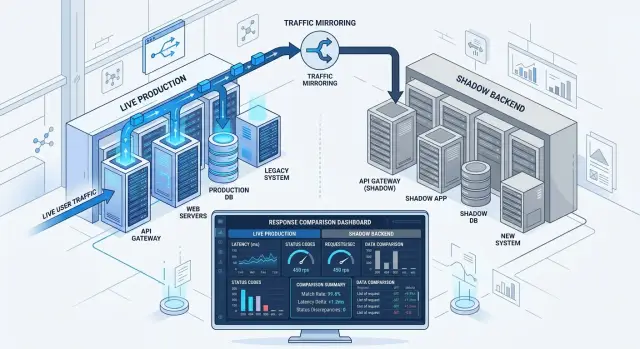
Table of Contents
Why risky backend changes break in production
Backend changes usually fail for boring reasons. The code works on clean test data, then production sends odd date formats, half-filled fields, duplicate records, stale cache entries, and requests that arrive in a different order than anyone expected.
That gap gets dangerous when the change touches logic people trust without thinking about it. A new version might round prices a little differently, sort results in a new order, or filter out records the old code kept. Each difference looks small on its own. In production, small differences pile up fast.
Real traffic is messy in ways test suites rarely match. One customer has an old account from years ago. Another sends a mobile request with missing metadata. A background job retries the same event twice. If your new code handles even one of those cases differently, you get a mismatch that staging never showed.
The damage rarely stays in one place. One wrong backend result can show up on a customer screen, land on an invoice, trigger the wrong follow-up email, feed a sync job, and end up in a finance report later.
That is why risky changes often feel safe right up until release time. The problem is not always a crash. Silent errors are worse. Pages still load, but totals, statuses, permissions, or recommendations are slightly wrong.
Teams also underestimate how much hidden behavior grows around old code. Another service may expect fields in a certain order. A client app may rely on a fallback nobody documented. A batch job may keep working only because an old endpoint returns an empty array instead of an error.
Shadow deployments help because they expose those gaps before users notice them. You send real production traffic to a silent copy of the new version, compare outputs, and catch weird cases that never showed up in tests. That turns a risky release from a guess into something you can measure.
What a shadow deployment does
A shadow deployment lets the new backend handle real production requests without putting real users at risk. The live system still answers every request. At the same time, a silent copy of that request goes to the new service.
Users keep seeing the old service as usual. If the new version crashes, slows down, or returns strange data, nobody outside the team sees it.
That is what makes shadow deployments different from a staged rollout. You are not sending a small share of users to the new code yet. You are mirroring production traffic so the new path can process the same inputs as the current one.
The idea is simple. A request comes in, your routing layer duplicates it, and both services process it. Only one response goes back to the customer: the response from the current stable service.
The shadow copy exists for measurement. Teams usually compare status codes, response time, payload differences, error messages, and timeout rates. If the old service returns 200 and the shadow version returns 500, the mismatch is obvious. If both return 200 but one takes 80 ms and the other takes 2 seconds, that matters too.
The risky part is side effects. The shadow service must not send emails, charge cards, create duplicate records, or trigger downstream jobs. If it can write to a database or call live third-party systems, the test stops being safe.
Most teams block those actions with read-only access, fake providers, disabled workers, or strict guards in code. The shadow service can read what it needs, compute its answer, and log the result. It should not change the world.
Done well, this gives you production mismatch detection before a real rollout. You get live evidence, and users do not pay for your test.
When this approach makes sense
Use shadow deployments when the code might return the wrong answer even if it does not crash. That is the best use case: changes that pass tests but behave differently under real traffic, real data, or awkward timing.
A full rewrite is a common example. The new service may follow the same contract, yet small differences in parsing, rounding, caching, or defaults can change the result. Database query changes fit too. A query that looks faster in staging can still miss edge cases in production because the data there is much messier.
New routing logic is another good fit. If requests now go to a different service, region, or rule set, you want to see whether the new path makes the same decisions before users depend on it.
This works best on paths that mostly read data and return an answer. Pricing checks, search results, recommendation feeds, eligibility rules, and account summaries are good first candidates because their outputs are easy to compare.
Be more careful when the new path changes data. If the shadow request can charge a card, send an email, reserve inventory, or write duplicate records, you can cause real damage while "testing." Sometimes you can stub those side effects or route them to a sink. If you cannot block them cleanly, skip this approach.
Comparison also needs clear rules. If you cannot define what counts as a match, the shadow run turns into noise. A recommendation engine can be a fair candidate if you compare score ranges, categories, or later click outcomes. It is a poor one if every difference turns into an argument.
Start where requests are frequent, outputs are easy to compare, and mistakes are cheap. That gives you useful mismatches early without turning production into an experiment.
How to set it up step by step
Start with one endpoint, not the whole service. Pick a request where the input is easy to capture and the output is easy to compare. Order pricing, tax calculation, search ranking, or fraud scoring are usually better starting points than a workflow that touches five systems at once.
The safest first move is a tiny sample of real traffic. Send 1% to 5% of live requests to both versions, but return only the current production response to the user. The new version runs quietly in the background, so you can inspect its behavior without changing the customer experience.
A simple setup usually looks like this:
- Choose an endpoint with a clear request and response.
- Mirror a small slice of production traffic to the new service.
- Add the same request ID to both copies, along with the flags that affect business logic.
- Save both outputs in the same shape and compare field by field.
- Log exact mismatches instead of vague messages like "response differs."
That last point matters more than it sounds. "total=49.90 vs 51.40, tax_rate=8% vs 11%" gives the team something real to fix. "Responses differ" just wastes time.
Review mismatch logs and error logs every day. Look for patterns, not just counts. Ten mismatches from one bad country code may matter less than one mismatch that changes a payment amount.
Only raise traffic after you can explain what you saw. Move from 1% to 5%, then 10%, then higher. If the new version stays quiet except for small, understood differences, trust grows. If the logs stay noisy, keep the rollout small and fix the cause first.
Teams with solid logs and metrics have a much easier time here. That is one reason experienced CTOs often insist on observability before risky backend changes.
What to compare before you trust the new version
Start with response status. If the old service returns 200 and the shadow copy returns 500, you already found a real problem. A 404 instead of 200 matters more than small payload differences, so sort mismatches by status code first.
After that, compare the parts of the response that affect decisions. Raw JSON size tells you almost nothing. Two responses can have the same length and still charge the wrong amount, miss a permission flag, or pick the wrong warehouse.
Focus on fields that people and systems rely on: totals, IDs, currency, discounts, stock state, user role, fraud result, or whether an item is marked as available. If the old version says "approved": true and the new one says false, that is a logic error even if everything else matches.
Some differences are only noise. Field order in JSON, extra whitespace, a new trace ID, or a timestamp rounded to seconds usually do not change behavior. Put those in a harmless bucket. Keep the serious bucket strict: wrong status, wrong value, missing field, changed side effect, or different downstream call.
Speed matters too. A new service can return the same answer and still be unsafe because it is slow. Track latency, retries, and timeouts while production traffic flows through the old version. If the shadow version matches the output but takes 1.8 seconds instead of 200 ms, users will feel that during a real rollout.
Retries deserve their own watchlist. They often expose flaky database queries or network calls that appear only under real load. Timeouts matter even more. A timeout in the shadow path is easy to ignore until it becomes a timeout users actually see.
A short scorecard keeps the review honest:
- status code match rate
- business field match rate
- timeout and retry rate
- latency gap between old and new
- repeated mismatch reasons
Do not judge a release by one strange request. Count how often mismatches happen, then group them by endpoint, customer segment, or request type. Repeated patterns matter more than isolated examples.
A simple example with order totals
A store decides to rewrite its order total service two weeks before a holiday sale. The old service has years of fixes in it, but the code is messy and hard to change. The new version is cleaner, faster, and easier to test. That sounds good until real carts start hitting it.
The team keeps the old service live. Customers still see totals from the current system at checkout, in receipts, and in payment requests. At the same time, the team sends the same cart data to the new service in the background. That second result stays hidden.
Both versions get the same items, discounts, shipping address, and coupon codes. One result goes to the customer. The other goes to a comparison log.
After a day of mirrored traffic, a pattern shows up. Most carts match exactly, but a small set does not. The bad cases cluster in regions with local tax rules. A cart with three low-priced items differs by one cent. A cart with tax-exempt products and a shipping discount differs by much more.
The problem is not random. The old service rounds tax after grouping items by tax class. The new service rounds each line first, then sums the cart. In some regions, both methods pass basic tests, but only one matches the rules the business already uses in production.
The team finds a second issue too. The new service applies a store coupon before tax in one region where the current rules require tax first. No customer notices because the live path still uses the old logic.
So the team fixes the rules, replays the mismatched carts, and compares again. The mismatch count drops to zero for the sample they care about. Only then do they consider sending a small share of real checkout traffic to the new version.
That is the practical value of traffic mirroring. You catch annoying, expensive edge cases before a holiday rush turns a quiet math bug into thousands of wrong totals.
Mistakes that hide real problems
A shadow test can look clean and still tell the wrong story. Usually the new path is not running under the same conditions as the live path, so the comparison is misleading from the start.
The most common mistake is letting the shadow copy touch outside systems. If it can charge a card, send an email, write to a webhook, or trigger a partner API, the test is no longer silent. Teams often try to be careful with test accounts, but that still changes behavior. The shadow version should process the request and stop before any side effect leaves the system.
Config drift causes another false pass. If the live version uses one set of feature flags, tax rules, cache settings, or timeouts and the shadow version uses another, the mismatches stop meaning anything. You are not comparing old code to new code. You are comparing two different products.
Many teams stare at response bodies and miss slower failures. A request that returns the right JSON after 4 seconds is still a problem if production normally finishes in 200 ms. Watch timeouts, retries, queue growth, database load, and error spikes that appear a minute later. Some bugs hide in the tail, not in the success rate.
Hardware can fool you too. If the shadow copy runs on smaller machines, colder caches, or a noisier database replica, people blame the code when the real issue is capacity. The reverse is just as bad. If you give the shadow version more CPU and memory than production, it may look fine until rollout day.
Timing matters as well. A quiet hour proves almost nothing. Low traffic misses ugly inputs, bursty clients, cache churn, and scheduled jobs. If the system gets busy at lunch, during nightly imports, or after payroll runs, the shadow test should cover that period.
Shadow deployments work best when the setup is boringly equal on both sides: same inputs, same config, same load, no outside side effects, and enough runtime to hit real traffic patterns. If the results look almost too perfect, check the test before you trust the code.
Quick checks before full rollout
A clean shadow run can still fool you if the compared requests are not truly the same. Before you send real traffic to the new version, keep the checks simple, visible, and strict.
Start with the inputs. The mirrored request and the live request need the same body, headers, query values, auth context, and timing assumptions. If one path gets a cached value and the other computes from fresh data, your mismatch rate stops meaning much.
A short pre-rollout checklist helps:
- Confirm both paths receive the same input data, including defaults added by gateways or middleware.
- Keep the shadow copy read-only so it cannot charge cards, send emails, write rows, or call outside services with real effects.
- Group common mismatches into named buckets the team can explain in plain language.
- Put mismatch rate, latency, and error count on one dashboard.
- Write down the rollback trigger before rollout starts, with an exact threshold and who can call it.
The mismatch buckets matter more than many teams expect. A small rate can be fine if you can explain it, such as harmless timestamp formatting or a known rounding rule. An even smaller rate is still bad if nobody can explain why order totals differ, why one version drops optional fields, or why large payloads fail.
Your dashboard should tell one story at a glance. If latency climbs but mismatches stay flat, the new code may still hurt users. If errors stay low but mismatches rise on one endpoint, you may have a logic bug that logs do not catch.
Rollback rules should be boring and specific. For example, roll back if mismatches stay above 0.5% for 10 minutes, if p95 latency rises above 20%, or if any side effect slips through the shadow path. Teams argue less when the rule already exists.
What to do after a clean shadow run
A clean shadow run is a good sign, but it is not the finish line. Mirrored traffic shows that the new version behaves like the old one under real load. It does not remove all risk once real users start getting live responses.
Start with a small share of live traffic. For most teams, 1% to 5% is enough to catch surprises without exposing too many users. Keep the old version as the default path until the new one stays boring under real traffic.
Do not turn off comparisons yet. Keep the same checks running during this first live slice and watch them for a few hours, or for a full business cycle if traffic changes during the day. A version can look fine in shadow mode and still fail once caches warm differently, retries stack up, or write paths behave a little differently.
During this stage, keep an eye on four things:
- status codes and response differences
- latency, timeouts, and retries
- database writes and downstream calls
- logs from edge cases that only live users trigger
Write down what happened while it is still fresh. Keep it simple: what matched, what failed, what you changed, and why you decided the rollout was safe to expand. That note saves time later, especially when the same class of bug shows up again six months from now.
Over time, that record becomes a playbook. The next risky backend change can reuse the same traffic rules, comparison points, and stop conditions unless the system changed in a major way.
If the rollout plan still feels shaky, a second opinion helps. Oleg Sotnikov at oleg.is advises startups and small teams on architecture, infrastructure, and Fractional CTO work, and this kind of release review is exactly where experienced eyes can catch weak spots early.
Once the small live slice stays clean, increase traffic in stages. Slow is usually faster than one bad rollback.
Frequently Asked Questions
What is a shadow deployment?
A shadow deployment sends real production requests to a new backend copy, but users still get the response from the current stable service. That lets your team compare results, speed, and errors without exposing customers to a bad release.
When does a shadow deployment make sense?
Use it when wrong answers worry you more than hard crashes. It fits rewrites, pricing logic, search, routing changes, and other backend work where small logic differences can hurt users even when the app still loads.
How is this different from a canary release?
A canary sends some real users to the new version and lets them feel any problems. Shadow mode does not do that. The new service sees the same traffic, but the old service still answers every request.
What should I compare between the old and new service?
Start with status codes, business fields, latency, retries, and timeouts. Compare the values that drive real decisions, like totals, discounts, stock state, permission flags, or approval results, not just raw JSON size.
How much traffic should I mirror first?
Most teams start small, usually around 1% to 5% of traffic. That gives you real examples without flooding logs or putting too much load on the new service while you still fix obvious gaps.
Can I use shadow deployments on endpoints that write data?
Yes, but only if you block every side effect. The shadow path must not charge cards, send emails, write rows, or trigger outside systems. If you cannot stop those actions cleanly, pick another testing method.
How do I keep the shadow copy from causing real damage?
Keep the shadow service read-only, disable workers, and swap real providers for fakes or sinks. Also guard risky code paths so the service can compute a response and log it without changing anything outside itself.
What counts as a real mismatch versus harmless noise?
Treat things like field order, trace IDs, whitespace, or minor timestamp formatting as noise if they do not change behavior. Treat wrong totals, missing fields, status changes, slow responses, and different downstream calls as real failures.
How long should I run a shadow deployment?
Run it long enough to hit normal traffic patterns, not just a quiet hour. Include busy periods, cache churn, scheduled jobs, and awkward inputs, because that is where hidden bugs usually show up.
What should I do after a clean shadow run?
Do not jump straight to 100%. Send a small share of live user traffic to the new version, keep the same comparisons running, and watch latency, errors, and writes closely. If the service stays boring under that live slice, raise traffic in stages.


