Session store for multi node apps: cookies, Redis, DB compared
Choosing a session store for multi node apps gets tricky fast. Compare cookies, Redis, and database sessions for logout control, scale, and failures.
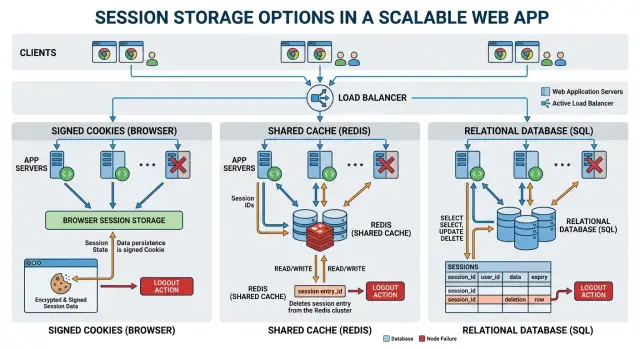
Table of Contents
Why sessions get harder on more than one node
A single app server can get away with sloppy session handling. If that machine keeps session state in memory, every request hits the same place, so the user stays logged in and everything feels fine.
That breaks as soon as you add another node. One request lands on node A, the next on node B, and node B has no idea who that user is unless both nodes share the same session state. The result is familiar: random logouts, missing carts, and users who look signed in on one page and signed out on the next.
Load balancers make the problem obvious. They send traffic to whichever node is available, not to the server that happened to see a user five seconds ago. Sticky sessions can hide this for a while, but they do not solve it. If that node restarts or dies, the session goes with it.
It also helps to separate three things teams often mix together. Login state answers one question: is this user signed in right now? User data is the profile, settings, and account details in your main database. Cache data is temporary data used to speed things up, like a rendered page fragment or a recent lookup result. Once those three start blending together, session bugs get ugly fast.
A good session store needs to do four jobs well. It has to keep users logged in across requests on any node, let you log them out quickly, survive an app server restart, and fail in a predictable way when part of the system goes down.
Logout control matters more than many teams expect. If you need to force a logout after a password change, an admin action, or suspicious activity, every node has to see that change quickly. Otherwise one server still accepts the old session while another rejects it.
That is the real pressure here. You are not just storing a session. You are deciding how your app shares trust, handles failure, and keeps user state consistent while traffic moves around.
What each option actually does
A session has to answer a simple question on every request: who is this user, and what state should the app remember for them? Cookie sessions, Redis sessions, and database sessions answer that question in different places, and that choice shapes everything that follows.
Cookie sessions put most or all session data in the browser cookie itself. The app signs it, and sometimes encrypts it, then sends it back to the browser. On the next request, the browser returns that cookie and the app reads it locally. The server usually stores little or nothing for that session beyond the secret used to verify the cookie.
Redis sessions move that state into a shared in memory store. The browser keeps only a small session ID cookie. Each app node reads the ID, asks Redis for the session data, and gets the same answer no matter which node handled the request.
Database sessions work in much the same way, but the session lives in a database row instead of Redis. The browser still keeps a session ID. The app looks up that ID in a sessions table, reads the stored data, and checks an expiry time. Cleanup usually happens with scheduled deletes or lazy expiration when the app notices an old row.
Where the data lives
The simplest way to compare them is by location:
- Cookie sessions store the session data in the browser and keep the signing secret on the server.
- Redis sessions store only the session ID in the browser and keep the session data in Redis.
- Database sessions store only the session ID in the browser and keep the session data in a database table.
Cookie sessions work well when you only need a small amount of state, such as a user ID, role, or a short cart summary. Redis and database sessions fit better when the server needs to control session contents directly, update them often, or share them across several nodes. In all three cases, the browser still holds a cookie. The real difference is whether that cookie contains the data itself or just a pointer to data on the server.
How logout control changes the choice
Logout sounds simple until you have more than one app node and more than one device per user. Signing users in is usually easy. Making a session stop working exactly when you want is the hard part.
Signed cookie sessions are the weakest option when strict revocation matters. After you send the cookie, the browser holds it, and every app node can trust it as long as the signature checks out. When a user clicks "log out," you can tell that browser to delete the cookie, but you cannot pull it back from every device that already has it. If someone copied the cookie, or a browser keeps sending it, it stays valid until it expires.
Teams often try to patch this with a denylist or a session version check. That can work, but now you added server side state anyway. At that point, cookie sessions lose much of their appeal.
Redis sessions handle logout cleanly. The cookie only carries a session ID, while Redis holds the real session record. To log a user out, your app deletes that record. Every node sees the same result on the next request, so revocation is close to instant.
Database sessions give you the same basic control. You delete the session row or mark it revoked, and every node checks that shared state. They are usually slower than Redis under heavy traffic, but logout behavior is direct and predictable.
That difference shows up in user and admin features. Logging out from one device, logging out from all devices, forcing a logout after a password reset, or letting an admin revoke active sessions are all natural fits with Redis or database sessions. With cookie sessions, those features usually need extra workarounds.
If logout has to mean "right now," use a server side session store. Cookies are fine when short expiry is enough. They are a poor fit when you need strict revocation.
How each option behaves under load
Cookie sessions move most of the session read cost into the request itself. The app can usually verify the cookie locally, so it skips a trip to Redis or a database. That helps at high request rates. The tradeoff is size: every request carries the cookie back and forth, so bandwidth grows with traffic, and CPU use grows when you sign or encrypt session data on every hit.
Redis sessions add a network hop, but the payload is usually small and predictable. For many apps, that is a fair trade. Reads and writes stay fast when Redis sits close to the app nodes. If latency goes up by even a few milliseconds, every authenticated request feels it. During a traffic spike, Redis sees more operations per second and more memory use as active users grow.
Database sessions look simple because most teams already run a database. Under load, though, they can age badly faster than people expect. Each request can turn into a read, and many apps also write on every hit to refresh expiry or store last activity. That creates connection pool pressure, more index work, more disk I/O, and more cleanup overhead.
A quick comparison helps:
- Cookie sessions grow request size as traffic grows.
- Redis sessions grow network calls and memory use as active users grow.
- Database sessions grow query volume, row churn, and cleanup work.
User count and request rate do not hurt each option in the same way. A million quiet users mostly stress storage capacity in Redis or the database. A smaller group of very active users can be worse because repeated reads and writes hit the session store nonstop.
Network latency matters most for Redis and database sessions. If your app reads a session on every request, one extra round trip becomes a tax on everything: page loads, API calls, and background jobs. Cookie sessions avoid that store latency, but large cookies can still slow requests on slower mobile connections.
Database sessions usually become a bottleneck when the app treats the sessions table like a high speed cache. The signs show up early. CPU climbs, slow queries pile up, and expired session cleanup starts competing with real user traffic. That is often the point where teams move from database sessions to Redis.
Failure modes you should expect
When you pick a session store, failure behavior matters as much as speed. Users rarely care where the session lives. They notice when they get kicked out, when pages hang, or when one click works and the next one fails.
When state lives on the server
A Redis outage is usually sudden and obvious. A user signs in, clicks to the next page, and the app tries to read the session from Redis. If Redis is down and your app has no fallback, the request fails or the app treats the user as signed out.
Active sessions feel unstable in that moment. Some people see a login screen again. Others get a 500 error, a spinner that never finishes, or a cart that looks empty because the app cannot load the session data behind it. If one app node still has a stale copy in memory and another does not, the user can bounce between "logged in" and "logged out" depending on which node answers.
A database slowdown feels different. It often starts gradually, then gets bad all at once. Imagine a busy hour after a product launch. Every request checks the sessions table, writes a last seen timestamp, or updates session expiry. When the database starts lagging, page loads get slower across the whole app, not just at login.
Users notice delay first. Buttons feel dead for two or three seconds. Then retries pile up, connection pools fill, and requests start timing out. At that point, even users with valid sessions may see random logouts because the app gives up before it can confirm the session. This is one of the nastier failures because the site looks half alive. Some pages work. Others fail.
When state lives in the cookie
Cookie sessions remove the Redis or database lookup, but they have their own sharp edge: secret rotation. If you change signing or encryption secrets the wrong way, every existing cookie becomes unreadable at once.
The user experience is blunt. People open the app and land on a login page even though they signed in five minutes ago. A saved checkout step disappears. A form draft tied to the session can vanish. Support gets messages saying the site logged everyone out, because that is exactly what happened.
The safe version is boring, and that is good. Accept the old secret for a while, sign new cookies with the new one, then retire the old secret after most sessions expire. If you skip that overlap, users pay for your deployment mistake right away.
How to choose step by step
Start with the thing users notice fastest: logout. If you need to kill a session right away across every node, signed cookies are usually a poor fit on their own. Redis or database sessions make that much easier because the server can mark a session invalid instead of waiting for a cookie to expire.
Then look at volume. A small app with low login traffic can do fine with database sessions, especially if you already trust your database and keep session data small. If people log in often, refresh pages constantly, or keep the app open all day, a database can turn into a busy session counter unless you tune it carefully.
Redis often sits in the middle. It handles frequent reads and writes well, and it gives you central control over sessions. But it only makes sense if your team already runs Redis with backups, alerts, and a clear plan for restarts. A fast tool still causes problems when nobody wants to maintain it.
A practical way to choose is to ask four questions in order. First, how strict does logout need to be? Immediate admin revocation points to Redis or a database. Second, what does traffic really look like, including login bursts and how often sessions change? Third, how large is the session data? Small records are easy almost anywhere, while large ones cause pain quickly. Fourth, what can your team run calmly at 2 a.m. during an outage?
Cookie sessions make sense when you want the fewest moving parts and can accept weaker server side control. Database sessions fit teams that already run a solid database and want to avoid another service. Redis sessions fit apps that need fast shared state and frequent session checks.
Pick the simplest option that covers your real risks, not every possible future problem. That usually leads to fewer outages and less cleanup later. This is also the kind of tradeoff Oleg Sotnikov at oleg.is often helps startups and small teams work through: cut unnecessary moving parts first, then add more control only when the app truly needs it.
A realistic example
Picture a small SaaS for appointment scheduling. It has three app nodes behind a load balancer, a few thousand active users, and one admin area that support staff open a handful of times a day to suspend accounts or force a re login after a billing issue.
Most traffic is ordinary. Users sign in in the morning, open dashboards, and save a few forms. Admins only step in when something goes wrong. This is the kind of setup where session design stops feeling theoretical.
With cookie sessions, node 1 creates the session cookie and nodes 2 and 3 can accept it too, as long as they share the same signing secret. That part is simple. There is no central session lookup, so ordinary page loads stay fast and adding a fourth node is easy.
The trouble shows up when support disables a user at 11:07. If the session lives inside the cookie, the browser can keep sending it until it expires. Logging out from the browser works for that browser, but copied or stolen cookies are harder to kill right away. To tighten control, the app usually needs extra checks on each request or a denylist, and now the once simple setup is not so simple anymore.
Redis looks calmer in the same app during a rolling deploy. Each browser keeps a small session ID cookie, while all three nodes read the real session from Redis. Node 2 can restart with new code, and the user still stays logged in when the load balancer sends the next request to node 3. Support can revoke one session quickly, and that change applies everywhere.
The weak spot is Redis itself. If the deploy also restarts Redis badly, or memory pressure forces eviction, users can lose sessions at once. That is noisy, but at least the behavior is clear: they sign in again.
Database sessions often feel safe at first because the team already runs PostgreSQL or MySQL. Logout control is good, and session data survives app restarts. Then traffic jumps after a product launch or email campaign. Every request starts touching the sessions table while the same database also handles invoices, dashboards, and search filters.
Nothing looks broken at first. Pages just get slower. Then cleanup jobs lag, write load rises, and the database becomes the busiest part of the login path.
For a SaaS like this, Redis is usually the most balanced choice. Cookie sessions are easy until you need strict logout control. Database sessions are fine until your main database gets busy with everything else.
Mistakes teams make early
Teams often treat sessions like a junk drawer. They start with a user ID, then add roles, feature flags, cart data, form state, and half a profile object. That feels harmless on day one, but it turns every request into extra network traffic, bigger cookies, or more reads from Redis or the database.
Small sessions age well. Large ones turn simple login state into a performance problem.
Another common mistake is forgetting that session data has a lifespan. Expired sessions do not always disappear in a useful way. Redis can hold stale data longer than expected if TTL rules are sloppy. Database sessions can pile up for months if nobody adds cleanup jobs. Then support asks why the sessions table is huge, backups are slow, and logins feel random.
Sticky sessions fool a lot of teams early. They can reduce pain for a while, but they do not fix the real issue. If one node dies, users may lose state. If traffic shifts, another node may not know anything about that user. Stickiness hides a weak design until load or failure exposes it.
Secret handling gets ignored too often. Cookie sessions depend on signing or encryption secrets, and server side sessions still rely on secure cookie settings. If you never plan for secret rotation, you create a bad choice later: keep old secrets forever or log everyone out at once.
The same goes for store outages. Before launch, ask what happens if Redis is down for 10 minutes, what happens if the sessions table locks or slows down, whether users can keep using the app or every request fails, and who rotates secrets without breaking active sessions. Those answers matter more than a neat architecture diagram.
Quick checks before you commit
Teams often choose a session setup by habit. That is how they end up with clean diagrams and ugly outages. Before you commit, ask a few plain questions and make someone answer each one without vague language.
- How fast does logout need to work? If a user clicks "log out," do you need access gone at once across all devices, or is a short delay fine?
- What happens if one app node dies? Users should stay signed in when a single server disappears.
- What does a login spike look like? Monday morning traffic, a product launch, or a mobile app reconnect can hammer the session layer.
- Who detects trouble and fixes it fast? A familiar database can still drag down auth for everyone when queries get slow.
- Can someone explain the tradeoff in one sentence? If not, the choice probably is not ready.
One extra check saves a lot of pain later: ask what breaks first when a dependency goes down. With cookie sessions, many users can keep browsing until the cookie expires. With Redis or database sessions, logins and session reads can fail right away unless you build a fallback.
For session handling, boring is often the better choice. Pick the option your team can monitor, explain, and repair under pressure.
What to do next
Choose based on the cost of being wrong. If you run a small product with simple auth and low risk, cookie sessions may be enough. If you need central logout, short lived sessions, or clean control across many nodes, Redis often gives the best balance. If you already depend on your main database and traffic is moderate, database sessions can be the simpler choice.
Do not stop at the happy path. Before launch, write down what should happen when Redis goes down, when a database replica lags, when one app node disappears, and when a user clicks logout from one device while another request is still in flight. A short page with expected behavior saves more time than another debate in chat.
A staging test is worth more than a long architecture diagram. Run the same checks every time you change session logic:
- Log in on two nodes and confirm the same session works.
- Log out and verify access stops everywhere you expect.
- Wait for expiry and confirm old sessions do not come back.
- Kill one node during active traffic and watch what users see.
- Simulate store failure and decide whether the app should fail open or fail closed.
Most teams should start with the simplest setup that matches their real risk level, then change only when the pain is real. A small SaaS with a few thousand users does not need the same session design as a regulated product with strict audit needs.
If your team is stuck between two options, a second opinion can save you from building around the wrong one. A Fractional CTO such as Oleg Sotnikov at oleg.is can review the tradeoffs, map them to your stage, and help you choose a setup your team can run without drama six months from now.
Frequently Asked Questions
Why do sessions break after I add a second app node?
On one server, every request hits the same memory, so sloppy session handling can still work. Add a second node and requests jump between machines, so any session data that lives only on one node stops being reliable.
Are sticky sessions enough for a multi node app?
No. Sticky sessions only hide the problem for a while by sending a user back to the same node. If that node restarts, dies, or loses traffic, the user can lose session state anyway.
When do cookie sessions make sense?
Use them when you want the fewest moving parts and the session stays small, like a user ID, role, or a tiny cart summary. They work best when short expiry is fine and you do not need to revoke sessions from the server right away.
Why are cookie sessions weak for immediate logout?
Because the browser holds the session data, the server cannot pull it back from every device once it gets issued. You can delete it in one browser, but copied or still valid cookies can keep working until they expire unless you add server side checks.
Why do teams pick Redis for sessions?
Redis fits apps that need shared session state across many nodes and fast logout control. Every node reads the same session record, so users stay signed in across deploys and restarts, and admins can revoke access quickly.
Can I use my main database for sessions?
Yes, if traffic is moderate and your team already trusts the database. It is simple to start with, but it can get expensive under load because each request may read or write the sessions table and cleanup work piles up.
What usually breaks first under heavy session traffic?
Cookie sessions usually add bandwidth and CPU cost because every request carries the cookie. Redis adds more network calls and memory use. Database sessions often hurt the database first through query volume, row churn, and expiry cleanup.
What should I avoid storing in a session?
Keep it small. Store only what the app needs for login state and a little session context, not profile data, form drafts, feature flags, and half the account object. Large sessions turn every request into extra work.
How should I rotate cookie signing secrets without logging everyone out?
Rotate secrets with overlap. Accept the old secret for existing cookies, sign new cookies with the new secret, and remove the old one only after most old sessions expire. If you switch in one step, you log everyone out at once.
What is a good default choice for a small SaaS?
For many small SaaS apps, Redis is the safest middle ground if logout control matters and you already know how to run Redis well. If your auth is simple and risk is low, signed cookies may be enough. If you want one less service and traffic stays modest, database sessions can work.


