Service catalog: stop internal work from vanishing in chat
A simple service catalog helps a 30-person company name owners, set request paths, and agree on response targets so work stops getting lost in chat.
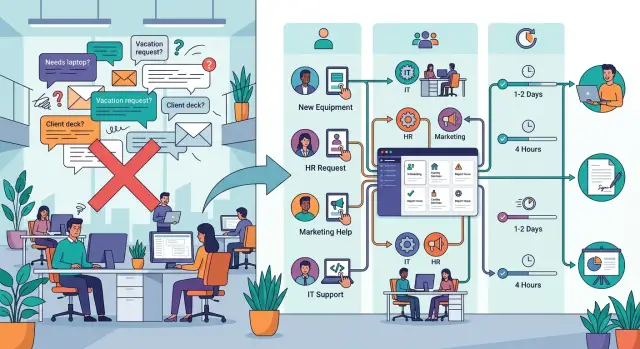
Table of Contents
Why work vanishes in chat
Chat is great for quick answers. It is bad at work that needs a clear owner, a simple path, and a predictable response time.
In a 30-person company, internal requests usually start with good intent. Someone needs a laptop fix, tool access, a pricing update, a landing page change, or help with payroll. They post in the nearest channel or message the person who helped last time.
That creates a quiet mess. People ask whoever seems available, not whoever owns the work. If the usual helper is busy, out of office, or just misses the message, the request sits there until someone notices it again.
Small internal jobs suffer most. Big customer issues usually get attention because everyone sees the pain. Routine internal work does not. No one owns it clearly, so a five-minute task turns into a week-long delay.
Urgency makes it worse. The loudest message gets picked up first. Calm, ordinary requests wait, even when they came in earlier and matter just as much. Over time, people learn to write louder messages instead of better requests.
Chat also forgets. The same questions come back because the answers live in old threads, private messages, and half-remembered conversations. One person explains the expense process on Monday, someone else explains it again on Thursday, and nobody updates a shared place.
A simple example shows the problem. A designer asks for a new software license in a product channel. Someone from ops replies, "I'll check." Then the thread dies. Two days later, the designer pings finance in a DM. Finance asks who approved it. Now three people have touched the same request, and nobody knows who should finish it.
That is the real cost of chat-first internal work. Not chaos, but drift. Work starts, stalls, and restarts with a different person. A service catalog fixes that by giving common requests a named owner, one request path, and a response target people can trust.
What a service catalog should include
A good service catalog is short, plain, and hard to misread. If someone needs laptop access, legal review, or a landing page update, they should know three things right away: who owns the work, where to send the request, and how long a normal wait looks like. If any part is missing, people go back to chat and requests disappear again.
Keep each entry small enough to scan in a few seconds. One page with 12 clear entries beats a long document nobody opens. Use names people already say out loud, like "New employee setup" or "Customer refund approval." Avoid internal labels that only one team understands.
Each entry should answer five questions:
- What is the service called in plain language?
- Who owns it right now?
- Where should people submit the request?
- How fast should they expect a first reply and final completion?
- What fits this service, and what does not?
The owner should be a real person, not "Ops team" or "IT." Team names hide responsibility. A real name gives people a clear path when something stalls. If Priya owns hardware requests, write "Priya Shah," not "Workplace support."
Request paths need the same discipline. Pick one path for each service and stick to it. That path might be a form, a ticket queue, or a shared inbox. It should never be "message whoever is online." If people have three ways to ask, work splits across channels and nobody sees the full queue.
Response targets should be honest. Set one target for the first reply and one for completion. Finance might reply within 4 business hours and finish routine expense approvals within 2 business days. If another team must approve the work, say that clearly.
Scope matters just as much. "New employee setup" might include a laptop, accounts, and building access. It might not include software training or desk moves. A small boundary like that saves a lot of back-and-forth.
The catalog does not need to explain everything. It only needs enough structure to send the request to the right place on the first try.
Build the first version in one week
A 30-person company does not need months of planning. It needs one short sprint, a small scope, and real examples from the last few weeks.
On day 1, pull the requests people already make. Search chat, email, forms, and ticket tools from the last month. Ignore rare edge cases. Look for repeat work like access requests, invoice approvals, internal bug reports, laptop help, account setup, or small website changes.
Day 2 is for grouping, not perfect naming. If ten messages all ask for software access, they belong under one service. If finance gets several kinds of budget questions and the process is mostly the same, combine them.
Keep the first list short. Ten to fifteen services is enough. Once the list gets too long, people stop scanning it and go back to chat.
Day 3 is where many catalogs break. Assign one owner to each service, not a department. People need a name they can remember. That owner does not have to do every task, but they do have to own triage and handoff.
On day 4, decide where each request should go and what happens first. One path per service works best: a form, a shared inbox, a queue, or even a named Slack channel if that is all you have for now. Add a simple sorting rule, such as "urgent if it blocks payroll" or "product bugs go to support first, then engineering."
Day 5 is simple: publish the catalog and use it right away. Ask three or four coworkers to send real requests through it. Watch where they hesitate, where they pick the wrong service, and where ownership still feels fuzzy.
Fix those rough spots the same day. The first version is good enough when people can find the right service in under a minute, know where to ask, and hear back from the right owner instead of waiting in a silent thread.
Choose owners people can actually name
If someone needs laptop access, payroll help, or a website update, they should see one clear name in the catalog. A department label is too vague. "IT" or "Operations" sounds neat, but it still pushes people back into chat because they do not know who will answer.
Pick one main owner for each service. Use a real person with a role people recognize, such as "Maya, office manager" or "Chris, finance lead." That makes the request feel directed, and it gives the owner a fair chance to say yes, no, or not my service.
Keep ownership close to the team that does the work every day. If support resets accounts, let support own that request. Do not hand it to a manager three levels away just because the title sounds broader. The closer the owner is to the actual work, the easier it is to keep the catalog accurate.
A backup helps, but only after you name the main owner. Teams often skip straight to shared ownership, and then no one feels responsible. One owner keeps the service alive. One backup covers leave, sick days, and busy weeks.
Ask each owner to approve the wording before you publish it. This catches problems early. Owners spot fuzzy requests, missing limits, and work that belongs somewhere else. They can also rewrite the description in plain language that matches how the team already works.
Roles change, and catalogs go stale fast. Review owner names whenever someone changes teams, gets promoted, or leaves. In a 30-person company, one move can break several request paths at once.
A simple test works well. Ask three people, "Who would you contact for this?" If they cannot name the same person, the owner is still too vague.
Set request paths people will actually use
People should be able to use the catalog without stopping to think. Put the request path inside the tools they already open all day. If the company lives in Slack or Teams, add a shortcut there. If finance already works from a shared inbox, keep finance requests there. Do not force people into a separate system just to ask for help.
Repeat requests need a short form, not a blank message box. Most people will type "need access" and move on. Then the receiving team loses time asking basic questions while the request sits half-finished.
For most internal requests, a short form should ask for only a few things:
- what is needed
- who needs it
- when it is needed
- which system or tool it affects
- any approval or business reason
That is usually enough. Keep the form short. If it takes more than a minute to fill out, people will go back to DMs.
Chat should stay open for follow-up, not intake. After someone submits a request, the team can use chat to ask one extra question, confirm timing, or post a status update. The first step still needs to create something people can find later, like a ticket, form entry, or email thread. Otherwise the request disappears as soon as the chat scrolls away.
Old side paths cause more damage than most teams expect. One outdated email alias, one pinned "temporary" spreadsheet, or one habit of messaging a friendly ops person can split requests across three places. Then nobody trusts the process. Remove old docs, unpin stale instructions, and set auto-replies that point people to the current path.
A small company does not need a fancy system. It needs one clear way to ask for each type of help, in the place people already use, with just enough detail to start the work. If the request path feels slower than sending a DM, people will ignore it.
Write response targets that feel realistic
Response targets only help if they match real life. If the catalog promises "same day" for everything, people stop trusting it after the first miss.
Split the target into two parts. One covers the first reply, so the requester knows a real person saw it. The second covers completion, so nobody mistakes "we got your message" for "the work is done."
That difference matters more than most teams think. A laptop access request might need a reply within 4 business hours, while completion takes 2 business days. A contract review might get a reply in 1 business day and take 5 business days to finish because legal work depends on risk and queue length.
Base targets on current capacity, not the ideal version of your company. If one HR person handles payroll questions, onboarding, and policy updates, do not publish targets that assume a bigger team. Check the last month of real requests, count who actually does the work, and write numbers the team can hit most weeks.
Use hours or business days. Avoid fuzzy words like "soon," "quickly," or "as available." People read those words differently, and that usually creates more follow-up messages.
A simple format works well:
- First reply: within 4 business hours
- Standard completion: within 2 business days
- Complex cases: within 5 business days
- Escalation path: manager after the target is missed
Add exceptions in plain language. Outages, security incidents, and legal issues often jump the queue. Say that urgent production problems override normal targets, or that legal review may take longer when outside counsel or extra approvals are involved.
Then review misses once a month. Keep it practical. Which targets did the team miss, by how much, and why? If the same request type slips every month, either change the target or change the staffing.
A simple example for a 30-person company
A service catalog for a 30-person company can stay small. If people know where to send five common requests, a lot less work gets buried in chat threads and private messages.
One page is enough to start. Each entry needs a clear owner, one request path, and a first response target that feels normal for the team.
| Request type | Owner | Request path | First response target |
|---|---|---|---|
| IT support | Ops | One intake form for access, devices, and software issues | 4 business hours |
| Contract review | Finance | Finance request queue | 2 business days |
| Marketing requests | Marketing | One weekly content queue | Added to the next planning cycle |
| Customer issue escalation | Product | One shared escalation path used by Support and Sales | 1 business hour during working hours |
| New hire equipment | People Ops | Onboarding request tied to the start date | Confirmed before day one |
This works because it removes choice. If someone needs a laptop, they do not have to guess whether to message IT, ops, or a friendly engineer. They use the ops form. Ops can route the work behind the scenes without making the requester guess.
Contract review is another place where work often disappears. A salesperson drops a PDF in chat, tags two people, and assumes someone picked it up. A better rule is simple: finance owns the queue and sends a first reply within two business days. That first reply can be brief. It only needs to confirm the request is in line and explain what happens next.
Marketing requests need limits too. In a small company, random "can you make a post for this" messages can eat half a week. One weekly content queue keeps the work visible and makes tradeoffs easier. Urgent items can still happen, but they should stay rare and clearly marked.
Customer escalations should use one shared path into product. Support and sales should not use separate channels, because that creates duplicate reports and mixed priorities. One path gives product a single place to assess impact, group similar issues, and answer once.
New hire equipment usually breaks when ownership flips too early. Keep it with People Ops until day one. That way, one team tracks shipping, setup timing, and missing items. After the person starts, ops can take over normal support.
If your company can publish this much and stick to it for a month, the catalog is already doing its job.
Common mistakes that break the catalog
A service catalog fails when it looks tidy on paper but still leaves people guessing. The most common problem is vague ownership. If the catalog says "Finance" or "Operations" without naming a real person, requests drift through chat because nobody knows who should answer.
Another common mistake is giving every service too many request paths. If people can ask through Slack, email, a form, or a project board, they will pick whatever feels easiest in the moment. Then work gets split across places, follow-up goes missing, and nobody can see the queue.
One normal path is enough. Keep urgent incidents separate. A broken production system should not compete with "please add me to this tool" in the same inbox or channel. When teams mix urgent issues with routine work, everything starts to feel urgent and response times get worse for both.
Response targets also break trust when they are too ambitious. If every line promises a same-day reply, the catalog may look good, but it fails almost immediately. A better target matches the kind of work. Password resets might need a few hours. Contract review might need two business days. Write the truth.
Broad descriptions create another problem. If a service says "general support" or "operations help," almost anything can get dumped into it. Each entry needs a clear boundary that says what belongs there and what does not.
A quick check catches most of this:
- one named owner
- one normal request path
- one separate path for urgent incidents, if needed
- one response target the owner can actually keep
- one short description with clear limits
If someone cannot tell where to send a payroll question or a laptop issue in 10 seconds, the catalog still needs work.
Quick check before you publish
Most catalogs fail for boring reasons: two owners for the same request, three places to ask, and promises nobody can keep. Fix those before anyone sees it.
Read every entry like an employee who joined last week. They do not know your shortcuts, your favorite Slack channel, or who "usually handles this." If the right owner is not obvious in a few seconds, the entry is not ready.
Before you publish, check four simple things. Every service should have one clear owner, one request path, and a response target that matches a normal week, not an ideal one. Then remove old channels and old docs so people do not keep using them by habit.
One more test works well. Ask a new employee, or someone outside the team, to find how to request software access, report a laptop problem, and ask for contract review. If they hesitate, open the wrong channel, or message a random manager, the catalog still has gaps.
Keep ownership and response targets a little boring. That is a good sign. Clear and modest beats impressive and false every time.
What to do next
Start with the requests that create the most chat noise. In a 30-person company, that usually means access requests, customer issue escalation, invoice approvals, hiring support, and production incidents. If people ask for the same help in three different channels, that service belongs in the first version.
Keep the next step simple. Pick 5 to 10 services people request every week. Name one owner for each service, not a group. Give each service one request path people should use every time. Then set a response target your team can actually meet.
Run the catalog for 30 days without trying to perfect it. Watch for missed handoffs, duplicate requests, and services that still drift back into private messages or random group chats.
A short review at the end of the month tells you a lot. If people keep asking, "Who handles this?" the owner is still unclear. If requests land in the wrong place, the path is too vague. If the team misses the target every week, the target was wishful thinking.
Rename unclear services after real requests come in. Teams often write labels that make sense to insiders but confuse everyone else. "Ops support" is fuzzy. "Website changes" or "New employee setup" is much easier to understand.
If ownership still slips after a month, outside CTO help can be useful. A fresh view often spots role overlap, weak handoffs, and places where the company depends too much on chat memory instead of simple rules. Oleg Sotnikov at oleg.is works with small and midsize teams as a Fractional CTO and startup advisor, and this kind of operating cleanup is often where that outside help pays off fastest.
Frequently Asked Questions
What is a service catalog, really?
A service catalog is a short page that tells people where to send common internal requests. For each service, name one owner, one request path, and a realistic reply and completion time.
In a 30-person company, that structure stops small jobs from drifting through chat and private messages.
Why do requests keep disappearing in chat?
Chat makes work easy to start and easy to lose. People message whoever looks available, threads go quiet, and the next person restarts the same request in another place.
Routine internal work suffers most because nobody sees one queue or one owner.
Which requests should we put in the first version?
Start with the requests that show up every week. Software access, laptop help, invoice approvals, new hire setup, website changes, and customer escalations usually belong in the first version.
Skip rare edge cases for now. You want the common work people already ask for in chat, email, and DMs.
How many services should we start with?
Keep the first catalog small. Ten to fifteen services usually fits on one page and gives people enough choice without making them search too long.
If the list grows too fast, people stop scanning it and go back to chat.
Who should own each service?
Pick one real person for each service. Use a name people can remember, like the finance lead or office manager, instead of a team label like Finance or Ops.
That person does not need to do every task. They need to own triage, handoff, and follow-up when the work stalls.
Should we use forms, email, or Slack for requests?
Use one normal path per service and put it inside tools people already use. A short form, a shared inbox, or one queue works well.
Avoid blank chat messages for intake. They leave out basic details and force the receiving team to chase information later.
What response targets make sense?
Set two targets: one for the first reply and one for completion. A first reply shows that someone saw the request, while completion tells people when the work should finish.
Base both numbers on your current team, not on wishful thinking. If one person handles the queue, write targets that person can hit most weeks.
How do we handle urgent requests without breaking the system?
Keep urgent incidents on a separate path. A production outage should not sit next to routine access requests in the same inbox.
Write a simple rule people can remember, such as payroll blockers, security issues, and production failures go to the urgent path. Everything else follows the normal service path.
How do we stop people from sending DMs anyway?
First, remove the old side paths. Unpin stale instructions, close outdated forms, and add auto-replies that point people to the current request path.
Then ask managers and service owners to redirect every DM back into the catalog. People change habits when the old shortcut stops working.
How often should we update the catalog?
Review it whenever ownership changes and do a quick check every month. Look for missed targets, duplicate requests, and services that still drift into chat.
If people still ask who handles something, rename the service or fix the owner. If the team misses the same target every month, change the target or add capacity.


