Serverless cold start costs in spiky traffic products
Serverless cold start costs can hurt user-facing flows when traffic arrives in bursts. Learn what to measure before moving requests to functions.
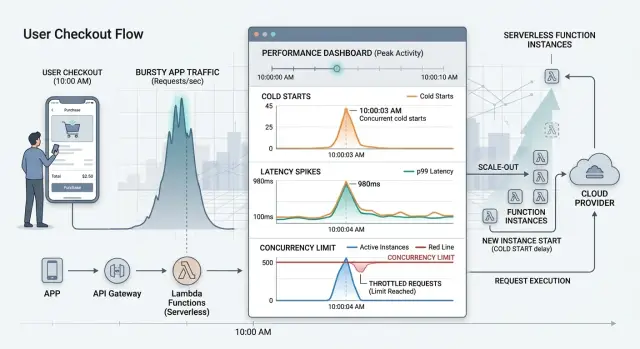
Table of Contents
What goes wrong with cold starts in burst traffic
A cold start happens when your cloud provider has to wake up a function before it can handle a request. If no ready instance is waiting, the platform loads your code, starts the runtime, pulls secrets, opens network connections, and only then runs the task. That extra work can add a small pause or a long one.
With steady traffic, you might barely notice it. Burst traffic makes it obvious. A sale starts, a campaign email lands, or a mobile app sends a notification. Many requests hit at once, but only a few warm instances are ready. The platform creates more, and every new instance adds startup delay.
Users notice that delay first in places where they expect an instant response. Login is a common problem. Someone enters a one-time code, waits, then taps again because the screen feels stuck. Checkout is even less forgiving. A two-second pause right before payment makes people wonder whether they should refresh or leave. Search suffers fast too, because every laggy query feels like the product is dragging.
The cold start is only part of it. Burst traffic often triggers several small waits at the same time. The function has to start, the database has to accept new connections, secrets and config have to load, and another service might throttle requests. Concurrency caps on the function platform can make it worse. A function that looks fine in a single test can slow down badly when fifty or five hundred users arrive together.
At that point, this stops being an engineering footnote and becomes a product problem. You do not pay only in compute time. You pay in abandoned carts, repeated clicks, support messages, and lost trust.
Moving a user-facing flow to functions can still make sense. But averages will mislead you. Measure the burst case first, watch the slowest requests, and test the full path around the function. Migrate after the numbers look safe.
The numbers that matter before you test
Latency is the time a person waits after they tap, click, or submit. If a page reacts in 200 milliseconds, it feels instant. If it takes 3 seconds, people start to doubt that anything is working. In a serverless flow, that wait can include cold start time, network travel, your code, and any database or API call behind it.
Average response time helps, but it can fool you. A flow might average 400 milliseconds and still feel slow if a small share of requests takes 4 or 5 seconds. Those slow requests usually show up during bursts, which is exactly when startup delays become visible.
A few numbers matter more than the mean:
- typical response time during normal traffic
- p95 and p99 latency
- the worst delay during a short traffic spike
- error rate during that spike
That gives you a much clearer picture than one average number.
Concurrency is simpler than it sounds. It just means requests overlap in time. If 300 people hit the same endpoint within a few seconds, your system does not process them one by one in a neat line. Many arrive together, and the platform may need to start many function instances at once. That is where burst traffic creates trouble.
You also need to separate platform limits from app limits. Platform limits come from the serverless provider. It may cap how fast new instances start, how many can run at once, or how much memory and CPU each one gets. Your app has its own limits. Your database may accept only so many connections. A third-party API may throttle calls. Your auth service may slow down long before the function platform does.
A login flow shows this clearly. The function itself may start in under a second, but the full request still drags if dozens of new instances all open database connections at once. If you measure only function runtime, you miss the part users actually feel.
Test the whole path, not just the function. That is where the real delay lives.
Where cold starts hurt the most
Users feel cold starts most in actions where they expect an immediate reply. A delay of two or three seconds feels broken when someone is trying to log in, pay, search, or open a dashboard.
These flows get judged by the first screen change. If that first function wakes up slowly, the whole product feels slow even when the rest of the stack is fine.
The riskiest places are login and session refresh, checkout and payment confirmation, search requests, form submits that should show a quick success message, and API calls that build the first page after sign-in.
Background jobs are different. If a report takes 20 seconds to build in the background, most users will accept it as long as the app shows progress and finishes reliably. If the same delay appears after a button tap with no feedback, people leave or tap again.
Retries often make the problem worse. A slow user-facing function can trigger client retries, gateway retries, or upstream retries. That turns one cold start into a burst, which creates more cold starts and pushes concurrency higher at the worst moment.
One slow step can also delay everything behind it. Imagine a checkout flow where the first function loads pricing rules, then calls tax, stock, and payment services. If that first step starts cold, every downstream call starts later, and the user waits for the full chain.
The same thing happens in sign-up flows. A new account request may create a user record, send a code, start a profile, and write an audit event. If the first function stalls, the user sees a spinner, taps again, and now you have duplicate requests fighting each other.
That is why cold starts matter most in live user paths, not in quiet background work. Measure the steps a user can feel, especially the first one, and treat retries as part of the real delay.
How to measure cold start impact step by step
Use one real user journey, not a generic test endpoint. Pick the path where delay is easy to feel, such as login, checkout, file upload, or report generation. Startup delay only matters when it slows something a user actually waits for.
Set a latency budget before you run anything. Decide how much extra delay the flow can absorb without feeling broken. A password reset email might tolerate an extra second. A payment confirmation page usually cannot.
Then test the flow in a way that matches real bursts:
- Define the exact start and end of the journey you will measure.
- Set a total latency budget and note how much of it the function can use.
- Create burst traffic that looks like reality, such as 40 requests in 10 seconds after a quiet period.
- Record cold runs and warm runs separately.
- Track p95, p99, error rate, and concurrency during the burst.
Keep cold and warm data apart every time. If you mix them, the average will look better than the user experience. A warm run might finish in 150 ms, while a cold run takes 1.6 seconds. The average hides the spike, but the person waiting still feels it.
Watch the tail, not just the median. P95 and p99 show whether a small but painful slice of users gets stuck behind startup time, queueing, or throttling. Error rate matters too, because some platforms fail before they get obviously slow.
Run the same test more than once. Quiet hours, peak traffic, and periods near scheduled jobs can produce different results. If your product has spiky traffic, one clean test at noon is not enough.
A simple example makes this real. Say a flash sale sends 200 people to checkout after 15 idle minutes. Test that exact pattern. If cold requests push checkout from 700 ms to 2.5 seconds at p99, you have a real user-facing risk even if warm requests look fine.
Good measurement is a bit boring, and that is the point. Clear budgets, realistic bursts, and separate cold and warm results give you numbers you can trust.
Hidden limits that change the result
A cold start test can look fine in isolation and still fail in production. The function may start fast enough, but another limit blocks the request before the user sees a response.
The first limit to check is account or region concurrency. Many teams test one function with ten requests, get decent numbers, and assume the flow is safe. Then a real spike hits, several functions scale at once, and the platform starts throttling new work.
Timeout and memory settings also change the result more than people expect. Low memory often means slower CPU, so startup takes longer. A timeout that feels generous in a warm run can be too short when the function has to boot, load code, fetch secrets, and open connections.
External services often set the real ceiling. Your function may scale to hundreds of concurrent invocations, but your database, queue, auth service, or third-party API may not. That gap is where a small delay turns into a broken checkout, login, or search request.
Connection pools are a common trap. If each new instance opens fresh database connections during a burst, the database may spend more time rejecting clients than answering queries. Light tests miss this because the problem shows up only when many cold instances start at nearly the same time.
Count startup work line by line. Large imports, SDK setup, config parsing, secret loading, and network calls before the handler runs all add latency. A function that does 400 ms of startup work in a lab can take much longer under load if secret stores, DNS, or shared services slow down.
A quick review usually catches the biggest risks. Check your total concurrency cap, not only the function setting. Compare cold start time with the full request timeout. Measure how many new connections a burst creates. Test database, queue, and API limits with the function under load. Trim startup code until only required work stays on the hot path.
A simple example: a passwordless login flow gets a burst after a campaign email. The function scales, but secret loading adds delay, the auth API rate limits requests, and the database hits its connection cap. Users do not care which limit failed. They only see a login screen that hangs.
A simple example with a user-facing flow
A flash sale checkout is a bad place to learn about cold starts. Traffic looks calm for most of the day, then a promotion starts and 2,000 people hit the same checkout flow in a minute. On paper, serverless looks cheap because you only pay when requests arrive. In practice, the first wave can feel slow enough to hurt sales.
Imagine a checkout built as a chain of functions. One function validates the cart, another calculates shipping and tax, a third reads inventory from the database, and a fourth creates a payment session with an external payment API. If the platform has few warm instances ready, many of those first requests wait while new workers start.
The difference shows up fast in the numbers. A warm request might finish the cart step in 120 ms, fetch inventory in 80 ms, and get a payment response in 300 ms. The full path feels acceptable at about 700 to 900 ms. A cold request can add 400 ms to 1.5 seconds before the real work even starts. If two or three functions in the same checkout path start cold, a customer can wait 2 to 4 seconds before they even see the payment form.
Later requests often look much better. Once the platform spins up enough workers, the same flow may settle near 800 ms again. That is why average latency can hide the problem. The first 50 to 100 customers get a worse checkout than everyone after them.
A function-only design makes this risk bigger because every step can cold start on its own. It also adds more network hops between steps. The database call and the payment API time stay the same, but the gaps between them grow.
A mixed approach usually works better for this kind of flow. Keep the public checkout endpoint on a small always-on service, and move bursty background work to functions. The service can hold warm database connections, manage session state, and call the payment API without extra startup delay. Functions still fit well for fraud checks, email receipts, or order export jobs that run after the customer has finished paying.
That split often costs a bit more at idle, but checkout is one of the last places where it makes sense to save money by adding uncertainty.
Mistakes that give you the wrong answer
Most bad test results come from clean lab conditions that never happen in production. Teams send a few requests, read the average latency, and call it done. That hides the pain users feel when traffic arrives in a burst.
Average latency is the first trap. A flow can look fine at 250 ms on average while the slowest 5% takes 2 to 4 seconds because new instances start at the same time. If you want a realistic estimate, check p95 and p99, not just the mean.
Warm-only testing causes the next mistake. If your test tool sends steady traffic for ten minutes, you mostly measure hot functions. Real products with spiky traffic do the opposite. They sit quiet, then get a burst from a push notification, ad campaign, scheduled job, or login wave after lunch.
A useful test should include ugly conditions: 15 minutes of no traffic, then 200 requests in 30 seconds; several bursts close together so concurrency rises before the platform settles; realistic payload sizes; and real auth, database, cache, and third-party calls.
Downstream limits change the result more than many teams expect. Your function may start fast, but the database may cap new connections, the auth provider may rate-limit token checks, or a third-party API may slow under parallel calls. When that happens, people blame cold starts for delays that actually begin one layer deeper.
Startup code is another blind spot. Many functions waste most of their cold start inside their own code. Large packages, slow config loading, heavy SDK setup, and opening connections too early can add hundreds of milliseconds before your handler does real work. Profile startup separately from request processing or you will mix two problems into one chart.
The last mistake is moving the whole user flow at once. That makes it hard to see which step breaks under burst traffic. Move one boundary first, such as image processing or PDF generation, then measure again. Leave the first user-facing step on something predictable if cold starts hurt sign-in, checkout, or search.
Small changes in test design can flip the answer. If the test looks too clean, it probably is.
A short checklist before you move the flow
A function can look cheap and fast in a calm test, then fall apart when 200 requests land in five seconds. Before you move a signup, checkout, or login step to functions, write down the answers to a few simple questions.
- What burst do you expect on a bad day, not on an average hour?
- What do the slowest requests look like, including p95, p99, timeouts, and failed calls?
- Are you testing with real dependencies instead of warm mocks?
- Have you checked provider quotas, connection ceilings, and rate limits before the test starts?
- Have you compared the function design with a small container service or a hybrid setup?
This list is short on purpose. If one answer is missing, the test is not finished.
A simple rule helps: if a person is waiting on the screen, test like a person is waiting on the screen. Count cold starts, retries, queue delays, and every external call in the full path. That is where spiky traffic usually hurts.
You do not need a huge benchmark lab for this. You need one realistic scenario, one traffic spike that matches real demand, and clear pass or fail numbers. If the flow still looks shaky after that, keep the hot path on containers and move only the async work to functions.
What to do next if the numbers look risky
If your test results show slow first requests during traffic bursts, treat that as a product problem, not a small tuning issue. For login, checkout, search, and other user-facing steps, people feel delays right away.
The safest move is often simple: keep those steps on always-ready compute. A small service, container, or reserved instance usually costs more than a function on paper, but it can protect the flow that makes you money.
Serverless still works well for work that does not need an instant response. Put email sending, file conversion, report generation, webhook fan-out, and other bursty jobs behind a queue. Users get a fast acknowledgement, and the heavy work runs a few seconds later without blocking the page.
Many teams also keep too much code in the request path. If startup-heavy libraries, large SDKs, model loading, or slow config setup happen before every cold start, split them out. Keep the fast path small and boring. Move the expensive setup into another worker or service where it will not slow down the first click.
A short architecture review helps before you migrate more of the flow. Look at cold and warm latency, burst size, concurrency, downstream limits like database connections or rate caps, and what the user actually waits for. That review often changes the answer. Sometimes you do not need a full rewrite. You might keep one or two endpoints always warm, queue the slow parts, and leave the rest on functions.
This problem often gets misread because average latency can look fine while the peak-minute experience feels bad. If five hundred users arrive at once, the worst-case response matters more than the median chart.
If you need a second opinion, Oleg Sotnikov at oleg.is works with startups and small teams as a Fractional CTO and can review whether a hot path belongs on functions, containers, or a hybrid setup before that decision becomes expensive to undo.
Frequently Asked Questions
What is a serverless cold start?
A cold start happens when the platform has no ready function instance for a request. It has to load your code, start the runtime, fetch config or secrets, and open connections before your handler runs. That startup time adds delay that users can feel.
Why do cold starts get worse during traffic spikes?
Burst traffic forces the platform to create many new instances at once. Warm capacity covers only part of the spike, so the rest of the requests wait for startup work. That delay often shows up right when users expect the app to react fast.
Which parts of a product suffer most from cold starts?
Login, checkout, search, and the first page after sign-in usually hurt the most. People notice even a short pause in those moments and may tap again, refresh, or leave. Background jobs usually tolerate more delay if the app shows progress.
Is average latency enough to judge serverless performance?
No. An average can look fine while a small share of users waits several seconds during a burst. Check p95, p99, the slowest requests in a short spike, and the error rate so you see what people actually experience.
How should I test a user-facing flow for cold start risk?
Pick one real user journey, set a clear latency budget, let the system sit idle, then send a burst that matches real traffic. Record cold runs and warm runs separately, and measure the full path from the user action to the final response. That gives you a much cleaner answer than a generic test endpoint.
What hidden limits can break a function flow even if startup looks okay?
Database connection caps, auth rate limits, secret loading, DNS lookups, memory settings, and provider concurrency quotas often decide the result. A function may start fast, but the full request still slows down if those services choke under parallel calls. Measure them under load, not alone.
Can retries make cold start problems worse?
Yes. When a slow request makes users tap again, or a client or gateway retries on its own, the system gets an extra burst at the worst moment. More requests push concurrency higher, which can create even more cold starts and more throttling.
How can I reduce cold start impact without a full rewrite?
Keep the hot path small. Remove heavy imports, delay nonessential setup, trim SDK work, and avoid opening fresh connections in every new instance if you can. If the user-facing step still looks shaky, move that step to always-ready compute and leave async work on functions.
When does a small container service make more sense than functions?
Use containers or another always-on service when a person waits on the screen and the flow earns or protects revenue. Checkout, sign-in, payment confirmation, and search often fit that rule. Paying a bit more for predictable response time usually beats losing users during spikes.
What is the safest way to migrate to serverless in a spiky product?
Move one boundary at a time. Start with async jobs like emails, file conversion, or reports, then test again before you move login, checkout, or search. A hybrid setup often works best because it keeps the first user-facing step predictable while functions handle bursty background work.


