Server vs client components: clear React app rules
Server vs client components can keep React apps faster and simpler. Use clear rules for data fetching, interactivity, and bundle size.
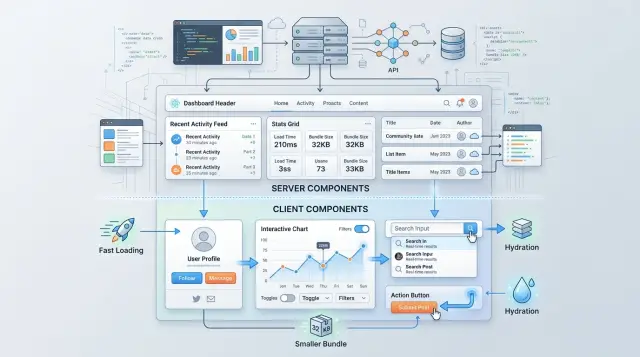
Table of Contents
Why this choice gets messy
Teams blur this line because most pages do two jobs at once. They load data and react to people. A product page might need prices from the server, a size picker in the browser, a saved cart, and a review form. Put all of that in one file and the boundary starts to look optional.
That is where trouble usually starts. A team adds one small browser feature, like a filter button or a local state toggle, and marks the whole component as client-side. It works, so the pattern spreads. Soon, data fetching, layout code, and static content all move into the browser too, even though they never needed to.
The shift often starts in familiar ways. A parent component becomes client-side because one child needs a click handler. Data fetching stays next to UI state because one file feels easier. Shared components get reused in a few places, and the browser version becomes the default. Nobody notices the cost until the page feels heavy on a real phone.
One bad choice rarely stays small. In React, the decision moves down the tree. If a high-level component becomes a client component, many children come with it. A page that was mostly static can end up shipping far more JavaScript than users need. The browser then has to download, parse, and run extra code before the page feels ready.
That cost is not theoretical. Extra JavaScript can add a second or two on slower devices. It can make simple pages feel busy, use more memory, and create loading states that never had to exist. Teams then patch the symptoms instead of fixing the split.
The goal is not purity. The goal is a few rules people can follow without arguing on every pull request. For most teams, the simplest rule is this: keep data fetching and static rendering on the server by default, then move only the small interactive pieces to the client. Clear rules beat clever React architecture most of the time.
What server components should handle
Server components work best for parts of a page that mostly read data and show it. If a section does not need browser state, click handlers, or live form logic, keep it on the server. Product grids, article pages, report summaries, account overviews, and search result layouts usually fit well.
A simple test helps. If the user mostly looks at the content, the server should prepare it. The browser can focus on the smaller parts people actually touch.
React data fetching is also cleaner on the server. Private details stay where they belong. Database credentials, API tokens, signed headers, and internal service calls do not leak into browser code. That removes risk and avoids a lot of awkward workarounds.
There is a performance win too. Every client component adds code the browser must download, parse, and run. On a fast laptop that may feel fine. On an older phone, it often feels slow. Server components cut that cost because they send rendered output instead of shipping logic the browser has to rebuild.
This works especially well for content-heavy pages, sections that pull from private APIs or databases, and layouts that combine data from several sources. It also works for content that changes slowly, such as pricing pages, help docs, changelogs, team directories, or a dashboard summary that refreshes every few minutes. The server can render those once per request or reuse cached results, and the page feels lighter right away.
An analytics page is a good example. The server can load usage totals, recent events, and billing details, then render the full summary before the browser does much work. If the page also needs a date picker or a filter panel, those small interactive pieces can live on the client without turning the whole page into client code.
That split is usually the calmest one: heavy reading on the server, small interactions in the browser.
What client components should handle
Client components should do the work that needs a live browser and a live person. If someone clicks, types, drags, opens, closes, or changes something on screen, that part belongs on the client. A modal button, a tab switcher, a search field with instant filtering, and a date picker all fit here.
Local state belongs here too, but keep it close to the component that uses it. Input text, a selected option, an expanded row, or a temporary loading flag should not rise to the page level unless there is a real reason. Once tiny state moves up too far, much more of the tree becomes client code for no real benefit.
Form feedback is a good example. Password strength hints, email format warnings, and character counters should sit right next to the input. The server should still do the final check, but the client should handle the instant feedback that makes forms feel normal.
Browser APIs draw a clean boundary. If code needs window, localStorage, navigator.clipboard, screen size, focus management, or scroll position, it has to run in a client component. The mistake is turning the whole page into a client component because one widget needs localStorage.
A good default is to keep the client surface as small as possible. Put the page shell on the server. Keep data-heavy sections on the server too. Move only the interactive piece to the client, and pass plain props down when you can.
That helps keep React bundle size under control without making the app feel stiff. A pricing page, for example, can stay mostly server-rendered while the billing toggle and contact form run on the client. Users get a fast first load, and you only ship JavaScript where it earns its place.
If a component can render once and sit still, leave it on the server. If it needs to react now, let the client handle that small piece.
Rules for drawing the line
Most teams make this harder than it needs to be. Start on the server and make a component move only when you can explain why the browser needs it. Server code can fetch data, read cookies, talk to a database, and keep more code out of the browser. That usually means a faster first load and a smaller bundle.
Move a component to the client only when the user needs browser-side interaction. Click handlers, local form state, drag and drop, live typing, and anything that depends on browser APIs belong there. If a component only reads data and renders UI, keep it on the server even if the markup is large.
One quick test works well: imagine the component with every button, input, and animation removed. If what remains is just data turned into HTML, it probably belongs on the server.
When data crosses the boundary, keep it plain. Pass strings, numbers, booleans, arrays, and simple objects. Do not send class instances, database clients, giant nested blobs, or random helper functions. Plain props are easier to inspect, easier to cache, and much easier to change later.
Wrappers should stay thin and boring. A client wrapper can manage one small piece of state, like opening a modal or switching tabs, then render server content inside it. A server wrapper can fetch data and choose what to show. Neither one should hide half the app behind layers of helpers.
A short rule set usually works:
- Start every new component on the server.
- Move it to the client only for real interaction.
- Pass small, plain props across the boundary.
- Keep wrappers short and easy to read.
This feels strict for a week or two. Then it starts saving time. Teams stop debating React architecture because each boundary has a simple reason. You also spot waste faster, like an entire page marked as a client component because one filter dropdown needed state.
How to choose data fetching step by step
Start with one screen and list every piece of data it needs. Be literal. A product page may need the product name, price, stock, reviews, and the signed-in user's cart state. Once you write the data down, the split gets easier.
Then mark what changes because of user action. If the data changes after a click, input, drag, or filter, that part probably needs a client component. If it can load once and render as HTML, keep it on the server. That is usually the cleanest answer.
A simple process helps:
- List the data for the whole screen, not just one widget.
- Mark the parts that change in real time or after user input.
- Fetch shared data high in the tree, often in the page or layout.
- Pass plain props down to smaller interactive components.
- Check the JavaScript cost before you merge.
Fetching shared data high in the tree prevents repeat requests and keeps the page easier to reason about. If the page header, sidebar, and main panel all need the same account data, load it once on the server and pass it down. Do not make three client components fetch the same thing just because they live in different spots.
Interactive islands should stay low in the tree. A search box, sort dropdown, chat input, or save button can live in a client component near the place where the user touches it. The rest of the page can stay server-rendered. That keeps the bundle smaller and avoids shipping code the browser does not need.
Check the cost every time. One small use client at the wrong level can pull a large part of the tree into the browser bundle. Teams often miss this in review because the feature works fine. The page still loads, but users pay with slower startup time.
A good rule for React data fetching is simple: fetch broad, stable data on the server, and keep browser code focused on interaction. If one component needs both jobs, split it into two pieces instead of forcing one component to do everything.
A simple page example
Imagine a product page for a pair of running shoes. The page shows the name, price, photos, stock status, a full description, and a list of customer reviews. It also lets the shopper pick a quantity and add the item to the cart.
Most of that page should render on the server. Product details and reviews are a good fit because they come from your database or API, and they do not need browser state to appear. The server can fetch that data once, build the HTML, and send a page that loads fast and is easy for search engines to read.
That leaves a much smaller client-side job. The quantity picker needs local state. The cart button needs click handling, loading feedback, and maybe a short success message. Those parts belong in a client component because the browser has to react to user input right away.
The split is straightforward. Keep the product title, images, price, description, and review list on the server. Move the quantity picker, add to cart button, and mini cart feedback to the client.
This keeps the browser bundle smaller. Reviews can be long, and product descriptions can be long too. If you push all of that into client components, users download JavaScript for content that could have arrived as plain HTML. That adds weight for no gain.
The user experience does not get worse. In many cases it gets better. Shoppers still see the product details right away, and the interactive parts stay responsive because they are small and focused.
Think about a slow phone. A fully client-rendered product page may wait for JavaScript before it becomes useful. With a better split, the product information appears first, and the only code that hydrates in the browser is the code that truly needs to be interactive.
That rule works for a lot of React data fetching decisions. If the page needs to display fetched content, start on the server. If the user needs to change something with clicks, typing, or local state, move only that slice to the client.
Mistakes that grow bundle size
Most problems around server and client components do not start with a huge app. They start with small boundary mistakes that keep piling up. A page feels fine at first, then ships more JavaScript than it should, fetches the same data twice, and turns simple content into work for the browser.
One common mistake is marking a whole layout as a client component because one small part needs clicks. A header might contain a theme toggle or a search box, but that does not mean the full page shell should ship to the browser. Keep the layout on the server and move only the interactive piece behind a small client boundary.
Teams also waste bytes by fetching the same data on both sides. A server component loads the user, then a client widget fetches the same user again after hydration. That adds network work, extra state code, and often a loading spinner for data you already had. Fetch once, then pass down the small piece the widget actually needs.
Large props do quiet damage. If an interactive widget only needs a product ID, title, and price, do not pass the full product object with reviews, related items, inventory history, and CMS fields. The browser has to receive and parse all of it. Small props keep interactive components cheap.
Another slow pattern is using client state for data that barely changes. A shipping policy, pricing table, or account summary often works better as server-rendered content. When you put stable data into client state, you add hooks, effects, and hydration work without giving the user anything useful in return.
Browser-only libraries can spread this problem across the app. A charting package, rich text editor, or drag-and-drop library belongs in a client-only area. If you import it into a shared component by accident, pages that do not even use that feature may still pay for it.
A simple rule helps: send HTML for reading, send JavaScript for doing. If a component mostly shows content, keep it on the server. If it needs browser APIs or instant input, make that part client-side and keep the border tight.
Quick checks before you ship
A page usually goes wrong in one of two ways: you send too much JavaScript to the browser, or you push interaction to the server and then fight the UI. A short review before release catches both.
Start with the component itself. If users never click it, type into it, sort it, drag it, or open and close it, keep it on the server. A product summary, account details block, or read-only table often does not need client code at all.
Then ask where the data belongs. If the server can fetch it once, render the result, and hand plain props to the browser, do that first. That keeps the bundle smaller and removes loading logic from the client. Save client fetching for cases where the user changes filters, edits data, or needs live updates after the first render.
A common mistake hides one level up. One client parent can pull a large subtree into the browser even when most children are static. That happens with layout wrappers, tab shells, and page-level containers. If only one small widget needs state, move the client boundary down and keep the rest on the server.
Use this checklist before you merge:
- Check whether the component holds click, input, open-close, or local UI state.
- Check whether the server can fetch the data once and pass the result as props.
- Check whether a client parent drags server-friendly children into browser code.
- Check the bundle report after the change, not just the UI behavior.
That last step matters. Good guesses still fail. A small refactor can add a chart library, a date picker, or a client wrapper that costs far more than expected.
A useful habit is to compare bundle size and reload cost after every change. If one button forced 80 KB of extra JavaScript, split that button into a smaller client island. That one move often keeps the page fast without changing how it feels to users.
What to do next
Do not try to clean up your whole app in one pass. Pick one rule your team can use this week and write it down where people will see it during reviews.
A good starting rule is simple: if a component does not need clicks, typing, local state, or browser APIs, keep it on the server. That clears up a lot of arguments before they start.
Then choose one page that already feels heavier than it should. A settings page, reporting page, or product detail page usually works well. Move the non-interactive parts back to the server first, such as headings, summaries, read-only tables, and content blocks. Keep only the parts that truly react to user input on the client.
Keep the first pass small and measurable. Write one team rule in your PR template or engineering notes. Pick one page and move a couple of calm, read-only components to the server. Compare bundle size, loading, and browser work before and after. If the page feels lighter and the code is easier to explain, keep the change.
Numbers matter here. If the page sends less JavaScript and starts faster on an average laptop or phone, that is a win. If your team cannot explain why a component lives on the client, that usually means it should move back.
A small example makes the point. Say a dashboard page has a static account summary, a chart filter, and an export button. The summary should stay on the server. The filter and export button can stay on the client. That split is easier to maintain, and it usually trims React bundle size with little risk.
If your team keeps circling the same boundary questions, an outside architecture review can help. Oleg Sotnikov at oleg.is works as a Fractional CTO and startup advisor, with deep experience in product architecture, lean infrastructure, and AI-first software development. A short pass from someone with that background can help a team set plain rules and stop revisiting the same React decisions every sprint.
One page is enough to start. After that, the pattern usually becomes obvious.
Frequently Asked Questions
Should I start with a server component or a client component?
Start on the server. Move a component to the client only when the browser must handle clicks, typing, local state, or browser APIs. That default keeps pages lighter and cuts review debates.
What should go into a server component?
Use a server component for content people mostly read. Product details, article pages, summaries, read-only tables, and layouts that fetch data usually fit there because they can render once and stay still.
What should go into a client component?
Put live interaction on the client. Buttons, inputs, tabs, modals, drag and drop, and code that needs window or localStorage belong there. Keep that area small so the rest of the page stays cheap.
How do I handle a page that needs both data fetching and user interaction?
Split the page into two jobs. Let the server fetch and render the broad content, then wrap only the interactive widget in a client component and pass plain props into it.
Why does one client parent make a page heavier?
Because the choice spreads down the tree. If you mark a high-level parent as a client component, many children ship to the browser too, even when they only show static content. Users then download and run more JavaScript for no gain.
Should I fetch the same data again on the client after hydration?
Usually no. If the server already has the data, fetch it there once and pass the small piece the widget needs. Client fetching makes sense when the user changes filters, edits data, or needs live updates after the first render.
What props should I pass from server to client?
Send simple data across the boundary. Strings, numbers, booleans, arrays, and small objects work well. Skip giant nested blobs, helper functions, and full records when a widget only needs a few fields.
How can I tell when a component should move back to the server?
Ask one blunt question: if I remove every button, input, and animation, does anything interactive remain? If the answer is no, move it back to the server.
What is a good split for a product page?
Render the title, images, price, description, stock, and reviews on the server. Keep the quantity picker, add to cart button, and cart feedback on the client. Shoppers see the content fast, and you ship less code.
When should a team ask for an architecture review?
Bring in outside help when the same boundary argument keeps slowing reviews, page weight keeps growing, or nobody can explain why a component lives on the client. An experienced CTO such as Oleg Sotnikov can help your team set simple rules and trim the biggest mistakes first.


