Serial IDs vs UUIDs: where sortable IDs fit in practice
Serial IDs vs UUIDs shapes logs, data imports, and sharding choices. Learn where sortable IDs help, where they hurt, and how to choose.
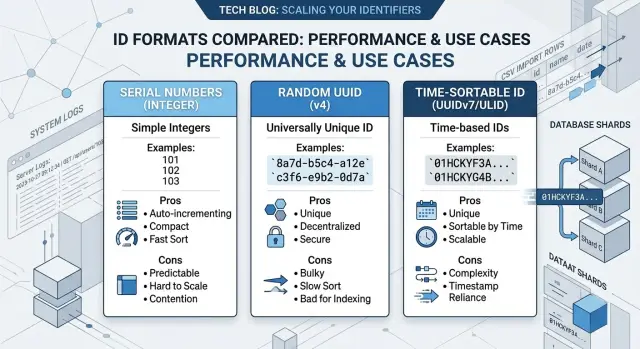
Table of Contents
Why ID choice turns into daily friction
An ID looks like a tiny detail when a product is new. You add a column, pick a format, and move on. Then that same ID starts showing up everywhere: logs, URLs, admin screens, exports, support tickets, and Slack messages when someone needs to trace a bad record fast.
That daily exposure changes the cost of the decision. A serial ID is easy to read over a call and easy to spot in a log line. A UUID gives you freedom across systems, but it is longer, harder to scan, and easier to mistype. A sortable ID often lands in the middle. It keeps the flexibility of globally unique values while making records easier to inspect when tables and logs get crowded.
That is why this stops being a schema argument very quickly. Teams usually choose an ID format in the first week, when the app has one database, one service, and a handful of users. Six months later, the same choice shapes bigger work: how you debug production problems, how you import outside data, and how you split writes across more than one database.
Changing ID format after launch hurts more than most teams expect. IDs leak into foreign keys, API responses, analytics events, cache entries, search indexes, internal tools, and copied URLs that users already saved. Even if the migration succeeds, the cleanup around it can drag on for weeks.
A simple example makes it obvious. Support gets a ticket about order 184233, engineering searches logs, and ops checks a replica. If everyone can find the same record in seconds, the ID choice helped. If people are copying long strings, guessing record age, or dealing with collisions during an import, the ID choice has turned into a daily tax.
Debugging, imports, and sharding are where these tradeoffs stop being theoretical. They show what an ID format feels like under pressure, not just what it looks like in a table definition.
How serial IDs, UUIDs, and sortable IDs differ
Serial IDs are the simple option. Each new record gets the next number: 1, 2, 3, 4. That makes them easy to read, easy to sort, and easy to discuss with another person. If someone says "order 18452 failed," you can find it fast. The tradeoff is structural. Serial IDs depend on one sequence, and that gets awkward when data comes from several databases, several regions, or systems that create records offline.
UUIDs solve a different problem. A UUID is a long value such as 550e8400-e29b-41d4-a716-446655440000. Teams often pick UUIDs because any service can create them without asking one central database for the next number. That helps with imports, offline work, and services that write on their own. The cost is human friction. UUIDs are hard to read, hard to say out loud, and annoying to debug when you are scanning logs fast.
Sortable IDs sit between the two. Formats like ULID and UUIDv7 keep global uniqueness, but they also carry time order, so newer records usually sort after older ones. You keep much of what makes UUIDs useful, but you avoid some of the mess that comes with fully random values. When you inspect a table or a log, the order often matches what happened.
Storage patterns change too. Serial IDs usually insert neatly because new rows land near the end of an index. Random UUIDs scatter writes across the index, which can hurt performance as tables grow. Sortable IDs usually behave better because their time order keeps inserts more predictable.
None of these options is best on its own. Serial IDs make local systems pleasant but can cause pain later when you merge or shard data. UUIDs make distributed writes easier but slow people down in daily work. Sortable IDs try to balance both, which is why they become attractive once a product grows past one database.
What debugging looks like with each option
ID arguments stop feeling abstract the first time someone hunts a bug through logs at 2 a.m. A serial ID like 48192 is easy to read, say out loud, and search. A UUID like 9f6c2c7e-1c4a-4d1e-9b1a-3d2f5e8c6a11 takes more effort. Sortable IDs land in the middle. They are still longer than plain numbers, but they usually give you some sense of order.
That changes how fast humans work. Serial IDs are the quickest to scan in logs and admin screens. UUIDs are great for uniqueness, but they are slow to read and easy to miscopy. Sortable IDs keep global uniqueness while making recent records easier to trace.
Copy and paste sounds trivial until a support ticket depends on it. Long random strings invite small mistakes: one missing character, one extra hyphen, one pasted fragment from the wrong message. Then the lookup fails, and the team wastes another five minutes checking whether the record exists at all. Short numeric IDs rarely cause that kind of friction.
Order matters too. If support says, "the problem started right after customer 48192 signed up," serial IDs give an immediate clue. Records near 48192 probably arrived around the same time. With random UUIDs, the ID itself gives you no timeline. Sortable IDs help because nearby records often sort close together, which makes incident tracing faster.
This shows up in everyday communication, not just logs. A cropped screenshot with order 154203 is still usable. A chat message with a full UUID is easier to clip, wrap, or paste incorrectly. Manual lookups in dashboards feel different too. People can remember a short number for a minute or two. Almost nobody remembers a long random token without copying it.
This is where the tradeoff feels most human. If your team handles support issues by reading logs, screenshots, and chat messages, the shape of an ID changes the speed of the work more than many teams expect.
How imports and merges expose weak choices
The question gets real when two databases need to become one. That happens during a migration, after an acquisition, or when a product outgrows a single app and starts splitting data across services. The problem is simple: both systems already have records with their own IDs, and those IDs rarely agree.
Serial IDs usually break first. If one database has users 1 through 500,000 and another has users 1 through 80,000, an import cannot keep both sets unchanged. One side must get remapped. That sounds manageable until you remember that every related row also points at those IDs: orders, invoices, comments, audit logs, API references, and old exports.
A remap creates pain in a few places at once. Foreign keys need rewriting. Old logs stop matching current records. Support loses an easy way to trace a record across systems. Import scripts get much more fragile than they looked on paper.
UUIDs avoid the collision problem because each system can generate IDs without asking a central database for the next number. When two datasets meet, records usually keep their original IDs. That saves a lot of cleanup work and lowers the chance of a bad merge.
Still, UUIDs annoy operators. A support person can read ticket 18452 and remember it. They will not remember 550e8400-e29b-41d4-a716-446655440000. Debugging gets slower when people have to copy and paste every identifier, and mistakes get harder to spot by eye.
Sortable IDs sit in the middle again. IDs such as ULIDs keep the global uniqueness that helps imports, but they also preserve rough creation order. That matters when a team imports millions of rows and wants to sanity check the result. If newer records sort after older ones, people can inspect data faster, replay imports in order, and spot gaps more easily.
This pattern shows up in growing products all the time. A team starts with serial IDs because they feel clean and simple. A few months later they merge staging data, ingest records from a partner, or split one app into separate services. The ID choice they barely noticed at the start now shapes how much repair work follows.
How sharding changes the tradeoff
Serial IDs feel easy when one database writes everything. The numbers stay short, readable, and cheap to index. One writer can hand out 1001, 1002, 1003 all day without much trouble.
That changes when several databases need to create rows at the same time. Each shard can produce the same numbers unless you reserve ranges, add shard prefixes, or run a central ID service. All of those add moving parts. They also make imports and later merges harder, because order 18452 may already exist somewhere else.
A common path looks like this: a product starts on one Postgres instance, then adds a second write region to cut latency. Serial IDs now need coordination. If the regions lose contact for a while, the conflict risk rises fast.
Random UUIDs solve the collision problem quickly. Any shard can create an ID on its own, so writes do not wait on a central sequence. That is why they appear so often in sharding plans.
The downside is how many databases store indexes. Fully random UUIDs scatter inserts across the index instead of appending near one area. That can cause more page splits, larger indexes, and weaker cache behavior. On small tables, you may not care. At higher write volume, the cost becomes easier to spot.
Sortable IDs sit between the two. They still let each shard create IDs locally, but the values roughly follow time. That keeps newer inserts closer together in many storage engines, and it gives you a better sense of order during debugging. If you inspect logs from a bad deploy, sortable IDs are much easier to work with than a wall of random strings.
They are not perfect. You still need one shared format, and your services need clocks that do not drift too far apart. Even so, that is often simpler than coordinating serial sequences across many writers.
A practical rule works well:
- Use serial IDs if one primary database will stay your only writer.
- Use random UUIDs if collision free writes matter more than index locality.
- Use sortable IDs if you expect several writers and still want time order and better insert behavior.
- Pick one format early, before every table and foreign key depends on it.
Pick a strategy step by step
Most teams choose IDs too early and revisit them only after a painful import or a broken merge. A better approach is to map the places where records are born, then pick the simplest format that still works a year from now.
Start by listing every writer. Your web app is only one source. Add background jobs, admin tools, mobile apps that may work offline, CSV imports, partner feeds, and quick scripts. If one database no longer creates every record, plain serial numbers start to feel tight.
Then check how people use the ID. If support staff read IDs from logs, paste them into SQL, or ask customers to type them, long random strings slow everything down. Sortable IDs usually feel easier than UUIDs, while serial numbers are still the simplest to read.
After that, think about future merges. If you may combine data from several stores, tenants, or regions, globally unique IDs save cleanup work. Serial numbers collide fast when two systems both have order 48291.
You should also test the side effects, not just the schema. Look at index size, log readability, export files, and API payloads. A choice that looks fine in a migration file can feel clumsy in monitoring or add noise to every support ticket.
Sometimes one ID is not enough. Many teams keep one public ID for APIs and customer workflows, then use a different internal ID for joins and local database work.
That split is often practical. A product can keep compact integer joins inside PostgreSQL, then expose a sortable ID in URLs, exports, and support tickets. You get small indexes where they matter, and you avoid collisions during imports or later sharding.
For a lot of teams, this middle path is the least annoying in daily work. It keeps debugging simple enough for humans and leaves room for growth without forcing every table and log line to carry a long random value.
A simple example from a growing product
A small SaaS product starts with one web app and one database. The team has an admin panel, a support inbox, and a few thousand users. Every new account gets an auto incrementing integer ID.
At this stage, serial IDs feel great. If support sees an error for user 1842, they can search that number, open the record fast, and compare nearby rows when something looks odd. For admin work and debugging, simple numbers are hard to beat.
The trouble starts when the product grows in two very normal ways. First, the company adds a mobile app that can create drafts offline and sync them later. Second, a partner sends customer data for import from its own system.
Now the main database is no longer the only writer that matters. The mobile app wants to create records before it talks to the server. The partner import arrives with its own IDs, and some of those numbers overlap with local rows. The team can work around this with mapping tables, temporary IDs, and import rules, but the system gets messy fast.
That is where the choice stops being theoretical. Serial IDs still work inside one database, but they do not travel well across systems that write independently.
A practical fix is to change two things. Keep the integer primary key for internal joins and admin use. Add a public sortable ID for anything created outside the main database or shared across systems.
A sortable ID such as UUIDv7 or ULID gives each writer a unique value without asking a central counter for the next number. It also sorts roughly by creation time, which makes logs and imports easier to inspect than random UUIDv4 values.
There is a cost. Sortable IDs are longer, less friendly to read over a call, and bulk indexes usually take more space than plain integers. Debugging also changes. Support may search by a short human reference like INV-10482, while engineers use the sortable ID when they trace sync issues.
That mixed approach is often the least painful path. You keep the speed and clarity of serial numbers where they help, and you avoid collisions when the product adds imports, mobile sync, or more than one place that creates data.
Mistakes that create pain later
Most ID problems start as a default that nobody revisits. A team picks one format, uses it everywhere, and moves on. That works for a while, but the people who read IDs are not all the same. Engineers, support staff, finance teams, and customers need different things.
One common mistake is using the same ID type for every job. An internal database row, a public order reference, and a CSV import field do not have the same needs. This is not only a database choice. It is also a product and operations choice.
Raw serial IDs in public URLs cause trouble more often than teams expect. They are easy to guess. If one customer can move from order 1042 to order 1043, you invite probing, scraping, and awkward security fixes later. Even if your access checks hold up, you still expose record volume and growth patterns for free.
Another painful mistake shows up during migrations. A team changes one service from integers to UUIDs or sortable IDs, then forgets about events, cache keys, reports, and old export scripts. Suddenly the API returns one format, Redis stores another, and the warehouse expects a third. Joins fail. Dashboards split the same customer into two records. Support sees both and trusts neither.
Imports look rare until the week they are not. A merge deadline arrives, or a partner sends a dump from an old system, and overlapping serial IDs collide at once. Then someone writes a remapping script at midnight and hopes every reference gets updated. Comments, audit logs, attachments, and background jobs often keep the old values.
Index behavior is another trap. Small tables hide the cost. Then the table grows, random UUIDs scatter writes, indexes bloat, and sort order stops matching creation time. Fixing that later is much harder than choosing well at the start.
A quick gut check helps. Ask who reads this ID every day and whether it needs to be short. Ask whether it will appear in public URLs or shared documents. Ask whether two systems can import data without collisions. Ask whether the table will need sharding or time sorting later. If you cannot answer those questions in one meeting, the default choice is probably too casual.
Quick checks before you commit
A good ID format should survive boring, messy work. This debate usually stops being theoretical when support calls, imports, and reporting start to pile up.
Start with the human test. If a customer or support agent may ever read an ID over the phone, long random strings create friction fast. A short numeric ID is easy to repeat. A full UUID is not. Sortable IDs sit in the middle: still longer than numbers, but usually easier to scan and less painful to copy.
Then check how records get created. If two systems need to create rows at the same time, plain serial numbers only work well when one database stays in charge. Once you have separate services, offline creation, or later merges, collision risk becomes real. UUIDs and sortable IDs solve that much better because each system can generate IDs on its own.
Imports are where weak choices get exposed. If you need to bring in old customer, order, or invoice data, ask whether you can keep the original IDs or map them cleanly. Serial IDs often force a full remap, and that means every related row must move with them. That is doable, but it turns a simple import into careful surgery.
Storage matters too. An integer index is small and fast. A UUID stored as text is bigger and harder on indexes. If you choose UUIDs, use the database UUID type or a compact binary form. Sortable IDs often help write performance because new rows land near each other instead of scattering across the index.
One more check saves a lot of confusion later: keep the same format everywhere. If the database stores one form, the API returns another, logs print a third, and analytics tools trim or recode it, people stop trusting the data. Pick one canonical representation and keep it unchanged across logs, APIs, queues, and reports.
A simple rule works well in practice: choose serial IDs when one database controls everything, choose UUIDs when independent creation matters most, and choose sortable IDs when you need both independence and saner indexing. If one of those choices makes support, imports, or search harder than it should be, it is probably the wrong one.
What to do next
Write down the decision before the schema spreads. A short note is enough: what ID format you chose, where it will be used, and what you are trading away. That keeps the argument from turning into a half finished mess across new tables, background jobs, and APIs.
Then test the choice with real behavior, not guesses. Generate sample records, run an import, check a few logs, and measure index size and insert speed. Ten minutes of real data usually tells you more than an hour of opinions.
Keep the plan simple:
- Write a one page decision note with the chosen ID type and the reason.
- Create a small test table and load it with data that looks like production.
- Run one import and one merge, then inspect logs by hand.
- Measure index growth, insert speed, and how easy it is to trace a single record.
- Decide now what happens later, even if you keep the current format for a while.
That last point matters. If you stay with serial IDs today, decide whether you will later add public UUIDs, move to sortable IDs for new services, or keep the current model and document the limit. If you already use UUIDs, decide whether sortable IDs belong only in new high write tables or across the whole product.
When the choice reaches sharding, imports, and service boundaries, it helps to get a second opinion from someone who has dealt with the failure modes before. This is one of those decisions that looks like a column type but usually reaches sync jobs, event payloads, backfills, and debugging habits across the whole team.
Oleg Sotnikov at oleg.is works with startups and small teams as a fractional CTO, and this kind of review fits that work well. If you are weighing schema changes, imports, or a move toward more distributed systems, a short architecture review can save a lot of rework later.
A clear note and a small test now cost very little. Cleaning up broken ID choices across five services later does not.
Frequently Asked Questions
What is the safest default for a small app?
Start with serial IDs if one database creates every record and you do not expose those IDs in public URLs. They stay small, fast, and easy to read.
If you already expect imports, offline writes, or more than one writer, pick a sortable ID early and avoid a messy change later.
When do serial IDs start causing problems?
Trouble starts when another system needs to create rows, or when you merge data from two places. Then the same numbers collide, and you end up remapping rows, foreign keys, logs, and exports.
They also cause trouble in public URLs because people can guess nearby records.
Are UUIDs bad for database performance?
Random UUIDs often make indexes larger and scatter inserts across the index. Small apps may barely notice, but bigger tables and heavy write traffic usually make the cost easier to see.
If you need global uniqueness and better write locality, sortable IDs like UUIDv7 or ULID usually feel like a better fit.
What do sortable IDs fix that UUIDv4 does not?
Sortable IDs still give each writer a unique value, but they keep rough time order. That makes logs, tables, and imports easier to inspect than fully random UUIDv4 values.
You still pay with longer values than integers, but daily debugging usually feels less awkward.
Should I use an integer primary key and a separate public ID?
Yes, that setup works well for many teams. Keep the integer ID for joins and local database work, then expose a sortable public ID in APIs, URLs, and shared records.
You get compact indexes inside the database and fewer collision problems outside it.
Do serial IDs create security issues in public URLs?
Yes. Sequential numbers tell outsiders roughly how many records you have and make record guessing easier.
Even if your permission checks block access, you still invite probing and noisy security work. Public UUIDs or sortable IDs avoid most of that.
Which ID type works best for imports and merges?
UUIDs and sortable IDs make imports much easier because each source keeps its own IDs. You avoid the chain reaction where one remap forces changes in child rows, logs, exports, and old references.
If humans need to read the value often, sortable IDs usually strike a better balance than random UUIDs.
Will UUIDs slow down support and debugging?
Most support teams dislike raw UUIDs because they are long, easy to mistype, and hard to remember for even a minute. That friction shows up in tickets, screenshots, chat, and log searches.
A short order number or public reference helps a lot, even if engineers keep a different internal ID behind the scenes.
Can I change my ID format after launch?
You can, but the change usually spreads much farther than the schema. IDs end up in foreign keys, caches, events, analytics, search indexes, exports, and saved links.
If you must change them, plan the full blast radius first. Most teams save time by adding a new public ID instead of replacing every old one at once.
When should I ask someone experienced to review my ID strategy?
Ask for help before you shard writes, merge datasets, or push a new public API that locks the format in place. A short review now often costs less than fixing broken imports and mismatched IDs later.
If your team already sees pain in logs, sync jobs, or support work, that review should happen soon.


