Sentry fingerprinting rules for cleaner issue groups
Sentry fingerprinting rules help you group repeat errors by business action and split alerts that need different owners, fixes, or customer replies.
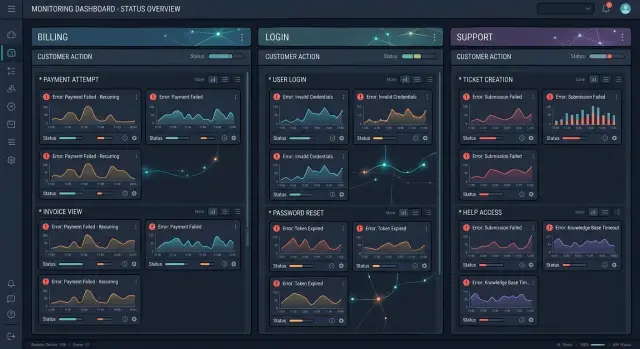
Table of Contents
Why issue noise gets expensive fast
A noisy error queue wastes time in small, annoying ways until it turns into a real operating cost. One broken checkout step can create dozens of almost identical issues, each with a slightly different stack trace or message. The team still has one problem. They just have to read it 30 times.
That clutter makes fresh failures easy to miss. A new regression lands next to last week's repeats and looks harmless until customers complain. On call gets worse too. When alerts keep firing for old or duplicated issues, people stop trusting them. They mute notifications, skim the queue, and assume the next alert is more of the same.
Support feels it from the other side. A customer reports a failed checkout, support opens Sentry, and sees five groups that all look related. Engineering then has to sort out whether it is one bug, a retry storm, or several failures that need different owners. Hours disappear in that handoff.
The effect gets sharper as volume grows. In Sentry setups that handle millions of events a day, small grouping mistakes can turn into a messy queue by afternoon. Oleg Sotnikov has run Sentry at more than 25 million events a day, and the lesson is simple: bad grouping slows triage, slows customer replies, and steals time from the actual fix.
Good fingerprinting rules reduce that noise without hiding the failure itself. One business problem should usually appear as one issue. Different problems should stay separate when different people need to act.
What a fingerprint rule should change
A good rule changes how the team works the problem, not just how the issue list looks.
If several events all break the same user action and lead to the same next step, grouping them usually helps. If they need different fixes, different owners, or different customer replies, keep them apart. That one test clears up most bad decisions.
Teams often focus too much on stack traces because the frames look similar. Users do not care about that. They care that "submit payment" failed or "export report" stopped halfway. Start with the business action, then ask what has to happen next.
A practical rule should do four things:
- Group events that break the same user task.
- Separate events that need different fixes.
- Separate events that need different customer messages.
- Leave enough room for a new failure pattern to show up as new noise.
That last point matters more than it seems. A new pattern should look a little noisy at first. If you merge it too early, you hide the signal that tells you production changed.
The same idea shows up in AI first operations: cut noise when the action is the same, but keep enough detail for the right person to act fast.
Start with the business action
Teams often begin with the error message. That usually creates messy groups. Better rules start with what the person tried to do: log in, pay an invoice, upload a file, invite a teammate, or export a report.
Do not guess these actions from class names or API routes. Pull them from real usage, especially checkout steps, onboarding tasks, repeat support tickets, and the flows that bring in revenue. If a flow breaks ten times a day, clean grouping for that flow matters far more than a rare edge case.
Make a short list of the actions people use every day and name them the way a non-engineer would. "Customer completes checkout" is much clearer than "NullReferenceException in PaymentController." One name tells you what broke for the customer. The other tells you where the code failed.
For each action, decide two things before you save any fingerprint: who owns the first look, and what support should say first. If "customer resets password" fails, support should know who to page right away instead of guessing between backend, auth, and frontend.
Write down the first customer reply too. Keep it short and practical. For a failed checkout, support might say, "Your card was not charged. Please try again in a few minutes." For a failed export, they might say, "Your data is safe. We are rerunning the export now." If two failures need different replies or different owners, they usually should not share one issue group.
That small map of action, owner, and customer reply prevents a common mistake: grouping by code similarity while ignoring the customer outcome.
Group repeats that mean the same thing
Fingerprinting rules should merge events that point to one real problem, not every error that happens to look similar. If ten failures all happen during the same checkout step and leave the customer with the same result, one issue group is usually enough.
That keeps the inbox smaller without hiding anything important. A payment form timeout, a duplicate click on "Place order," and a tax lookup delay can produce different raw messages. If they all fail in the same step and customers all get stuck before payment completes, one group can still make sense.
The safest approach is to fingerprint on stable fields, such as the checkout step, route name, payment provider, or a normalized error code. Those values stay consistent across repeats. That is what you want.
Raw message text is a weak base for grouping. It changes when a library updates its wording, when a provider includes a different phrase, or when your app inserts a request specific value into the message.
Ignore fields that make every event look unique:
- order IDs and cart IDs
- timestamps
- request IDs and trace IDs
- random token values
- full raw exception text when it includes user or session data
This matters quickly in busy systems. Oleg Sotnikov has run Sentry at very high volume, and the same rule applies at any size: noisy groups waste triage time, but over-merged groups waste even more because they hide patterns that need different fixes.
Before you save a merge rule, pull a week of samples and read them like a support queue. Do these events happen in the same step? Do customers hit the same dead end? Would the same engineer fix them, and would support send the same reply? If yes, grouping them makes sense.
If the answer changes for even one of those questions, stop there. Similar errors are not always the same issue.
Split errors that need different owners
One noisy issue group can waste more time than ten small ones. When billing, auth, product, and support all share one bucket, nobody knows who should act first.
Good grouping rules split problems by owner and by customer impact. That does not mean creating a new group for every tiny variation. It means separating failures that lead to different fixes, different urgency, or a different reply to the customer.
Billing problems and login problems should almost never live together, even if both happen during checkout. A card decline belongs with payment cases. A broken session token belongs with auth or backend work. If those events share one group, the team loses context and support sends the wrong message.
Vendor outages deserve their own group too. If your payment provider times out, that is different from a product bug in your checkout code. One case may need a temporary status update and a retry plan. The other needs an engineer to fix your logic.
User input errors often need a separate path as well. An invalid promo code, a malformed email, or a missing field usually points to copy, validation, or support guidance. A null pointer, bad SQL query, or failed permission check points to a server defect. Customers should not get a "we are fixing a bug" reply when they simply entered the wrong value.
Silent retries need special care. If the system retries in the background and the customer never notices, group those events apart from failures that block the screen or stop an order. Engineers may still want to watch both, but the visible failure needs faster triage.
A simple test helps here:
- Who owns the fix?
- Does the customer notice it?
- Does support need a different reply?
- Is an outside vendor involved?
- Does the event point to bad input or bad code?
If those answers differ, split the group. If they stay the same, keep the events together.
Roll out rules one step at a time
Changing a lot of grouping logic at once is how teams lose trust in Sentry. If ten rules change on the same day, nobody can tell which one reduced noise and which one hid a real failure. Small changes feel slower, but they are easier to test and easier to undo.
Pick one noisy issue family first. Use a case that already wastes time every week, like the same checkout timeout showing up under several stack traces. Leave rare errors alone for now. They do not give you enough pattern to group with confidence.
Read 20 to 50 recent events before you touch the rule. That sample is usually enough to show what stays the same across true repeats and what changes when a different team should own the fix or support should answer the customer differently. Good rules are usually boring. You should be able to explain one in a sentence.
Then make one simple change and watch it for a few days. Check the new groups every day, not just in the first hour. You want to see whether duplicates now land together, whether unrelated failures stay apart, and whether alerts still reach the right owner.
Keep a short note with each rule change. It saves a surprising amount of time later. Record the old problem, which fields the new rule uses, what you expect to merge or split, who reviewed the change, and when you will check the result again.
If the rule works, move to the next noisy family. If it creates confusion, roll it back quickly and try a narrower version.
A simple checkout example
A customer clicks "Pay," waits a few seconds, and then sees an error instead of an order confirmation. In Sentry, that single moment can turn into a mess if every failed order lands in its own issue group.
Say the payment provider times out for 200 orders in an hour. The stack trace looks almost the same each time, but the order ID, customer ID, and request details differ. If your grouping includes those changing values, the team gets 200 issues for one problem. Nobody learns more from issue 57 than from issue 1.
A better rule groups those events by the business action first. In this case, that action is "checkout payment." Then it adds the subsystem or failure type that tells the team what kind of problem they are dealing with.
In practice, that often means:
- payment gateway timeouts go into one group for the payment step
- tax service failures go into a separate group for the same checkout flow
- fraud check errors go into another group, even if they happen after the customer clicks "Pay"
This gives cleaner Sentry issue grouping without hiding real failures. The payment timeout issue goes to the team that owns gateway retries or failover. A tax service error goes to whoever owns tax calculation or the tax integration. That is better error ownership, and it cuts the back and forth that slows fixes down.
Support needs this split too. A timeout across many orders usually gets one customer reply: "We could not finish the charge. Please try again in a minute." A fraud check problem often needs a different script, such as telling the customer that the order is under review and that no second charge is needed yet. Tax failures may need another reply if the cart cannot compute the final total.
The pattern is simple: group by checkout step, then split by subsystem when a different team or a different customer reply is needed.
Mistakes that bury real failures
Teams usually make the same mistakes when they get tired of noisy alerts and try to clean up Sentry too fast. The queue looks tidy for a week, then a real customer problem slips into the wrong group and nobody sees it early.
Grouping by a broad exception type alone is one of the fastest ways to hide useful detail. A TimeoutError during checkout, a TimeoutError in an invoice export, and a TimeoutError in a retry worker may share the same exception name, but they do not mean the same thing. Different teams own them, and customers feel them in different ways.
Grouping by the full error message creates the opposite problem. Messages often include order IDs, email addresses, UUIDs, or other changing values. One bug then turns into hundreds of tiny groups, and the trend disappears. Use stable signals instead, such as the business action, endpoint, job name, or the outside service involved.
Keep staging and production apart. If both environments land in the same issue group, test traffic can make a production problem look harmless, or a noisy test can make a production trend look worse than it is.
Another common mistake is folding customer facing bugs into background job noise. A failed password reset request and a failed nightly sync job might hit the same code path, but the response is different. Support may need to answer a customer within minutes, while the background job can wait.
Before you keep a rule, ask a few blunt questions. Does the group mix two different business actions? Does the rule depend on random values in the message? Can staging events join production events? Would support and engineering read this issue differently? Can you explain the rule in one short sentence?
Changing many rules at once is another trap. When a team edits five fingerprinting rules in one go, they lose the ability to tell which rule reduced noise and which rule hid a spike. One rule, one reason, then watch the issue groups for a few days.
Quick checks before you save a rule
A good rule makes issue groups quieter, not blurrier. A bad rule does the opposite. It hides a real breakage inside a neat-looking group, and your team loses time untangling it later.
Before you save anything, pull a small sample of events that would land in the same group. Five to ten is usually enough. Read them the way support, engineering, and the on call owner would read them.
Support should be able to send the same reply for every event in the group. Ownership should stay clean too. Every event in the sample should belong to one team. The fix matters just as much. If the same code change, config change, or rollback would close all the sample events, grouping makes sense. If one event needs a retry policy and another needs a UI fix, split them.
Also look at the failing step, not only the final error text. Two events can both say "timeout" while failing in different places. One may fail during tax calculation, another during payment capture. Those are different problems, even if the exception name matches.
Use this short check before you save a rule:
- Support would answer every grouped event the same way.
- One team owns the full group.
- One fix would resolve the full group.
- The sample events fail at the same step in the user flow.
- You can revert the rule quickly if grouping goes wrong.
That last check saves a lot of pain. Write down what changed, who approved it, and which sample events you tested. If the rule starts swallowing signals, you want a two-minute rollback, not a long debate in chat.
Next steps for your team
Most teams do not need a giant cleanup project. They need one short review, one customer flow that keeps causing confusion, and one rule they can test without guessing.
Start with the three issue groups that wasted the most time this week. Check volume, repeat comments, and how often the same alert bounced between support and engineering. If one group keeps sending people in circles, fix that one first.
Then pick a single customer flow where noise slows response. Checkout is a common example, but signup, password reset, invoice payment, or file upload may be a better place to start. Choose the flow where people already lose time deciding who owns the issue or what reply the customer should get.
A short checklist works well:
- Review the noisiest three groups from the last 7 days.
- Choose one business action with repeat confusion.
- Write a small set of rules for that flow only.
- Measure the result for one week.
- Keep the rule only if triage gets cleaner.
When you measure the result, keep it simple. Look at group count, time to first response, and how often the team reroutes an issue to a different owner. If those numbers improve and nobody misses real failures, the rule is doing its job.
After that, check the mistakes. One rule might merge two problems that need different owners. Another might split one real pattern into too many groups. Change one thing at a time, then watch another week. It is a boring pace, but it works.
If your team wants a second set of eyes, Oleg Sotnikov does this kind of review as part of his Fractional CTO advisory. His work on oleg.is includes helping teams clean up noisy operations, tighten ownership, and use AI in a practical way without losing sight of what customers actually feel.
Frequently Asked Questions
What is a Sentry fingerprint rule?
Use a fingerprint rule to tell Sentry which events belong in one issue group. A good rule groups repeats that break the same user action and keeps apart failures that need a different fix, owner, or customer reply.
When should I group errors together?
Group them when they break the same step for the user and your team would handle them the same way. If support would send the same reply and one engineer or team would own the fix, one group usually works.
When should I split similar errors apart?
Split them when the owner changes, the fix changes, or the customer impact changes. A payment gateway timeout, a fraud check error, and a tax service failure may all happen during checkout, but they usually need different actions.
Which fields work best in a fingerprint?
Use stable fields like the business action, route or job name, subsystem, provider name, or a normalized error code. Those values stay steady across repeats and help you see one real problem instead of dozens of near copies.
Which fields should I avoid in fingerprinting rules?
Skip values that change on every event, like order IDs, cart IDs, request IDs, trace IDs, timestamps, random tokens, and raw messages with user data inside. Those fields turn one bug into a pile of tiny groups.
Should I group by stack trace or full error message?
Do not start with the full message or the stack trace alone. Start with the user action first, then add one stable signal that tells you what sort of failure happened. That gives cleaner groups and keeps new patterns visible.
How do I test a new rule without hiding real failures?
Pick one noisy issue family, review 20 to 50 recent events, and change one rule only. Then watch the new groups for a few days and check whether duplicates merge, unrelated failures stay apart, and alerts still reach the right owner.
Should staging and production share the same issue groups?
Keep staging and production separate from the start. If you mix them, test traffic can bury a production problem or make a harmless staging issue look urgent.
What does a good checkout fingerprint rule look like?
For checkout, group by the checkout step first, then split by subsystem when a different team needs to act. Payment timeouts can live in one group, while tax failures and fraud check errors should live in their own groups so support and engineering can respond faster.
When should we bring in outside help for Sentry grouping?
Ask for help when the same alerts bounce between support and engineering, or when your team keeps arguing about ownership instead of fixing the bug. A short review from someone who has run Sentry at high volume can clean up the noisiest flows fast. If you want a second set of eyes, Oleg Sotnikov offers this kind of review through his Fractional CTO advisory.


