Self-serve and enterprise product architecture that stays flexible
Self-serve and enterprise product architecture helps teams keep onboarding, billing, support, and access rules clean as both customer types grow.
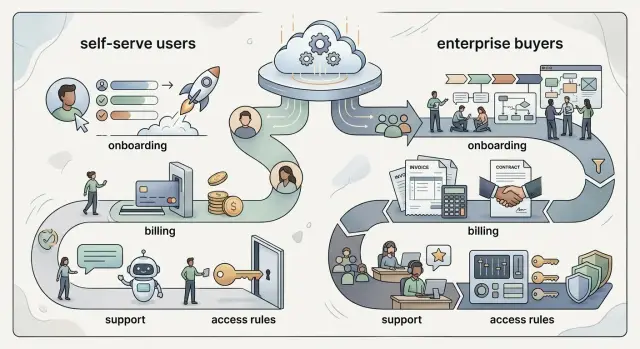
Table of Contents
Why mixed customer types create product strain
A product can feel clean and simple until two very different buyers show up at the same time. One person wants to sign up in two minutes, add a card, and start using the product right away. Another needs legal review, invoice billing, security answers, and a contract before anyone logs in.
Both requests are reasonable. Problems start when the product treats one path as normal and the other as a pile of exceptions. Then small choices in signup, pricing, permissions, and support start pulling against each other.
Self-serve users want speed, clear limits, and no calls with sales. If the product asks them to wait for approval or contact support for basic setup, many leave. Enterprise buyers usually expect the opposite. They often need approvals, invoices, purchase orders, and custom terms before they can buy.
One special case rarely stays small. A custom invoice turns into invoice billing with tax handling. A manual approval turns into approval plus account setup plus exception tracking. Soon the team has five extra rules, and nobody remembers which customers follow which path.
Support and product teams feel this first. Support handles confused users, urgent workarounds, and "just this once" promises. Product teams carry the bigger cost later, because each shortcut becomes behavior they have to keep supporting.
A simple example shows how fast this happens. A startup adds SSO for one large customer. Then that same customer asks for role rules, audit logs, and slower rollout controls. None of those requests are strange on their own. Together, they can twist the whole product if the original structure only fit fast self-serve signup.
That is why mixed customer types create pressure early. The product still works, but the rules behind it start fighting each other.
Choose shared rules before you add exceptions
Teams get into trouble when enterprise deals rewrite the product one promise at a time. A better approach starts with a small set of rules that apply to everyone, even if pricing and support differ later.
Write down the default experience first. What does every new customer get on day one? Usually that means the same account setup, the same first workspace, the same basic roles, and the same way to invite teammates. If those basics change for every deal, the product turns into a stack of one-off paths.
Keep one core model for accounts and workspaces. A small self-serve customer and a large enterprise buyer can live inside the same structure, even if one needs extra approvals or contract terms. That saves you from building separate code for "regular" users and "special" users. That split almost always gets messy.
A simple rule helps. Product structure belongs in the app. Special terms belong in settings or admin config. Sales notes should stay out of daily operations, and contract promises should not rewrite plan logic.
That last part matters more than most teams expect. Plan limits belong to the product: seats, projects, storage, API usage, and feature access. Contract promises belong to the agreement: custom invoicing, response times, security review, or migration help. When teams mix those two, billing breaks, support gets confused, and nobody knows whether a request needs code or just a setting.
If a customer gets something unusual, store it somewhere the product and the team can both read. A setting, flag, or policy record works. A note in a CRM, a Slack thread, or someone's memory does not.
Map the four places where complexity shows up
Most products do not get messy all at once. Trouble usually starts when one sales-led customer asks for a different path than everyone else. If you do not map those differences early, small exceptions spread into product logic, operations, and support.
The pattern usually shows up in four places.
Signup and first use come first. Write down every path from account creation to a useful first session. Include self-serve signup, trial flows, invite-only setups, sales-assisted onboarding, admin approval, SSO setup, and any manual work your team still does behind the scenes.
Then look at billing. List every billing path you support today, not just the ones on your pricing page. Monthly card payments, annual prepay, invoice terms, purchase orders, free pilots, usage charges, and contract renewals all create different product needs.
Support is next. Note where the support experience changes by account type. A self-serve customer may rely on docs and email, while an enterprise account may expect a shared channel, named contacts, or faster response targets.
Access rules are the fourth area. Mark which permissions change by team size, role, or contract. Small teams may need simple admin and member roles. Larger accounts often ask for department-level access, approval rules, audit logs, or limits by workspace.
A quick example makes the risk clear. A startup might begin with one checkout flow and one admin role. Then a larger buyer asks for invoice billing, SSO, and separate access for finance and support teams. If the product handles those requests with one-off flags, every future customer inherits that mess.
This map does not need to be fancy. A single table works. What matters is that your team can point to each exception and say why it exists, who uses it, and whether the product should keep it.
Set it up step by step
Start with the customers you sell to right now, not the ones you might sell to next year. Teams often sketch future enterprise needs too early and bake extra rules into the product before any customer asks for them.
Write down the paths you already run. For each one, mark what stays the same and what actually changes. In many SaaS products, the app itself barely changes. Onboarding, billing terms, support response, and access approvals do.
Keep the center of the product simple. Use one shared data model for accounts, users, plans, and permissions. When one customer group needs special treatment, put that logic in configuration or internal tools instead of creating a separate version of the product.
That usually means keeping one account record for every customer type, adding settings for contract terms or rollout timing, giving your team an admin panel for approvals and overrides, and storing exceptions where sales, support, and product can all find them. Drop one-off rules unless you know they will repeat.
This is where teams save themselves months of cleanup later. If enterprise customers need custom start dates or invoice terms, your team should handle that through admin controls, not through code branches that change the product for everyone.
Test every new exception before sales offers it again. Ask three blunt questions: who uses it, where does it live, and what happens when the customer upgrades, downgrades, or stops paying. A discount is usually easy. Manual access changes tied to custom billing often cause trouble fast.
Good architecture often looks plain. That is usually a good sign. Plain systems are easier to support, easier to explain, and much harder for one customer type to bend out of shape.
Build onboarding in layers
The first step should stay simple. A small team should create an account, invite a coworker, and start using the product in minutes. If every new customer sees a long intake form, a security questionnaire, and a sales handoff, you slow down the people who were ready to buy on their own.
Larger accounts need a different path, but not a different product. Give them assisted setup when the account has more users, special procurement steps, or approval needs. A sales or success team can help with workspace setup, user import, contract details, and training, while the product still follows the same logic underneath.
Ask for extra details only when the account actually needs them. Security contacts, SSO settings, data handling requirements, and compliance paperwork should appear when someone requests those features, not during basic signup. Most teams do not need that gate on day one.
This also cuts repeated form work. If a sales-assisted customer already shared company size, billing contact, or security needs during the deal, pass that data into the product. Do not make the admin type it all again after signing. That kind of repetition feels sloppy fast.
Keep the finish line the same for both paths. After setup, every customer should land in the same product structure with the same navigation, account model, and core actions. A small team may arrive there alone. A large company may arrive with help. Both should end up in one product, not two versions that drift apart over time.
Keep billing flexible without making a mess
Billing usually breaks before the product does. A team starts with simple card payments for self-serve users, then adds invoices, annual contracts, credits, custom discounts, and usage charges for bigger customers. If each deal gets its own logic, finance spends hours fixing edge cases and support cannot explain a bill with confidence.
Start with one billing system and one customer account model. The same account should handle a monthly card, an annual invoice, or a switch between the two without turning into a migration project. That matters because customers often start small and grow into a contract later.
Keep every money-related event in one place. Recurring fees, seat changes, usage, discounts, credits, write-offs, and one-time services should all land in the same ledger. When support opens an account, they should see why the total changed, what credit remains, and whether the customer is on prepaid usage or postpaid terms.
Contract terms need the same treatment. Support and finance should see renewal dates, payment terms, purchase order details, discount rules, and agreed limits without digging through email. If a customer says, "We have Net 30 and a usage cap," the team should be able to confirm that in seconds.
Avoid custom billing branches
Big deals tempt teams to hard-code special cases. That feels fast, but it piles up. A better approach is to use reusable billing rules: payment method, term length, price book, discount type, tax handling, and approval flow. Then a large deal becomes a configuration choice, not a new code path.
A simple test helps. Imagine one customer pays $49 by card each month, and another signs a yearly invoice with a credit balance and lower seat pricing. Midway through the quarter, both add users. If your billing system can apply the right price, adjust the balance, and show a clear record for both accounts, you are in good shape. If someone needs a spreadsheet and manual edits, the design still needs work.
Teams that get this right keep billing boring. That is the goal.
Use access rules that can stretch
Access control usually breaks when teams model it around pricing plans instead of real jobs. A small company and a large company still have admins, managers, editors, and viewers. If you start there, self-serve accounts stay easy to set up, and bigger accounts can grow without a rewrite.
A simple setup often begins with a few roles:
- Admin manages billing, security, and team members.
- Manager changes settings for their group.
- Editor does day-to-day work.
- Viewer reads data but cannot change it.
These names work because people understand them right away. Permission names should be just as clear. "Export reports," "invite teammates," and "approve invoices" tell users what will happen. Vague labels like "advanced access" or "power user" only create confusion.
Team admins should handle most access changes on their own. They need tools to invite people, remove them, reset access, and assign roles without asking support for help. That saves your team time, and customers do not get blocked by basic account work.
For larger accounts, add a second layer instead of replacing the first. Keep the base roles the same, then add extras only when a customer needs them. That might mean group-level access, approval rules for sensitive actions, or custom permissions for one department.
A finance team is a good example. In a small self-serve account, one admin and two editors may be enough. In a larger company, the same product may need separate access for finance, operations, and support, plus tighter rules around exports or billing changes.
If a five-person team can set up access in minutes, and a 500-person customer can lock down sensitive actions without custom code, your model has enough range.
A simple example with two customer paths
Picture two customers arriving on the same day. One is a five-person design studio. The other is a 700-person company that wants a controlled pilot before a full rollout.
The design studio follows the fast path. A team lead signs up, creates a workspace, adds a payment card, invites two coworkers, and starts using the product in ten minutes. They do not need calls, legal review, or custom steps. The product gives them the standard plan, the same core features everyone gets, and a simple upgrade path if they grow.
The larger company takes a different path, but it should still land in the same product shape. Their buyer wants an invoice, their security team asks for approval steps, and their manager wants the pilot limited to one department. So the account starts with a trial workspace, a manual billing profile, and a few extra controls around who can invite users or export data.
What stays the same matters more than what changes. Both customers use the same workspace structure. Both create projects in the same way, add users to the same roles, and use the same core product. That is what keeps the product from splitting into two versions your team has to maintain forever.
Support also needs one clear view of each account. When a customer writes in, the support team should see plan type, payment method, invoice status, approval settings, seat count, and access rules in one place. That saves time and avoids the usual mess where billing lives in one tool, permissions in another, and support guesses the rest.
A good test is simple: if the enterprise customer needs special handling, can you add it around the edges without changing how the product works for everyone else? If the answer is yes, the system can grow without bending out of shape.
Mistakes teams make early
Teams usually get into trouble when they treat one large deal as the new default for everyone. A prospect asks for manual approval, custom billing dates, extra roles, and a special support path. The team says yes, then hard-codes those rules into the main product. A month later, new self-serve users hit screens and steps they never needed.
Another common mistake is splitting too soon. One app becomes a self-serve version and another becomes an enterprise version. That feels neat for a week. Then both versions need the same bug fixes, the same feature updates, and the same reporting. Product and engineering teams start doing the same work twice. Most teams do better with one product, shared foundations, and a small number of controlled differences.
Sales teams also create hidden debt when they keep contract terms in email threads or call notes. That sounds harmless, but it breaks fast when billing, onboarding, or support depends on details nobody can see in the product. If a customer has custom renewal terms, seat limits, or response times, the system should store them somewhere operations and support can trust.
The mess gets worse when people promise things the product cannot enforce. A rep may offer priority support, stricter access rules, or team-level permissions before the product is ready. Then staff members improvise by hand. Support checks spreadsheets before answering tickets. Engineers edit accounts manually. Finance fixes invoices after they go out. Admins ask for permissions the UI cannot express.
A simple test helps. If a promise depends on a person remembering it every time, the promise is too loose. Put the rule in the product, or stop selling it until you can.
Quick checks before you add another exception
Most exceptions look harmless at first. A month later, they turn into hidden rules that confuse sales, support, and engineering. The safest exception is the one that still fits the same product model.
Before you approve a special case, ask five blunt questions:
- Can the team change this rule in configuration, or will engineers need to edit code every time a deal changes?
- If a customer starts with a trial and later signs a contract, can the same account move over cleanly without data loss or manual repair?
- Can support open the account and understand the setup in under a minute?
- If the customer changes plan, adds seats, or switches billing terms, will invoices stay accurate?
- Does the same permission model still work, or are you creating a one-off access rule for one customer?
If two or more answers are no, stop and rethink it. You probably do not need a quick patch. You need a cleaner product rule.
A simple example makes this easy to spot. Say a company signs up on a self-serve plan, invites five users, and later asks for annual invoicing, SSO, and an internal approver before new seats go live. That shift should feel like an account upgrade, not a migration project. If your team needs spreadsheets, manual scripts, or special support notes to make it work, the design is already drifting.
This check takes ten minutes, and it can save weeks of cleanup later.
Next steps for a product that stays flexible
This kind of architecture usually improves through cleanup, not new features. Put every current exception on one page across onboarding, billing, support, and access. Include who asked for it, how often it comes up, and what the team does today.
That exercise usually exposes two problems fast: similar requests handled in different ways, and old rules nobody uses anymore. Teams often carry both for months because each one feels small on its own.
A simple sort helps. Keep repeated cases that should become product rules. Keep rare cases that can stay manual. Merge duplicate rules with slightly different wording. Remove exceptions tied to old customers or old pricing.
This pass usually cuts more confusion than another round of custom work. If two large accounts need the same approval step, make one clear rule. If one contract from two years ago created a billing oddity nobody wants now, retire it.
After that, separate product changes from process changes. A process change might be a sales checklist, a support tag, an approval step, or a contract note. Save product work for requests that show up often, block revenue, or create real risk when people handle them by memory.
If your team keeps arguing about the same exceptions, an outside review can help. Oleg Sotnikov shares this kind of fractional CTO and product architecture work through oleg.is, usually by helping teams separate rules that belong in the product from work that should stay in team process.
The goal is simple: fewer one-off promises, fewer hidden rules, and a product your team can still explain in one meeting.
Frequently Asked Questions
Can self-serve and enterprise customers use the same product?
Yes. Keep one account, workspace, role, and billing model underneath. Add contract terms, approvals, and support differences through config and admin tools, not through a second product.
When does a special request stop being harmless?
It stops being small when your team needs memory, spreadsheets, or manual edits to support it. If support, finance, or engineering must remember extra steps every time, turn the request into a visible rule or stop offering it.
Should I split the app into self-serve and enterprise versions?
Usually no. Two versions double bug fixes, feature work, and reporting pain. One shared product with a small set of controlled differences stays simpler and costs less to run.
What should every customer get the same way on day one?
Keep the starting structure consistent. New accounts should land in the same workspace model, basic roles, invite flow, and core actions. Change billing terms or onboarding help if needed, but do not change the product shape for each deal.
Where should custom terms and exceptions live?
Put them where product, support, sales, and finance can all see them. Use settings, flags, policy records, or an admin panel. Do not hide them in email, Slack, or someone’s head.
How do I keep onboarding fast without blocking enterprise deals?
Let small teams sign up and start fast. Ask for security contacts, SSO details, and procurement data only when an account actually needs them. Sales or success can guide larger buyers, but both paths should end in the same product structure.
What keeps billing from turning into a mess?
Use one customer account model and one ledger for charges, credits, seat changes, discounts, and renewals. Then a customer can move from card payments to invoices without a migration project or manual repair.
What access model works for both small and large accounts?
Start with clear job-based roles like admin, manager, editor, and viewer. Let larger accounts add group rules, approvals, or tighter controls on top of those roles instead of replacing the whole model.
How should we test a new exception before sales sells it?
Ask where the rule lives, who will use it, and what happens when the customer upgrades, downgrades, or stops paying. If the answer depends on code edits or a person remembering extra steps, the offer is not ready.
When should we ask for outside product architecture help?
Bring someone in when the same exceptions keep coming back, teams argue about where a rule belongs, or upgrades feel like migrations. A fresh review often shows which rules belong in the product and which should stay in team process.


