Security headers for SaaS apps: sane defaults that ship
Learn security headers for SaaS apps, plus cookie defaults that block common attacks, reduce rollout pain, and keep browser behavior predictable.
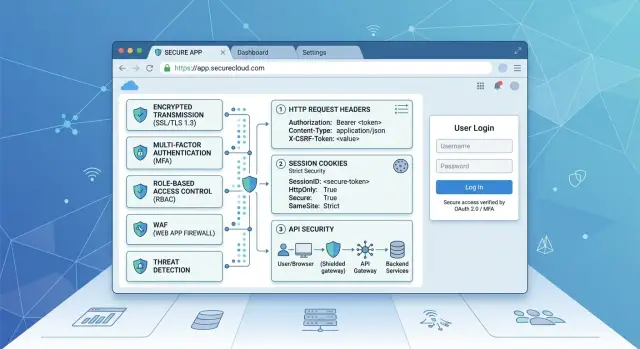
Table of Contents
Why these defaults matter
Small browser defaults stop a surprising number of common attacks before your team touches application code. One missing cookie flag, a loose script policy, or a single page that still allows insecure content can turn a minor mistake into a stolen session or a fake login prompt. Fixing those gaps early often protects you more than a rushed patch after launch.
The same weak spots show up again and again. Login pages attract abuse because they handle passwords, tokens, redirects, and third-party scripts at the same time. Session cookies cause trouble when they travel too freely, stay readable by client-side code, or cross site boundaries without a clear reason. Embedded scripts add risk because one compromised tag can run code inside your app. Mixed content sounds old, but one insecure image, script, or iframe can still weaken a page users thought was protected.
Even a simple SaaS product has enough surface area to cause real damage. A dashboard, a billing page, and a login flow are plenty. If the browser refuses unsafe behavior by default, you get a quiet layer of defense every time someone signs in.
Teams usually get into trouble when they change too many browser rules in one release. A strict Content Security Policy can block scripts that power the sign-in form. A cookie change can break single sign-on, remember-me sessions, or embedded support widgets. HSTS can lock a bad redirect into the browser if you roll it out carelessly. The app looks safer on paper, but real users can't load pages or log in.
The better goal is simple: block easy attacks, keep the app loading, and let users sign in without weird browser errors. Start with protections that rarely break product behavior, watch what fails, and tighten the rules in steps. That usually works better than a big security push that lands on Friday and burns the weekend.
What to set first
Start with HTTPS everywhere. If any login page, asset, callback, or admin screen still loads over HTTP, fix that before anything else. Headers and cookie flags help, but they don't do much if the connection itself is open to tampering.
Force HTTP to redirect to HTTPS, and send auth cookies only over encrypted requests. Then test the app from a clean browser session, not from a developer machine full of old exceptions and cached settings.
Cookies come next, and different cookies need different rules. A session cookie that keeps a user signed in should not get the same treatment as a theme preference or an analytics cookie.
For most SaaS products, this baseline works well:
- Session cookie:
Secure,HttpOnly,SameSite=Lax - Preference cookie:
Secure,SameSite=Lax - Cross-site cookie only when you truly need it:
SameSite=None; Secure - Separate session cookies from UI or tracking cookies
- Use the shortest reasonable lifetime for sensitive cookies
That split clears up a lot of confusion. Your app can keep a tight lock on login state while still letting the front end read a harmless preference cookie when needed.
A common example is a dashboard app with email login links and a normal web UI. In that case, SameSite=Lax is usually the safest default for the session cookie. It blocks a lot of careless cross-site behavior without breaking ordinary navigation. SameSite=Strict is often too rigid, and None is too loose unless you have a specific reason.
After cookies, add a small set of response headers and stop there until they work cleanly. Start with Content-Security-Policy, HSTS, and frame rules such as frame-ancestors or X-Frame-Options. CSP reduces script injection risk. HSTS tells browsers to stick to HTTPS. Frame rules help block clickjacking.
Don't collect obscure headers just because a scanner complains. Rare or outdated settings add noise fast. Get the basics stable first, then tighten the parts your app actually needs.
A safe cookie baseline
Cookies deserve the same care as headers. If a cookie can keep a user signed in, treat it like a secret, not a convenience setting.
Set every session cookie with Secure. That tells the browser to send it only over HTTPS, so a plain HTTP request can't leak the session by accident. Add HttpOnly too. If a page picks up a script bug, that script still can't read the cookie and send it somewhere else.
SameSite needs a little more thought. For most SaaS sign-in flows, SameSite=Lax is the right default. It blocks many cross-site requests from carrying the cookie, but it still works for normal navigation. Problems usually show up in flows that jump between domains, such as some SSO setups, magic-link sign-in, or payment returns. Test those paths in real browsers before you loosen the setting.
Keep the cookie scope tight. If your product runs on app.example.com, don't share the auth cookie with every subdomain unless you truly need that. The same goes for Path. A narrow scope reduces accidental exposure. If you host marketing pages on www and the app on app, the sign-in cookie should usually stay on app.
Expiry rules matter just as much. A session cookie should end when the session ends, and your server should reject it after a clear timeout. A "remember me" cookie should be separate, last longer by design, and be easy to revoke. Don't leave authentication cookies active for months because it feels convenient. A shorter lifetime might annoy a few users. A stolen long-lived cookie causes a much bigger mess.
Headers that give you the most value
A short set of headers blocks a lot of low-effort web attacks. Start with the ones that protect logins, reduce data leaks, and don't need weeks of debate.
HSTS belongs near the top of the list. It tells the browser to use HTTPS only, which helps stop downgrade tricks and accidental insecure requests. Add it only after you confirm HTTPS works on every subdomain you serve, including old admin hosts, support tools, and staging domains users might still reach. If one subdomain isn't ready, HSTS can turn a small config mistake into an outage.
Content Security Policy can do a lot, but it can also break a working app fast. Start with Content-Security-Policy-Report-Only and watch what your app actually loads. Inline scripts, third-party chat widgets, old analytics tags, and file preview tools often show up here. After you clean that up, move to an enforced policy.
Frame restrictions matter most on login, billing, and admin pages. If another site can embed those pages in an invisible frame, clickjacking gets much easier. frame-ancestors 'none' is the cleanest choice for pages that should never appear inside another site. If you need same-site embedding in some areas, use frame-ancestors 'self' there instead.
A good baseline usually looks like this:
- HSTS after full HTTPS checks across all served subdomains
- CSP in report-only mode before enforcement
frame-ancestorsset to block unwanted embeddingX-Content-Type-Options: nosniffReferrer-Policy: strict-origin-when-cross-origin
X-Content-Type-Options: nosniff is an easy win. It stops browsers from guessing file types, which closes off some messy script and asset handling cases. Most teams should ship it early.
For referrers, keep the balance practical. strict-origin-when-cross-origin usually gives you enough analytics context without sending full paths and query strings to other sites. That means your app can still measure traffic sources without leaking reset tokens, internal IDs, or search terms buried in a URL.
How to roll this out without breaking things
Most header rollouts fail for one reason: teams change too much at once. If you turn on strict cookies, a new CSP, and HSTS in the same release, you'll waste hours guessing which change broke sign-in or a third-party widget.
Start by mapping what the app actually loads in the browser. Write down every script, font, image, frame, and API endpoint, including payment pages, analytics, chat widgets, and anything on a custom subdomain. Surprises hide in places people forget, like password reset pages, billing portals, or an embedded help desk.
A slow rollout works better:
- Make cookie settings match in development, staging, and production
- Add CSP in report-only mode first
- Review the reports and remove sources you don't need
- Enforce one header at a time, then test again
The cookie step matters more than many teams think. If staging uses loose defaults but production uses Secure, HttpOnly, and SameSite rules, you're not testing the real app. Keep the rules consistent so a login flow that works in staging doesn't fail after release.
CSP needs patience. Report-only mode lets the browser tell you what would break without blocking it yet. After a few days, you'll usually find old script sources, forgotten image hosts, or a support widget that loads assets from two extra domains. Trim that list before you enforce anything.
Don't move every header from soft mode to strict mode on the same day. Pick one, enforce it, and retest the flows that hurt most when they fail:
- Sign-in and sign-out
- Password reset
- Billing and checkout
- Embedded chat or support widgets
- Admin pages that use older scripts
A small SaaS team can finish this over a few short releases instead of one risky launch. That's usually the better trade: fewer surprises, cleaner policies, and much less back-and-forth with support after deployment.
A simple SaaS example
Picture a small B2B SaaS app. Users sign in with email, pay through Stripe, and open a help widget from the dashboard when they get stuck. The team wants basic protection against common web attacks, but they don't want every deploy to turn into a browser bug hunt.
Start with the session cookie. Set it to Secure, HttpOnly, and SameSite=Lax. That means the browser sends it only over HTTPS, page scripts can't read it, and normal top-level navigation still works for most sign-in flows. Then test the full login path, including the redirect back from email links and billing pages.
Most teams should begin with a small allowlist, not a huge one. App pages should load scripts and frames only from your own app, the payment provider, and the approved support tool. If a random analytics snippet or old chat widget stops working after that, that's useful signal. It means the page trusted more third parties than the team realized.
Keep public pages and private pages separate. A marketing page might allow an embedded demo, video, or scheduling tool. Your admin area should not allow framing at all. Billing screens, user management, and audit pages are the last place you want a clickjacking risk.
A simple setup often looks like this:
- Session cookie:
Secure,HttpOnly,SameSite=Lax - App CSP: allow scripts and frames from self, Stripe, and the approved help widget
- Admin pages: block all iframe embedding
- Public marketing pages: allow only the specific embeds they need
Then test the flows people actually use on real phones. Open a password reset email in mobile mail, tap the link, sign in with a magic link, visit billing, and log out. Safari and Chrome on mobile often expose small mistakes that desktop testing misses, especially around redirects and cookie handling.
If logout leaves an old tab active, or a magic link works in only one browser, fix that before release. Users notice those bugs long before they notice a clean header policy.
Mistakes teams make
Teams often pick the strictest option and assume it's safer. In practice, that habit causes more trouble than most teams expect.
A common example is SameSite=Strict on session cookies. It blocks some cross-site requests, but it can also break normal flows like email sign-in links, OAuth handoffs, and payment returns from a checkout provider. Users click a link, land back in your app, and suddenly look logged out.
Cookie scope causes a quieter problem. Teams set the cookie domain to .example.com because it feels convenient, then every subdomain can receive that cookie. If one forgotten subdomain has weaker security, your session exposure grows for no good reason. Keep the domain as narrow as possible, and don't share session cookies across subdomains unless you truly need that behavior.
CSP trips up a lot of teams too. They switch on a strict policy in blocking mode before they know what the app actually loads. Then their own scripts fail, fonts disappear, analytics stops, or API calls break in strange ways. CSP works best when you start with reporting, review what the browser flags, and tighten rules in small steps.
Another mistake is collecting headers like stickers on a laptop. Teams copy old advice, add every header they can find, and never clean it up. That leaves a messy setup with outdated items that add noise without adding much protection. If your team can't explain why a header is there, remove it or review it.
A short sanity check helps:
- Test login from an email link
- Test OAuth and payment return flows
- Check which subdomains receive session cookies
- Run CSP in report mode before enforcement
- Verify local and staging behave like production
That last point gets missed all the time. Security breaks in local and staging, so developers bypass it to keep moving. Then production becomes the first real test. If cookie settings or CSP rules work only in production, the rollout is already fragile.
Quick checks before release
Release day is a bad time to learn that login works only in your usual browser, or that the reset flow fails when cookie rules get stricter. A short pass in a clean browser profile catches a lot of that before users do.
Start with the paths people hit first. Create a new profile with no saved cookies, no extensions, and default settings. Then run signup, login, logout, and password reset from start to finish. If one step quietly depends on old session state, this is where it shows up.
Then inspect the actual responses, not just the app behavior. Check the login page, the main app shell after login, and a few API responses that matter for auth. You want to see the headers you meant to ship, not the headers you thought your framework added.
A quick release checklist helps:
- Confirm the session cookie uses
SecureandHttpOnly - Check
SameSitematches the flow you support - Verify domain and path scope are intentional, not overly broad
- Make sure expiry and rotation behavior match your session policy
- Compare headers across web pages and API responses for gaps
Browsers with stricter privacy settings can break weak assumptions fast. Turn on blocked third-party cookies and test common user paths again, especially login redirects, embedded flows, and anything that crosses subdomains. A setup that looks fine in one browser can still fail for a real customer on a locked-down machine.
CSP needs one last look too. Review recent reports before release and sort signal from noise. If a report points to a real inline script, an unexpected domain, or a browser-extension pattern that affects many users, fix the cause. Don't silence violations just to get a clean dashboard.
This final pass should feel boring. If the app works in a fresh browser, the cookies look right, and the headers stay consistent across pages and APIs, you're in good shape to ship.
What to do next
Good defaults help only if every new service inherits them. If your team leaves headers and cookie flags to individual developers, the same mistakes come back with every new app, subdomain, and login flow.
Write one short policy and keep it plain. A page or two is enough if it names the headers you expect on public responses, the cookie flags you require by default, and the few cases where a service can ask for an exception.
A simple baseline often looks like this:
- Cookies use
Secure,HttpOnly, andSameSite=Laxunless a real cross-site flow needs something else - Browser-facing apps send HSTS,
X-Content-Type-Options: nosniff, and a clearReferrer-Policy - CSP starts simple, then gets tighter as the app removes inline scripts and stray third-party code
- Teams document exceptions in the repo, not in someone's memory
After that, make the rules testable. Add checks in CI that fail when a service drops a required header or removes a cookie flag. That's much better than catching the issue in a late review. If a login service ships a session cookie without HttpOnly, the build should stop right there.
Review browser-facing changes during design work, not only in the last week before release. A new auth flow, a customer portal on another subdomain, or a third-party widget can change what your cookie settings and headers need to do. Those choices are easier to fix on a diagram than in production.
This is also the point where outside review can help. Oleg Sotnikov at oleg.is works as a Fractional CTO and startup advisor, and this kind of sanity check fits well when a team wants practical guidance on app security defaults, infrastructure, and AI-driven development workflows. It works best when the team already has a draft policy, a CI check, and one owner who keeps the defaults consistent across services.
Frequently Asked Questions
What flags should my session cookie use?
For a session cookie, set Secure, HttpOnly, and usually SameSite=Lax. Keep the lifetime short, and let your server expire old sessions instead of leaving them active for months.
Should every cookie use `HttpOnly`?
No. Put HttpOnly on cookies that hold login state or other secrets. Leave it off only when your front end must read the cookie, such as a theme or language setting, and keep those cookies separate from auth.
Is `SameSite=Lax` enough for most SaaS logins?
Most SaaS apps can start with SameSite=Lax. It blocks many cross-site requests while still allowing normal top-level navigation, which fits common login flows better than Strict.
When do I need `SameSite=None; Secure`?
Use SameSite=None; Secure only when a real cross-site flow needs it, such as some SSO setups, embedded apps, or payment returns. Test that path in real browsers first, because this setting opens the door wider than Lax.
Should I share auth cookies across subdomains?
Keep auth cookies on the narrowest domain and path you can. If your app lives on app.example.com, store the login cookie there unless you truly need to share it with another subdomain.
Which headers should I ship first?
Start with HSTS, Content-Security-Policy in report-only mode, frame-ancestors or X-Frame-Options, X-Content-Type-Options: nosniff, and a clear Referrer-Policy. That set blocks a lot of common problems without turning your config into clutter.
Should I enable HSTS right away?
Wait until HTTPS works on every host people can reach. Check old subdomains, admin tools, support pages, and redirects first, because HSTS tells the browser to keep using HTTPS even after a mistake.
How do I add CSP without breaking things?
Begin with Content-Security-Policy-Report-Only and watch what the page actually loads. Remove unused domains, fix inline scripts, and enforce the policy one step at a time so you can see what breaks.
Do I need frame protection on every page?
Protect login, billing, admin, and account pages first. Marketing pages sometimes need a video, demo, or scheduler embed, so give those pages their own rule instead of weakening the whole site.
What should I test before release?
Open a fresh browser profile and run signup, login, logout, password reset, billing return, and magic link flows from start to finish. Then inspect the real responses and confirm the cookie flags, scope, expiry, and headers match what you meant to ship.


