Second cloud provider vs better architecture: fix this first
Second cloud provider vs better architecture compares uptime gains, staffing load, and failure risks before a small team adds more cloud work.
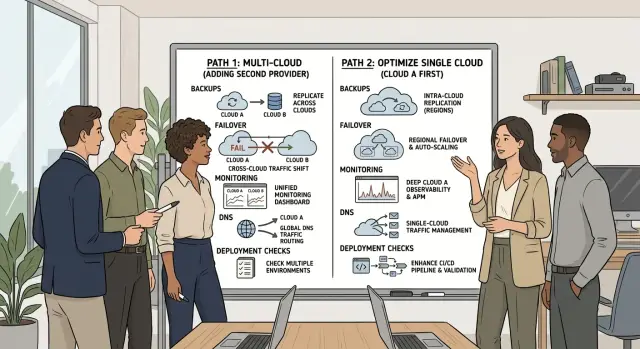
Table of Contents
Name the failure first
Teams usually start thinking about a second cloud when they feel exposed. The problem is that the fear is often too vague to be useful. "Our database region could go down" gives you something to plan for. "We need more resilience" does not.
Start by separating customer pain from internal pain. Customers notice checkout failures, missing data, and dashboards that stop loading. Engineers feel noisy alerts, late-night pages, and deploys that break too often. Both matter, but they do not point to the same fix.
A simple way to cut through the noise is to write down your last three incidents in plain language:
- A bad deploy broke login for 27 minutes.
- A database migration locked writes and slowed the app.
- An expired certificate took the API offline.
That short list changes the conversation fast. If your recent failures came from releases, schema changes, or missed renewals, a second cloud will not save you. It just gives your team two places to misconfigure instead of one.
Team size matters more than most founders want to admit. A five-person team with one person carrying most of the on-call load handles risk very differently from a company with round-the-clock coverage. Budget matters too. If you cannot afford duplicate environments, cross-cloud networking, extra monitoring, and regular failover drills, you probably cannot afford real multi-cloud operations.
Ask four direct questions before you design anything new:
- What exact outage do we want to survive?
- How would customers notice it first?
- Did any of our last three incidents look like that?
- Who will maintain and test the extra setup every month?
For small teams, the honest answer is often uncomfortable. The biggest risk is usually not provider failure. It is a weak change process, unreliable backups, missing runbooks, or thin on-call coverage. Fix that first. If provider risk still sits at the top after that, then a second cloud starts to make sense.
Where small teams usually break first
Most small teams get hurt by their own changes before a cloud vendor has a major outage. A rushed deploy, a bad migration, or one wrong config value can knock out the product in minutes. If you push the same broken release to two providers, you do not reduce risk. You spread the same mistake wider.
Deploys cause real pain because they happen all the time. Cloud-wide outages are rare. Releases happen weekly, sometimes daily. That usually makes the release process the biggest source of risk: no rollback plan, no staging check, no feature flags, and no health check that blocks a bad version.
The database is another common weak point. A product can run on several app servers and still go fully down when one database locks, runs out of disk, or stalls during backup. Small teams often route login, billing, dashboards, and internal tools through the same database. One problem there can freeze everything at once.
Some failures stay quiet until customers complain. DNS points traffic to the wrong place. A certificate expires on a weekend. A secret rotates and background jobs fail while the website still loads. These half-broken states are nasty because the homepage looks fine while payments fail, emails stop, or webhooks never arrive.
Backups also give false comfort when nobody has practiced a restore. Teams say, "we have backups," but they have never timed a full recovery. Then an incident hits and they discover missing files, a broken dump, or a restore process that takes six hours instead of forty minutes. A backup only matters if the team can restore it under pressure.
Weak alerting stretches every incident. If the first signal comes from a customer email, you already lost time. Alerts do not need to be fancy. They need to tell you when users cannot log in, error rates spike, queues stop moving, disks fill up, or backups stop running.
For a small SaaS team, five boring fixes usually buy more uptime than a second provider: safer deploys with rollback, tested database recovery, alerts on user-facing failures, expiry checks for certificates and secrets, and restore drills every few months. None of that looks impressive on an architecture diagram. It prevents the failures that happen most.
What a second provider really adds
A second cloud helps with one specific problem: a full provider outage. It also creates daily operational work, and that work appears long before any disaster does.
With one provider, your team learns one IAM model, one network setup, one logging stack, and one billing system. Add another provider and you double the places where a small mistake can lock people out, expose a service, or hide a real alert. Even simple jobs, like rotating secrets or tracing a failed request, take longer because the answer might sit in two different consoles.
Data gets harder fast. If users write data in both clouds, you need rules for sync, conflict handling, and recovery when links fail or lag grows. If one side stays on standby, you still need fresh backups, tested restores, and a clear answer for what happens to recent writes after failover.
The extra work usually lands in the same few areas: access control, networking, DNS, load balancing, logs, metrics, alerts, replication, restore testing, runbooks, and on-call ownership. That is a lot for a small team to carry.
Failover plans also look much better on slides than they do at 3 a.m. A box on a diagram that says "send traffic to cloud B" is not a real plan unless engineers rehearse it, time it, and fix what breaks. DNS delays, stale data, expired credentials, and missing firewall rules usually show up during drills, not during design reviews.
People cost matters as much as cloud cost. Under pressure, engineers must remember two APIs, two security models, two quota systems, and two vendor support paths. That is where multi-cloud hurts small teams most - not in the diagram, but in tired human decisions during an outage.
Bills and internal docs grow faster than teams expect. You pay twice for baseline capacity, spend more time updating runbooks, and spread monitoring across more tools. The tradeoff is often bad unless provider-level failure is truly one of your top risks.
What better architecture fixes sooner
Most small teams get more uptime from improving one cloud setup than from adding another one. A second provider does not help much if the app still runs in one zone, stores session state on one machine, or cannot recover cleanly after a bad deploy.
Start with availability zones. If your app runs in only one zone, one local failure can still take everything down. Running across two or three zones usually cuts more risk than copying the same fragile design into a second cloud.
State is another common problem. If a service stores sessions, temp files, or job progress on one machine, failover gets messy fast. Move that state into shared storage or a database where it belongs, and keep app servers as stateless as you can. Then you can replace nodes without drama.
Databases need more than backups on paper. Many teams feel safe because backups exist, but nobody has checked whether restore works, how long it takes, or what data gets lost. A scheduled restore test, even once a month, often gives a bigger resilience gain than any multi-cloud plan.
Short failures happen constantly. A payment API times out. A worker loses network access for 30 seconds. One service restarts during deployment. Queues and retries help absorb those bumps instead of turning them into visible outages. The trick is to retry with limits and delays, not hammer a broken dependency until everything backs up.
Health checks deserve more attention too. If they are too shallow, broken instances stay in rotation. If they are too strict, healthy instances flap in and out during traffic spikes. Rollback needs the same care. When a release goes bad, the team should know who rolls back, how long it takes, and what happens to in-flight jobs.
That is usually the real answer for small teams. Fix the failure modes you already know: spread across zones, reduce state, prove restores, buffer short outages, and make rollback boring. That lowers risk now. It also makes any future multi-cloud setup much easier to run.
How to decide without guessing
Start with your own incidents, not with cloud marketing. Pull the last six to twelve months of outages, slowdowns, late-night alerts, and near misses. Put them in one sheet and note what actually broke: a bad deploy, one database, a DNS mistake, an expired certificate, a full disk, or a region outage.
Then set two numbers before you talk about providers. How long can the service be down before the business takes real damage? How much data can you afford to lose? Without a clear recovery time target and a clear data-loss target, the debate gets fuzzy fast.
Next, draw the system on one page and mark every single point of failure. Be blunt. If one PostgreSQL instance, one queue, one secrets store, or one person on the team can block recovery, circle it. Most small teams find that their weakest points sit inside one cloud, not between clouds.
After that, price the people work, not just the cloud bill. A second provider means two sets of networking rules, IAM, monitoring, backups, runbooks, and on-call knowledge. It also creates more room for config drift. For a small team, that staffing load often costs more than the infrastructure.
Now sort fixes by cost and risk. Teams usually get more value from cheap, direct changes first: restore tests for backups, a standby database in another zone or region, simpler deploy rollbacks, alerts that catch quiet failures, and written recovery steps someone can follow at 2 a.m.
Run one real failover test before you plan anything bigger. Do it on purpose, during a quiet window, with a timer running. If the team cannot switch traffic, restore data, or bring up a standby copy inside the target you set earlier, a second provider will mostly add more moving parts.
This is often where an outside review helps. Someone who has run lean production systems can spot the cheap fixes in an hour. Oleg Sotnikov does that kind of work on oleg.is, and for many small teams it is a better first spend than carrying multi-cloud complexity for problems they have not clearly named.
A realistic small-team example
Picture a SaaS product with five engineers. Two focus on product features, two handle backend and frontend work, and one spends part of the week on infrastructure, support, and whatever caught fire yesterday. There is not much slack.
The choice becomes real on a bad Friday. A deploy goes out at 4:40 p.m. It passes basic checks, then starts throwing errors under normal traffic. At almost the same time, one availability zone has trouble. The app loses one database node and one cache node.
If this team stayed in one cloud but fixed the simpler risks first, recovery is annoying but manageable. They already set up safer deploys, database failover in another zone, disposable cache nodes, and a clean rollback path.
Recovery might look like this:
- Roll back the deploy in a few minutes.
- Shift database traffic to the healthy replica.
- Recreate the cache node instead of trying to repair it.
- Keep the queue running so jobs do not disappear.
- Use read-only mode for a short time if writes stay unstable.
That is not pretty, but a five-person team can do it. One engineer rolls back. One checks the database. One watches logs and error rates. The others answer customers and pause risky changes. The team works one incident in one control panel with one set of runbooks.
Now picture the same company after adding a second provider too early. They copied some services across clouds, but not all. The database still mostly lives in one place because cross-cloud writes were hard and expensive. Secrets, monitoring, CI runners, alert rules, and deploy scripts differ between providers. Failover exists on paper, but nobody has practiced it under pressure.
When Friday breaks, they face a different set of problems. Which cloud has the latest good build? Is the data current on both sides? Will DNS changes propagate fast enough? Which logs tell the truth during failover? Who knows both setups well enough to make the call quickly?
This version often takes longer to recover. The outage is no longer just a bad deploy plus a zone issue. It becomes a coordination failure. Small teams usually lose more time to that than to the original problem.
Mistakes that increase risk instead of lowering it
Small teams often add a second cloud to feel safer, then copy the same weak setup into both places. If the app still depends on one fragile database design, one manual release process, or one person who knows how everything works, two vendors do not change much.
That is why the answer is often a bit boring at first. Fix the simple breakpoints before you pay for a more complex one.
One common mistake is mirrored failure. The team runs the same app in two clouds, but both versions depend on the same bad assumption. Maybe both rely on one migration script, one cache warm-up step, or one brittle deploy process. You did not remove risk. You duplicated it.
Failover scripts are another trap. Teams write them once, test them during a calm week, and stop touching them. Six months later, credentials changed, network rules drifted, and nobody remembers the exact order. The first real outage becomes the test. That is a rough time to find a typo.
Some hard stops sit outside compute entirely. One DNS provider can still take both environments offline. One auth service can still block every login. One payment, email, or queue vendor can still freeze the app. One tired engineer on call can still miss the alert at 3 a.m.
Data replication causes quiet trouble too. Dashboards look healthy during normal traffic, then fall behind during a real write spike. Orders arrive faster than replication can keep up, and the standby copy lags by minutes. If you fail over at that moment, users may see missing or stale data. That is harder to explain than a clear outage.
Thin on-call coverage is the mistake people rarely want to discuss. Two clouds mean more alarms, more dashboards, more IAM rules, more networking edge cases, and more strange failures when people are tired. A team of three does not become more resilient just because it has two control panels.
For most small SaaS teams, one cloud with tested backups, fast rollback, clear runbooks, and regular restore drills is safer than a shaky multi-cloud setup.
A quick checklist before multi-cloud
Most small teams are not one provider away from safety. They are one broken restore, one slow rollback, or one confusing outage message away from a long night.
If you cannot recover cleanly inside your current setup, a second provider gives you more places to fail. It also gives a small team more dashboards, more permissions, more networking rules, and more deployment paths to babysit.
Use this short test before you add anything new:
- Restore a recent production backup into a separate test environment and make sure the app starts, users can log in, and the data looks usable.
- Ask one engineer to roll back the last deploy without help. Time it.
- Shut off one zone, or simulate it as closely as you can, and check whether traffic moves, queues drain, and users can still do the main job in the app.
- Give support one plain-language outage note to send to customers.
- Run small outage drills every quarter: expired certificate, bad release, full disk, dead replica.
These checks look basic, but they catch the risks that hurt small teams most. Backups often exist but restores fail. Rollbacks exist but only one release engineer knows the exact steps. High availability exists on paper, but one zone outage still knocks out sessions, file storage, or background jobs.
A clear support message matters more than many teams admit. During an outage, customers mostly want two things: a simple explanation and a believable next update time. If your team cannot say what broke, who is affected, and what users should do next, the incident grows beyond the technical fault.
What to do next
Most small teams get more protection from boring work than from a second cloud. Tighten backups, make deployments safer, and prove that a zone failure will not knock you out for hours. If you have never tested restore time, rollback, and zone failover, start there.
Write down the exact failure you want to prevent. "Cloud outage" is too vague. Name the event: bad deploy, deleted data, failed migration, expired certificate, DNS mistake, or regional outage. That keeps the discussion honest.
A practical order looks like this:
- Restore backups into a clean environment and time the full recovery.
- Add safer deploys with health checks, staged rollout, and fast rollback.
- Run critical parts across zones if your provider supports it.
- Measure how long the business can tolerate downtime.
- Revisit a second provider only if one provider still leaves a gap you cannot accept.
A second provider makes sense when you can point to one failure mode that better architecture does not cover. Maybe your customers need stricter uptime than one provider can realistically give. Maybe a provider-wide issue would stop revenue fast enough to justify the extra operational load. If you cannot explain that reason in one sentence, you probably do not need multi-cloud yet.
Also count the people cost. Two providers mean two sets of networking, security rules, monitoring, deployment paths, and on-call runbooks. For a small team, that extra load often creates more risk than it removes.
If you want a second opinion, keep it practical. A short architecture and operations review can tell you whether you truly need multi-cloud or just a simpler setup that fails less often. Oleg Sotnikov, through oleg.is, works with startups and small businesses on exactly these tradeoffs.
Pick one failure mode, test it, and fix the cheapest weak point first. That usually gets you farther than opening another cloud account.
Frequently Asked Questions
Do small teams usually need a second cloud provider?
Usually, no. Most small teams get more uptime from safer deploys, tested restores, better alerts, and running across more than one zone in the same cloud. Add a second provider only after you can name one provider-level failure that still leaves an unacceptable gap.
What should I check before I plan multi-cloud?
Start with your last few incidents and write them in plain language. Then set two numbers: how long you can stay down and how much data you can lose. If your recent pain came from deploys, migrations, certificates, or backups, fix those first.
Which failures hurt small SaaS teams most?
Bad deploys, database issues, expired certificates, DNS mistakes, full disks, and weak alerting usually cause more pain than a cloud-wide outage. Those problems happen often, and they hit customers fast. A second cloud does not stop them if the same team and process still cause them.
Will multi-cloud protect me from bad deploys?
No. If your team ships the same broken release to two providers, you spread the damage wider. Safer rollouts, health checks, feature flags, and fast rollback do much more for this kind of risk.
When does a second provider actually make sense?
It makes sense when you can point to a provider outage as a real business risk and better design inside one cloud still does not cover it. You also need the people and budget to test failover, keep data in sync, and maintain two environments every month. If you cannot support that work, multi-cloud will likely slow recovery instead of helping.
What architecture work should I do before adding another cloud?
Run the app across multiple availability zones first. Move session data and temp state off single machines, prove that database restores work, and make rollback fast and boring. Those fixes usually remove more risk than opening an account with another vendor.
How do I know if my backups are actually useful?
Do a real restore into a separate environment and time the full recovery. Check that users can log in, the app starts, and the data looks usable. Backups only count when your team can restore them under pressure.
Why does multi-cloud create so much extra team load?
Because the work doubles in places people forget about. Your team must handle two IAM systems, two networks, two billing setups, two monitoring paths, and more runbooks. During an outage, tired engineers have to make decisions across both systems, and that often costs more than the extra servers.
Should I add another region before I add another cloud?
For most small teams, another zone or region inside the same provider comes first. That path usually gives you better failover with less operational drag. Move to a second cloud only if one provider still leaves a risk you cannot accept.
How should we test failover without building a huge setup?
Pick one failure and rehearse it during a quiet window with a timer running. Try a restore, a rollback, or a zone loss, and watch how long recovery takes and where the team gets stuck. That exercise tells you more than any architecture diagram.


