Search index rebuilds that avoid drift after schema changes
Search index rebuilds need more than a fresh import. Learn how to backfill data, swap indexes without downtime, and check relevance after schema changes.
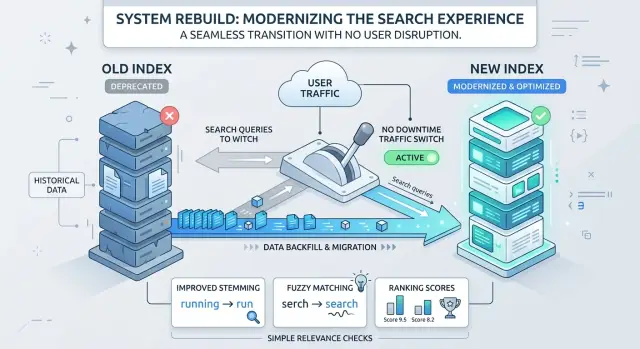
Table of Contents
Why results drift after a schema change
Search can feel wrong even when it never goes down. Queries still return results, logs look normal, and nothing appears broken. But a schema change can alter what each document stores, how text is indexed, and which fields shape ranking.
Small changes often have bigger effects than teams expect. Add a popularity score, split one text field into two, or change how tags are stored, and the same query can return a different order. Users do not care that the schema changed. They compare today's results with what worked last week.
Drift gets worse when the index holds a mix of old and new records. New documents may include fresh fields while older ones still have blanks or fallback values. Then the ranking logic treats similar items differently, even when they should match the same query the same way.
Backfill gaps cause a lot of this. If you add a field like brand, category_weight, or normalized_title, but only new records get it, older records quietly lose ground. Nothing looks wrong in logs. Users just start seeing odd ordering, weaker matches, or products that look almost identical but rank far apart.
This is why a rebuild is more than copying data from one index to another. A schema change can quietly rewrite ranking rules. If old and new documents do not share the same shape, defaults, and scoring inputs, relevance splits in two.
Decide what must stay the same
Before you touch mappings or start a rebuild, decide what must not change for users.
Start with real searches from your logs. Group them by intent: brand searches, exact product names, category terms, part numbers, and common problem based searches. Those usually carry most of the traffic, and users notice fast when they stop working.
Then map those searches to the fields behind them. Some names can change without much pain. Others cannot. If your app searches title, filters on brand, and sorts by price, renaming any of those fields without a clear plan creates silent failures. The app may keep sending the old field name, the new field may index differently, or the filter may return an empty set with no obvious error.
Be explicit about filters and sorting too. If users can filter by size and color today, those filters should return the same kind of set tomorrow. If "price low to high" ignores out of stock items now, keep that rule unless you want to change product behavior on purpose.
A short scorecard keeps this honest:
- The top daily searches return the same or better first page results.
- Filters return expected counts for a few known queries.
- Sorting matches current product behavior.
- Empty result searches do not increase after the swap.
A small example makes the risk obvious. Say an online store renames product_name to title and splits category into department and type. That can work fine, but only if the query logic still knows where to search, which filters to show, and how to sort. If you decide that before the rebuild starts, you avoid a slow relevance leak later.
Backfill the new index step by step
Freeze the new schema before you load anything. If fields, analyzers, token filters, or ranking settings keep changing during the load, you stop measuring one rebuild and start chasing a moving target.
Create the new index beside the live one. Do not reuse the old index, and do not send production reads to the new one by accident. Two indexes give you room to build, test, and compare without touching the results users see.
Load data in batches you can retry without drama. For one team that might be 500 records. For another it might be 5,000. The right batch size is the largest one you can rerun quickly, inspect easily, and recover from if a worker fails halfway through.
Each backfill run should record a few plain numbers: how many records it read, how many it wrote, the oldest and newest timestamps in that batch, which items failed, and how long the batch took. These numbers catch problems early. If writes suddenly drop or timestamps stop moving, you know where to look.
Make the loader idempotent. If the same product or document gets sent twice, the second write should replace the first cleanly. That saves a lot of cleanup when jobs restart.
Near the end, run a catch up pass for records that changed during the main load. In a busy system, some data will always move while you backfill. Query by last updated time, reload that smaller set, and repeat until the lag is small enough to accept.
Many teams also take one short pause on writes, run a final delta sync, and then switch traffic. The pause can be brief. The point is simple: when you swap indexes, the new one should reflect the same world the old one saw a moment earlier.
Swap indexes without downtime
Keep all reads on the live index while you build the replacement. Teams still get this wrong and send part of production traffic to a half filled index. That is how users end up debugging your rebuild for you.
Before cutover, warm the new index with a sample of real searches from recent traffic. Use common queries, messy ones, and a few long tail examples. This loads caches, exposes slow filters, and shows whether the new schema changed ranking in ways you did not expect.
If your search stack supports aliases or routing, use them for one atomic move. Point the read alias at the old index during the rebuild, then switch it to the new index in one action. Do not update app servers one by one. Do not wait for staggered cache refreshes. One move is safer and much easier to reverse.
What to watch right after cutover
The first few minutes tell you a lot. Watch a short set of signals that surface trouble fast:
- search error rate
- query latency, especially p95 and p99
- empty result searches for common queries
- click or add to cart behavior if search drives purchases
Keep that dashboard open during the first hour. If latency jumps or empty results spike, treat it like a release problem now, not a tuning task for later.
Rollback needs as much planning as cutover. Leave the old index intact, be careful with mirrored writes, and make sure the alias can point back just as quickly as it pointed forward. A rollback plan that exists only in someone's head is not a plan.
The safest pattern is boring for a reason: backfill in the background, warm the new index, flip traffic once, and stay ready to flip back.
Check relevance before users notice
A rebuild can finish on time and still make search feel off. Users notice fast when an exact product name drops below a broad match, when filters hide obvious items, or when a "newest" sort starts looking random.
Use real queries from your logs, not invented tests. Pick searches that bring the most traffic, the ones tied to sales or support, and a handful that users repeat with small spelling changes.
Run the old and new indexes side by side and focus on the first page. That is all most people ever scan. If the same intent now produces a different top set, stop and find the cause before you ship.
For each query, check a few things. Does the exact match still land near the top? Do filters return the same items and roughly the same counts? Does sort order stay stable for price, date, and popularity? Did any field go empty during backfill and quietly change ranking?
Empty fields cause more damage than most teams expect. If a popularity score, brand name, category path, or stock flag is missing in the new index, ranking can shift even when the schema change looked small.
Some movement is fine. A cleaner index may reward better titles or push out of stock items lower, and that can help users. The problem is unexplained movement. If result 2 becomes result 18, you should know which field or rule caused it.
Do not stop at common searches. Review a small batch of rare queries too. Long product names, model numbers, part codes, and awkward phrasing expose mapping mistakes quickly.
Keep the review small and honest. Twenty to thirty strong queries tell you more than a huge set of synthetic tests if they cover broad terms, exact identifiers, and edge cases. Mark each query as "same," "better," or "worse," and note the reason. If the same reason keeps appearing, fix the data or ranking rule before the swap.
A simple product catalog example
A store with 20,000 products makes the problem easy to see. The team expands its catalog schema and adds two fields to every item: color and size. New products get those fields right away, but older products still have empty values.
That gap changes search more than many teams expect. If the engine now gives extra weight to the color field, a query like "black shoes" can start returning a messy mix. Some newer products rise because they have color set to "black," while older black shoes stay lower because their records never got that value.
Before the rebuild
On paper, the schema change looks harmless. The title still says "Men's Black Running Shoes," and the description still mentions the color. But once search starts using the new structured fields, documents with missing values often lose ground.
Users feel this as inconsistency. Two almost identical products can rank very differently only because one record was updated last week and the other came from an older import.
The fix starts with a full backfill. The team builds a new index in parallel and fills color and size for the old catalog first. Sometimes those values come from product options, sometimes from variant data, and sometimes from a cleanup script that extracts them from existing text.
If an item truly has no known size or color, mark that clearly instead of leaving it half empty. Empty fields and explicit "unknown" values behave differently in many ranking rules and filters.
After the backfill
Once the missing data is filled, the query "black shoes" becomes much more stable. Old and new products now compete on the same signals, so ranking reflects product relevance instead of record age.
The team should not trust one spot check. Save a small query set and compare the old and new order before the swap. For this catalog, that set might include "black shoes," "red dress size m," "kids blue sneakers," and "winter boots 42." Review the first page for each query and ask a plain question: do the new results make more sense than the old ones?
That is the real job of the rebuild. The schema update makes new fields possible, but the backfill makes them useful.
Mistakes that break search during a rebuild
Most failed rebuilds do not crash. Search just gets a little worse every day.
One common mistake is changing tokenization and assuming it will be fine. Brand names often break first. If you split or normalize text differently, queries like "3M," "AT&T," or model names with numbers can stop matching the way people expect. Always test brand terms, part numbers, and short names before you trust a new analyzer.
Another mistake is pulling deleted records back into the new index. This usually happens when the backfill reads from an old export or when soft deleted rows look the same as live rows. Users notice quickly when search shows items they cannot open or buy anymore.
Scoring can also go wrong during zero downtime reindexing. If one alias points at indexes with different ranking logic, the same query can produce a mixed page. Some results come from the old score, others from the new one, and the order feels random. Keep reads on one index until the new one is fully ready, or keep scoring rules consistent while both indexes exist.
Teams also forget smaller settings that shape everyday search. Synonyms, stop words, stemming rules, faceting fields, and sort fields often live outside the main schema. If you rebuild the mapping but miss "tv" = "television," or forget the field that powers price sorting, search feels half finished.
The last mistake is the most common: checking document count and stopping there. Matching counts only prove that data moved. They do not prove people can find what they need.
Ask a few blunt questions before you call the work done. Do brand names still match? Do deleted items stay out? Does one query return one stable ranking? Do filters and sorts still work? Do the top results still make sense? If any answer is "no," the rebuild is not done.
Quick checks before and after launch
Most search failures after a release look small at first. A few products disappear, a filter count looks odd, or one popular query starts ranking the wrong item first. Catch those problems in the first hour and most users will never notice.
Start by comparing the new index to the source data, not just to the old index. If the source says you have 48,220 live records, the new index should hold the same set, minus anything you chose to exclude on purpose. Check the full count and a few slices such as active items, archived items, or one large category.
Before the switch, run a short sample of real queries. Use exact product names, partial names, common misspellings, and broad category terms. For each one, confirm that the first few results still make sense. Rebuilds usually break relevance at the edges first, not on the obvious queries.
Filters need their own pass. Open a few common filter combinations and check both the values shown to users and the counts beside them. A catalog with the right products but wrong facet counts still feels broken.
Right after launch, keep the checks practical:
- compare document counts against the source again
- rerun the sample queries and review the top results
- test a few filters and confirm counts match returned items
- watch error logs, indexing jobs, and search timeouts for spikes
- edit one record, sync it, and make sure rollback still works
That last check matters. A rollback plan can look fine until the first write hits the new schema. If a product update lands in the new index and the old index can no longer accept the same shape, rollback stops being real.
If this checklist takes more than 15 to 20 minutes, trim it until people will actually run it every time.
What to do next
Treat every rebuild like a repeatable release, not a one off repair. Write the plan before the next schema change lands. One page is enough if it names the old and new fields, the backfill order, the cutover steps, and the rollback trigger.
Save a small query set and reuse it on every release. Pull it from real searches, not guesses. Include high traffic terms, a few long queries, common misspellings, and searches that often lead to purchases, support requests, or empty results. When the same query set runs before and after each rebuild, drift becomes much easier to spot.
A short runbook should cover what you backfill first, how you compare old and new results, who approves the cutover, who can roll back, and what signals trigger that rollback.
Pick one owner for the cutover. Teams get into trouble when search, app, and infrastructure changes overlap and nobody makes the final call. One person should own the checklist, timing, and rollback decision.
If search and infrastructure changes ship together, get a short architecture review first. Thirty minutes can catch bad shard sizing, alias mistakes, queue pressure, or database load before users feel it.
If you want an outside review, Oleg Sotnikov at oleg.is works as a fractional CTO and startup advisor. He helps teams with product architecture, lean infrastructure, and practical AI driven development, which can be useful when a search rebuild touches both ranking logic and operations.
The process itself is simple: save the runbook, save the query set, name the owner, and use the same process every time.
Frequently Asked Questions
Why did my search results change after a small schema update?
A small schema change can change ranking more than teams expect. When you add fields, rename them, or change analyzers, the search engine stores and scores documents differently, so the same query can return a new order even when nothing looks broken in logs.
Do I need a full backfill after adding new fields?
Usually, yes. If only new records get the new fields, old records compete with weaker data and start to rank lower. A full backfill puts old and new documents on the same shape so search compares them fairly.
What should I define before I start a rebuild?
Decide what users should still get after the change. Keep a short scorecard for top queries, filters, sorts, and empty-result rates, then map each one to the fields that power it. That gives you something concrete to test before you switch traffic.
How can I rebuild an index without downtime?
Build the new index next to the live one and keep all reads on the current index until the replacement is ready. Load data in retry-safe batches, run a final catch-up sync for recent changes, and switch reads with one atomic alias or routing move.
How do I know the new index is ready?
Run real queries from your logs against the old and new indexes side by side. Check the first page for exact matches, filter behavior, sort order, and missing fields that change ranking. If you cannot explain a big result shift, do not cut over yet.
What should I monitor right after cutover?
Watch search errors, latency, empty results on common queries, and user actions like clicks or add-to-cart if search drives sales. Keep the old index intact so you can switch back fast if those signals move in the wrong direction.
Why do mixed old and new documents cause relevance drift?
Mixed data makes similar items look different to ranking rules. New documents may have brand, normalized_title, or popularity data while older ones still hold blanks, so the engine scores them on different inputs and users see odd ordering.
What mistakes break search during a rebuild?
Teams often change tokenization without testing brands and part numbers, pull deleted records back into the new index, or point reads at indexes with different scoring rules. Another common miss is forgetting synonyms, facet fields, or sort fields that live outside the main mapping.
How many queries should I test before launch?
You do not need hundreds of synthetic tests. A set of about 20 to 30 real queries usually works well if it covers broad searches, exact product names, model numbers, misspellings, and a few rare edge cases. Reuse the same set on every rebuild so drift shows up fast.
When should I roll back instead of tuning the new index?
Roll back when users start seeing clear regressions, not after a long debate. If empty results jump, latency climbs hard, filters return the wrong sets, or top queries lose obvious matches, point traffic back to the old index and fix the cause before you try again.


