Database schema to client code: when shared types help and hurt
Database schema to client code can speed teams up, but it can also leak table details into the UI. Learn where to share types and where to stop.
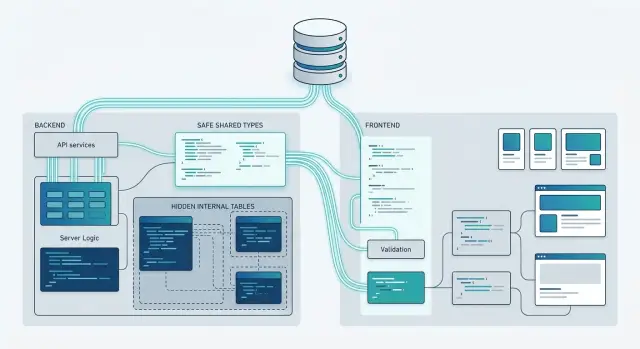
Table of Contents
Why this gets messy fast
Type generation feels clean on day one. You point a tool at the database, get types for free, and both sides of the app agree on names and field shapes. For a small team, that saves real time.
The mess starts when "what the database stores" becomes "what the UI thinks the product is." A table usually contains fields that exist for storage and backend work, not for the screen itself. Think audit timestamps, soft-delete flags, join IDs, internal status codes, or migration leftovers. The database needs those. The user interface usually does not.
Once front-end code imports raw table types, developers start building against column names instead of product concepts. An orders page might read deleted_at, status_code, warehouse_id, and updated_by because the generated type exposes them. Now the screen knows details it should never care about.
That is where frontend backend contracts get shaky. A backend developer renames a column, splits one field into two, or moves data into a related table. The product behavior may stay the same, but the screen still breaks because it depended on storage details, not on a response model made for the UI.
This problem spreads quietly. One component imports the table type. Then a form reuses it. Then tests, filters, client caches, and helper functions do the same. After a few months, a simple schema cleanup turns into a wide front-end refactor.
Generated types are not bad. They help a lot inside the backend, in data access code, and sometimes between internal services. Trouble starts when database schema to client code becomes a direct pipe with no boundary in between.
A good rule is simple: if a field exists because of how you store data, keep it on the server. If a field exists because the user needs it, expose it through an API shape the front end can trust. That extra step feels slower at first, but it prevents small schema changes from breaking half the product later.
What shared types do well
Shared types work best when the backend and frontend already speak almost the same language. In a database schema to client code setup, that often means simple CRUD screens, admin panels, and internal tools where a record on the server looks a lot like the record in the UI.
The first win is sync. If the backend renames order_total to total_amount, the client does not quietly keep using the old field for weeks. Type checks fail early, and the team fixes the mismatch before users see a broken page.
That matters more than it sounds. Small rename errors are boring, but they waste hours. Shared types turn them into fast, obvious compiler errors instead of support tickets.
They also cut down on copy-paste model files. Without a shared source, teams often keep near-identical definitions in three places: database models, API models, and frontend interfaces. Those files drift. One adds a nullable field, another forgets it, and now the form, table, and API all disagree in slightly different ways.
For a small team, this speed-up is real. One person can change a field, regenerate types, and follow the errors until the app is consistent again. That is often faster than updating hand-written models across services and hoping nothing got missed.
A simple case makes the benefit clear:
- The backend adds a new
statusfield to orders. - The generated client types pick it up right away.
- The frontend now knows
statusexists and what values it can hold. - The UI can show the field in a table or form without guessing.
This also makes everyday work less messy. Editors can suggest the right field names, forms can use the right value types, and API calls become easier to trust.
Shared types are especially good when the same people own both sides of the app. Startups often fit that pattern. When the product is still simple and the team is small, shared types remove friction and keep the work moving.
Used in that narrow space, they are practical and boring in the best way.
Where database types leak too much
When you push database schema to client code without a filter, the UI often gets fields it should never touch. That looks efficient for a week or two. Then forms, screens, and tests start depending on storage details that were only meant for the server.
A common leak is internal IDs. The client may need a public reference to load or link a record, but it usually should not edit raw primary keys, tenant IDs, foreign keys, or row version fields. Once those appear in client types, someone will put them in a form state object, send them back on update, and treat them like user input. That is how accidental privilege bugs start.
Audit fields leak just as often. A profile edit screen does not need created_at, updated_at, deleted_at, or created_by. Those fields are useful for logs, support tools, and admin views. In normal product screens, they add noise and tempt people to build UI around data that should stay read only.
Join tables are another trap. A screen might show that a user belongs to three teams, but the UI should not need to know about user_team_memberships or whether the database stores that link in one table or two. The same goes for storage enums. If the database stores status = archived_soft, that does not mean the product should show "archived_soft" on a button or in a filter menu.
Names cause quiet damage too. Database names are often short, old, or shaped by migration history. A column called cust_name might make sense in SQL. It is a bad label in a form. When screen text starts following table and column names, the product inherits every odd choice the database made years ago.
A better rule is simple: export types that match what the client can read and write, not what the database happens to store. Keep server models close to the schema. Keep client models close to the user action. Those are not the same thing, and treating them as the same thing usually creates extra work later.
Choose the boundary on purpose
The trouble with database schema to client code is rarely the generator itself. Teams get into trouble when they export the wrong shape too far. A table model can stay useful on the server and still be a bad contract for the browser.
Keep database models inside server code. They often include fields the UI should not know about, like internal flags, foreign keys, audit columns, soft-delete markers, or pricing fields that only finance staff should see. Once front-end code starts depending on those fields, every schema change turns into a product change.
A cleaner split usually looks like this:
- Database models describe how data lives in storage.
- API response models describe what one endpoint returns.
- View models describe what one screen needs to render.
- Mapping code translates one layer into the next.
API response models should match a use case, not a table. An orders endpoint for a customer dashboard may need order number, status, total, and a short shipping summary. The same order in an admin screen may need refund state, risk checks, and internal notes. One shared type for both screens sounds tidy, but it pushes extra fields everywhere and invites accidental coupling.
View models can go even further. A screen may need canCancel, statusLabel, or isLate, even if none of those exist in the database. That is normal. The UI works better when it reads simple, ready-to-use data instead of rebuilding business rules in five components.
Put the mapping in one clear place. A service, controller, or adapter file works fine. What matters is consistency. When a team spreads mapping across SQL queries, API handlers, React components, and helper utilities, nobody knows where the contract really lives.
This extra step feels slower at first. In practice, it saves time. You can rename columns, split tables, or change internal logic without breaking the front end. For startups and small teams, that freedom matters more than saving ten minutes with a generated type you will regret next month.
Shared types still help, but only when they cross a boundary on purpose. Export the contract you want other code to trust, not the storage details you happen to have today.
How to set up a safer type flow
When teams move from database schema to client code, the safest path starts outside the database. Start with the user action. Ask what the screen needs to send and what it needs back. "Create account", "pay invoice", and "load order history" each need their own shapes. A table rarely matches them cleanly.
Define request and response types first. Keep them small and written in product language. If a screen asks for "email" and "password", do not export every field from the users table. If the UI shows "orderStatus", do not make it depend on raw columns like paid_at, refund_code, or internal flags. The contract should describe the feature, not the storage.
Generate database types, but keep them on the server. They help query code, inserts, and migrations stay honest. They also make refactors safer when a column type changes. Frontend code should not import them. Once the client knows table names and nullable edge cases, it starts depending on details you may want to change next month.
Small mappers fix most of this. Read from the database into a server type, then map that result into an API model. Write the mapping by hand. It takes a few extra lines, but those lines force clear decisions.
A simple flow looks like this:
- UI sends a request type based on the user action
- Server validates it and calls database code with server-only types
- Server maps table rows into response types for the client
- Frontend imports only those request and response types
This setup keeps each layer honest. The database can store five columns to support one status, while the client only sees status: "paid" | "pending" | "failed". That is easier to use and much safer to change.
Names matter more than many teams think. Export types that match how the product talks: OrderSummary, CheckoutRequest, ProfileCard. Avoid names like orders_row or public_users_select in client code. Those names leak internals and train the frontend team to think like the database.
If you need one rule, use this one: database types are for persistence, API types are for behavior. Keep that split, and shared types help instead of locking your app to yesterday's schema.
A simple example with orders
An orders table often holds more than a customer should ever see. It may store a status code, separate tax fields, an internal note for support, fraud flags, warehouse data, and a few timestamps. That is fine for storage. It is a bad shape for a customer screen.
Say the table has fields like status_code, subtotal_cents, tax_amount_cents, delivery_eta, and internal_note. The customer page usually needs far less. It needs the final total, a human status like "Shipped", and the expected delivery date.
If you push types straight from database schema to client code, the front end gets every field whether it needs it or not. Someone will use status_code directly. Someone else will show a raw tax field because it is already there. A month later, the backend changes how tax gets stored or adds a new status code, and the screen now depends on internals it should never have known about.
A better API response might look like this:
total: 42.50status: "Out for delivery"deliveryDate: "2026-04-14"
That response does a few useful things. It hides internal_note completely. It turns a code like 4 or out_for_delivery into plain text. It also combines subtotal and tax into one number the customer can understand without extra math in the browser.
This matters even if you like shared types. Shared types work best when they describe the boundary between systems, not the database itself. The client type should match the screen. If the screen never shows tax breakdowns or internal comments, those fields do not belong in the client model.
The same order can have different shapes for different jobs. A support dashboard may need internal_note. A finance export may need every tax field. A customer app does not. One table can feed all three, but each API response should carry only what that user and that screen need.
That small step keeps frontend backend contracts stable. It also gives the backend room to rename columns, split fields, or change status logic without dragging the UI through every storage change.
Mistakes teams repeat
The trouble with database schema to client code starts when a team treats the database model as the product model. It feels fast at first. One package, one source of truth, no mapping code. Then the browser starts importing ORM types, and now front-end code knows about internal flags, join tables, soft-delete fields, and column names that should stay private.
A common pattern is the "one giant type" problem. Teams use the same type for read screens, form writes, and admin tools. That sounds tidy, but those jobs want different shapes. A read model may include computed fields. A write model should leave out server-owned values. An admin model may expose fields that normal users must never see. One shared type turns all three into a compromise, and compromises age badly.
Another mistake shows up in tests. A front-end test starts asserting on created_at, customer_id, or is_deleted because those names came straight from the database or ORM. A few months later, the back-end renames a column or splits one table into two, and UI tests fail even though the product behavior did not change. The test was checking storage details, not user-facing behavior.
Large refactors make this worse. Teams often skip versioned API types because they want to move fast. Then old clients and new clients depend on the same unstable shape, and every change turns into a coordinated release. A small rename can force updates across mobile, web, admin, and internal tools at the same time.
A safer habit is simple:
- Keep database types on the server.
- Define API response models for what clients should see.
- Use separate input types for create and update actions.
- Version API types when a refactor changes meaning, not just field names.
Yes, this adds a little code. It also gives you room to rename a column, hide an internal enum, or split a table without forcing the front end to relearn your schema. Teams that do this early spend less time fixing avoidable breakage later.
Quick checks before you export a type
When a type moves from the database schema to client code, treat that move like a product decision, not a shortcut. A field can be valid in storage and still be wrong for the UI.
Start with the plainest test: would this field make sense to a user? If the screen shows an order, "status" probably makes sense. "deleted_at", "internal_score", or "last_recalculated_by_job" usually do not. Frontend code should describe what the interface needs, not carry every column just because it exists.
A second test is more practical. If someone renamed a column tomorrow, would the screen break for no good reason? If the answer is yes, the UI depends on storage details too closely. That is a warning sign. The screen should depend on an API model that changes only when the user-facing behavior changes.
A short review catches most bad exports:
- Remove fields that users never see or act on.
- Keep out secrets, audit data, and internal flags.
- Check whether a rename in the schema would force a frontend change.
- Ask whether each field still makes sense if you never mention tables or columns.
That last check is stricter than it sounds. Try explaining every field to a designer, support agent, or product manager. If you have to say "this comes from the join table" or "the database needs it for sync," the field probably belongs behind the API, not in the client type.
A small example makes this obvious. Say the database record for an order includes fraud_review_state, payment_retry_count, archived_by, and updated_at. The customer screen may only need orderNumber, status, total, and canCancel. Exporting the full record feels fast on day one. A month later, frontend code starts branching on internal flags, and now cleanup gets expensive.
Shared types work best when they describe stable meaning. They cause trouble when they expose storage choices. If a type reads like a database row, stop and trim it before it spreads.
What to do next
Start with a small audit. Most teams already have more shared types than they think, and a few of them probably came from the database without anyone making that choice on purpose.
Make a short list of every type your client imports today. Next to each one, note where it came from: a table definition, an ORM model, a hand-written API type, or a mapper built for one screen.
That simple pass usually shows the real problem. If a front-end page depends on column names, nullable fields, join shapes, or internal status values, the boundary is too low. The client is reading implementation details, not a product contract.
A practical next step is to test one screen instead of changing everything at once:
- Pick one screen with a few reads and one write
- Replace table or ORM-based imports with API response models made for that screen
- Add a small mapping layer on the server
- Compare the result after one normal change request
The comparison is usually clear. With API-first types, the front end changes less when the schema changes. Reviews get easier too, because people can discuss what the client should receive instead of what the database happens to store.
If you work on a team that moved from database schema to client code years ago, do not try to fix the whole stack in one pass. Move screen by screen. Keep both patterns running for a while, then remove the shared database types when nobody imports them anymore.
Some teams need an outside opinion because this boundary sits between product, backend, and frontend work. Oleg's Fractional CTO advisory can review the architecture, point out where shared types still make sense, and help you set cleaner contracts without pushing a large rewrite.
A good result is simple: the client imports types that describe the UI and API, not the tables behind them.


