SAML rollout checklist for a safe enterprise cutover
Use this SAML rollout checklist to test tenants, keep a fallback login, verify attributes, and cut over your first enterprise customer safely.
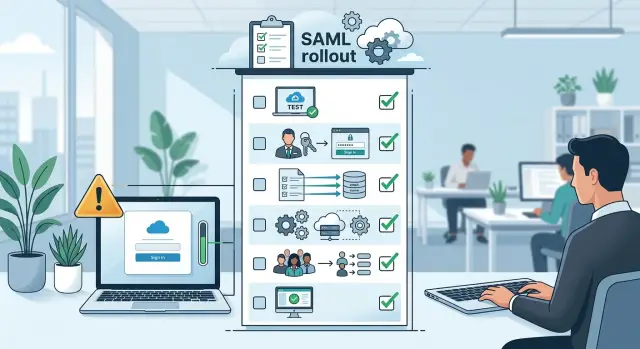
Table of Contents
Why the first SAML cutover goes wrong
Most first cutovers fail for ordinary reasons, not obscure SAML bugs. Your first enterprise customer expects login to work on day one, and they read login trouble as a trust problem. If the first few users get blocked, the customer notices fast.
A single mapping mistake can block an entire account. Your app might expect an email address but receive an employee ID. The NameID format might not match your user records. In both cases, users can authenticate successfully and still fail to get into the product. That is why attribute mapping is part of access control, not admin paperwork.
A common failure looks tiny at first. The customer's identity provider sends "[email protected]", but your app already knows that user as "[email protected]" from an older invite. SAML works. The match fails. The user lands in a dead end. Repeat that across a tenant and your support queue fills up in minutes.
Teams also get burned because they test with one helpful admin and assume everyone else will behave the same way. Real accounts are messier. Some users have aliases. Some have missing fields. Some belong to groups nobody mentioned during setup. A configuration that looks perfect for one admin can fail for half the company.
The pressure builds quickly because SSO failures pile up at the same time. Customer IT says the assertion looks correct. Your support team sees failed provisioning or bad role assignment. End users only know they cannot log in, and they all report it at once.
The fix is often simple. The recovery path matters more. Before you flip the switch, keep a tested fallback login for a small admin group, decide who can disable SSO for that tenant, and write down the rollback step in plain language. If the first morning goes badly, that recovery path can save the account.
What to prepare before setup
Most SAML problems start before anyone opens the admin panel. A safe cutover begins with a few decisions on paper, and those decisions matter more than the actual clicks.
Create a separate test tenant before you touch production. Make it look as close to the real customer account as you can. Use the same roles, product features, and a few realistic users. If the customer has managers, regular staff, and admins, mirror that shape. A test tenant with one fake admin tells you almost nothing.
Keep one owner account outside SAML. This is your break-glass login if the identity provider sends the wrong claim, a certificate fails, or a role mapping blocks every admin. Protect that account with a strong password and MFA, and decide who can use it before go-live. Do not share it across the whole team.
You also need a customer admin who can change settings in their identity provider during testing. If you only have a sales contact, you can lose hours waiting for someone else to fix a claim or resend metadata.
Before the first config step, gather the basics: the IdP metadata file or metadata URL, the SSO URL, the entity ID, signing certificate details, a direct contact for the customer's IdP admin, the login field your app will trust, and the role or group values your app expects.
Be very clear about attribute mapping. Decide which field identifies the user, which fields are optional, and which values grant admin access. Email is common, but it is not always the best unique identifier. If a customer changes email addresses often, match on a stable internal ID and treat email as profile data.
This part feels boring. It prevents the worst kind of launch: one where login works for a tester and fails for the people who actually need access.
How to build a test tenant that mirrors reality
A clean demo tenant is not enough. Your test tenant should copy the parts of the customer's setup that can break access: roles, group rules, default permissions, domain restrictions, and any rule that decides what users can see after login.
If the customer has admins, managers, regular staff, and contractors, create the same mix. Do not test with five admin accounts and call it done. SAML issues often hide in lower-permission roles, where one missing attribute leaves the user signed in but blocked from the tools they need.
Use sample users that resemble the real team, not just internal test accounts. In practice, four account types catch most problems: a brand new user who should get an account on first login, an existing user with a local account already in the system, a limited user with narrow permissions, and an admin who should see everything.
Run new-user and existing-user flows as separate tests. New users tell you whether account creation, default roles, and profile fields work. Existing users tell you whether account matching works, especially if your app matches on email, employee ID, or another mapped field. Teams often test only one path and find out too late that returning users cannot sign in.
Turn on clear sign-in logs before you test anything. Support should be able to see the SAML request, assertion timing, mapped attributes, group values, the login path selected by the app, and the exact failure reason. During a cutover, that detail matters more than most teams expect.
One small habit helps more than it should: name test users by purpose. "new-sales-rep" is easier to debug than "user3". When something fails, your team can tell quickly whether the problem is provisioning, role mapping, or account linking.
A good test tenant catches boring mistakes first. Those boring mistakes are usually the ones that lock out the first enterprise account.
How to run the rollout step by step
Turn on SAML for one customer account only. Keep every other account on the normal login flow for now. If something breaks, one team feels it, not your whole user base.
Start with a tiny pilot group. Two or three users is enough if they cover different access levels, such as one admin and one regular user. Avoid the busiest people on the customer side. Pick users who will actually report what they see.
Run your checks in a fixed order. First, test login and confirm each user lands in the correct account. Then test logout and make sure the session really ends. After that, check the role each user gets and confirm team or group access matches your app rules. That order matters. If login works but role assignment fails, the customer may think SSO is fine when users still cannot do their jobs.
After your team runs the pilot, ask the customer admin to repeat the same flow from their side. They often catch issues that never appear in your test, such as a policy rule in their identity provider, a missing group, or a user assigned to the wrong app.
Do not schedule the full rollout after one clean test. Run the pilot twice. Use a fresh browser session the second time, and if possible test on another day. The first pass shows that the setup can work. The second pass shows that it still works when cookies, sessions, and cached settings are no longer helping you.
Only then should you set a date for the wider rollout. Tell the customer which users will move first, who to contact if something looks wrong, and how long your team will watch sign-ins after go-live. Quiet rollouts usually start with a small, predictable first step.
Attribute mapping checks to do before cutover
Most cutovers fail on small identity mismatches, not on the SSO connection itself. A user signs in, the IdP sends claims, and your app cannot match that person to the right account or role.
Pick one field as the user identifier and keep it stable. If the customer can send an immutable employee ID, use that. If you must use email, decide that up front and do not mix email for some users with employee ID for others.
Email sounds simple, but it causes plenty of trouble. Decide whether your app lowercases email before matching, trims extra spaces, and treats aliases as the same person or as different users. Write those rules down before testing, or you will get false passes in the test tenant and failed logins on cutover day.
Group mapping needs the same care. If the IdP sends Admin and your app expects admin, decide who will change it. Exact names matter. A single letter or case mismatch can turn an admin into a basic user or block access entirely.
Before cutover, confirm four things: the exact identifier claim your app will trust, the email normalization rules on both sides, every group name in the role map, and what your app does when a claim is empty or missing.
Missing claims need a clear rule. Do not improvise later. If the group claim is missing, will you deny access, assign the lowest role, or keep the last known role? Denying access is often safer, but only if the error message tells the customer what broke.
Test renamed users before go-live. Someone may have changed their last name, moved to a new domain, or received a new email after a merger. If your system matches on email only, that person may look like a new user instead of an existing one.
Also test duplicate email edge cases. Large companies sometimes reuse shared inboxes, keep aliases alive for years, or have overlapping identities across subsidiaries. You need at least two awkward test users, not just one clean happy-path account.
If you catch these issues in a test tenant, cutover day stays boring. That is the goal.
How to keep a fallback login without creating a mess
A fallback login should be boring too. If SAML breaks on cutover day, you want one clean way back in, not five old admin accounts nobody remembers.
Start with a local admin account that does not depend on SSO. Keep it active, store the credentials in the same secure place your team uses for other production secrets, and make sure the account can still reach the admin area after SAML is turned on. Do not use a shared personal inbox or a former contractor's email for this account. That mistake shows up more often than people admit.
Keep backup access limited to named people. In most teams, that means one person on your side and one person on the customer side. If ten people can bypass SSO, the fallback path stops being a safety net and becomes a second login system you now have to manage.
The rule can stay simple: keep one local admin account for emergency access, give backup access to a short named list, test the local login before go-live, and remove extra legacy accounts after the cutover settles.
Test the backup login before the real switch. Open a private browser window, use the exact login page users will hit, and confirm you can still sign in, reach settings, and disable SAML if needed. Do this a day or two before cutover, not during the incident.
Write the rollback steps in plain language. Skip internal shorthand. A tired engineer at 6:30 a.m. should be able to read the steps and act fast. For example: sign in with the local admin account, turn off SAML enforcement, confirm email-password login works, notify the customer admin, and then retry the SSO setup.
If you use a checklist, put an owner's name next to this step. Otherwise teams assume somebody tested it, and nobody did.
Mistakes that lock people out
The fastest way to create a bad first impression is to enforce SAML for every user at the same time. If one setting is wrong, nobody gets in, including your own team. Keep a small break-glass path open for admins and turn on SAML for a limited customer group first.
Another common mistake happens on first login. Your app sees a SAML response, fails to match it to the existing account, and creates a second user instead. The customer signs in successfully, but their data, role, and history seem to be gone because they landed in a fresh account. This usually starts with a mismatch in email format, NameID choice, or letter case.
You need one clear rule for account linking, and you need to test it before cutover. If your product already has local users, check what happens when the IdP sends [email protected] for a user who signed up as [email protected] or under a different username months ago. A quiet duplicate is often worse than a hard failure.
Group mapping causes a different kind of lockout. Teams assume the IdP group name will match what the app expects. Then the assertion sends Admins, while the app looks for admin, or someone adds a space and role assignment fails. The user signs in but gets no access, which feels exactly like a login failure.
Certificate and time issues are easy to miss because everything can look fine during setup. Then the certificate expires, the new one is not active yet, or one server clock drifts by a few minutes. SAML is strict about time windows. A small clock problem can reject every valid login on cutover morning.
Support teams get stuck when the product hides all the useful details. Users should see a plain error message. Support should see the request or trace ID, issuer and audience values, the received NameID and mapped attributes, plus certificate status and timestamps. If support only gets "login failed," they waste time guessing. If they can see the exact mismatch, they can usually fix the issue in minutes.
These are account access risks, not minor setup details. One forced switch, one bad mapping rule, or one expired certificate can lock out the first enterprise account before the customer finishes the kickoff call.
A simple first customer scenario
A safer first rollout starts small. Picture a 60-person company that wants SSO, but only for its support team first. Eight people is enough to test real work and small enough that one bad setting will not lock out the whole company.
Their IT admin sends the IdP metadata and the group names they expect to use, such as "Support-Agent" and "Support-Manager." You set up a test tenant that matches production as closely as possible: same roles, same login rules, same session timing, and one local admin account kept outside SSO until the cutover is done.
Two pilot users try the login flow that afternoon. The first signs in without trouble and lands in the right workspace. The second gets in too, but the role is wrong. The account should map to manager permissions, yet the app assigns the basic agent role instead.
That usually points to attribute mapping, not user error. You inspect the SAML assertion, compare the incoming group value with your rule, and spot the issue: the customer sends "Support Managers" while your rule expects "Support-Manager." One small name mismatch is enough to put someone in the wrong role.
You fix the group rule in the test tenant and run the same login again. This time the second pilot user gets the correct permissions. You also test the local fallback login once more, just to make sure an admin can still get in if the identity provider has trouble the next morning.
Only after those checks pass do you schedule the rollout. The next day, the customer enables SSO for the support team, not for all 60 employees. That first wave goes smoothly because the risky part already happened in a controlled test.
Quick checks for cutover day
Cutover day is a bad time for guesswork. If one setting changed overnight, or one admin is away, a clean launch can turn into a support queue fast.
A few hours before the switch, do your checks in the real environment, not in screenshots or old notes. Ask two or three pilot users to sign in that day. They should get in on the first try, with no manual profile edits, no hand-set roles, and no special bypass from your team.
Test the fallback admin login yourself. Open a private browser window and make sure at least one non-SSO admin account still works end to end. If the SAML config fails, this account is your way back in.
Compare role mappings against the live IdP assertion, not the customer's description of it. Group names, email format, first name, last name, and role values often differ in small ways that break access.
Confirm who is on point during the switch. One person from your side and one from the customer should stay reachable until the first real users are in and basic actions work. Put the rollback steps in one shared note and keep them short: who disables SSO enforcement, where the setting lives, which account can still log in, and how you will tell users to retry.
If any one of these checks fails, delay the cutover. That is usually the cheaper choice.
One last detail matters here: test with fresh sessions. Old browser cookies can hide real problems. If the pilot group can sign in from a clean browser, reach the app, and land with the right roles, you are in good shape to proceed.
What to do right after go-live
The cutover is not done when the first person signs in. The first 24 hours tell you whether the setup works for real users, real roles, and real edge cases.
Start with failed sign-ins. Watch your auth logs, support inbox, and any alerting you have for login errors. A small spike is normal. Repeated failures from the same company usually point to one of three issues: a bad audience value, a certificate problem, or a user who exists in the IdP but does not match your expected email or NameID format.
Keep the review simple. Count failed sign-ins by user and by error type. Ask the customer admin to test each important role, not just basic access. Confirm JIT provisioning or account matching worked as expected. Then check that logout and session renewal behave normally.
Role access needs a direct human check. Ask the customer admin to log in as an admin, a normal user, and any restricted role that matters for billing, approvals, or settings. One common problem is that authentication works, but the user lands with the wrong permissions because a group claim maps incorrectly.
Do not rush to remove the fallback login. Leave it in place until the customer has used SSO without trouble for a few business days. Keep that fallback narrow and controlled, log every use, and make sure the customer knows when it is acceptable to use it.
If nobody touches the fallback and sign-ins stay clean, remove it on purpose. Pick a date, confirm the customer agrees, and update your runbook. Teams create problems when they leave emergency access around forever and forget who still has it.
Write down every issue while it is still fresh. Record the exact error, who saw it, how you fixed it, and whether the fix belongs in your default checklist. A simple note like "customer sent groups as display names, not IDs" can save hours on the next rollout.
If your team wants an outside review before the next launch, Oleg Sotnikov at oleg.is helps startups and smaller companies check rollout plans, fallback paths, and identity mapping before they put another customer live.
Frequently Asked Questions
What usually goes wrong on the first SAML cutover?
Most failures come from identity mismatches, not broken SAML itself. Users authenticate, but your app cannot match them to the right account or role because email, NameID, or group values do not line up with what your product expects.
Do I really need a test tenant first?
Start in a separate test tenant that mirrors the real customer setup. Copy roles, permission rules, domain restrictions, and a mix of user types so you can catch account matching and role problems before anyone touches production.
What should I use as the user identifier?
Pick one stable identifier and stick to it for everyone. If the customer can send an employee ID that never changes, that is often safer than email. If you use email, define your matching rules up front, including lowercase handling, spaces, and aliases.
How many users should I include in the pilot?
A tiny pilot works if it covers different access levels. Start with two or three people, such as one admin and one regular user, then run the same flow twice in fresh sessions so cookies do not hide problems.
What does a safe fallback login look like?
Keep one local admin account outside SSO and give access to a short named group. Test that login before go-live in a private browser window, and make sure that account can still disable SAML if the rollout goes sideways.
How do I avoid duplicate accounts on first login?
Set one account-linking rule and test it with existing users before cutover. Check edge cases like [email protected] versus [email protected], old invites, renamed users, and aliases so your app does not create a second account by mistake.
What group mapping checks matter most?
Compare the exact group values from the IdP with the values your app expects. Small differences like Admin versus admin, extra spaces, or display names instead of IDs can give users the wrong role or block access after login.
What should my team log during testing and cutover?
Support should see more than login failed. Log the request or trace ID, issuer, audience, timestamps, NameID, mapped attributes, group values, certificate status, and the exact failure reason so your team can fix the problem fast.
When should I postpone the cutover?
Delay it if any live check fails on the same day. If pilot users cannot sign in from a clean browser, roles need manual fixes, the fallback admin login fails, or nobody from the customer can change IdP settings during the switch, wait and fix that first.
What should I check right after go-live?
Watch failed sign-ins, error types, and role assignment during the first day. Ask the customer to test every role that matters, including admins and restricted users, and keep the fallback login until sign-ins stay stable for a few business days.


