Safe bulk actions in admin panels without costly mistakes
Learn how safe bulk actions in admin panels use previews, dry runs, rate limits, and undo paths to stop costly mistakes before records change.
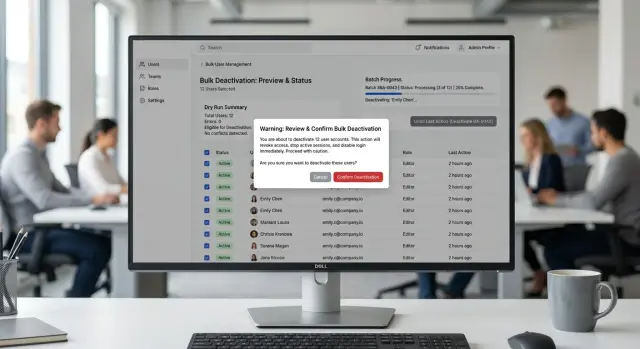
Table of Contents
Why bulk actions fail so easily
Bulk actions go wrong for a simple reason: a small mistake scales instantly.
When someone edits one record by hand, they usually spot the problem on the next screen. When they run the same change across 8,000 records, the error spreads before anyone notices. The filter is often the first trap. A user thinks they selected "inactive customers from last month," but one missed condition turns that into "all customers." The page still looks normal. Then the update runs, and every row gets touched.
Routine work makes this worse. People move faster when a task feels familiar, and those fast clicks remove the pause where doubt usually helps. A button used every day starts to feel harmless, even when it can rewrite prices, statuses, permissions, or billing flags.
Labels add risk too. "Apply" or "Update selected" sounds minor. It doesn't tell people whether the action will change 12 records or 12,000, whether it will overwrite existing values, or whether the change can be reversed. Short text saves space, but it also hides the cost of a bad click.
Most bulk-action errors don't come from careless users. They come from normal people doing boring work under time pressure.
Cleanup is usually the worst part. Reverting bad data is rarely as simple as running the opposite command. Teams end up comparing exports, checking logs, asking support what changed, restoring backups, or writing one-off scripts to repair records. A job that took 10 seconds to start can burn half a day.
The same problems show up again and again: filters that look narrower than they are, familiar buttons that invite autopilot, vague action names, and changes that overwrite old values with no easy recovery path. Good safety design isn't about blocking people. It's about slowing the risky moment just enough for them to catch the obvious mistake before the database obeys.
What people need before they click
The last screen before confirmation has to tell the truth in plain language. If people need to guess what will happen, many of them will guess wrong.
That screen should show the action, the scope, and the record count together. A user should see something like "Archive 1,248 invoices in the filtered list" or "Disable 87 user accounts selected on this page," not a vague line like "Apply changes to selected items."
The verb matters more than many teams expect. Words like "archive," "refund," "disable," and "delete" leave little room for doubt. Words like "process," "update," or "run" sound tidy in a spec, but they hide risk in the product.
The confirmation should also make the scope explicit. If the action affects a filtered result, say that. If it affects only checked rows, say that too. People often confuse "all results" with "this page," and that mistake can affect thousands of records.
A good confirmation screen answers a few basic questions at once: what exactly will happen, how many records will change, where the selection came from, which rows will be skipped, and what happens right after the change. Skipped rows should never appear as a surprise after the job starts. If 124 records will fail because they're locked, already refunded, or missing data, say so before the click.
Risk should look like risk. Deleting customers, refunding payments, or disabling live accounts should not use the same quiet style as adding a tag or an internal note. Stronger color, firmer wording, and a stricter confirmation step make sense for destructive actions.
A small preview often works better than a long warning. Show a few sample rows, the first and last affected IDs, or a short summary such as "32 active subscriptions will move to canceled." People catch mistakes faster when they can see real records instead of abstract text.
Build the flow step by step
Start with selection, not the action button. People need to see exactly what they picked and how many rows match the filter before they do anything else. If the list changes with search, tags, or date filters, keep the count visible the whole time.
That count matters more than many teams think. "12 selected" feels safe. "12,418 matched" should make anyone pause. Good admin panel design makes that difference hard to miss.
Before any write happens, open a preview. Show a few real sample records, the total number of rows that will change, and the exact field values before and after the action. If the action affects only some records, explain why the rest will be skipped.
Then run a dry run with no writes. This is where you catch validation problems, missing permissions, locked records, and odd edge cases. The results should be blunt and readable. "247 records will fail because status is already archived" is much better than a generic warning.
After that, ask for final confirmation with text that names the action clearly. "Change 12,418 customer records to Inactive" is much safer than "Confirm." If the action is risky, ask the user to type the action name or the record count. That extra friction is worth it.
Large changes should run in a background job, not in the browser request. Show progress with numbers people can trust: processed, skipped, failed, and remaining. If the job takes a while, let the user leave the page and come back to the same status.
Finish with an audit entry every time. Record who ran the action, when they ran it, what filters they used, and what changed. When support gets a complaint two days later, that log saves hours.
This flow takes more work, but it's the difference between a safe bulk tool and one bad click that turns into a cleanup project.
A simple example: changing customer statuses
A support lead selects 3,200 customer accounts marked inactive and wants to move them to archived. It sounds like a quick cleanup task. In practice, one rushed click can hide accounts that finance or support still needs to see.
The preview should do more than repeat the total count. It should show a summary of the change, a few sample rows, and any conflicts the system already knows about. In this case, the preview shows that 180 of those accounts still have open invoices.
That changes the decision right away. Those 180 accounts probably should stay where they are until the billing team closes them, or at least reviews them first.
A dry run adds another layer of safety. It checks the same rules as the real action but doesn't write anything to the database. During that check, the system flags 25 rows with missing status rules, perhaps because an old import skipped a field or a custom account type never got mapped correctly.
Now the support lead can act with context instead of guesswork. They can remove the invoiced accounts, send the 25 broken rows for cleanup, or cancel the job and fix the rules first. That small pause is what good admin tooling looks like.
If they continue, the system should process the update in small batches, such as 100 or 200 rows at a time. After each batch, it should log the run ID, the row IDs it changed, the old status, the new status, and whether the batch finished cleanly. If batch 8 fails, the team knows exactly what changed and what didn't.
Undo matters just as much. If someone later finds that a few accounts should not have moved, undo should restore only the rows that this run actually changed. It should not touch rows another teammate edited later, and it should not try to roll back the 25 rows that failed the dry run.
Predictable bulk actions follow the same pattern every time: preview first, test the rules, apply changes in controlled batches, and tie undo to one specific run.
Use smaller batches and rate limits
Never try to change everything in one write. Split the job into small batches, such as 100 or 500 records at a time. If batch 7 fails, you know where to look, and you don't leave 50,000 records in a murky half-finished state.
The right batch size depends on the risk. A tag update can move quickly. Deletes, refunds, credits, invoice changes, and permission updates should move much slower, even if the system could go faster. A rushed money action can become a finance problem in seconds.
Rate limits protect the database, external APIs, and the people using the rest of the admin panel. If one bulk job consumes all write capacity, support staff can't open customer pages, save notes, or fix mistakes while the job is running.
A few simple rules help a lot. Process rows in chunks. Add a short wait between chunks for high-risk actions. Pause the job when error rates jump past a set threshold. Retry only the failed chunk, not the whole run.
That pause matters. If errors jump from 1 in 1,000 to 1 in 20, the system should stop and ask for a human check. Quietly pushing through is how a small issue turns into a long cleanup.
Staff should also be able to stop a bulk job without corrupting data. Each batch needs a clear start and finish, with progress saved after every completed chunk. "Stop after this batch" is usually safer than "stop right now."
Show progress in the panel, but keep the rest of the panel usable. People still need search, filters, notes, and record pages while the job runs in the background. A frozen screen makes people guess, and guessing leads to bad calls.
Plan the undo path before launch
A bulk action without undo is a bet that nobody will make a rushed click. That bet fails all the time.
If one action can touch 5,000 rows, the system should keep enough detail to put those rows back the way they were. Store the before and after value for every changed row, not just a summary like "5,000 records updated." Summaries help with reporting. They don't help when support needs to restore one customer account or when half the batch changed the wrong field.
Set a clear undo window and put it where people can see it. "Undo available for 30 minutes" is plain and easy to trust. If the window depends on the action, say that before the user confirms. Hidden limits create support tickets and angry teammates.
Don't offer a revert button for actions you can't safely reverse. If a bulk action sends emails, triggers webhooks, or deletes data forever, say so plainly and don't pretend undo exists.
The audit log should read like normal language, not a database dump. It should tell support who ran the action, when they ran it, which filter they used, how many rows changed, and whether undo is still available. For example, "Sam changed 842 customer records at 2:14 PM using the filter 'plan = trial' and can undo the change until 2:44 PM" is clear in seconds.
Undo also needs real testing. Stop one batch halfway. Make a few rows fail because of permissions. Let another user edit some of the same records before revert starts. Undo logic often breaks on partial failures, and that's exactly where people need it most.
If undo can't restore every row, the system should say which rows were restored, which were skipped, and why. Clear recovery beats silent damage every time.
Mistakes teams keep making
Teams often design bulk actions around the database write instead of the person who has to click the button. That's why the flow looks fine in a demo and still causes damage in daily use.
One common mistake is hiding the true record count until the final modal. By then, many people are already in finish-this-task mode. If the action will touch 38 records, say 38 early. If a broad filter turns that into 3,842, show that number next to the action before anyone reaches the final step.
Button labels cause more trouble than they should. "Continue" and "Apply" don't tell anyone what will happen next. A safer button names the action directly, such as "Preview changes for 842 customers" or "Archive 12 invoices."
Another repeated mistake is running writes right away with no dry run. That turns every bulk edit into a bet. A preview should show which records will change, which ones will fail validation, and which fields will stay the same. Even a simple before-and-after view can stop a bad batch.
Crowded admin layouts create their own errors. Teams often squeeze search, filters, table controls, and bulk actions into one busy area. Then someone thinks they selected "Active customers" when the table still shows "All customers." Bulk tools work better when the scope stays visible and separate from everyday search.
Audit logs help after the mistake. They don't undo it. A log can tell you who changed 5,000 rows at 4:12 PM, but it can't restore the old values unless the team built that path on purpose. If the action changes live records, plan a real rollback or a timed undo.
A blunt test catches most of these problems. Show the record count before confirmation. Name the button with the exact action. Let people run a preview without writing data. Give support a way to reverse the change without manual database work. If any of that is missing, the feature is still too easy to misuse.
Checks before release
A bulk action isn't safe just because it works in staging. It's safe when a tired staff member can use it without guessing and when the system can recover from a bad run.
Start with a new staff account. If that person can't tell what will change within about 10 seconds, the screen is too vague. The action name, affected records, and result should be obvious from the first view.
Check the preview like a real user would. It should show the exact count of records that will change, what fields will change, and a few real sample rows so staff can catch an obvious mistake before they confirm.
Break a few rows on purpose. The job should skip bad rows, keep going when it can, and show a clear reason for each skipped row. "Failed" is not enough. "Skipped: missing customer ID" is useful.
Start a test run, then stop it halfway through. The system should pause safely, avoid duplicate updates, and leave a clear status so staff know what changed and what didn't.
Test recovery, not just success. If someone runs the wrong action, they should have a real way back: undo the last run, roll back from a snapshot, or replay a saved before-state.
The preview often matters more than teams think. A small table with five sample rows catches bad filters, wrong date ranges, and mixed-up environments faster than another paragraph of warning text.
Stopping safely matters too. If staff cancel a run and the system leaves half-written changes with no useful log, support teams spend hours cleaning up a mess that a simple pause-and-resume design could have avoided.
One last test is worth doing with someone outside the team. Ask them to explain the action out loud before they click. If they hesitate, rename the action, rewrite the preview, or slow the flow down.
What to do next
Start with the actions that can lock people out, change billing, delete data, or remove access. Those deserve attention first. If one mistake can trigger a support queue or a refund mess, move that action to the top of your list.
Don't try to rebuild every bulk tool at once. Pick one risky action and add three things: a preview, a dry run, and an undo path. That small change usually teaches more than a large redesign plan sitting in a document.
A sensible first pass is simple. Show exactly how many records will change. Show a few sample rows before the action runs. Let staff test the action without saving changes. Write a clear log entry with who did it and when. Give them a way to reverse the action when the result is wrong.
After that, put the flow in front of the people who use it under pressure. Support and operations staff are perfect for this. Ask them to do a real task, not a demo task. Watch where they pause, what they reread, and what they assume the button will do.
You'll usually find small problems that matter a lot. Maybe the preview hides an edge case. Maybe the action name is too vague. Maybe undo only works for part of the change. These are boring fixes, but they prevent expensive clicks.
Treat this as product work, not just backend work. The code matters, but the wording, order of steps, and error messages matter just as much. A calm flow can stop a bad decision before it reaches production.
If you need an outside review, Oleg Sotnikov at oleg.is works as a Fractional CTO and startup advisor. He helps small and mid-sized teams improve internal tools, rollback design, logging, infrastructure, and practical AI-driven development workflows without forcing a huge rewrite.
One well-designed bulk action can change how your team builds the next ten.
Frequently Asked Questions
What should a bulk action confirmation say?
Name the action, the exact scope, and the record count in one sentence. Text like Archive 1,248 invoices from the current filtered list leaves far less room for a bad click than Apply changes to selected items.
Why is a simple "Are you sure?" not enough?
Because it hides the real risk. Users need to see what will change, how many records the job will touch, and whether it affects checked rows, one page, or all filtered results.
What’s the difference between a preview and a dry run?
A preview shows what the system plans to change, often with sample rows and before-and-after values. A dry run goes further and checks rules, permissions, and validation without writing anything.
Should I update everything in one write?
No. Run large changes in background jobs and split them into small chunks so you can track progress, stop safely, and fix failures without guessing what changed.
How small should my batches be?
Start small and match the size to the risk. Around 100 to 500 rows per batch works well for many tools, but money changes, deletes, and permission updates should move slower.
When should I ask users to type a confirmation?
Use typed confirmation for actions that can lock people out, change billing, delete data, or affect a large number of records. That extra pause catches rushed mistakes better than another warning sentence.
What makes undo safe?
Store the before and after value for each changed row and tie undo to one run ID. Then the system can restore only the rows that this job changed and avoid overwriting later edits from another teammate.
What should the audit log include?
Record who ran the job, when they ran it, which filter or selection they used, how many rows changed, and whether undo still exists. Support can answer problems much faster when the log reads like plain language.
Can users stop a bulk job halfway through?
Yes, but stop after the current batch finishes. That keeps data consistent, saves progress cleanly, and tells staff exactly what completed and what still remains.
Which bulk actions should I improve first?
Fix the actions that can remove access, change billing, refund money, delete records, or edit permissions. Those mistakes spread fast and usually cost the most time to clean up.


