S3 event fan-out with queues and workers you can trace
S3 event fan-out gets easier when you send uploads to a queue and let workers handle each step. Learn a traceable setup that stays simple.
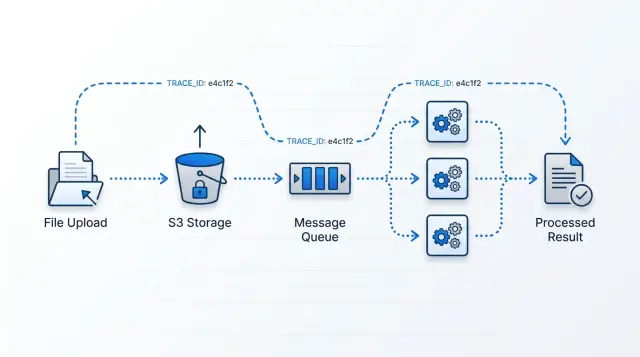
Table of Contents
Why direct S3 triggers get messy
Direct S3 triggers look clean when the flow is small. One upload arrives, a few functions run, and the diagram seems tidy. Real systems do not stay that neat for long.
A single PDF can trigger text extraction, preview generation, malware checks, and a database update. Each step has its own timeout, retry rules, logs, and failure modes. If one step runs twice, you can end up with duplicate records, double billing, or a file that looks partly processed.
Retries add another layer of confusion. They help with short outages, but they also bury the first failure. By the time someone checks the logs, they might see a timeout on the third attempt and miss the actual cause from the first one, such as bad metadata or a parsing error.
Then logging turns into the next headache. One upload can touch S3 events, queue metrics, worker logs, and database records. None of those tells the whole story on its own. A developer can burn 40 minutes switching tabs just to answer a basic question: did we process this file, skip it, or fail halfway through?
Support teams feel that pain too. A customer asks what happened to a file, and the team can only answer in fragments. Something triggered. Something retried. One step might have finished. The full path from upload to result is still missing.
That is why direct triggers rarely stay simple under real traffic. They are fine for demos. They get messy when you need clear ownership, fewer duplicates, and a way to follow one file without guessing.
The pattern that stays readable
A cleaner setup starts with one simple rule: when a file lands in S3, send one message to one intake queue.
Do not let the upload event decide the entire workflow. Keep the first step boring. Then let one intake worker read that message and decide what should happen next.
That worker can inspect the file type, size, source, or metadata and create only the jobs that make sense. A PDF might need text extraction and preview images. A CSV might need validation and import. An image might need resizing and moderation.
This keeps branching logic in one place. If the rules change later, you update the intake worker instead of hunting through several triggers.
After that, each follow-up job should do one thing. A worker that only extracts text is easy to retry. A worker that only makes thumbnails is easy to scale. A worker that tries to scan, convert, classify, and notify in one run usually becomes hard to reason about.
A simple mental model works well here: one upload, one parent record, and several child jobs.
Create the parent record as soon as the file enters the system. Every child job should carry the same parent ID, along with its own job ID and status. That gives you quick answers to the questions people actually ask: which upload started this work, which jobs finished, which one failed, and what should retry.
This structure also helps with duplicate protection. If S3 sends the same event twice, or a worker retries after a timeout, the system can check whether it already created child jobs for that parent ID.
You do not need a huge stack to do this well. A queue, an intake worker, a few focused workers, and a small job table are often enough. On paper, that can look slower than direct triggers. In practice, it is easier to trace, easier to test, and much easier to fix at 2 a.m.
What each part does
A clean upload pipeline has only a few moving parts, and each one has a narrow job.
S3 stores the file and emits one intake event. That event should mean one thing only: "a new file arrived." S3 should not act like a workflow engine. Once storage starts deciding downstream behavior, debugging gets harder.
The queue is the buffer. If 20 files arrive, workers keep up. If 20,000 files arrive, the queue holds the extra work instead of forcing every worker to scale at once. It also gives you a simple view of what is waiting, what is running, and what is stuck.
A router worker reads the intake event and creates the child jobs the file actually needs. One file may need "extract text," "make preview images," and "scan metadata." Another file type may need a different set. The router should stay light. It decides, records, and hands work off. It should not do heavy processing itself.
Task workers handle the real work, but each worker should focus on one job type. That rule sounds strict, yet it pays off quickly. A PDF text extractor fails in different ways than a thumbnail generator. If both jobs live in the same worker code, small changes start breaking unrelated tasks.
The job table is the shared memory for the whole pipeline. It stores status, error details, attempts, timestamps, and output paths. When someone asks, "What happened to this upload?" you should be able to check one record and see the path clearly: file received, jobs created, worker started, worker failed or finished, output written.
A small job table usually needs only the basics: the source file ID or S3 object path, the job type and current status, retry count, last error message, output location, and created and updated timestamps.
When these parts stay separate, each part stays boring. That is a good sign. Boring systems are easier to operate and cheaper to fix.
How the flow works
A good upload pipeline is mostly about discipline. Each file should follow one path, and each step should leave enough evidence behind that you can explain what happened later.
Start with the object name. Save the file under a path that means something to humans, not just machines. A name like incoming/2026/04/customer-481/invoice-8842.pdf is much easier to debug and clean up than a random string.
As soon as the upload lands, create one trace ID for that file. Use the same ID everywhere: in the job record, logs, queue messages, and output written later. If a customer asks, "What happened to my file?" that trace ID should answer the question quickly.
Keep the queue message small. Most messages need only the bucket name, object path, trace ID, and maybe one extra field such as file type or account ID. S3 already holds the file, so there is no reason to stuff the queue with heavy payloads.
A typical flow looks like this:
- S3 receives the upload, and the app creates a job record with status
queued. - The app sends a short message to the queue with the file location and trace ID.
- A worker claims the message, marks the job as
processing, and records the start time. - The worker reads the file from S3, does the work, and writes results to a result path.
- The worker updates the job to
doneorfailed, with error details if needed.
That status update matters more than many teams expect. Without it, people end up reading logs from three places just to learn whether a worker started, crashed, or finished. A tiny jobs table often saves more time than fancy automation.
Retries should stay quiet until they stop helping. If a worker hits a short network issue or a temporary API failure, let the queue retry it a few times. After retries run out, move the message to a dead letter queue and raise an alert.
That keeps noise down and makes real failures easier to spot. One upload, one trace ID, one job record, one clear outcome.
A simple PDF example
Imagine a customer uploads a PDF invoice to S3. The app creates a file record right away with a file ID, customer ID, and a status such as "processing." The upload event then creates separate jobs instead of asking one worker to do everything in one pass.
One job goes to a text worker. That worker opens the PDF, extracts the text, and stores it so the app can search it later. If someone searches for an invoice number or supplier name, the app can find the file quickly.
A second job goes to an image worker. It renders the first page as a preview image, which makes document lists and admin screens much easier to scan.
A third job goes to a validation worker. It checks simple facts: does the file open, is it really a PDF, and does it look like an invoice rather than a contract or a folder full of photos? You can keep this check simple at first by looking for invoice patterns such as totals, dates, line items, or vendor details.
The useful part is that these workers do not depend on each other. If preview generation is slow, text extraction can still finish. If validation fails, the app can still keep the text and preview while marking the document for review.
The app should mark the file as ready only when every required job reports back. A small status table is usually enough to track text, preview, validation, and the overall file state.
That last step matters. Do not mark an upload as finished because one worker succeeded. Mark it ready only when all expected results are present.
This pattern stays easy to reason about. If the preview worker breaks, you retry only that job. You do not reprocess the whole PDF.
How to trace one file from start to finish
Most teams make tracing harder than it needs to be. One file should carry one ID from the moment it lands in S3 until the last worker finishes.
Create that ID at upload time. Put it in the object's metadata, then copy the same value into every queue message created from that upload. If one PDF creates a text extraction job, a thumbnail job, and an indexing job, all three should still carry the same parent trace ID.
A simple format is enough, such as trace_01J8.... Fancy naming does not help. Consistency does.
Put the ID everywhere
If a worker logs ten lines for one job, all ten should include the trace ID. Do not rely on file names alone. Names change, users upload duplicates, and support teams should not have to guess which invoice.pdf caused the problem.
Each worker should also record a few timestamps in a small job store: when the job started, when a retry happened, when it failed, and when it finished. Those four points tell most of the story. You can see whether the job sat in the queue, crashed fast, or kept failing for 20 minutes.
Make one small status page
A small internal status page helps more than a pile of raw logs. Search by trace ID and show the parent upload at the top, then list every child job under it with its current state: queued, running, retrying, failed, finished.
If support gets one ID from a customer, they should find the full path in seconds. They should not need the bucket name, worker name, or exact upload time.
Picture a user who uploads tax-return.pdf. The upload gets trace ID trace_7F3K2. S3 stores that ID in metadata. The queue message carries trace_7F3K2. The OCR worker logs trace_7F3K2. A retry happens two minutes later, and the status page shows it. When the indexing worker finishes, support can see the whole chain under the same ID without piecing together clues from five systems.
That is the standard to aim for: one file, one ID, no guessing.
Mistakes that create duplicate work
Duplicate work usually does not come from one dramatic bug. It starts with small decisions that seem harmless when traffic is light.
A common mistake happens right after upload. The system creates child jobs before it checks whether the file should move through the pipeline at all. Someone uploads a PDF, a JPG, and a temporary file from the same folder, and the pipeline creates work for all three. Later, one worker rejects them, but the queue already spent time and money moving useless jobs around.
Message size causes trouble too. Teams often pack queue messages with full metadata, extracted text, or chunks of file content. That slows retries, makes failures harder to read, and pushes people to resend the whole message when one field changes. A better message is plain: object key, bucket, version or ETag, job ID, and a small bit of routing data. Keep the heavy data in storage.
Workers create even more duplicate work when they skip idempotency checks. Retries are normal. Timeouts are normal. A worker must assume the same message can arrive twice. If it writes records, sends emails, or creates more child jobs without checking whether that work already happened, one upload can turn into two or five results.
Deleting the source file too early causes a quieter mess. The first attempt fails, the message retries, and now the worker cannot read the original object. Someone uploads the file again by hand, and the pipeline starts a second partial run.
Failure details often disappear into worker logs. Then the queue shows a retry count, but nobody can tell whether the worker failed on file validation, OCR, antivirus, or a database write. When teams cannot see the failure reason next to the job record, they replay work blindly.
A safer setup is simple: validate the file before you fan out, keep queue messages small, give every job a stable idempotency key, keep the source object until retries and dead letter handling finish, and store failure status where operators can query it quickly.
If one PDF upload creates one job tree with one clear trail, duplicate work drops fast.
Checks before release
Run your tests with one real upload and one messy day in mind. Queue and worker setups look simple on a diagram, but small gaps create duplicate jobs, stuck files, and support tickets nobody can answer.
The hard part is not moving messages. It is proving what happened to one file and replaying one failed job without touching everything else.
Before release, ask someone who did not build the pipeline to trace a single file. They should find the upload time, job ID, current step, retry count, and final output in under a minute. If they need three dashboards and guesswork, the tracing story is still weak.
A few checks catch most problems:
- Confirm the same file ID appears in object metadata, the queue message, worker logs, and the result record.
- Force one worker to fail halfway through and verify that a retry does not create duplicate files, rows, or notifications.
- Send a burst of uploads and watch queue depth, worker time, and age of the oldest message.
- Replay one failed job and make sure you do not have to reprocess the whole batch.
- Ask a support person to check job status without opening AWS.
If those checks feel awkward, fix the design before traffic grows. Teams that keep this part boring usually sleep better during launch week.
What to do next
Start small and add parts only when you can point to a real bottleneck. For most teams, that means one queue for upload events, one router worker that decides which jobs to create, and one job table that records each file, its status, attempt count, and any error.
That is enough to prove the pattern. It also makes the whole flow easier to reason about because every file has one place where the team can check what happened and what should happen next.
A good first version is simple: send each new upload event to one queue, let one router worker create or update a job record, give every job a stable file ID or trace ID, and make workers update the same job table as they move work forward.
Split queues later, not early. Do it when image work blocks PDF parsing, when large files delay small ones, or when one worker needs very different retry rules.
Write down ownership before you ship. Someone should own retries. Someone should own alerts. Someone should own cleanup for stuck jobs, old payloads, and dead letter messages. If nobody owns those jobs, the system will look fine until broken work quietly piles up.
One simple test catches a lot of weak designs: upload one file in staging and follow it all the way through. You should be able to answer five questions quickly. When did it arrive? What job did you create? Which worker picked it up? How many times did it retry? Where did the final result land?
If that trace takes ten minutes and three dashboards, tighten the design before traffic grows.
If your team wants an outside review, Oleg Sotnikov at oleg.is can assess the queue, worker, and tracing design in a short Fractional CTO consultation. He has spent years building lean production systems with clear operational visibility, so he tends to spot duplicate work, weak retry logic, and missing trace points quickly.
Start with the smallest version you can trace end to end. That is usually the version a team can still run cleanly six months later.


