Rotate webhook secrets without breaking client apps
Learn how to rotate webhook secrets with a safe overlap period, firm expiry dates, and simple client updates that prevent failed deliveries.
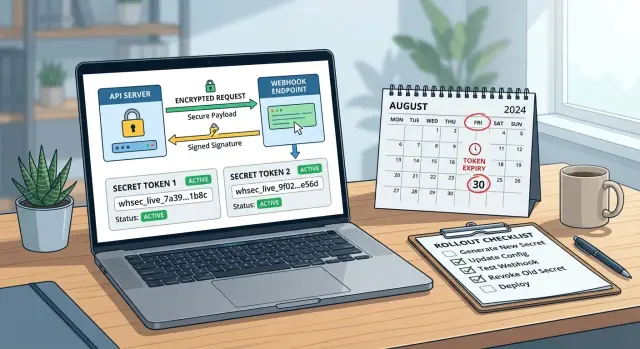
Table of Contents
Why rotation breaks webhook clients
A webhook secret is tiny, but it sits in the middle of trust. Your system signs each event with that secret, and the client checks the signature before it accepts the payload. Change the secret in one move, and every client still using the old one starts rejecting real events.
The failure usually looks random from the outside. Customers do not see a clear message saying, "your secret is old." They see missing orders, stuck account syncs, or retries piling up in logs. To them, it feels like an outage, even though your sender is still working exactly as designed.
Teams often plan a rotation during a quiet period and assume clients will update quickly. That is optimistic. Some customers have one engineer covering several systems. Some need a change ticket, a review, and a release slot. Some do not even know where the secret lives because it has been sitting in an old environment variable for years.
A hard cutover turns those delays into downtime. The sender starts signing with the new secret, the receiver still validates with the old one, and every event fails the signature check. If the client drops failed requests instead of storing them for review, the damage spreads fast.
The symptoms are messy. Delivery rates drop for some customers but not all. Retries rise and hide the real cause for hours. Support hears about broken workflows before engineering sees the pattern. Clients blame the payload format, the network, or a recent app change.
Webhook secret rotation is not like resetting a user password. Webhooks run in the background. They fail quietly, and people notice only after business actions stop.
The goal is simple: rotate secrets without stopping events. That means giving both sides time to move, making signature failures easy to spot, and setting an update window that matches how customers actually ship changes.
What the secret does in a webhook flow
A webhook secret is a shared password between the service that sends events and the app that receives them. Both sides store the same secret, but they do not send it in the request itself. They use it to prove that the webhook came from the expected sender.
When the sender creates a webhook request, it combines the request body with the secret and runs them through a signing method. That produces a signature, usually sent in a header. Change even one character in the body, and the signature changes too.
The receiver does the same calculation on its side. It takes the body it received, uses its copy of the secret, and creates its own version of the signature. If its result matches the signature in the header, the receiver can trust that the sender knew the secret and that the payload arrived unchanged.
This is mostly about trust, not secrecy. The payload may still be plain JSON, and anyone who can read the traffic could read it too unless you also use HTTPS. The secret answers a different question: "Did this request really come from the sender I trust, and did it arrive untouched?"
A billing example makes this concrete. If a billing system sends a webhook saying a customer paid an invoice, your app should not accept that event just because the JSON looks right. Anyone can copy the shape of a payload. The signature check is what separates a real event from a fake one.
That is why rotation needs care. If the sender switches first, valid webhooks fail. If the receiver switches first, the same thing happens. The secret sits in the middle of the trust check, so both sides need a safe way to move from one secret to the next.
Use a two-secret overlap, not a hard cutover
If you replace one webhook secret with another in a single deploy, some customers will reject the next event they receive. Their code still checks the old signature, so your webhook suddenly looks broken.
A short overlap fixes most of this pain. Create the new secret first, keep the current one active for a limited window, and tell customers they can switch any time before the end date. During that window, your sender signs requests with the new secret, and your validation logic accepts signatures made with either the old or new secret.
This works because it matches how teams really release changes. Some clients update the same day. Others need a week, a ticket, or a full release cycle. If you want secret rotation without turning a routine security task into an outage, this is the simplest way to do it.
Keep the overlap predictable. Add the new secret and mark it active now. Keep the old secret valid until a fixed expiry date. Accept signatures from both secrets during that period, then reject the old one as soon as the date passes.
Do not leave the old secret around forever. A rotation with no end date is just secret accumulation. Pick a clear window, such as 7, 14, or 30 days, based on how often your customers deploy. Then put that date in the notification, the admin screen, and your internal runbook so nobody has to guess.
Small details matter here. Label secrets clearly. "Current" and "next" is much better than two unlabeled values in a dashboard. If customers can tell which secret they should move to, support noise drops quickly.
The rule is simple: add first, overlap briefly, remove on schedule. That keeps webhook signing strict without forcing every client to change at the same moment.
How to rotate secrets step by step
Start by creating a new secret and storing it the same way you store production passwords or API keys. Put it in your secret manager or encrypted environment settings. Do not paste it into chat, tickets, or shared docs where it tends to live longer than anyone expects.
At the same time, give the old secret a fixed end date. Put that date in your internal notes, your customer notice, and your deployment checklist. If the date exists in only one place, someone will miss it and the old secret will stay active far too long.
A clean rotation usually follows five steps:
- Generate the new secret and label it with a start date.
- Keep the old secret active, but mark its shutdown date.
- Update your sender so new webhook requests use the new secret.
- Keep verification open for both secrets during the overlap window.
- Disable the old secret on the planned date, then remove it from storage.
That overlap window is what keeps client apps online. Your system should sign outgoing webhooks with the new secret once you switch, but your validation logic should accept signatures made with either secret until the deadline passes. That gives customers time to update without a late-night scramble.
Monitoring matters during the whole change. Watch failed deliveries, signature mismatch errors, retries, and support tickets from the first day of the overlap until a few days after the old secret expires. If your team already uses Sentry, Grafana, or another alerting tool, put webhook failures on a simple dashboard and check it daily during the rollout.
One detail trips teams up again and again: time zones. Pick one time zone for the cutoff, write it down, and use it everywhere. "Old secret stops at 17:00 UTC on June 14" is clear. "Old secret expires Friday" is not.
If you rotate secrets often, write this flow into your runbook. The second rotation should feel boring. That is usually a good sign.
Set expiry rules people can follow
Vague dates cause more trouble than the secret change itself. Give customers a fixed overlap window that matches how they deploy. For many teams, 14 days is enough. If your customers work through approval chains, maintenance windows, or slower release cycles, 30 days is safer.
That overlap should feel generous, not endless. Leave the old secret active too long, and people delay the update because nothing seems urgent. Then you carry extra risk for no real gain.
Publish one start date and one end date. Keep it plain: "The new secret becomes valid on 2026-05-01 00:00 UTC. The old secret stops working on 2026-05-31 23:59 UTC." Customers should not have to guess when to add the new secret or when they must finish the change.
A good rotation notice needs a few basics: the exact time the new secret starts working, the exact time the old secret stops working, the time zone used for both dates, what your server accepts during the overlap, and what error clients will see after the cutoff.
Use the same time zone in every email, dashboard message, and support reply. UTC is the safest choice because it avoids daylight saving mistakes. Mixing UTC in one message and local time in another is an easy way to create an outage.
Be clear about what happens after the end date. If the rule is firm, say so. After the cutoff, your server rejects webhook signatures created with the old secret and returns a clear authentication error. That helps teams test before the deadline instead of hoping for extra time.
Open-ended grace periods sound polite, but they usually backfire. Customers treat them as optional, and support ends up answering the same question all week: "Does the old secret still work?"
Fixed dates beat friendly but fuzzy language. Customers can move on their own schedule, and you still get a clean end to the change.
A simple example with real customer timing
Picture a payment platform with 2,000 merchants. On May 1, it creates a new webhook secret for every merchant account, but it does not switch off the old one. The platform accepts signatures made with either secret during a 30-day overlap, so merchants get time to update without losing events.
Some merchants move fast. A small SaaS company updates its config the same day, sends a test event, and confirms that webhook signing works with the new secret. After that, payments, refunds, and dispute notices keep flowing as usual.
Other merchants wait until the last week. A larger company may need a security review, an internal ticket, and a scheduled release before anyone can change production settings. On May 26, its developer swaps in the new secret, replays a recent event, and sees valid signatures. They moved later, but they still received every webhook because the old secret stayed valid during the overlap.
The schedule is simple:
- May 1: generate the new secret and notify merchants
- May 1 to May 31: accept signatures from both secrets
- May 24 to May 31: remind merchants who still use the old secret
- June 1: reject the old secret and keep only the new one
The deadline needs plain wording. "Your old webhook secret stops working on June 1 at 00:00 UTC" is clear. "Please rotate soon" is not. When dates stay fuzzy, customers guess, delay the change, or open support tickets because they are afraid of breaking production.
That is the real value of an overlap. Merchants who update on day one stay fine. Merchants who wait until the last week also stay fine. Both groups keep receiving webhooks during the update window, and the platform removes the old secret after a date everyone can plan around.
Mistakes that cause avoidable outages
Most failures during a rotation come from one habit: changing more than one thing at once. If you replace the secret, rename the signature header, and switch the signing format in one release, customers have no clean way to debug the break. Keep the signature format stable while you rotate the secret. Make one change, confirm it works, then handle format changes later.
Another common mistake is leaving the old secret active for months because someone is afraid to cut it off. That feels safe, but it quietly turns a temporary overlap into a permanent risk. Set an end date when you start the rotation, publish it clearly, and stick to it. If a customer misses the window, you can still help them, but the default rule should stay simple.
Communication problems
A lot of breakage starts with bad notices, not bad code. If the cutoff date is buried in the middle of a long email, some teams will miss it. Put the date, time zone, and required action near the top.
A short notice usually needs four things: when the new secret becomes available, when the old secret stops working, what stays the same in the request format, and how customers can verify that they updated correctly. That last point matters more than people expect. Teams need a quick test, not a long document.
Tracking and support mistakes
Do not guess which clients already updated. Support teams often assume large customers moved first, or that quiet customers are fine. Those guesses create surprise outages on cutoff day. Track updates with evidence. For example, mark a client as updated only after your system accepts a webhook signed with the new secret.
Be careful with support tooling too. Raw secrets should never end up in tickets, chat transcripts, or screenshots. Once a secret spreads through support systems, cleanup gets ugly fast. Show only a secret ID or the last few characters so teams can confirm which value they mean without exposing the whole thing.
Boring rules win here. Change one thing at a time, publish one deadline, and use one clear way to confirm that each client has switched.
Checks before you start
Most webhook outages begin before the rotation itself. Teams pick a cutoff date, send one notice, and assume clients will update in time. That is how small mistakes turn into broken billing, missed orders, or silent sync failures.
Before you announce anything, make sure your setup can handle the messy middle where some customers update quickly and others do not. Rotation works best when your code, support team, and alerts all tell the same story.
Your webhook verifier should accept both the old secret and the new one during the overlap window. It should also record which secret matched so you can see real progress instead of guessing.
Your support team should have a simple status view for each client. "Old secret still in use," "new secret working," or "no recent webhook traffic" is enough to save a lot of back and forth.
Your alerts should fire on signature failures right away. Group them by customer or endpoint if you can, because one bad integration can bury the signal for everyone else.
Every message about the change should show the same cutoff date and time, with a time zone. Put that same deadline in your docs, release notes, and customer notices so nobody sees two different dates.
Test rollback before launch. If the new secret causes trouble, you need to know who can extend the overlap window, how long that change takes, and what customers will hear. This is the step teams skip most often, and it causes a lot of unnecessary stress later.
Visibility matters more than many teams expect. If a customer writes, "We already updated," support should be able to confirm that in seconds. They should not need to ask engineering to search logs by hand.
Run a dry run with signed test payloads, switch back to the old secret, and make sure alerts quiet down when they should. If these checks feel a bit tedious, that is fine. Secret rotation should feel routine, not dramatic.
What to do next
Put monitoring in place before you change anything. A dashboard for signature failures should show the error rate by customer, endpoint, and hour. That makes it much easier to tell the difference between a brief rollout bump and a real break that needs attention.
Track which secret matched each request. Do not log the secret itself. Log a simple label like "old" or "new" with the customer name or ID and a timestamp. That one detail gives you a clean view of adoption and saves a lot of back and forth with support.
Review the data every day during the overlap window. Look for customers who still validate only with the old secret, then sort them by traffic and business impact. If a high-volume customer is still on the old secret near the deadline, reach out early. Waiting until the cutoff date is how small issues turn into late-night outages.
Keep the fallback plan short and specific. Allow one extension of the overlap window for a fixed number of days. Approve exceptions for named customers only. Assign one owner to make the call during urgent cases. Record the final expiry date in the ticket or runbook.
That fallback plan should stay boring. If people need to debate it during an incident, it is too vague.
One more check helps a lot: review failed requests and matched-secret data together. A customer might think they switched, while the logs show half their traffic still uses the old secret from one forgotten worker or background job. You can spot that in minutes if the labels are already there.
If the rollout touches many customers or revenue-critical systems, a second review is often worth it. Oleg Sotnikov at oleg.is works as a Fractional CTO and startup advisor on production infrastructure and AI-first software operations, and this kind of rollout review fits that work well. A short review of the plan, logging, and fallback path can catch weak spots before the old secret expires.
Frequently Asked Questions
Why can't I replace the old webhook secret in one step?
Because a hard cutover makes real events fail right away for any client still checking with the old secret. Keep a short overlap window so clients can update without losing webhooks.
How long should the overlap window be?
Start with 14 days if most customers can ship changes quickly. Use 30 days if they need tickets, reviews, or release windows. Pick one end date and stick to it.
Should I sign requests with both secrets during rotation?
Most teams should sign new webhooks with the new secret after the switch. On the receiving side, accept signatures from both secrets until the cutoff date.
What should I log during the rollout?
Log which secret matched each request, along with the customer or endpoint and the time. Do not log the secret value itself. Labels like old and new give you enough data to track progress.
How do I know a customer actually updated?
Mark a client as updated only after your system accepts a webhook signed with the new secret. Customer replies or internal guesses are not enough.
Why does the cutoff time zone matter so much?
Use one exact cutoff time in one time zone, usually UTC. Write it the same way in emails, dashboards, docs, and support replies so nobody sees two different deadlines.
What should clients see after the old secret expires?
Return a plain authentication error that tells them the signature failed because the old secret no longer works. That helps their team test the right thing instead of chasing payload or network issues.
What if a customer misses the deadline?
If a customer misses the window, give a short extension only if you have a defined rule for it. Keep the exception narrow, name the customer, and set a new final date right away.
Do I still need HTTPS if I verify webhook signatures?
No. Signing proves the sender knew the secret and that the body did not change on the way. HTTPS protects the traffic so other people cannot read or tamper with it in transit.
Where should I store the new webhook secret?
Keep the new secret in your secret manager or encrypted environment settings. Do not drop it into chat, tickets, or shared docs, because those places tend to keep secrets around for too long.


