Room vs SQLDelight vs Realm for offline Android apps
Room vs SQLDelight vs Realm for offline Android apps: compare schema ownership, sync conflict handling, and migration pain before you commit.
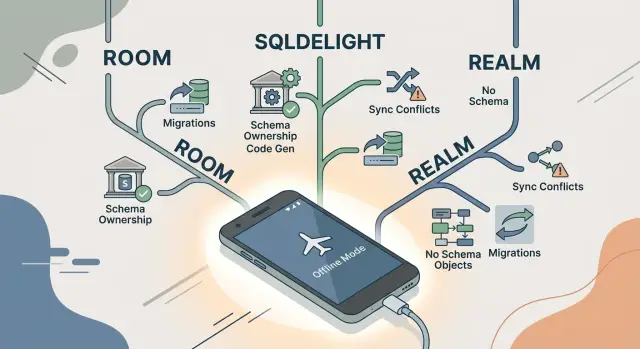
Table of Contents
Why this choice gets painful later
Most teams pick a local database when the app is still small. It stores drafts, cached records, maybe a sync queue, and everything feels manageable. A year later, that same database can hold old edits, half-synced items, deleted records, and data from users who have not opened the app in months.
That is when the real problems show up. Offline apps keep local data far longer than people expect, so early decisions stay alive on thousands of devices. A field added in a rush can outlive two server model changes.
Basic reads and writes are rarely the hard part. Trouble starts during upgrades and sync. A user edits an order on a plane. Someone else changes that same order on the server. Now the app has to decide what wins, what merges, and what the user sees.
A bad choice does not hurt much on day one. It hurts when product rules change every few weeks. One "status" field becomes three. Soft delete turns into archive plus restore. The server starts rejecting stale updates. At that point, the database is no longer just storing data. It is carrying business rules, sync history, and old upgrade decisions.
That is why Room vs SQLDelight vs Realm is not just about developer taste. It is about boundaries. Where does the schema live? Where do defaults live? Who decides conflict rules? Who owns the truth when local data and server data disagree?
If a team does not answer those questions early, the rules spread across annotations, model classes, migration files, repository code, and sync handlers. Then a small product change touches five places and starts to feel risky.
A simple example makes this concrete. Say an app stored one "name" field for a customer, then later split it into first and last name. That sounds easy until you remember old app versions, unsynced edits, partial server updates, and users coming back after weeks offline. The library matters, but ownership matters more. Decide that first, and the tool choice gets clearer.
How each option handles schema ownership
Schema ownership decides who edits the shape of your app data and where those edits happen. It sounds abstract until someone asks, "Where is this table actually defined?"
With Room, schema work stays close to Android code. Entities, relations, and DAOs usually live in Kotlin inside the app module that uses them. For Android teams, that feels familiar. The downside is that the database can become split across several files. A field lives in an entity, a query lives in a DAO, and a migration lives in raw SQL.
SQLDelight takes the opposite approach. SQL files define tables and queries first, and generated Kotlin code follows that structure. If you want to know how a table works, you open the SQL. Constraints, joins, indexes, and uniqueness rules sit in one place, so ownership is easier to see.
Realm leans harder on the object model. You work with model classes and Realm APIs instead of SQL tables and queries. That can feel simple early on, especially if the team thinks in app objects rather than database rules. The tradeoff is that storage behavior is less explicit, so some rules are harder to inspect quickly.
A good test is simple. If a teammate needs to find a uniqueness rule, the query behind one screen, or the first file that changes when the schema changes, how fast can they do it?
Room answers those questions in Android code first. SQLDelight answers them in SQL first. Realm answers them through model definitions and behavior managed by its API.
That difference matters more than most feature lists. If your team wants the app layer to own the database shape, Room feels natural. If your team wants the database to stay explicit and readable, SQLDelight is usually easier to reason about. If your team prefers object-first local storage and accepts less direct control over SQL-level details, Realm can still fit.
Where sync conflict rules actually live
Conflicts begin the moment two devices change the same record before either one syncs. One user edits a customer name on a plane, another changes the phone number from the office, and both expect their version to stick. The database stores both attempts, but it does not decide what the app should trust.
With Room, that decision usually lives in app code and on the backend. Room can store timestamps, version numbers, and a queue of pending changes, but it does not give you a built-in opinion about merging. Your repository layer, sync worker, and server endpoints usually carry the real rule.
SQLDelight works in much the same way, but it is more explicit. You write the SQL, so you also tend to write the conflict checks around it in Kotlin and on the server. That control is useful, but it means your team owns the full rule set and has to keep client and backend behavior aligned.
Realm can pull conflict handling closer to the data model if you build more of your stack around Realm. That can feel simpler because data objects and sync behavior sit nearer to each other. The tradeoff is clear: the more you lean on that model, the more your conflict rules follow Realm's approach instead of staying plain and portable.
Before launch, your team should answer a few very plain questions. Which side wins when the same field changes twice? Do you merge by record or by field? What happens when a deleted item comes back from an offline device? How many retries do you allow before you stop and flag the issue? Which version number or timestamp do you trust?
This is where teams often misjudge Room vs SQLDelight vs Realm. They compare query syntax, speed, or setup time, then leave conflict policy for later. Later gets expensive fast.
If you pick "last write wins," say it clearly and use it everywhere. If you merge fields, write down which fields can merge and which cannot. Test the rule with two offline devices, one slow network, and one delete action. That small test usually teaches more than a week of clean demo data.
What migration work feels like in real projects
Fresh installs hide most database pain. Trouble starts when version 12 meets a phone that still has data from version 3, half-synced records, and fields the team stopped thinking about months ago.
With Room, migration work is direct. You write the upgrade steps yourself: add a column, move data, split a table, backfill defaults. It can feel repetitive, but the tradeoff is clear. The team can see exactly how old data becomes new data, and bugs usually point to one migration file instead of disappearing inside the library.
SQLDelight often feels cleaner in review. Schema changes live in SQL, so reviewers can inspect them without jumping through annotations and generated models. If someone asks why a column changed or why a default exists, the answer is often right there in the migration script.
Realm often feels light at the start. You change an object, bump the version, and keep building screens. The rough part shows up later, when product rules drift away from the object model. A simple status field turns into status, sync_state, updated_at, and maybe a conflict note from the server. Then migration work gets awkward because the shape that once looked natural in code no longer matches how the app behaves.
This can happen quickly in a small offline app. You start with a local note that has title and body. Six months later, you need soft delete, merge rules, and a way to track whether a change came from the phone or the server. That is where the day-to-day difference shows up. Room makes you do the work directly. SQLDelight makes the change visible. Realm can force you to untangle earlier model decisions before you move on.
Fresh installs are not enough for testing. Use old databases with messy records, including rows with nulls, records created before a field rename, pending items that never finished syncing, and duplicate values caused by earlier bugs. Those cases catch the problems users actually hit.
If your team only tests a clean install, migration pain waits until release day.
A simple way to choose
Most teams pick an offline Android database by looking at API style first. That is usually the wrong test. For offline work, a better test is simple: make each option handle the annoying parts before you commit.
Use a short spike instead of a feature grid.
- Write down every screen that still has to work without a network. Be specific. "Order history" is not the same as "edit draft order with cached prices and attachments."
- List three conflict cases your app must settle on sync. For example, two users edit the same note title, a deleted record comes back from an old device, or a price changes while a worker stays offline all day.
- Change the schema on paper twice. Add one field, then split one table or object into two. Estimate who updates queries, migrations, tests, and seed data.
- Build one real screen with your hardest query, not an easy CRUD page. Then simulate one app upgrade with old local data still on the device.
- Pick the tool that makes these steps feel routine, even a little dull.
That last point matters. In a Room vs SQLDelight vs Realm decision, dull is good. You want the tool that makes schema changes, conflict rules, and upgrade tests clear enough that a tired developer can still get them right on a Friday afternoon.
Some patterns usually appear fast. If your hardest screen depends on joins, filters, and SQL you want to see plainly, SQLDelight often earns its place. If your team already knows Room and the app stays close to standard Android patterns, Room is often the safer pick. If your app fits Realm's object model and your team likes that style, Realm can feel quick at first, but you should push hard on migration and sync behavior before you trust it.
Do not choose based on the first demo. Choose based on the first awkward change. That is where the maintenance bill usually starts.
A realistic example
Picture a field service app for a repair team. A technician opens a job in a basement with no signal, adds notes, takes photos, and records the parts used. The app has to save all of that on the device and sync later when the phone gets a connection again.
Now add a common mess. One worker updates the job on site, while another changes that same job from the office or a second device. Later, the company decides to track warranty details and keep a full status history instead of one current status field. That is where the easy demo starts to fall apart.
In this kind of app, schema ownership matters more than quick setup.
With Room, Android developers usually move fast at first. The data model lives close to Kotlin code, which feels natural if the app team owns most of the product. But when two workers edit the same job, Room does not decide how conflicts merge. Your team still has to write those rules somewhere else. Do notes merge line by line? Does the latest parts list replace the old one? Does status append to history instead of overwriting it?
SQLDelight feels stricter, and that helps here. The schema lives in SQL files that people can read without chasing annotations and generated code. When the team adds warranty fields and a status_history table, the change is explicit. That makes sync rules easier to discuss because everyone can point to the same columns and tables.
Realm often feels smooth in the first version. Saving objects locally is quick, and offline use is comfortable. The pain shows up later when records need careful merge rules, audit history, and predictable migrations. At that point, an object-first model can feel less clear than a schema-first one.
For this sort of app, clear schema ownership matters more than fast setup. If sync bugs can lose warranty data or the wrong parts list, pick the tool that keeps data rules obvious when the app gets messy.
Mistakes teams make
Most teams do not choose an offline Android database after a serious trial. They pick the one with the shortest tutorial, the cleanest demo, or the API that feels familiar on day one. That saves a few hours early and can cost weeks later.
You can see this in many Room vs SQLDelight vs Realm discussions. People compare syntax, setup time, and sample apps, but skip the harder question: who owns the schema, and who approves changes once the app starts carrying real user data?
Another common mistake is leaving conflict rules vague until users start losing edits. Two phones update the same note, or the server sends older data back, and the team scrambles. One developer patches the sync worker, another adds checks in a repository, and someone else fixes a screen. Now the app has three different answers to the same conflict.
It gets worse when data rules spread across UI code, repositories, and sync jobs. A status field changes in one place but not another. A deleted item comes back after sync. A draft looks saved on the device but disappears after reconnect. Users do not care which layer made the mistake. They just see broken trust.
Migration testing is another place teams fool themselves. They test a fresh install, maybe one upgrade path, and move on. Real phones rarely look like that. Users have old rows, partial data, stale cache, records created by older app versions, and odd states caused by bugs the team already forgot.
An empty database proves almost nothing. A copied database with messy data tells you much more.
Teams also lock into one model too early. They design for today, then six months later they need local-only fields, soft deletes, partial sync, shared records, or audit history. The problem is not that the library changed. The app changed, and the original model was too rigid.
A safer approach is plain enough:
- Decide where schema rules live before you write much app code.
- Write conflict rules before the first sync release.
- Test migrations on old, messy databases.
- Assume your data model will change sooner than you expect.
If a team skips those steps, the library choice starts to feel much bigger than it really is.
Quick checks before you commit
Before you pick a local database, run a few simple checks. They save more time than any benchmark chart. In Room vs SQLDelight vs Realm, teams often compare syntax first, but syntax is rarely what hurts six months later.
Start with readability. Give your schema, models, and migration notes to a developer who did not design them. If that person cannot explain the stored data, relations, nullable fields, and update flow in about an hour, the setup is already too opaque for an offline Android database.
A short checklist helps:
- Ask one person to describe the schema in plain English after a quick read.
- Ask another person to explain sync conflict handling in one short paragraph.
- Test an upgrade path from at least two older app builds, not just the last release.
- Count how much app code depends on database-specific APIs and models.
- Write down who owns schema changes, conflict rules, and destructive actions like hard delete.
That second check matters more than teams expect. If your conflict rule needs a whiteboard and twenty minutes, it is not ready. "Server wins except for local drafts" is clear. "It depends on state, source, retry order, and a few flags" usually turns into bugs.
Upgrade testing is where nice demos fall apart. Install an app version from a few months ago, create data, then upgrade straight to the current build. Do it again from an even older version. If that feels annoying now, it will feel worse after you have real users with stale installs.
Exit cost deserves a blunt look too. If you ever move away from Realm or from SQL-first tools, can you keep your domain models and repository layer mostly intact? If every screen imports database types directly, you are locking yourself in.
One more check sits outside Android code. Product, backend, and Android need the same answer to a simple question: who decides the shape of data, and who decides what happens when two edits collide? If those answers differ by team, your schema migrations will hurt no matter which tool you pick.
What to do next
Stop arguing in the abstract. Build a small spike with one real screen from your app, one sync case, and one migration. Use the same sample data and the same business rule in each tool. That will tell you more about Room vs SQLDelight vs Realm than another round of opinions.
Choose a screen that breaks in a visible way if offline data goes wrong. A notes screen, order draft, or task list is enough. Then create one conflict on purpose: edit the same record on two devices, sync both, and decide which change wins.
The spike should answer four plain questions. Who owns schema changes on the team? Who owns merge rules when local and server data disagree? How much code changes for one small migration? Can you test that migration before users install the update?
Write those answers down while the spike is fresh. Teams often skip this, then months later only one developer knows how the database works. That slows reviews, makes bugs harder to fix, and turns migrations into guesswork.
Keep conflict handling out of UI code from day one. The screen should collect input and show state. Your sync or data layer should decide whether to keep the newest edit, merge fields, or flag a manual review. If you mix that logic into the UI, every new screen repeats the same problem.
A simple example makes the risk obvious. A salesperson edits a customer note on a plane while support changes that same note from the office. If your rule says "server always wins," the app can erase a useful local edit. If your rule says "latest timestamp wins," clock drift can still break it. You need to pick the rule, test it, and keep it in one place.
If you want an outside review before you commit, Oleg Sotnikov at oleg.is helps startups and small businesses sort out schema ownership, migration risk, and app architecture. That kind of review is most useful before the first big sync release, when the model is still easy to change.


