Retry storms in AI products: stop failures from multiplying
Learn how retry storms in AI products turn short model outages into billing spikes, and how to set caps, backoff, and fallbacks that protect users.
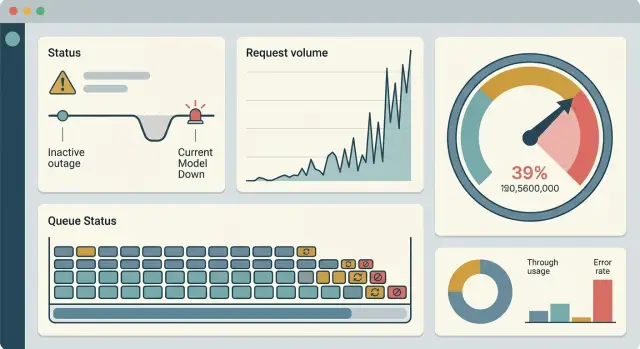
Table of Contents
What a retry storm looks like
A retry storm starts with a small failure. The model slows down for a few minutes, or it returns timeouts and 5xx errors. On its own, that sounds manageable.
The trouble starts when the app reacts badly. Instead of waiting, it retries every failed call right away. That second request hits the same overloaded model, so it fails too. One problem quickly turns into several.
This gets messy fast in AI products because one user action often triggers more than one model call. A single button tap might ask the model to read a message, draft a reply, score intent, and write a summary. If each failed step retries immediately, one action can create a pile of extra requests.
A short outage often snowballs like this:
- Users send normal requests.
- The model slows down or starts returning errors.
- The app fires instant retries.
- Queues grow and users wait longer.
- Some users click again, which adds even more traffic.
Request volume rises while successful work drops. Response times get worse. Error rates stay high. Cost climbs because the system keeps making paid API calls even though users still are not getting answers.
The graphs can look deceptively healthy at first. Request volume shoots up. Workers stay active. Logs fill with activity. But most of that activity is waste.
You can usually spot the pattern when several numbers jump together: request count, wait time, token usage, and failed jobs. If your normal load is 1,000 model calls per minute and each failure triggers two fast retries, a brief outage can push that to 3,000 calls per minute almost instantly. If users refresh or resubmit, it climbs again.
That is why model outages feel more expensive than they should. The outage hurts, but bad retry rules multiply the damage. A five-minute slowdown can leave a much bigger mess in your app, your queue, and your bill.
Why bad retry rules make outages worse
A model outage rarely stays small when your app retries too fast. The first request fails, then the same app sends another one a second later, then another. If thousands of users do that at once, recovery gets harder, not easier. You are just adding more traffic to the same busy model.
The damage spreads because one user action often creates more than one call. A web request might retry in the browser, then your API server retries, then a background job retries after that. Each layer thinks it is helping. Together, they can turn one failed prompt into three, six, or ten requests.
Long timeouts make this worse. When a request hangs for 30 or 60 seconds, your server keeps memory, workers, and open connections tied up the whole time. New requests wait longer, more users stare at a spinner, and more retries begin before the old ones even finish.
Users add their own pressure. If the app looks stuck, many people click again. They refresh. They resend the same message. Now your system is fighting both the outage and a second wave of traffic from real people who think nothing happened.
The usual failure pattern is simple:
- Failed calls come back before the model has recovered.
- Different parts of the stack repeat the same work.
- Slow timeouts clog workers and queues.
- Users create duplicates by trying again.
That creates a nasty feedback loop. More retries create more load. More load slows the system further. A slower system causes more timeouts, more clicks, and even more retries. Bills can jump too, especially if the provider charges for partial work, repeated requests, or tokens processed before failure.
A good rule of thumb is to treat retries as a limited backup plan, not an automatic reflex. If a model is overloaded, repeating the same call right away rarely helps. It mostly increases traffic at the worst possible moment.
How to set retry rules that stay safe
A short outage should stay short. Problems spread when every layer retries on its own, all at once, and keeps going after the odds of success have already dropped.
Start with a hard limit on retry count. For most user-facing AI calls, one or two retries is enough. After that, you usually add delay, load, and cost without helping the user much.
The wait between attempts should grow each time. A simple pattern like 1 second, then 2, then 4 works much better than retrying every few hundred milliseconds. Fast loops feel harmless in testing, but they pile onto a provider that is already struggling.
Random delay matters too. If 5,000 requests all retry after exactly 2 seconds, they hit as one spike. Add a little jitter, such as 10% to 20% extra wait, so traffic spreads out instead of landing in a single wave.
Some errors should stop the process immediately. Do not retry bad input, auth failures, or exhausted quota. Those requests will not improve on the next attempt, so repeating them only burns time and money.
A safe default is usually enough:
- Retry in one layer only, not in every client and worker.
- Stop after 2 retries.
- Use exponential backoff with a small random jitter.
- Fail fast on 400-level input or auth errors, and on quota exhaustion.
Set one deadline for the whole user action, not a fresh timeout for each retry. If a chat response gets 10 seconds total, every attempt has to fit inside that budget. Otherwise a request can linger for 30 seconds, fail anyway, and still trigger more work behind the scenes.
This is where outage handling, retry backoff, and cost control meet. A capped retry count, growing delays, and one total deadline may look conservative on paper. During an incident, they can save you from a much worse bill.
How to cap traffic before cost runs away
When a model slows down, traffic often gets worse before it gets better. A few retries turn into thousands, queues grow, and your bill climbs even though users still wait. The safest response is to limit traffic on purpose.
Start with a hard per-minute ceiling on model calls. Make it small enough that one broken feature cannot flood your account, but high enough to keep normal demand moving. Put the limit close to the caller, not only at the vendor edge, so every service sees the same stop sign.
A second cap should track money, not just request count. Give each feature, customer tier, or tenant its own budget for a time window. If an internal summarizer burns through its budget, it should not steal spend from checkout, fraud review, or support replies that customers need right now.
When the cap hits
Do not keep hammering the model and hoping for one lucky response. Queue low-priority work, delay it, or drop it if you can rebuild it later. Background tagging, long summaries, and bulk exports can wait. Password resets, payment checks, and live agent handoff usually cannot.
You also need a reserved lane for flows that matter most. Split capacity before an incident, not during one. For example:
- Reserve part of capacity for login, payments, or human support handoff.
- Limit background jobs to whatever capacity is left.
- Stop free-tier or batch traffic earlier than paid-user traffic.
- Expire stale queued jobs so old work does not flood the system later.
Users handle bad news better than silence. If the cap blocks a request, return a plain message such as "AI replies are busy right now. We saved your request and will try again soon" or "This task is paused because the service is at capacity." That is much better than a spinner that retries forever.
Traffic caps can feel strict, but they give you room to recover. They protect cost, keep your most useful paths alive, and stop one outage from turning into a second failure inside your own system.
A simple example from a support chatbot
At 9:05 a.m., 1,000 customers open a support chat to ask where their order is. The bot sends each question to an AI provider. The provider slows down for two minutes. Answers start timing out after 8 seconds, even though some requests might have worked if the app had simply waited a little longer.
The chatbot uses a common rule: retry every failed request up to three times, almost immediately. That feels safe when traffic is low. During a slowdown, it turns one problem into several.
The first 1,000 requests go out. Many fail. The app sends 1,000 retries. Those fail too, so it sends another 1,000, then another 1,000. A short outage has now created 4,000 billable calls instead of 1,000.
The math is simple:
- 1,000 users ask one question each.
- 1 original call + 3 retries = 4 calls per user.
- 1,000 x 4 = 4,000 total calls.
Users still wait. Support staff still get complaints. The bill is four times higher, and the extra traffic makes the provider slower for everyone.
A safer setup changes the shape of the spike. Put failed requests into a queue instead of firing them again right away. Use backoff so the second attempt waits 10 seconds, then 30, then maybe 60. Add random delay so all retries do not hit at the same moment.
Then add a hard cap. For example, allow only 100 active AI calls at once and no more than 300 queued retries. If the queue fills up, stop retrying and send a plain message like "We're seeing delays. Please try again in a minute." That reply is far cheaper than thousands of extra model calls.
In the same outage, the chatbot still struggles, but the spike stays contained. You might handle 1,000 original requests, retry only the small share that still matters, and avoid turning a two-minute slowdown into a thirty-minute mess. Good retry rules do not just protect uptime. They protect your budget when things go wrong.
Mistakes teams make under pressure
Pressure makes teams reach for easy fixes, and easy fixes often make an outage worse. Panic plus automation causes most of the damage.
A common mistake is retrying in two places at once. The browser retries because the user sees a spinner, and the server retries because the upstream call failed. One customer action can turn into four, eight, or more model calls before anyone notices. That burns quota fast and makes the outage look bigger than it really is.
Teams also reuse one timeout everywhere. It sounds tidy, but it fails in real traffic. A quick classification call and a long document summary should not wait the same amount of time. If the timeout is too short, healthy requests get cut off and retried for no good reason. If it is too long, stuck requests pile up and tie up connections.
Fallbacks cause trouble too. Switching to another model feels safe, but it can quietly double spend. During an incident, teams often fail over from a cheaper model to a larger one with no daily or per-minute budget cap. The app may keep answering, but the bill can jump in minutes.
Logging can create another mess when people overdo it. If every failure stores full prompts, full responses, and long stack traces, error handling starts producing huge payloads all day. Logs should help you debug. They should not become a second source of cost.
Another common error is treating 429s and 500s the same way. They are different problems. A 429 means the provider wants less traffic right now, so aggressive retries make things worse. A 500 may clear on the next try, but even then you still need spacing, limits, and a hard stop.
When teams stay calm, the rules usually get simpler:
- Retry in one layer, not two.
- Set timeouts by task.
- Put a spend cap on every fallback path.
- Log enough to debug, then sample or trim the rest.
- Slow down hard on 429s, and keep 500 retries rare.
Simple rules save money. They also make incident graphs easier to read when the team is tired and guessing.
Quick checks before you ship
Most teams test happy paths and stop there. That is how retry storms slip into production.
Before launch, count the most calls a single user action can trigger. One click in a chat app can hit the model, a safety filter, a search step, a logging service, and a second model for formatting. If each layer retries three times, one failed response can turn into dozens of paid requests.
Write down the worst case, not the average case. Frontend retry plus API retry plus background job retry is where teams usually get burned.
A short preflight check helps:
- Map one user action from click to final response, then count the maximum API calls it can create.
- Mark the errors that should never retry, such as bad input, auth failures, quota errors, and hard validation failures.
- Test slow failure, not just hard failure. Add a 10-second provider delay and watch what your app does.
- Set alerts on request rate, error rate, latency, and spend signals so the team hears about trouble before costs jump.
- Give product and support a plain fallback message so users get a clear answer when the model is unavailable.
The delay test catches more bugs than many teams expect. A provider does not need to go fully down to cause damage. If responses stall for 10 seconds, impatient users click again, timeouts stack up, workers stay busy, and your retry logic may start firing while the first request is still alive.
The fallback message matters too. If support says "please try again" while the app also retries in the background, users can double the load without realizing it. A better message is direct: the service is slow right now, your request may take longer, and repeated attempts will not speed it up.
Run this check before every release that touches model calls, queues, or timeout rules. It takes less than an hour, and it can save a week of incident cleanup plus a painful bill.
What to watch during an incident
When a retry storm starts, the main problem is speed. A small model failure can turn into a traffic spike in a few minutes, and your usual dashboards may hide it if they only show hourly or daily trends.
Watch retries as their own signal, not as part of total request volume. Split them by feature, model, and customer segment. If one workflow, one model provider, or one customer group drives most of the retries, you can cut pressure fast without slowing everything else.
A useful incident view should answer five questions:
- How fast is the retry rate rising for each feature and model?
- Are queues growing, timing out, or dropping work?
- What is the cost per minute right now?
- Do fallbacks recover more requests than retries do?
- How long does the system take to settle after you turn caps on?
Queue depth matters because it shows pressure before users complain. If your queue climbs for ten straight minutes, your workers are already behind. Timeout rate tells you whether calls are hanging long enough to create more retries. Dropped work matters just as much. If the system starts discarding jobs, you need to know which jobs those are and who gets hit.
Cost per minute is often the missing graph. Daily spend looks calm while the bill burns in real time. During an outage, a bad retry rule can turn a $20 hour into a $200 hour. Teams that watch live cost can make sharper choices, such as disabling one expensive feature instead of cutting the whole product.
Compare success after fallback with success after retry. This is one of the clearest ways to see whether your retry logic still helps. If retries succeed 3% of the time but fallback succeeds 40% of the time, more retries only add load and cost.
Recovery time tells you whether your controls actually work. After you cap traffic, rate-limit customers, or shorten queues, measure how long it takes for timeouts, backlog, and spend to return to normal. If recovery drags on, the cap may be too loose, or stuck jobs may still be keeping pressure high.
During a real incident, simple beats fancy. Five clear graphs on one screen help more than twenty charts nobody can read under stress.
What to do next
Start with a map, not a patch. Most teams know the main model call, but they miss the side paths: background summaries, moderation checks, embeddings, failed job replays, and support tools used by staff. Put every model call on one page with three notes beside it: who triggers it, how often it runs, and what happens when it fails.
That map usually shows where trouble begins. A small outage rarely stays small when the same request can bounce through app code, queue workers, cron jobs, and vendor SDK retries.
Then fix the busiest path first. If one chat request can fire three retries in different layers, cut that chain now. Pick one place that owns retries, set a hard retry limit, and add a spend cap for the path that carries the most traffic. A simple cap is better than a clever rule that runs wild at 2 a.m.
A short outage drill will tell you more than a long document. Force fake 429s and timeout errors in a test environment and watch what happens. Check whether requests pile up, whether users keep clicking send, whether fallbacks stay cheap, and whether alerts fire early enough for someone to react.
Keep the checklist short:
- List every model call and every automatic retry.
- Put strict limits on the busiest user flow.
- Add spend caps, queue caps, and a kill switch.
- Run one drill with fake 429 and timeout failures this week.
If your team already has retry logic spread across SDKs, workers, and internal services, an outside review can save time. Oleg Sotnikov, through oleg.is, works as a fractional CTO and startup advisor and helps companies tighten AI retry rules, fallback paths, infrastructure, and cost controls before the next incident turns into a bigger bill.


