Request missing constraints before coding with assistant prompts
Learn how to write assistant prompts that request missing constraints before coding, reduce rework, and turn partial tickets into clear steps.
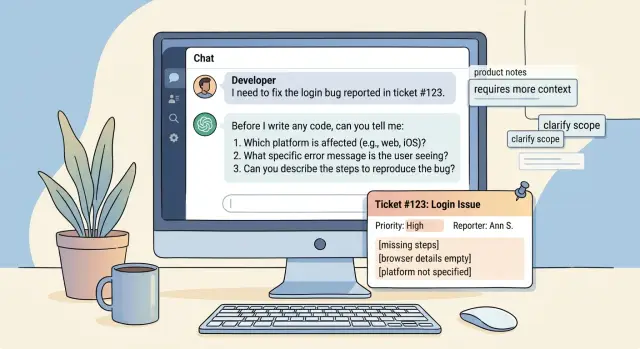
Table of Contents
Why partial tickets lead to wrong code
A ticket can look clear and still leave out the rule that matters most. "Add export to CSV" sounds simple. Then the developer has to guess: which fields, which date format, which user roles, which file size limits, and what should happen with missing data. Once guessing starts, the code may work technically and still fail the real need.
Vague tickets push people toward speed instead of accuracy. A developer sees a short deadline, fills in the blanks, and ships something that seems reasonable. The problem is not bad coding. The problem is silent assumptions.
Those assumptions often hide in places the ticket never mentions:
- business rules that live in someone's head
- old behavior users already expect
- security or permission limits
- edge cases from messy real data
Each missing detail can turn into rework. A team writes the feature, reviews it, tests it, and maybe deploys it. Then someone says, "We only wanted managers to use this," or "This should match the old report format." Now the team rewrites logic, updates tests, changes the UI, and explains the delay. A two-minute question at the start would have saved hours.
This gets worse with AI coding tools because they are built to complete patterns. Give them a partial software ticket, and they will often produce clean, confident code around unstated assumptions. That is why teams should request missing constraints before coding, not after the pull request is open.
A short clarification round is usually the cheaper path. One message like "Should guests see this button, and should the export include archived records?" can close the biggest gaps. That small pause feels slower in the moment. In practice, it is faster than building the wrong thing twice.
Teams that move well do not wait for perfect tickets. They ask one or two focused questions when the risk of guessing is high, then code with a clear target. That habit cuts churn, lowers friction in review, and makes delivery feel calmer.
What counts as a missing constraint
A missing constraint is any fact that can change the code, the output, or the review. If a ticket supports two reasonable implementations, the assistant should stop and ask. That is why teams request missing constraints before coding instead of letting the assistant guess.
The first gap is often the user role. "Add a dashboard filter" means different things for a support agent, an admin, and an end customer. Role affects permissions, visible fields, default actions, and even the wording of errors.
The next gap is the shape of the work itself: what goes in, and what should come out. A ticket that says "import leads from a CSV" still leaves a lot open. The assistant needs the file format, required columns, validation rules, and the exact result the user expects after upload.
Some constraints sound small, but they decide the approach:
- business rules and exceptions
- size, speed, and security limits
- APIs, libraries, or hosting rules the team must follow
- approval checks such as tests, logs, or screenshots
Rules and exceptions matter more than people expect. If duplicate emails should merge in one case but fail in another, the code path changes. If the feature must work only for new accounts, not legacy data, that also changes testing and rollout.
Technical limits need direct questions. The assistant should know the stack, version, package limits, deployment environment, and any policy such as "no new paid service" or "use the existing PostgreSQL setup." Otherwise it may return code that looks fine but does not fit the team.
Approval rules matter too. A reviewer may accept the work only if the API matches an existing schema, tests cover the error path, and the change uses the current logging pattern. If the assistant does not know how someone will approve the work, it cannot aim at the right result.
How the assistant should ask first
An assistant should pause as soon as a ticket leaves room for more than one valid build. If the request says "add login" or "export reports," code should not start yet. Early code often locks in guesses about auth, data shape, or edge cases, and then the team reviews the wrong solution.
To request missing constraints before coding, the assistant should ask the smallest set of questions that can change the implementation. That usually means two to five questions, not a long interview. If one answer could change the database, API contract, security rules, or user flow, ask about that first.
Ask only what changes the build
Rank questions by impact. A good assistant starts with the choices that would force a rewrite later.
- Which auth provider should this use?
- Should this work for existing users or only new ones?
- What should happen when the external API times out?
- Do we need audit logs or role checks?
Those questions are short, concrete, and easy to answer. Compare that with vague prompts like "Can you share more context?" Most people answer vague questions with vague words, and the assistant still has to guess.
A partial software ticket might say: "Add invoice export to the admin panel." The assistant should not jump into code. It should ask whether export means CSV, PDF, or both, whether admins can export all invoices or only filtered results, and whether the file must include deleted or refunded records. Three short questions can prevent hours of rework.
Wait for answers before writing any code. The assistant can say what it is waiting on and why each answer matters, but it should stop there. No scaffolding, no placeholder functions, no sample implementation. Even "temporary" code nudges the team toward one path.
If the user wants speed over precision, the assistant can offer labeled options and ask for a quick pick. That keeps the AI coding workflow moving without hiding assumptions.
A simple prompt pattern that asks before coding
To request missing constraints before coding, the prompt needs a hard stop, not a polite suggestion. If the assistant can guess, it often will. That is how small gaps in a partial ticket turn into the wrong schema, the wrong endpoint, or a feature that works but does not fit the product.
A good prompt does five things at once. It blocks guessing, limits the number of questions, keeps each question focused on one missing area, explains why each answer matters, and tells the assistant to wait for answers before writing code.
You are helping with a software ticket.

Rules:
- Do not guess missing constraints.
- If the ticket is missing details that change the implementation, ask questions first.
- Ask no more than 5 questions.
- Ask only 1 question per missing area.
- After each question, add a short line starting with "Why:" to explain why the answer changes the code.
- Do not write code, pseudocode, file plans, or architecture until the answers arrive.
- After the answers arrive, summarize the confirmed constraints in 3 to 6 bullets, then write the code.

Ticket:
[paste ticket here]
This pattern works because it removes two common failure modes. First, it stops the assistant from asking ten vague questions at once. Second, it stops it from asking nothing and inventing defaults. Five questions is usually enough for scope, input and output, edge cases, permissions, and integration details.
The short "Why:" line matters more than most teams think. It forces the assistant to show its reasoning in plain language. If it asks, "Should deleted users be hard-deleted or soft-deleted?" and adds, "Why: this changes the database update and restore logic," the reviewer can answer fast and spot whether the question is worth asking.
This also makes review easier for a founder, product manager, or fractional CTO. They do not need to read code to see whether the assistant is stuck on a real constraint or just being noisy. If the answers are missing, the assistant waits. When the answers arrive, it can code with far fewer wrong turns.
A realistic example from a partial ticket
A ticket lands in the backlog: "Add invoice export." That sounds simple until someone starts building it. One developer thinks it means a CSV for the finance team. Another assumes customers need a PDF download from the billing page.
This is where teams lose time. With partial software tickets, the assistant should stop and ask for the missing constraints instead of guessing.
For this ticket, the gaps are easy to spot. What file type does the product owner want? Who can use it? Should users export one invoice, a date range, or the full history? What happens if the account has 30,000 invoices? Do draft, refunded, or canceled invoices belong in the file?
A useful prompt would make the assistant ask questions like these:
- Which format should the export use: CSV, XLSX, or PDF?
- Which user roles can see and run the export?
- Can users export a single invoice, a filtered list, or all invoices?
- What limits should apply for large exports?
- Which edge cases count, such as drafts, refunds, time zones, and empty results?
Now imagine the product owner replies with clear answers. The export should be CSV only. Admins and account owners can use it, but regular members cannot. Users can export by date range, up to 10,000 invoices at a time. Draft invoices stay out, refunded invoices stay in, and dates should use the account time zone.
That turns a vague request into a coding brief: add a CSV export button on the billing page for admins and account owners, support date-range filters, block exports over 10,000 rows with a clear message, and include refunded invoices but not drafts.
Now the task is testable. QA can check that the right roles see the button, the CSV contains the expected rows, large exports fail with the right message, and time stamps match the account setting. That is the difference between coding fast and coding twice.
When to ask and when to move ahead
You do not need a perfect ticket to start. If the ticket names the user, the action, and the expected result, you can usually move ahead. "Manager exports invoices as CSV" is clear enough to sketch the endpoint, UI trigger, and a basic test.
The point is not to request missing constraints before coding every single time. The point is to stop guessing when one missing detail can change the work in a serious way.
If only one gap blocks safe progress, ask one question and keep it tight. A ticket that says "Add search to orders" may be almost clear, but one detail still matters: should search match order ID only, or customer name too? One short question can save a rewrite.
Some areas need more than one question because the risk is higher. Money, privacy, and access rules belong in that group. If the ticket touches refunds, customer data, or role permissions, slow down and ask enough to remove doubt.
A team can move faster with defaults, but only if those defaults are written down. If your team already agreed on things like pagination size, audit logging for admin actions, or how soft delete works, use them. If those rules live only in someone's head, they are not defaults. They are guesses.
A simple way to judge the ticket is to ask whether two capable readers would build the same thing. If the answer is no, stop and ask. "Add notifications" could mean email, in-app alerts, SMS, or all three. Two engineers could both act in good faith and still ship different features.
This quick filter works well:
- Move ahead when the user, action, and result are clear.
- Ask one question when a single gap changes the design.
- Ask more when the work touches payments, personal data, or permissions.
- Use defaults only if the team documented them.
- Stop when two readers would build different versions.
That last rule is the one teams ignore most. It is also the one that prevents the most wasted code.
Common mistakes in clarification prompts
Most bad clarification prompts fail in two opposite ways. They either ask for everything at once, or they pretend the ticket says enough. Both create extra work.
A long pile of broad questions is the usual first mistake. If the assistant asks about business goals, edge cases, naming, security, performance, UI, test coverage, and deployment in one shot, the person on the other side often answers half of it and skips the rest. A better prompt asks only for the smallest missing details that block safe work.
Another common problem is asking questions the ticket already answered. If the ticket says the feature is for mobile users, uses PostgreSQL, and must return CSV, the assistant should not ask those again. That makes the exchange feel sloppy, and people stop trusting the process.
Fuzzy words also cause trouble. Terms like "simple," "fast," or "secure" sound clear until two people mean different things.
A prompt gets much better when it swaps vague words for concrete checks:
- "simple" becomes "what is the smallest version that is acceptable?"
- "fast" becomes "what response time or batch size is acceptable?"
- "secure" becomes "what auth, roles, and audit rules must this follow?"
The worst mistake is letting the assistant fill gaps by guessing and coding anyway. If the ticket does not say how errors should look, who can access the feature, or what should happen on duplicate input, the assistant should stop. Teams that want to request missing constraints before coding need that rule to be real, not optional.
One more issue sits outside the prompt itself. Many teams keep their rules in old chat threads instead of shared notes. Then the assistant misses naming rules, migration policy, test expectations, or review standards unless someone remembers to paste them again. Put those rules in one shared place and reuse them in prompts.
A decent clarification prompt feels selective, not noisy. It notices what is missing, ignores what is already known, and refuses to patch over blanks with guesswork.
A quick review checklist
A fast review catches weak prompts before they turn into wrong code. The goal is simple: request missing constraints before coding, while the ticket is still cheap to fix. If a prompt leaves room for guessing, the assistant will usually guess.
Read the ticket or prompt once, then ask whether another teammate could explain the job in one plain sentence. If they cannot, the task is still blurry. A short summary forces the writer to name the feature clearly instead of hiding behind vague wording.
Use this quick pass before you send anything to an assistant:
- Name who the user is, what they do, and what should happen after that action.
- State the rules that cannot change, such as permissions, timing, data limits, or required formats.
- Add the awkward cases: empty input, duplicate records, failed API calls, slow responses, partial saves.
- Make the assistant ask questions first when any rule, dependency, or edge case is missing.
- Describe what "done" means so a reviewer can approve or reject the result without guessing.
Small wording changes make a big difference. "Add export" is weak. "Admin exports filtered invoices to CSV, capped at 10,000 rows, with masked customer emails" is much better. A reviewer can picture the behavior, and the assistant has fewer places to wander.
The "ask first" check matters more than many teams think. If the prompt says "write the code" before it says "ask about missing constraints," the assistant often skips clarification. Put the stop sign early. Tell it to pause, list unknowns, and wait if those unknowns affect the output.
Done should be easy to test. A reviewer should know which input to try, what output to expect, and which cases must fail safely. If that is still fuzzy, the ticket is not ready.
One missed constraint can waste a day. A two-minute review is usually enough to catch it.
What to do next with your team
Make one process change first: every new ticket gets a clarification check before anyone asks an assistant to write code. Put that check into ticket triage, not into code review. If the ticket leaves open questions about inputs, outputs, limits, error handling, or success criteria, the team asks for those details before work starts.
This looks small, but it removes a lot of avoidable rework. Teams often blame the model when the real problem sits in the ticket. A request like "add export" sounds clear until one person means CSV, another means PDF, and nobody mentions access rules, audit logs, or file size limits.
Save one reusable prompt and make it the default:
- Read the ticket.
- List the missing constraints that block safe coding.
- Ask only the questions needed to remove ambiguity.
- Do not generate code until those answers are provided.
A shared prompt turns a good habit into a team rule. It also makes request missing constraints before coding part of the normal AI coding workflow instead of something people remember only when a bug slips through.
Then spend an hour looking backward. Pull a small batch of tickets that led to rework, long review threads, or last-minute fixes. For each one, name the missing detail that caused the problem. Most teams see the same patterns again and again: permission rules, field formats, failure cases, performance limits, migration steps, or approval boundaries.
That review gives you a practical checklist built from your own mistakes. It is better than a generic template because it matches the way your team actually ships work.
If you want to make this stick, add one owner. That person does not need to approve every ticket forever. They just need to help the team set the first version of the rule, prompt, and review habit.
If your team wants outside help, Oleg Sotnikov can review your prompts, delivery flow, and approval steps as part of Fractional CTO advisory. That kind of review is useful when you already use AI for code generation but still lose time to vague tickets, noisy outputs, or inconsistent handoff between product and engineering.
A simple rule works well: no code prompt goes out until the ticket can answer the assistant's basic questions in one pass. When your team follows that rule for a few weeks, the difference usually shows up fast in cleaner first drafts and shorter review cycles.