Repository maps for coding assistants that keep work on track
Learn how repository maps for coding assistants give each module a short summary, cut wrong turns, and make code changes easier to review.
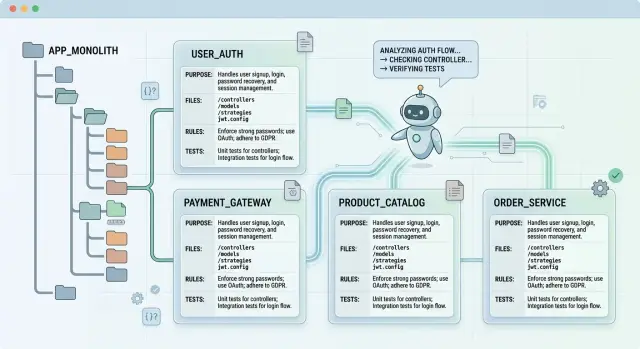
Table of Contents
Why assistants wander across the codebase
Coding assistants do not build a full mental picture of your app from one prompt. They see fragments: a ticket, a few files, maybe a failing test. If the repo does not tell them where a task starts and stops, they keep searching. That is why a small change in one module can send the assistant into auth, config, tests, migrations, and UI files that never needed attention.
They also open unrelated files too early because code ownership is rarely obvious from names alone. A signup change might touch validation, email delivery, feature flags, analytics, and background jobs. Without a plain summary of what each module owns, the assistant guesses. That is where drift starts.
A short request can turn into a wide patch fast. The assistant fixes one function, edits a shared helper nearby, updates types, then cleans up another file that looks inconsistent. Each step seems reasonable. Together, they create a patch that is harder to review and easier to break.
Teams feel this in repeated explanations. The same module needs the same notes every week: "do not edit this generated file", "the retry logic lives in the worker", "this service wraps a vendor API, so keep the interface stable". People get tired of repeating that. The assistant will not remember unless the repo says it clearly.
Reviews slow down for the same reason. Once edits drift outside the intended area, reviewers stop checking the actual fix first. They start asking why each extra file changed, whether the assistant crossed a boundary, and whether some side effect slipped in.
This gets worse on lean teams that rely heavily on AI. Oleg Sotnikov has shown that small AI-augmented teams can run serious production systems, but only when module boundaries stay clear. Repository maps help because they shrink the search area. The assistant spends less time wandering and more time changing the right code.
What a repository map should do
A good repository map gives an assistant a fast mental model of the codebase. It should answer one question right away: "Where should work happen, and where should it not?"
Start with plain language. Each module needs a short summary of what it does in everyday words, not architecture jargon. If a module sends welcome emails, say that. If it validates billing webhooks, say that. A simple description is often more useful than a long list of class names.
The map should also state ownership. Assistants drift when several folders look related, or when one module quietly reaches into another. Write down what each module owns, such as email templates, send rules, and retry logic, and what it does not own, such as account creation or user preferences.
File order matters more than most teams expect. Put the first files or folders to read near the top of the summary. When you name the entry points early, assistants stop opening random helpers and abandoned utility files.
In most cases, a module summary should point to four things first: the main folder, the entry file or service, the config that changes behavior, and the tests that show expected behavior.
Boundaries are the part many teams skip, and that is where bad edits start. A map should say which modules this code can call, which data it can change, and which areas are off limits. Clear boundaries keep the assistant from touching auth, billing, or shared types when the task only needs a local fix.
This matters even more in an AI coding workflow. An assistant can read a lot of files quickly, but speed is not judgment. If the map says that the notification module may format messages but must not decide business rules, the assistant has a much better chance of keeping changes small and correct.
A useful map does not describe every detail. It reduces search space. It helps the assistant choose the right module, open the right files first, and stay inside the lines while it works.
What to include in each module summary
A good module summary answers the same questions every time. When an assistant opens a folder, it should learn what the code owns, how people use it, and where a careless edit can break things.
Start with purpose. Keep it to one or two sentences. Say what the module does for the product, not just what framework it uses. "Handles signup emails after a new account is created" is useful. "Contains mailer classes and helpers" is too vague.
Then define the edges of the module. That usually means naming the inputs it reads, the outputs it produces, the public interfaces other modules can call, the rules it must follow, and the places where small changes often cause trouble.
Write the rules in plain language. If the assistant must send only one welcome email per user, say so. If the module must use a shared template service and never call the SMTP client directly, say that too. Short rules prevent "almost right" edits.
Risk notes matter just as much. Name the files where small changes cause real trouble, such as retry logic, billing hooks, auth checks, or shared serializers. Add the tests a developer should run before opening a pull request. A note like "run signup email snapshot tests and queue retry tests" is enough.
Finish with nearby modules. Many changes are not truly local. A signup email module may also touch user creation, template rendering, audit logs, and feature flags. If you name those neighbors up front, the assistant is less likely to wander into random parts of the codebase or miss files that actually matter.
Keep each summary tight, factual, and easy to scan. If it grows past a few short paragraphs, split the module or trim the noise.
How to write a useful map in 15 minutes
Set a timer and stay shallow. A good map is not a rewrite of the module. It is a short guide that helps an assistant find the right files, avoid the wrong ones, and make one safe change without roaming through half the repo.
Start at the module entry point. That is usually the file where requests arrive, a job starts, a command runs, or exports leave the module. If you begin there, you can trace the main path in a few minutes instead of reading helpers that do not matter.
Then read the public interface and the few files that carry most of the module's behavior. Look at exported functions, config values, schema definitions, and the one or two files where state changes happen. Skip deep internals unless the module is tiny. These maps work best when they show the surface area first.
What to write down
Write one purpose statement in plain English. Keep it concrete: "Sends signup emails after account creation and records delivery status" is enough. Then note where an assistant can edit with low risk and where it should not touch code without a human check.
A useful map usually names the entry file or main trigger, the public API or exported calls, two to four files that matter most, safe edit areas such as templates or validators, and no-go zones such as shared auth, billing logic, or generated code.
Finish with two checks. Add one smoke check that takes less than a minute, such as creating a test signup and confirming that one email job appears in the queue. Then add one test command or test file to run before opening a PR.
If you have three minutes left, add a warning about a common mistake. For example: do not change the email event name because analytics depends on it. One line like that can prevent a lot of noisy edits.
Done well, a module summary is short enough to trust and specific enough to guide daily work.
A simple template your team can reuse
A good map is short enough that people keep it updated. If it takes half an hour to read, assistants will skip it and wander through unrelated folders. Keep each module summary to one screen and make every line answer a real question.
This format works well because it tells assistants where to start, what they can safely change, and what they must verify before they open a pull request.
### Module: [module name]
Purpose: [one sentence on what this module does and who or what depends on it]

Read first:
- [main entry file]
- [core service or handler]
- [tests or examples worth reading]

Common tasks:
- [add a field, fix validation, change API call, update UI copy]
- [one more task people do often]

Rules before editing:
- [important business rule]
- [do not change these files without checking X]
- [follow this pattern for naming, data flow, or error handling]

Checks after edits:
- [unit test command]
- [lint or type check]
- [manual test steps]

Notes:
- [known trap, edge case, or dependency that breaks easily]
The first line matters most. A clear module name and one-line purpose stop a lot of bad guesses. "Handles signup emails after account creation" is much better than "Email module." The boundary is obvious right away.
The "Read first" section saves time. Point to two or three files, not ten. Pick the files that show the main flow, such as the entry handler, the service that does the work, and one test that shows expected behavior.
For tasks, write what people actually do in that module. Think in verbs: add, fix, update, remove. That helps an assistant choose the smallest possible change instead of rewriting code that already works.
Rules should be blunt. If the module uses a queue, a retry limit, or a fixed event shape, say so. If changing one file means updating a schema or test fixture, name it.
End with checks that match the module. Run local tests, run lint, and do one manual check that proves the user-facing behavior still works. That last step catches plenty of mistakes that clean test output will miss.
Example: a signup email module
A signup email module is a good test case because it looks small, but assistants often drift out of scope. They start in the welcome email template, touch password reset logic, then wander into user creation, auth rules, or billing checks because those files sit nearby in the repo.
A clear map stops that drift early. This summary should say what the module owns, where the assistant should work, and where it should not go.
For a signup email module, the summary can be very plain. It sends welcome emails after account creation and reset emails when a user asks to change a password. It owns email templates, subject lines, shared email helpers, provider delivery code, and the test fixtures that cover those paths.
It should also name the files or folders that matter most. That usually means one place for templates, one place for delivery logic, and one place for tests. If your app has a queue, mention the job file too. That saves the assistant from opening twenty files just to guess the flow.
The boundary note matters just as much. Say it directly: do not edit auth flows, user creation rules, billing code, or account state checks unless the task explicitly asks for it. Those areas may trigger an email, but this module does not own them.
A short module map might include the purpose, the main files, the inputs, the out-of-scope areas, and one done check. In plain terms: send welcome and password reset emails; read templates, the mailer service, the queue job, and tests first; accept user email, token, and template data as inputs; leave auth, billing, and account permissions alone; then preview one email and run one test.
That last step keeps the work grounded. If the assistant changes a reset template, it should preview a real email and run one test for the changed path. One quick preview catches broken markup or missing variables. One test confirms the delivery path still works.
This kind of map does not need polish. It needs sharp edges. When the assistant knows where the module starts and stops, small edits stay small.
Mistakes that make maps hard to trust
A repository map loses trust fast when it reads like a wiki page and acts like a rumor. If engineers or assistants check it once, get burned, and find stale or fuzzy notes, they stop using it.
The most common problem is length. A module summary should help someone act, not retell every decision the team made over two years. If a note takes five minutes to scan, people skip it and start digging through random files instead.
Too much history, not enough rules
Old design history often crowds out the part that matters now. A short note about why a module exists can help, but long stories about past migrations, abandoned patterns, and old bugs make the current rules harder to spot.
Keep the summary focused on the present tense. What does this module own? What inputs does it expect? What should nobody change without checking the rest of the system?
Vague warnings are another trust killer. "Be careful here" tells nobody what to do. A good warning names the risk and the boundary.
For example, "Be careful with signup emails" is weak. "Send signup emails only through EmailQueueService. Direct sends skip retry logic and can duplicate messages" gives a clear rule. The same applies to auth. "Auth is tricky" says nothing. "Do not read user roles from the session object. Use PermissionService so cache invalidation stays correct" gives a direct instruction.
Far from the code, then forgotten
Maps also fail when teams store them in a separate doc that nobody opens during normal work. Put the summary near the module, where people edit code and read files. A small README, a map file in the folder, or a top-level index that points to local summaries works better than a forgotten page in another tool.
Refactors break trust even faster. A module gets renamed, a service moves, a queue disappears, and the map still describes the old shape. After that, even correct notes look suspicious.
A simple rule helps: if a pull request changes ownership, file paths, entry points, or public behavior, update the summary in the same branch. Treat the map like code, not office paperwork.
The best maps feel boring in a good way. They stay short, close to the code, and painfully specific. That is why people believe them.
A quick check before each release
Stale notes are worse than no notes. A wrong summary sends people and tools into the wrong files, wastes review time, and creates edits you never wanted.
Run one fast review before you cut a release. It should take a few minutes, not half an hour. Open the module summary, then compare it with the code that shipped this week.
Use a short checklist. Read the summary as if you joined the team today. If you cannot understand the module in about a minute, trim it. Check that it names real files and folders, not vague areas like "the auth code" or "email logic". Look for clear guardrails so the summary says what people should not edit unless they mean to change behavior, such as shared templates, migration files, or billing rules. Confirm one real test or smoke check. "Run tests" is too vague. Name the command, screen, endpoint, or user action that proves the module still works. Then compare the summary with the latest code and update it if the flow, file names, or test steps changed.
One small example makes this easy to judge. If the summary says signup emails live in modules/notifications/signup.ts, but the team moved the logic into services/mailer/, the note is already wrong. An assistant will follow the old trail and start patching dead code.
This check works best when the release owner does it during the final review, not days later. Fresh context helps. People still remember which shortcuts they took, which files they touched, and which test they ran to confirm the fix.
If you keep module summaries honest, they stay useful for both humans and tools. A new teammate finds the right folder faster. An assistant makes fewer random edits. That is the point of repo documentation.
Next steps for your team
Start small. Pick the two modules your team changes most often and write maps for those first. You will learn more from one week of real use than from a long planning session.
This works best when the modules already cause repeated problems. Maybe the assistant keeps editing the wrong service, or it misses one file that always matters. A short map fixes that faster than another prompt trick.
Keep the format boring and consistent. If one map uses a paragraph, another uses a checklist, and a third reads like release notes, both people and tools slow down. Every assistant should get the same structure, the same field names, and the same level of detail.
A simple starting set is enough: what the module does, which files matter most, its inputs and outputs, the rules the assistant should not break, and the tests or checks to run after changes.
Do not treat repository maps as separate documentation work that happens later. Write them next to the code, update them in the same pull request, and keep them short enough that someone will actually read them. If your team is moving toward a heavier AI coding workflow, that discipline matters more than fancy prompting.
For teams that need help setting those boundaries, practical guidance from operators who have built AI-first engineering workflows can save time. Oleg Sotnikov writes about this work at oleg.is and advises startups and small teams on structuring code, infrastructure, and development processes so AI tools stay useful instead of noisy.
Done right, a repository map is small, plain, and a little boring. That is exactly why it works.
Frequently Asked Questions
What is a repository map in a codebase?
A repository map is a short note that tells people and coding assistants where work should happen in a module and where it should stop. It gives the purpose, the first files to read, the rules to follow, and the checks to run after a change.
How long should a module summary be?
Keep it to one screen if you can. If a summary takes several minutes to scan, people will skip it and start opening random files instead.
Where should we store repository maps?
Put the map next to the code it describes. A small README.md in the module folder or a local map file works better than a separate doc that nobody opens during normal work.
What should every module summary include?
Most teams need five things: what the module does, which files to read first, what it owns, what it must not touch, and what test or smoke check proves the change still works. That gives an assistant enough context without turning the note into a wiki page.
How do repository maps stop assistants from editing unrelated files?
It narrows the search area early. When the map names the entry file, the main service, and the off-limit areas, the assistant stops guessing and spends less time in auth, billing, shared helpers, or old utility folders.
Do we need a map for every folder in the repo?
No. Start with the modules your team changes often or the ones where AI tools drift the most. A few honest maps help more than a giant doc full of stale notes.
How do I write a useful map quickly?
Set a 15-minute timer and stay near the surface. Open the module entry point, read the public interface, note the few files that carry most of the behavior, then write a plain summary with one quick check to run before a PR.
What makes a repository map hard to trust?
Teams stop trusting maps when they grow too long, stay vague, or fall behind the code. Notes like "be careful here" do not help; direct rules like "use EmailQueueService for sends" do.
When should we update a module map?
Update the map in the same branch whenever a PR changes file paths, ownership, entry points, or public behavior. If the code moves and the map stays old, the next person or assistant will follow the wrong trail.
Can repository maps help a small team that uses AI a lot?
Yes. Small teams get more value from clear boundaries because they cannot spend review time untangling wide AI-made patches. A short map helps the assistant make smaller edits, and it saves humans from repeating the same warnings every week.