Repo map for coding agents that cuts wrong file edits
A repo map for coding agents shows modules, entry points, and side effects so assistants pick the right files and reviewers scan changes faster.
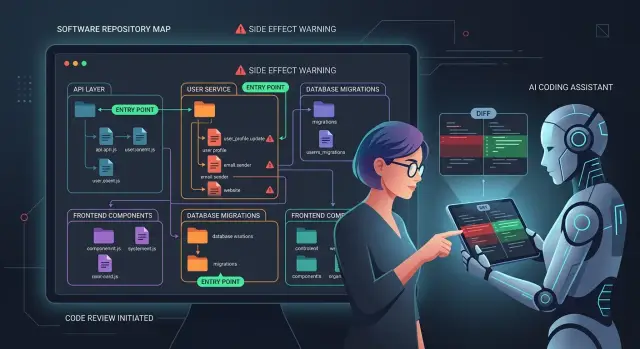
Table of Contents
Why agents edit the wrong files
Coding agents usually fail for a plain reason: the repo gives them too many plausible places to make the change.
A folder called billing, another called payments, and a helper named invoice_service can all look right. The agent often picks the file that matches the words in the prompt, not the file that actually controls runtime behavior.
The problem gets worse when setup code lives far from the feature folder. A request might start in api/routes, pass through middleware, load config from bootstrap, and only then reach the service you meant to change. Humans learn those jumps over time. Agents do not, unless the repo makes them obvious.
Small edits also carry side effects that the local file does not show. Change one validation rule and you might also fire an email, write an audit log, update Redis, or trigger a background job. The agent sees the line it can edit. The reviewer has to find the blast radius by hand.
That is where review time disappears. Instead of judging whether the change is good, reviewers spend ten or fifteen minutes tracing intent across handlers, jobs, and integration code. They end up asking basic questions the repo could have answered:
- Where does this flow start?
- Which module owns this behavior?
- What else runs when this function changes?
A common example makes the problem obvious. A product team asks an agent to "fix duplicate welcome emails." The agent edits the template or the mailer class because those names look right. The real bug lives in signup retry logic inside a worker, plus one idempotency check in the account service. The diff looks clean, but production behavior stays broken.
Without a repo map, the tool keeps guessing from names and proximity. Even a short map improves the odds. It shows which files own the feature, where execution enters the system, and which edits can affect logs, emails, queues, or writes. Reviewers spend less time playing detective and more time deciding whether the fix is actually correct.
What to put in a repo map
Start with ownership, not folder names. A good repo map tells each top-level module what it owns, what it should not touch, and where changes usually begin.
If billing owns invoices and subscriptions, say that. If dashboard only renders UI and should not contain payment rules, write that down too. One plain sentence per module is often enough.
Top-level notes matter because agents often choose a file that looks close enough. Reviewers then waste time asking why a UI change touched business logic or why a billing update landed in a shared helper. A short ownership note prevents a lot of drift.
Then name the entry points. Most repos have more than one: web requests, CLI commands, queue workers, cron jobs, and migration scripts. Agents guess badly when they cannot see where execution begins or which process runs in the background. If a feature starts in api/orders, fans out to a worker, and ends in an email sender, make that path easy to follow.
Shared libraries need warnings too. Some files look harmless but sit underneath half the product. A tiny edit in auth, logging, config loading, feature flags, or database helpers can ripple across many features. Mark those areas so people slow down before changing them.
You do not need a long document. A short map can say:
app/owns user-facing screens and request handlersworkers/runs background jobs, retries, and scheduled taskslib/authaffects sign-in across the whole productservices/paymentscharges cards and writes billing recordslegacy/importercontains old rules and brittle tests
Side effects deserve plain language. Mark files that send emails, take payments, write data, call outside APIs, or trigger jobs. These files carry more risk than their size suggests.
Legacy areas need honest notes. If a module has odd naming, hidden coupling, or old patterns that confuse new team members, say so in one sentence. "Works, but mixes three generations of code" is more useful than silence.
Start with modules and boundaries
A useful repo map starts with modules that have a clear job. Give each one a single sentence in plain English. "Billing creates charges and invoices." "Auth signs users in and checks sessions." If you need three sentences to explain a module, the boundary is probably blurry.
Then mark where data enters and leaves that module. Keep it simple: what comes in, what goes out, and where it goes next. An orders module might accept a checkout request, write an order record, and send an event to billing. That small note helps the agent pick the right file, and it helps reviewers spot changes that cross lines they should not cross.
Good repository documentation also says which files are off-limits for casual edits. Some files look easy to patch but create a mess later. Database migrations, permission checks, shared types, and low-level storage code are common trouble spots. If other modules should not edit them directly, say so. A note like "edit only when the task names this file" is often enough.
It also helps to separate stable code from fast-changing code. Stable code includes schema rules, money logic, access control, and anything else that can break production in quiet ways. Fast-changing code includes UI text, feature flags, email copy, and prompt templates. Agents often match by names rather than intent. When both kinds of code sit close together, they can touch the wrong layer.
A small team can map this on one page. The checkout module owns cart totals and order creation. The email module sends receipts and status updates. Pricing rules change rarely. Receipt templates change often and are safer to edit. That boundary alone can make AI code review much faster, because reviewers can verify module choice before reading the diff line by line.
Mark entry points and runtime paths
Most wrong edits happen before the agent even reaches the feature logic. It opens a file that looks related, misses the real starting point, and changes code that never runs in the path you care about.
A repo map should name every place where execution begins. That usually means web routes, CLI commands, background workers, and cron jobs. If your app has more than one runtime, spell them out instead of assuming folder names make it obvious.
A short path description helps a lot. For each runtime path, show where it starts, what runs first, and where the request or job lands next. Reviewers can scan a change and see whether the agent touched the real path or wandered into a similar module.
For example:
- Web request: route file -> middleware -> handler -> service
- CLI task: command entry -> argument parser -> command handler
- Worker job: queue consumer -> job handler -> processing code
- Scheduled task: cron definition -> runner -> task function
Name the handler that owns each path. "Orders API" is vague. src/api/orders.ts -> createOrder() -> services/orders/create.ts is much better. The agent gets a real trail to follow, and the reviewer gets a quick way to check the edit.
Do the same for config. Small config files often change behavior more than feature code does. Note env files, feature flags, route registration, dependency injection setup, job schedules, and any per-environment settings that affect which code runs.
Startup code matters too. If the app loads middleware, patches globals, registers services, warms caches, or reads config before a request reaches the handler, write that down. Agents often miss startup layers and then "fix" the wrong file.
A compact entry for each runtime path can include five facts:
- entry point name
- start file
- first handler or runner
- startup code that runs before business logic
- config files that can change behavior
If this part of the map stays current, reviewers spend much less time asking, "Why did the agent edit this file?"
Write down side effects and risky spots
A file can look harmless and still do expensive or dangerous work. That is where agents often slip. They change a handler, a job, or a model, and miss the fact that the same path also sends emails, charges a card, deletes records, or updates customer access.
Mark those side effects in plain words. Reviewers should not have to dig through three services to learn that one small edit can trigger billing, notifications, or data removal.
In many cases, a short note next to the module name is enough. "Writes to Stripe and sends receipt email" tells both the agent and the reviewer to slow down.
Watch for hidden writes too. Teams usually remember the database and forget the rest. Caches, queues, analytics events, webhooks, and search indexes often drift out of sync when an agent edits one path but misses another.
A simple note for risky areas should answer four questions:
- What can this code change?
- Which outside systems does it touch?
- What must stay in sync?
- Who can trigger it?
Permission checks need the same treatment. If a controller, middleware, or service enforces role checks, say so. Otherwise an agent may move logic into a shared helper and quietly bypass an admin-only rule.
Generated files deserve a warning label too. If a file comes from code generation, say where it comes from and whether people should edit the source schema instead. The same goes for migration scripts. One careless rename in application code is annoying. One careless schema migration can lock a table or wipe data.
Picture a team changing the "cancel subscription" button label. The route does more than update text. It also stops future invoices, revokes premium access, clears a cache entry, and pushes an event to the support queue. If the map lists those side effects, the agent edits the right files and the reviewer checks the risky path first.
This part of the map saves time because it shows where a tiny diff can have a very large blast radius.
Build the map in a few short passes
A useful map does not need a week of diagrams. Most teams can make a solid first version in an hour or two if they stay practical and focus on how the code really runs.
Start at the repo root and name the modules that matter. Keep the notes short: what each module owns, what it should not touch, and who calls it. If two folders look similar, spell out the difference.
Then pick one real user action and follow it from entry to exit. Use something ordinary, like "user signs in," "customer checks out," or "admin exports a report." Trace the request through the handler, service, jobs, and storage layer. A repo map gets much better when it follows a path people use every day instead of a made-up example.
As you trace that path, mark the shared code and the side effects. Shared code is where agents often wander off and change more than they should. Side effects are the places that surprise reviewers: database writes, cache updates, queued jobs, emails, webhooks, file writes, feature flags, and analytics events.
A simple first pass looks like this:
- List the top-level modules and what they own.
- Trace one common action through the code.
- Note shared helpers used on that path.
- Mark every side effect and risky dependency.
- Ask a reviewer to rewrite vague lines.
That last step matters more than teams expect. The person who knows the repo best will spot weak notes right away. "Handles billing" is vague. "Creates invoice, writes billing record, triggers tax call" is much better.
Save the map where people see it before they open half the codebase. Put it near the repo entry docs, the agent instructions, or the review checklist your team already uses. If you run AI-assisted development in GitLab or a similar flow, early placement helps because both the agent and the reviewer read the same map before changes spread across the wrong files.
Keep the first version lean. If it helps someone choose the right file on the first try, it is already useful.
A simple example from a product team
A team gets a small request: change the wording and send time for invoice emails. It sounds simple, but agents often drift when the repo gives them no map. They search for "invoice," find PDF generation, admin screens, old cron jobs, and start editing files that have nothing to do with the email flow.
A repo map cuts that drift fast. In this case, the map points to the billing worker that queues and sends invoice messages, the template folder that holds the email copy, and the audit log code that records when an invoice email goes out.
Three short notes are enough:
- the billing worker owns invoice email scheduling and delivery
- the template folder controls subject lines and body text
- the audit log records send attempts and status changes
That changes how the agent works. It edits the worker logic if send timing changes. It updates the right template if the text changes. It checks the audit log only if the new behavior should leave a different record.
The map also tells the agent what to ignore. PDF code may mention invoices, but it only builds attachments. Admin screens may show invoice status, but they do not send the email. Once those areas are marked as unrelated, the agent stops guessing and leaves them alone.
The reviewer feels the difference right away. Instead of opening twenty files because the change touched every folder with the word "invoice," the reviewer checks three files and understands the full path in a minute or two. That makes AI code review much calmer. Less noise, fewer reversions, and fewer "why did this change?" comments.
This is why repository documentation works best when it is practical. A short note about ownership, entry points, and side effects can save more review time than a long architecture page nobody reads.
Mistakes that waste review time
Teams often think repository documentation is finished once they list top-level folders. That rarely helps. A folder name like services, core, or utils tells a reviewer almost nothing about what lives there, what owns it, or why an agent changed it.
A good repo map needs one more layer of meaning. If billing contains invoice rules, webhook handlers, and retry logic, say that. If api only exposes routes and should not hold business logic, say that too.
Another common mistake is hiding risky side effects in one giant note called misc or gotchas. Reviewers should not have to hunt for the sentence that says a small change also triggers emails, cache invalidation, audit logs, or outside API calls. Put side effects next to the module that causes them.
Background work gets missed all the time. A reviewer may see a small change in an admin screen and approve it quickly, not knowing the same code also feeds a nightly sync job or a queue worker that runs every five minutes. Then the review slows down because someone has to reconstruct runtime behavior by hand.
I have seen teams map request paths cleanly but skip scheduled tasks. An agent updates a model used by a dashboard and a billing job. The web flow still works. The overnight job breaks. The review turns into a long comment thread just to uncover where the second path lives.
The map also loses value when it drifts after refactors. If checkout logic moved three months ago but the document still points to old files, reviewers stop trusting it. Once that happens, they ignore it.
Static diagrams often end up the same way. If nobody uses them during review, they become wallpaper. Short text near real modules usually works better. Reviewers need to see, at a glance, what this area owns, where requests enter, which jobs or schedulers touch it, and which side effects happen outside the app.
If a reviewer can scan those notes in under a minute, change reviews get faster and agents guess less.
Quick checks before you hand it to an agent
Before an agent gets a task, test the map with someone who did not write it. If that person cannot follow one real feature from screen to storage in about five minutes, the map still leaves too much room for guessing.
A short repo map should make risky paths obvious fast. Reviewers should not need to search through ten folders to answer basic questions like "does this touch billing?" or "can this change write customer data?"
A quick check helps:
- Ask a new teammate to trace one ordinary feature end to end.
- Check that payment, auth, and data-write paths stand out immediately.
- Make sure every note names the real file or directory.
- Compare the map with recent refactors.
- Keep the top layer short and move deeper detail under the owning module.
Say an agent gets the task "fix failed checkout retries." The reviewer should find the checkout entry point, the retry job, the payment adapter, and the order write path in seconds. If the map points to old filenames or hides the retry worker inside a generic jobs note, the agent may patch the wrong file and the reviewer will waste time proving it.
Short maps usually work better than complete maps. Once a page tries to explain every helper, every hook, and every utility, nobody scans it anymore. Keep the first screen tight. Add deeper notes only where the risk is real.
If this quick test fails, fix the map before you hand over the task. That is usually faster than cleaning up a bad edit later.
What to do next
Pick one path through the product that keeps creating noisy pull requests. Login, billing, and background jobs are good places to start. If reviewers often ask, "Why did this file change?", map that flow first.
Do not try to map the whole codebase in one pass. A small repo map helps more than a giant document nobody reads. Write down the modules involved, the real entry file, and the side effects that keep surprising reviewers. One clear page usually beats ten stale ones.
Then fold it into normal team habits. Ask the author to check the map before giving work to an agent. Ask the reviewer to compare changed files against the map. Update the map when entry points move or a module gets a new side effect. If a code change shifts runtime behavior, update the map in the same pull request.
That turns the map into working documentation instead of a side project. Reviewers spend less time tracing call paths. Agents make fewer wrong edits. New team members also get useful context without asking the same questions every week.
Be strict about one rule: if runtime paths or side effects change, the map changes too. Teams skip this part all the time, and then the document becomes misleading.
If your team uses AI coding tools often and reviews still feel noisy, Oleg Sotnikov at oleg.is works with startups and smaller companies on AI-first development workflows, repo structure, and technical review processes. A short outside review can help you tighten the map and remove the patterns that keep causing the same wrong-file edits.
Frequently Asked Questions
What is a repo map in plain English?
A repo map is a short guide that tells people and coding agents which module owns a feature, where execution starts, and what side effects a change can trigger. It cuts guessing, so the agent opens the file that actually controls runtime behavior instead of the file with the most obvious name.
Can a repo map be just one page?
Yes. One page often does the job if it names the main modules, the real entry points, and the risky side effects. If someone can trace a common flow in a few minutes, the map is already useful.
What should I document first?
Start with one noisy flow that keeps causing wrong edits or slow reviews, like login, checkout, or a worker that sends emails. Map the entry file, the handler or job, the owning service, and any writes or external calls on that path.
Do I need diagrams for this?
No. Plain text near the repo entry docs usually works better because reviewers can scan it fast and compare it with the diff. Most teams get more value from clear module notes than from a diagram nobody updates.
What counts as an entry point?
Entry points are the files or commands where execution begins, like routes, CLI commands, queue consumers, cron jobs, or startup code. If you name them clearly, the agent has a real trail to follow instead of guessing from folder names.
How do I document side effects?
Write them in direct language next to the module that causes them. Notes like charges cards, sends receipt email, writes audit log, or pushes to queue tell the reviewer where a tiny diff can cause a big problem.
Where should we keep the repo map?
Keep it in the same place reviewers and authors already read before they open half the repo. Repo entry docs, agent instructions, or the review checklist work well because the map shows up before changes spread into the wrong files.
How do we keep the map from going stale?
Update it in the same pull request whenever a runtime path, module boundary, or side effect changes. If the map points to old files after a refactor, people stop trusting it and go back to tracing everything by hand.
How can I tell if our map actually works?
Give it to someone who did not write it and ask them to trace one real feature from screen or request to storage. If they get lost, open the wrong folder, or miss a worker or config file, the map still leaves too much room for guessing.
When does it make sense to get outside help?
Bring in outside help when reviews stay noisy, agents keep touching the wrong files, or the team cannot agree on module boundaries. An experienced CTO or advisor can tighten the repo structure, clean up runtime paths, and make AI-assisted work less chaotic.