Repo boundaries for AI assistants that cut mistakes
Good repo boundaries for AI assistants reduce wrong edits, keep deploys clear, and make reviews simpler for teams that ship often.
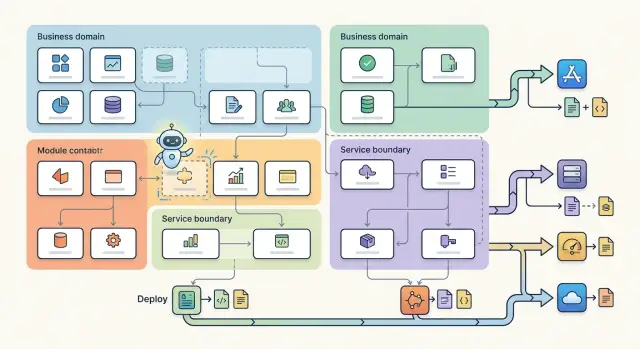
Table of Contents
Why assistants go wrong in messy repos
Assistants do not read a codebase the way a senior engineer does. They look at the files closest to the task, copy nearby patterns, and keep going. If those nearby files mix several jobs, the assistant copies that confusion.
That is why a messy repo hurts coding accuracy so fast. The model sees what is close, not what is correct. A change that should touch one pricing rule can pull in an old API shape, the wrong utility, or a test from a different flow.
Mixed concerns make this worse. When billing logic sits next to UI helpers, background jobs, and admin-only rules, the assistant has no clean edge to follow. It guesses. The guess can even look reasonable in review, which is why these mistakes slip through.
Shared folders cause a different problem. Names like common, shared, or utils sound neat, but they often hide business rules that belong to one part of the product. A discount rule for invoices ends up beside date formatting, auth helpers, and retry code. The assistant then treats all of it as equally reusable, even when one file only makes sense in one narrow context.
Small prompts can spill far beyond what you meant to change. Ask for an update to order cancellation, and the assistant may edit checkout screens, refund jobs, webhook handlers, and admin reports in one pass because they all mention the same fields. The repo gave it no boundary, so it crossed several.
Humans can stop and ask, "Should this live here at all?" An assistant usually will not. It follows local clues. If those clues come from old team ownership, folder habits, or years of quick fixes, you get code that looks tidy nearby but breaks the larger system.
Clear boundaries reduce that confusion. They tell the assistant where a rule starts, where it stops, and which part of the system owns it. When that line is obvious, suggestions get smaller, imports get cleaner, and edits stay inside the right service.
What a useful boundary looks like
A good boundary feels a little boring. Open a module, and you can tell what rules live there, what data it can change, and what service ships it. That kind of clarity keeps an assistant from guessing.
In practice, one business rule should have one home. If discount rules live in checkout, the assistant should not find half of them in admin forms and the other half in a shared folder. When the rule changes, one module changes first. Other modules should call it through a small public interface.
Write paths matter more than read paths. Reading order history from three places is messy, but letting three places create refunds or update invoice status is where bad suggestions start. Keep the code that writes data close to the code that owns that part of the business. Then the assistant sees one source of truth instead of several competing patterns.
Small interfaces help for the same reason. A module should expose a few plain functions, events, or API handlers. It should not expose internal tables, helpers, and side effects. Assistants can follow a short contract. They get lost when every module reaches through the wall and touches private code.
A useful boundary also makes deploy edges obvious. You should be able to answer a few questions fast:
- Where does this service start?
- Which code builds and ships with it?
- Which module owns writes to this data?
- What can other modules call without reaching into internals?
Take billing and admin. Admin may show invoices and trigger approved actions, but billing should still own charge logic, refund rules, and ledger writes. If billing deploys as its own service, the repo should show that in one obvious place. Its entrypoint, config, tests, and release files should sit close to the module instead of hiding across the tree.
If a new engineer, or an assistant, can predict where a change belongs before using search, the boundary is probably doing its job.
Split by domain rules, not by who owns a folder
Teams change faster than business rules. Your repo should follow the product, not the current org chart.
If one team owns checkout today and another owns payment recovery next quarter, the code should not need a big move. When folders mirror reporting lines, every reorg turns into a repo rewrite. That creates churn, broken imports, and stale context for the assistant.
A better split keeps one business idea in one place. Checkout logic belongs together even if two teams touch it every week. Cart totals, tax handling, payment retries, and order confirmation rules should live near each other only when they answer the same product question. If they belong to different questions, split them.
Pricing rules need the same discipline. Keep them away from email tools, admin screens, or support scripts, even if those areas read pricing data. Email code should send messages. Admin code should manage staff actions and settings. Pricing code should decide what something costs, when discounts apply, and which plan a customer can buy.
When you mix those concerns, assistants copy logic into the wrong place. A discount check written for billing can end up inside an email job because the repo suggests they belong together.
Shared helpers create another mess when teams extract code too early. The "shared" area turns into a junk drawer full of one-off functions with vague names. Wait until two modules need the same helper for the same reason. If checkout and billing both normalize currency values in the same way, extract it. If one module formats a price for an invoice and another formats it for a promo email, keep them separate until the overlap is real.
There is a simple smell test here. If a folder name matches a team name, a meeting name, or a manager's scope, it will probably age badly. If it matches a business rule, it usually lasts longer.
That stability matters. People move. Teams split. The product still needs one place where checkout rules make sense.
Match modules to deploy paths
Put code where it ships. When a service deploys on its own, it should have its own module, config, and tests nearby. That keeps changes local, and it gives an assistant a smaller area to read before it suggests edits.
Boundaries get much clearer when they line up with deployment. If the API, worker, and admin app release on different schedules, they should not live in one mixed module just because they all touch the same product area. A shared library can make sense, but shipping code and shared code are not the same thing.
A common mess looks like this: one folder holds app logic, database migrations, job handlers, env files, and test fixtures for three different services. A person can untangle that after a few days. An assistant usually cannot. It reads a migration for one service, a config file for another, and then suggests a change that breaks both.
A cleaner layout keeps each deploy target self-contained. Service code should live with the files that control its release. Migrations should stay with the database used by that service. Service-level tests should sit next to the code they check. Shared helpers should move to a separate library only when more than one service truly uses them.
That last point matters. Teams often pull code into a common package too early. Then the package becomes a junk drawer, and every assistant starts treating unrelated code as if it belongs together. If only one service uses a rule today, keep it there.
Cross-service calls need the same care. Put them in one obvious place, such as a dedicated client or integration module inside the calling service. Do not scatter HTTP calls, queue messages, and retry rules across random files. When those calls live in one spot, an assistant can trace what happens between services without guessing.
Think about what you deploy at 4 p.m. on a Tuesday. The repo should make that answer boring. If one release touches an API service, its config, its migration, and its tests, all of that should sit in one clear home.
A simple way to redraw the repo
Start with user actions, not folders. If your product lets people sign up, pay invoices, request refunds, or export data, write those actions down first. That gives you a cleaner map than whatever grew from old team habits.
Then match each action to the code that actually ships it. A refund might touch a web handler, a billing service, an email job, and a ledger update. If one prompt keeps dragging in reporting code, admin screens, and old scripts, that is a clue that the boundary is too wide or too vague.
You do not need a grand rewrite. Make one practical pass. Write down the business actions your product performs every day. Note which service, worker, or app delivers each one in production. Mark the files assistants pull into prompts by mistake. Then split one area at a time and give folders plain names that match the action.
Add one short import rule before moving on to the next area. Without a rule, the old shape grows back fast. Keep it simple: the billing module can use billing internals, other modules call it through a small public surface, and shared code stays generic. If you need a paragraph to explain the rule, it is too loose.
Plain folder names help too. payments, refunds, and invoices tell both humans and tools what belongs there. core, utils, and misc invite drift. Assistants do better when names carry real meaning because prompts and file search stay tighter.
Do not redraw the whole repo in one pass. Pick the area that causes the most wrong suggestions, move that first, then watch what changes. Good boundaries usually come from a few small cuts, not one large rewrite.
You will know the split works when a prompt about one action mostly pulls files from one module, one deploy path, and a small shared layer. That is a much easier shape for an assistant to read without guessing.
Example: checkout, billing, and admin
A store app often puts these three areas near the same tables, so people dump everything into one orders package. It looks neat for a week and messy after that. An assistant sees cart items, payment attempts, invoice records, refund notes, and staff flags in one place, then edits rules that do not belong together.
Checkout should own the path from cart to placed order. That includes cart totals, coupon checks, shipping choice, stock hold, and the rules that decide whether an order can exist. If a customer changes quantity or address, the assistant should stay inside checkout code and finish the job there.
Billing has a different job. It should own money work after the order exists: tax logic, invoice creation, payment retries, refund records, and charge status. Finance rules change for reasons that have nothing to do with cart behavior. When an assistant updates the retry delay for failed cards, it should not wander into coupon code or staff screens.
Admin can read the same orders and payments without owning those rules. Staff dashboards, approval flows, fraud review notes, support actions, and internal search belong in admin. A dashboard may show invoice status or checkout errors, but that does not mean admin should calculate taxes or rebuild cart totals.
One clean split is easy to describe:
- checkout owns cart, pricing, and order creation
- billing owns taxes, invoices, payments, and refunds
- admin owns staff views, review tools, and manual actions
This makes changes smaller. Fix a rounding bug in checkout, and the edit stays there. Change retry policy in billing, and it stays there too. Add a new support action, and admin gets the work without dragging in payment logic.
Shared tables do not mean shared ownership. Put each rule where it belongs, and the assistant will make fewer broad, noisy edits.
Mistakes that create noisy suggestions
The most common trap is the "shared" folder that slowly turns into a junk drawer. One helper for billing lands there, then a checkout rule, then admin-only code. After a few months, the assistant sees one mixed pile instead of clear domain rules, so it starts reusing the wrong thing in the wrong place.
Another mistake starts earlier. Teams split code into frontend, backend, and scripts before they map the business flow. That layout looks tidy, but it hides how the product actually works. If checkout logic lives in three separate trees, the assistant has to guess which files belong to one change. That is where noisy suggestions start.
Deploy files cause the same problem when they sit far away from the module they ship. If a worker, API, and scheduled job all have configs buried in one ops folder, the assistant cannot easily tell what runs where. It may update code and miss the Docker file, CI step, or environment settings that make the change real.
Direct database writes across module lines are worse. If the admin module writes straight into billing tables, or billing reaches into checkout data without a clear interface, the folder names stop meaning much. The repo says one thing. The data flow says another.
Old boundaries also linger long after the product changes. A startup may begin with one general orders area, then grow separate flows for checkout, invoicing, fraud checks, and support tools. If the repo still reflects the old product, the assistant keeps pulling old patterns into new work.
These smells usually show up in the same ways:
- the assistant edits files in modules you did not expect
- similar business rules exist in two or three places
- deploy changes get missed until review or production
- small requests trigger wide diffs
- tests pass in one module while another quietly breaks
Clean module lines do not make the assistant smarter. They give it less room to be wrong.
Quick checks before you freeze the structure
A repo can look tidy and still confuse both people and tools. Before you lock the layout, test whether one change stays local or leaks across the codebase.
Start with a real customer action. Ask someone who did not design the repo to trace one flow, like updating a card, placing an order, or issuing a refund. If they have to jump through UI code, shared helpers, random services, and admin files just to follow one action, the boundary is too blurry.
A few checks catch most problems. Try deploying one module on its own. If a small release forces you to inspect half the repo, the deploy path is too wide. Change one business rule and watch the tests. A billing rule should fail in billing first, not in five unrelated places. Read the imports between modules. Good boundaries expose a small public API and hide the rest. Then ask an assistant to make a simple feature edit. If it needs to open ten folders before it can act, the structure is working against it.
The import check matters more than many teams think. When developers reach across boundaries into internal files, assistants copy that habit fast. Then a small change turns into edits in places that should have stayed untouched.
Tests tell the same story. If one rule change creates failures in checkout, billing, admin, and reporting all at once, the repo probably mixes domain rules with convenience imports. That slows people down, and it also lowers assistant accuracy because the model sees many weakly related files and cannot tell which one owns the rule.
Boring is usually better. If one customer action has one obvious home, one rule change breaks one obvious test area, and one module can ship without reading the whole repo, you are close enough to freeze the structure.
What to do next
Start small. Pick one flow that already costs time or causes bad edits, such as checkout, billing, or user onboarding. Do not redraw the whole repo in one pass. A narrow test gives you real evidence, and it keeps the team from arguing about folder taste.
For that one flow, write the boundary rules in plain language beside the code. Keep them short and blunt. A note in the billing module might say: "This module decides charges, refunds, and invoice state. It does not send emails or manage admin permissions." That helps people, and it helps assistants stay inside the lines.
Then test the structure with real work. Ask the assistant to make a handful of small changes in that flow. Review the diffs and mark every place where it touched the wrong module. Look for repeat drift, such as business rules leaking into UI code or deploy-specific code spreading across shared folders. Adjust the boundary only where the same pattern shows up again.
This matters more than a long design doc. You are checking how the repo behaves under pressure. If the assistant keeps guessing wrong, the boundary is still fuzzy. If the diffs get smaller and cleaner, you are moving in the right direction.
Keep the rules close to the code, and keep them readable. A short README in each module often works better than a central architecture file nobody opens. When the repo changes, update those notes the same day. Old rules are worse than no rules because they teach both people and tools to trust the wrong map.
If this kind of cleanup keeps stalling, outside help can be useful. Oleg Sotnikov at oleg.is works as a Fractional CTO and startup advisor, with hands-on experience in AI-driven development, repo structure, and lean delivery. That can help when boundary problems start affecting shipping speed, review load, and production risk.
Frequently Asked Questions
Why do AI assistants make such wide changes in a messy repo?
Because the assistant follows nearby files and repeats local patterns. If one area mixes billing, UI, jobs, and admin rules, it will pull all of that into one change and guess where the rule belongs.
What is the first sign that a boundary is too blurry?
Watch for small requests that touch several modules. If a simple refund change drags in checkout screens, admin code, and old scripts, your module line is too loose.
Should I organize folders by team ownership or by product area?
Split by product rules, not by the current org chart. Teams change often, but checkout, billing, and refunds still need a stable home in the repo.
When does a helper belong in a shared folder?
Do not move code there just because two files look similar. Put a helper in a shared area only when two modules need the same behavior for the same reason; otherwise keep it close to the rule that uses it.
Why do write paths matter more than read paths?
Reads can come from a few places without much damage, but writes create drift fast. If several modules can create refunds or update invoice state, the assistant sees multiple sources of truth and copies the wrong one.
Should modules match deploy paths?
Yes, when a service ships on its own, keep its code, config, tests, and release files close together. That gives people and assistants one clear place to change when they ship that service.
Do I need to redraw the whole repo at once?
Start with one painful flow and fix that first. A few small cuts usually work better than a big rewrite because you can test the new shape with real changes before you move on.
How would you split checkout, billing, and admin in practice?
Let checkout own cart totals, coupons, stock holds, and order creation. Let billing own taxes, invoices, payments, and refunds. Let admin handle staff views and manual actions without owning money rules or cart math.
How can I test a repo structure before I freeze it?
Pick one real customer action and trace it from start to finish. If you have to jump through random helpers, unrelated services, and admin files just to follow that action, the structure still leaks.
What small rule should I add after I move code into a new module?
Write a short note beside the module that says what it owns and what it does not own. Then enforce one simple import rule: other modules call the public surface, and they do not reach into internals.


