Remote build cache for monorepos that avoids lock-in
Remote build cache for monorepos can cut wait time and cloud waste. This outline covers setup, storage choices, safety checks, and rollout.
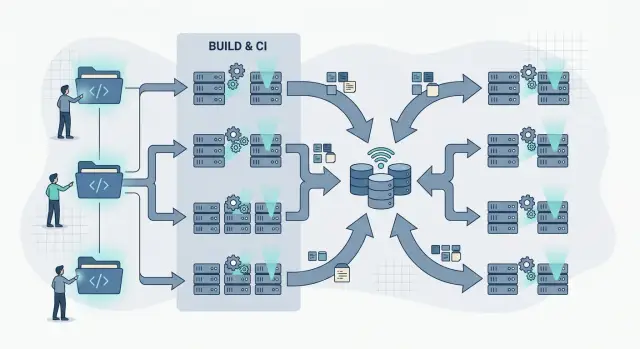
Table of Contents
Why monorepo builds slow down
A monorepo feels fast at first. You keep apps, shared packages, tests, and deployment code in one place, and day to day work gets simpler.
Then the repo grows. The team grows too. One small change starts waking up far too many jobs.
That usually happens because build tools and CI systems play it safe. When a shared package changes, they rebuild everything that might depend on it. If your dependency graph is messy, or your build rules are too broad, a tiny edit in one folder can trigger web builds, API tests, mobile checks, and image creation that never needed to run.
Branches make it worse. A developer opens a pull request and CI runs the full pipeline. Then they push a typo fix, and CI repeats the same expensive work. Another branch touches similar files, and the system does it all again. Teams spend hours compiling code they already compiled yesterday.
Fresh runners add another cost. Many CI platforms start each job on a clean machine. That sounds tidy, but the machine remembers nothing. It has no local build outputs, no warm dependency cache, and no test artifacts from earlier runs. Each build starts cold, downloads the same inputs, and rebuilds the same targets.
The damage is not only cloud spend. Reviews move slower because checks crawl. Test feedback arrives late, so developers switch context and lose focus. Releases start piling up because nobody wants to wait through another full pipeline.
A team can work around a 10 minute build. A 35 minute build changes how people work. That is usually the point where a shared remote cache starts to make sense. Not because it sounds advanced, but because wasted work keeps stacking up.
What a remote cache really saves
A cache saves time by keeping work you already finished. In a large repo, one small change should not force every package, test, and bundle to run again. A remote cache lets the whole team reuse that work, not only the person who built it first.
Most caches keep three things: build outputs, task results, and the hash that proves those results are safe to reuse. The hash matters most. It captures the inputs for a task, such as source files, lockfiles, compiler settings, environment values, and the command that ran.
If those inputs still match, the build tool can pull the old result and skip the task. If one input changes, it runs the task again. That is normal. A cache miss is not a failure. It just means the system chose the safe path.
In practice, the cache might hold compiled files, generated code, test results for unchanged packages, and metadata that maps each task to its exact input hash.
This is different from source control, and it is different from release storage. Git holds code and history. Your package registry or artifact store holds releases you ship on purpose. The cache sits beside both and stores temporary build data you can always recreate.
That separation matters. If you delete the cache, your pipeline still works. The next few runs just take longer until the cache warms up again. If you mix cache data with release artifacts, cleanup gets messy fast.
Teams also get better results when they study misses instead of fearing them. Compare warm build time with cold build time. Watch which tasks miss most often. A sudden drop in cache hits usually points to noisy inputs, unstable environment settings, or tasks that write different outputs every time.
A simple example makes it clear. A developer edits one UI package, opens a pull request, and CI reuses unchanged test and build results for twenty other packages. The build still checks correctness. It just stops paying the full price on every run.
What you should control
Speed matters, but ownership matters more. A remote cache should cut build time without tying your team to one CI provider, one billing model, or one hidden format.
Start with storage you can move. Plain object storage is usually the safest option because you can point another runner, another CI system, or another region at the same cache later. If you ever switch vendors, you want to move buckets and credentials, not redesign the whole pipeline.
Keep access rules simple. Give runners one clear way to read cache entries and one clear way to write them. Split read and write permissions if your workflow needs it, but avoid a maze of tokens, service accounts, and exceptions. Complex auth usually breaks at the worst moment, and teams blame the cache when the real issue is access drift.
Retention should stay under your control too. Old cache data piles up quickly in a busy monorepo, especially when branches, tool versions, and build targets all create their own entries. Set your own expiry rules, size limits, and cleanup jobs so costs stay predictable.
It also helps to write down four basics: which jobs can read from cache, which jobs can publish new entries, how cache keys are built, and when runners should skip writing. A short runbook saves time when a new engineer joins or when hit rates suddenly drop.
Be careful with convenience features from CI vendors. Some are fine. Others only work inside one hosted runner setup and quietly lock you in. If cache keys, metadata, or restore rules only make sense inside one system, you do not really own your pipeline.
A good test is simple: could your team move this cache to another CI tool in a week without changing how developers build locally? If the answer is no, the setup is probably too tied to one vendor.
A setup that stays portable
The cleanest setup keeps cache logic inside the build tool, not inside a hosted CI product. Your tool should decide when work matches a past run by hashing the inputs and expected outputs. That usually includes source files, config files, lockfiles, build flags, and sometimes the tool version. If the hash matches, the runner can reuse the old result instead of rebuilding it.
At a high level, the flow is simple. The build tool creates a hash for each task. The runner checks shared storage for that hash. If it finds a match, it restores the saved output. If not, it runs the task and uploads the result.
That setup is boring in the best way. You can change CI providers later because the cache format and storage stay under your control.
Store cache files in object storage you manage. That can be an S3 compatible bucket, Google Cloud Storage, MinIO, or another simple blob store. Save outputs as zip files or build artifacts under paths based on the hash. Object storage is usually cheap, easy to copy, and easier to move than a vendor cache service.
If several runners need shared access, add a small auth layer. In many teams, the CI system can issue temporary credentials for one bucket and nothing else. If that is not practical, a thin proxy can sign upload and download requests. Keep permissions narrow. A build runner does not need access to databases, source control, or the rest of your infrastructure just to read and write cache files.
Measure the basics from the start: cache hit rate, restore time, upload time, and total storage size. A high hit rate sounds good, but it matters only if restoring is faster than rebuilding. Teams often miss this and end up storing huge artifacts that save almost no time.
Clean up on a schedule. Remove entries nobody has touched in the last few weeks, keep recent branch data, and delete oversized artifacts that cost more to store than to rebuild. If you do that from day one, the cache stays fast, cheap, and portable.
How to roll it out without drama
Roll this out in small steps. If you switch the whole repo at once, you will not know whether the speedup came from the cache, a config change, or pure luck.
Start by measuring one slow job before you change anything. Frontend builds are often a good first target because they run often, take time, and usually depend on a clear set of inputs like source files and lockfiles. Keep a baseline with cold build time, repeat build time, and how often the same job runs in CI each day.
Treat the first phase like an experiment, not a migration. Pick one package or app, enable remote cache reads, and leave writes off at first. That lets your team test whether restored outputs are correct without filling the cache with bad entries.
After a few days, check the numbers. If the job restores cleanly and the hit rate stays steady, allow writes from one trusted place, usually CI on the main branch. That keeps local machines from pushing messy or half finished outputs.
The rollout can stay simple. Measure one slow job for a week. Turn on remote reads for that job only. Then allow writes from CI once the results look stable. After that, add the next package or app.
Make one rule especially clear: when should people bypass the cache? A lockfile change, compiler upgrade, environment variable change, or build script edit can all make old entries useless. If nobody knows when to skip cache, they waste hours chasing odd failures.
A small team using self hosted GitLab runners, for example, can test this on one Next.js app first and store artifacts in object storage. Once that app restores reliably and CI gets faster, they can add shared packages one by one. Slow rollout usually beats a big launch.
A realistic team example
Picture a seven person product team with its web app, API, and shared packages in one repo. The layout is simple: apps/web, apps/api, and a few shared folders for UI components, types, and utility code. Code sharing is easy, but build times start climbing once every pull request hits the same pipeline.
Their first pain point is obvious. A designer changes a button style in the shared UI package, and the API build runs again for no good reason. This is where a remote cache starts paying off. The cache stores results per target, so the web app rebuilds what changed while the backend job reuses earlier results.
The team keeps the cache in object storage it controls instead of tying it to one CI vendor. CI still runs the jobs, but the outputs live in a bucket the team can move, back up, or inspect. If they switch runners later, they keep the cache and the build logic.
Feature branches get another benefit. A developer branches from main, changes one screen, and pushes a commit. The branch can pull cached results from the latest successful main build for unchanged targets. That cuts a lot of wasted work, especially for test and compile steps that depend on shared code but did not really change.
The team also runs one nightly job that builds the most common targets from main and refreshes the cache before the morning rush. It sounds minor, but it saves a lot of waiting during the first few pull requests of the day.
They still watch the misses. After a dependency update, hit rates often drop because lockfiles, tool versions, or environment settings changed. When that happens, the team checks whether the miss is real or whether the cache key is too broad. A good cache should skip work, not hide problems.
This setup does not feel fancy. It just keeps a CSS change from turning into a full backend rebuild.
Mistakes that lead to bad cache results
A remote cache works only when the cache key matches reality. If the hash misses one real input, your team gets the worst mix possible: slow builds on some runs and wrong outputs on others.
One common mistake is hashing source files while skipping lockfiles, compiler versions, or build tool versions. Then two developers run what looks like the same build with different dependencies and still hit the same cache entry. The build finishes quickly, but the output can be wrong. Include anything that changes the result: lockfiles, compiler version, build flags, environment values that affect output, and generated schema files.
Shared write access creates a different problem. If every branch can write to the same cache, untrusted code can poison it. A broken branch can upload outputs that look fine and later get reused by main. Let feature branches read from the shared cache, but allow only trusted branches to write to the shared area.
Another issue comes from mixing test artifacts with build outputs. Tests often depend on time, random data, snapshots, local ports, or service state. Build outputs should stay repeatable. Keep those two kinds of data apart and give them different cleanup rules.
Storage costs creep up too when teams keep old entries forever. Most cache data goes cold quickly, yet you still pay to store it. Set expiration rules by age and, if useful, by hit count. If nobody has used an entry in weeks, delete it.
The most wasteful habit is clearing the whole cache after one odd failure. That hides the real bug and forces everyone to rebuild from scratch. When one target acts strange, remove only that target's cache and inspect the inputs first.
A few defaults go a long way. Hash lockfiles, compiler versions, build flags, and generated inputs. Let trusted branches write while the rest stay read only. Store test data away from build outputs. Expire old entries on purpose.
When builds feel random, teams often blame the cache. Most of the time, the real problem is incomplete inputs.
Quick checks before you trust it
Before you trust a remote cache, test it like any other build dependency. Fast demos can hide bad cache rules, bloated artifacts, or misses that only appear once the team grows.
Start with repeatability. Two CI runs on the same commit should produce almost the same hit pattern if they use the same lockfile, image, environment, and build flags. If one run gets strong hits and the next one falls back to fresh work, something unstable is sneaking into the cache inputs.
A small dependency change is another good test. Bump one package version and check which targets rebuild. The affected apps or libraries should miss cache, but unrelated parts of the repo should still hit. If the whole graph rebuilds, your invalidation rules are too broad. If nothing rebuilds, they are too loose.
Time matters more than hit rate. A cache hit helps only when restore time is lower than rebuild time. Pulling a large artifact from object storage to save a few seconds is not a win.
Before you call the setup done, run the same commit twice and compare hit and miss counts. Change one dependency and confirm only connected targets rebuild. Measure restore time, decompression time, and rebuild time side by side. Check the monthly storage bill against the CI minutes you saved. And give developers a clear way to force a clean build.
That last point matters more than it seems. When a test fails only with cached outputs, developers need an easy escape hatch, such as a no cache flag or a simple environment variable. If bypassing the cache takes five steps, people stop trusting it.
Cost deserves a hard look too. Self hosted cache storage is usually cheap, but growth can get messy in a large repo. Set retention rules early. If old artifacts sit around forever, storage climbs while the extra data helps no one.
A good cache feels boring. The same inputs produce the same results, restore stays faster than rebuild, and people can turn it off when they need a clean read on a bug.
What to do next
Start small this week. Pick one workflow that runs often and wastes the most time, such as pull request builds for the main app and a few shared packages. Test the cache on that narrow path first, then widen it after you see real numbers.
Keep the trial simple. Record current build time for 10 to 20 runs. Turn on remote reads first, then writes. Keep logs that show hits and misses. Set a basic retention rule from day one.
Run the trial for a month and watch three numbers closely: total build time, cache hit rate, and storage growth. Build time shows whether the setup helps in real life. Hit rate shows whether your cache keys stay stable. Storage growth tells you whether the system stays cheap or starts collecting junk.
Do not tie the design too tightly to one CI vendor. Keep the cache in object storage you control, and keep the cache logic plain enough that another runner can call the same steps later. If you move from one CI service to another, your storage and cache format should not need a full redesign.
One rule helps: keep compute separate from storage. CI jobs can come and go. Your bucket, retention policy, and cache naming scheme should stay readable and portable.
If the first month looks good, expand to a second workflow, not the whole monorepo at once. That makes bad cache keys, noisy writes, and oversized artifacts easier to spot before they spread.
If you want an outside review, Oleg Sotnikov at oleg.is works with startups and smaller teams on CI, infrastructure, and Fractional CTO work. A short review of your cache design, runner setup, and storage plan can catch expensive mistakes before they turn into daily friction.
Frequently Asked Questions
When does a monorepo actually need a remote cache?
Yes, if your team waits on the same builds over and over. A remote cache helps most when small changes trigger lots of repeat work across apps, packages, and pull requests.
What does a remote build cache do?
It stores build outputs and task results that your team already produced. When the same inputs show up again, the build tool restores the old result instead of running the task again.
Is a remote cache the same thing as Git or artifact storage?
No. Git stores source code and history. A cache stores temporary build data that you can recreate at any time. If you delete the cache, builds still work; they just run slower until it warms up again.
Where should I store the cache if I want to avoid lock-in?
Plain object storage usually gives you the most freedom. An S3 compatible bucket, Google Cloud Storage, or MinIO keeps the storage side simple and makes it easier to move runners or CI tools later.
How should I roll this out without breaking builds?
Start with one slow job that runs often, such as a frontend build. Turn on remote reads first, check that restored outputs match clean builds, then allow writes from CI on the main branch after the results look stable.
What should go into the cache key?
Hash every input that can change the result. That usually means source files, lockfiles, compiler version, build flags, generated files, and any environment value that affects output.
Can feature branches poison the cache?
Yes, if every branch writes to the same shared area. Let feature branches read from the shared cache, but keep writes limited to trusted CI jobs so one bad branch does not pollute later builds.
Which metrics matter most after setup?
Watch total build time first. Then check cache hit rate, restore time, upload time, and storage growth. A high hit rate means little if restoring large artifacts takes longer than rebuilding them.
What should I do when cached builds start acting weird?
Do not wipe the whole cache right away. Run a clean build for the failing target, compare inputs, and remove only the cache entry for that target if needed. Whole-cache clears hide the real problem and slow everyone down.
Should we bring in an outside expert for this?
A small team can set this up, but an outside review often saves time if your repo or CI rules already feel messy. If you want help with cache design, runners, or CI cleanup, Oleg Sotnikov can review the setup and point out the risky parts before they turn into daily friction.


