Release trains vs continuous deployment for B2B SaaS
Release trains vs continuous deployment: compare QA, support, and customer update work so your B2B SaaS team picks a pace it can keep.
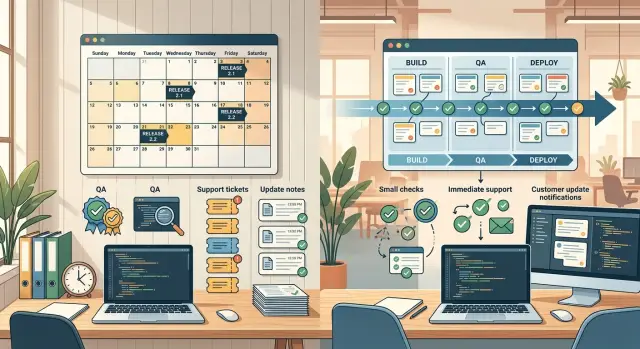
Table of Contents
Why release timing turns into an operations problem
Business software users notice workflow changes fast. If a dashboard breaks, an export fails, or a field moves without warning, someone usually reports it within minutes. In B2B SaaS, that report rarely stays in one place. Support gets a ticket, an account manager gets a message, and the customer wants an answer before their own deadline slips.
That is why the choice between release trains and continuous deployment is not only about engineering. Shipping code is the easy part. The harder part is what happens in the next hour, the next day, and the next week after customers see the change.
Each team feels the impact differently. Support deals with confusion and urgent complaints. QA has to work out whether the problem is a bug, an odd edge case, or a change nobody explained clearly. Product teams pay the trust cost when users feel surprised, even if the release fixed more than it broke.
A faster cadence does not always make life easier. Smaller releases can reduce the blast radius, but they also create more follow-up work. Every deployment can trigger checks, questions, and customer reactions. If the team cannot absorb that load, speed starts to hurt more than it helps.
Picture a SaaS tool that sales teams use to send quotes. A small update changes how approvals work. The code change takes one day. The cleanup takes three. Support answers tickets, QA reproduces strange account setups, and customer success explains the new flow to frustrated users.
Release timing is a staffing choice, a communication choice, and a risk choice. The right model depends on team size, product risk, and how customers use the product. A small internal tool can tolerate surprise. A billing, compliance, or operations product usually cannot.
How release trains work in practice
A release train means the team ships on fixed dates, even when the contents change. Many B2B SaaS teams use a weekly or biweekly schedule because people can remember it and plan around it.
Developers still work in small chunks. The difference is that finished work waits for the next shared release window instead of going to customers right away. Product, engineering, support, and operations all know the next ship date, so planning gets easier.
Most teams follow a simple pattern. Early in the cycle, they decide what can fit. In the middle, developers finish work and merge changes behind flags or into a release branch. Near the end, the team slows new work and focuses on testing, fixes, and release notes. On release day, they ship the batch and watch for problems.
That fixed calendar changes behavior in useful ways. If a feature slips by a day, the team usually moves it to the next train instead of rushing it through. That can feel slow, but it often prevents the last-minute scramble that causes bigger problems.
The downside is obvious once the team gets busy. Finished work can sit and wait. A sales request, a small bug fix, or a minor improvement may stay on the shelf until the next slot. Teams accept that delay because the schedule gives everyone else a stable routine.
This model helps when one release affects several groups at once. Support can staff the right day. Customer-facing teams can prepare updates. Managers can review risk in one place instead of tracking changes every afternoon.
But the schedule only works if the team protects it. If people keep forcing late additions, the train loses its main benefit. Missed scope has to feel normal. Exceptions should stay rare.
How continuous deployment changes daily work
Continuous deployment shifts release work into the background of every day. Instead of saving changes for a set date, the team pushes small updates as soon as tests, reviews, and deployment checks pass.
This removes the drama of big launch days, but it does not remove release work. It spreads that work across the week.
Engineers have to think about production from the start. A change is not done until someone can ship it, watch it, and undo it quickly if needed. That pushes teams toward smaller pull requests, reliable feature flags, and rollback steps people trust.
Release notes change too. In a train model, someone can write them near the end of the cycle. With continuous deployment, notes need to stay current all the time. If a customer asks what changed this morning, nobody should have to dig through a week of commits to answer.
Monitoring moves closer to the code. Teams watch dashboards, logs, error tracking, and alerts every day because any merge can affect real users within minutes. Lean teams can handle that pace, but only if observability is strong and rollback is quick.
Support work feels different as well. You usually get fewer large spikes because customers do not hit a pile of changes at once. Instead, questions spread across the week. That often feels easier, but it creates a constant background load. Someone from engineering and QA needs to stay close to production all the time, not only on release day.
A healthy rhythm is simple: ship small changes, watch production after each deploy, keep release notes current, test rollback before you need it, and fix issues while the change is still fresh. If the team cannot keep that rhythm, continuous deployment turns messy fast.
How QA load shifts
QA pressure changes in ways many teams do not expect when they change release cadence. The main difference is not the total amount of testing over a month. It is when the pressure hits, how often people switch context, and how quickly the team has to make a ship or stop call.
With release trains, QA usually builds toward a larger test round before each ship date. Testers check more stories at once, revisit older areas that might have changed, and spend more time on full regression passes. That can feel safer, but the work bunches up near the deadline. Bugs bunch up too, which makes triage harder.
Continuous deployment spreads that load out. QA spends less time on large pre-release sweeps and more time on fast checks after small changes. That sounds lighter, but it asks for discipline. The team needs reliable smoke tests, clear ownership, and a habit of risk-based testing so people know what deserves deep testing and what only needs a quick pass.
Automation matters in both models. It just fails differently. A release train without good automation creates long manual test cycles. Continuous deployment without good automation turns production into the test environment, and support pays for that later.
Some areas always need stronger coverage. For most B2B SaaS teams, the red zones are sign-up and login, permissions, billing, admin settings, imports and exports, API contracts, and anything tied to audit trails or compliance rules.
Manual testing still matters, even for teams with solid automation. Billing flows break on ugly edge cases. Permission rules fail in ways unit tests miss. Admin screens collect lots of branches, and one small UI change can hide a serious problem.
A simple rule works well: if a bug could block revenue, expose customer data, or lock out an admin, a person should test it before release or immediately after. Teams that skip this usually save time for a week and lose much more time in cleanup.
What support and incident response look like
Support pain rarely comes from code alone. It comes from timing, volume, and how quickly the team can decide who owns the problem.
Release trains usually create a spike. Customers hit the same set of changes at once, support inboxes fill up in a few hours, and the team has to sort real bugs from confusion, setup issues, and old requests that only surfaced because people logged in after the release.
Continuous deployment spreads that load out. You get fewer ticket floods, but you trade them for a steady stream of smaller conversations. One customer notices a moved button. Another sees a workflow change. A third reports a bug that only affects a narrow account type. The pressure feels lower, but the interruptions can become constant.
Ownership and triage
When a customer reports a problem, someone should own the next step within minutes. If ownership is fuzzy, support asks product, product asks engineering, and the customer gets no clear answer.
The handoff does not need to be complicated. Support confirms the issue, gathers account details, and checks whether others see the same thing. Engineering decides whether it is a bug, a config problem, or expected behavior. The on-call person makes the first call on rollback, hotfix, or watchful waiting. One person posts updates so the customer does not get mixed messages.
The cadence should shape the incident rules. For release trains, plan heavier support coverage right after launch. That is when ticket volume and stress rise. Keep rollback steps simple, because a bad bundled release can hit many customers at once.
For continuous deployment, optimize for quick triage and small reversals. Feature flags, narrow rollbacks, and short incident notes matter more than a big war room. On-call rotations also need protection from alert fatigue because many small changes can produce many small pages.
If the team cannot staff post-release support for a big launch day, release trains will feel rough. If the team gets derailed by constant small checks, continuous deployment will wear people down. The right model is the one your support team can survive on an ordinary week.
How customer communication changes
Customers do not judge releases the way product teams do. Most B2B buyers care less about how often you ship and more about whether changes arrive when they expect them, with enough context to prepare.
That is where these two models start to feel very different. The product may improve at the same pace, but the communication work changes a lot.
With release trains, communication is easier to organize. Teams can send one planned update, one release note, and one customer message on a known schedule. Customer success, support, and sales know when to expect questions, and larger clients can plan around the date.
That predictability matters more than many teams think. If a buyer has training docs, admin approvals, or internal change control, a stable release calendar feels safe. They usually do not ask for constant updates. They ask for fewer surprises.
Continuous deployment works better with smaller messages. Instead of a long monthly note, teams need short in-app notices, a changelog that stays current, and brief alerts only when a change affects workflows, permissions, billing, or integrations.
This can feel lighter for users when each update is small. It can also create confusion if teams publish changes quietly and expect account managers to explain them later. Customers notice when a button moves, a default changes, or a report looks different, even if the change felt minor internally.
Account managers need advance notice for anything risky. That includes UI changes for common tasks, pricing logic, permissions, API behavior, exports, and anything likely to trigger security or compliance questions. In many cases, a one-page internal summary works better than a long product memo.
A simple rule helps. If a release changes daily work, warn customers before it ships. If it changes setup or policy, brief account managers first. If it fixes small bugs, keep the notice short and easy to find. If it is likely to generate tickets, give support a plain-language explanation before customers start asking.
Teams often underestimate this work. Shipping faster only helps if customers can absorb the change without friction. For many B2B SaaS companies, the best cadence is the one support, success, and account teams can explain clearly every week.
How to choose a cadence your team can keep
Most teams do not choose the wrong release model. They choose a pace their people cannot support for long.
Start with staffing, not preference. Count the people who can test changes, watch production, answer support tickets, and coordinate a release when something breaks. If one or two people cover most of that work, a fixed weekly or biweekly train often holds up better than pushing every change as soon as it passes checks.
Then look at product risk. A typo on a settings page is annoying but manageable. A change to billing, permissions, reporting, contracts, or integrations can create customer problems fast. Those areas need tighter review and a rollback plan the team has already practiced.
A short scorecard helps:
- Who handles QA, support, and release coordination each week?
- Which features can affect billing, reporting, permissions, or contract terms?
- How fast can the team detect a bad release, triage it, and roll it back?
- Can you test a new cadence in one product area before changing everything?
- Do you measure ticket volume and bug rate after releases?
These answers tell you more than opinions do. If alerts fire quickly, the team can sort the issue in minutes, and rollback feels boring and routine, continuous deployment may fit. If QA piles up at the end of the week, support hears about changes from customers first, or rollback takes an hour of guessing, a release train is usually safer.
Start small. Try the new cadence in one product area for a month, then check support tickets, bugs that reached customers, rollback count, and interruptions outside working hours. A cadence you can keep should feel calm most weeks, not heroic.
A simple hybrid example
Picture a seven-person SaaS team that sells back-office software to finance and operations teams. Their product has three busy areas: admin settings, reports, and invoicing. Customers log in during business hours, follow the same steps every day, and expect the product to behave the same way each time.
The team learns that not every change needs the same release path. Small UI fixes, text edits, and minor report tweaks go out daily. If they find a broken filter in the morning, they patch it, test it, and deploy it that afternoon. Most users barely notice, which is often the best result.
Billing work gets different treatment. A change to invoice numbering, tax rules, or payment reminders can affect accounting habits and month-end tasks. The team puts those updates on a release train every two weeks. That gives QA time to test real billing cases, not just happy-path clicks, and gives support time to read release notes before customers start asking questions.
They also use one shared support calendar. Engineering, QA, support, and customer success all look at the same launch days, customer deadlines, and no-release windows. If a major customer closes books on the last two business days of the month, nobody pushes invoicing changes then. That one habit prevents a lot of self-made trouble.
This is where the debate becomes less theoretical. The team uses both models because the product has both low-risk and high-risk areas. Daily deployment works well for polish and small fixes. A train works better for changes that can confuse users, create finance mistakes, or fill the support queue for three days.
It is a deliberately boring setup. For B2B SaaS, boring is often a good sign.
Mistakes that create release chaos
Release chaos often starts with imitation. A small B2B SaaS team sees how a famous company deploys all day and copies the cadence without copying the staffing, test coverage, feature flags, monitoring, or on-call habits that make that pace safe.
That gap hurts quickly. Developers spend more time fixing rushed changes, support gets hit with confused tickets, and sales walks into customer calls without clear answers. A release model only works if the team can carry the support work around it.
Another common mistake is treating QA as the last gate before launch. Teams code for days or weeks, then throw everything at QA and hope for a green light. That turns release day into a pileup.
Daily QA is less dramatic and much safer. Developers can test small changes while they build, reviewers can check risky paths early, and QA can focus on what is new or likely to break. When teams wait until the end, bugs stack up and context disappears.
Customer confusion creates its own kind of outage. If a release changes permissions, exports, billing screens, or a workflow that customers use every day, sales and support need notice before customers do. People usually accept change. They hate surprise.
The warning signs are easy to spot. Support learns about a change from a ticket instead of an internal note. Sales promises old behavior because nobody told them about the update. The team ships fast, then reopens the same bug two days later. Rollbacks take longer than the original release.
Metrics can hide the problem. Teams love speed because it looks clean on a dashboard. Deploy count, lead time, and cycle time matter, but they do not tell the whole story.
Track the messy part too. Watch reopen rates, support ticket spikes after releases, rollback time, and how often account teams have to explain unexpected changes. If those numbers keep rising, the team is moving faster than it can safely support.
A steady cadence beats an impressive one that breaks trust every week.
Quick checks before you change anything
A release cadence only works if your team can keep it up on an ordinary week. The fastest schedule on paper often fails when support gets surprised, QA feels rushed, and nobody wants to touch production during customer hours.
Before you change cadence, run a simple reality check. Ask product and engineering to explain the last few releases in plain language that support can use with customers. If that takes jargon or a long meeting, the release notes are still too technical.
Then test rollback for a live daytime release, not just in theory. If a bad deploy lands at 2 p.m., the team should know who decides, who acts, and how long recovery usually takes.
It also helps to read a month of support tickets before promising a faster pace. Look for repeat confusion after updates, hidden bugs that escaped QA, or customers who only notice changes when something breaks.
Finally, compare staffing to the work each model creates. This choice is not only a product decision. It changes the daily load on QA, support, and customer-facing teams.
Small teams usually do better with a boring cadence they can explain well. A weekly or biweekly train, with clear release notes and a tested rollback path, often beats daily deployment chaos.
If your product is growing and the team cannot agree on the right pace, outside review can save a lot of trial and error. Oleg Sotnikov at oleg.is works as a Fractional CTO and startup advisor, and this is the kind of operating problem he helps teams sort out: release process, support load, QA pressure, and a cadence the team can actually sustain.
Frequently Asked Questions
What is the difference between release trains and continuous deployment?
Release trains ship on a fixed schedule, like every week or every two weeks. Continuous deployment ships as soon as a change passes review, tests, and deploy checks. Release trains give everyone a routine. Continuous deployment cuts waiting time but asks the team to watch production all the time.
Which model is safer for B2B SaaS?
For most B2B SaaS teams, release trains feel safer at first. They give QA, support, and customer-facing teams time to prepare. Continuous deployment fits teams that catch issues fast, roll back in minutes, and keep release notes current every day.
When do release trains work best?
Pick release trains when one release can affect support, billing, permissions, reporting, or customer workflows. They also help small teams that cannot spare someone to monitor every deploy during the week. The tradeoff is simple: some finished work waits for the next ship date.
When does continuous deployment make sense?
Continuous deployment works well when your team ships small changes, trusts its test suite, and can undo a bad deploy without drama. It also helps when you want to avoid big release-day spikes and spread changes out across the week.
Does continuous deployment reduce support tickets?
Not always. It often reduces large ticket floods because customers do not get a pile of changes at once. But support still feels the load in a different way: questions show up all week, so engineering and QA need to stay close to production every day.
How does QA change with each approach?
QA load usually stays similar over a month, but the timing changes. Release trains push QA into bigger test rounds near the deadline. Continuous deployment spreads testing across the week and asks for strong smoke tests, clear ownership, and fast risk calls on each change.
What changes need extra caution no matter which cadence we use?
Treat billing, permissions, admin settings, imports, exports, API contracts, login, and audit-related changes with extra care. Those areas can block work, create finance mistakes, or expose customer data. A real person should test risky changes before release or right after deploy.
How should we handle customer communication?
Warn customers before a release if it changes daily work, setup, policy, billing, or integrations. Keep the message short and plain. Support and account managers should hear about risky changes before customers do, or they will spend the day catching up.
Can we mix both models?
Yes. Many teams use daily deployment for low-risk fixes and a release train for billing, finance, compliance, or workflow changes. That setup keeps simple fixes moving while giving risky work more testing and better customer prep.
When should we get outside help choosing a release cadence?
Ask for outside help when releases keep causing ticket spikes, rollback feels slow, or the team argues about cadence every week. A Fractional CTO can review staffing, QA flow, support load, and release risk, then help you choose a pace the team can actually keep. If you want that kind of review, Oleg Sotnikov offers this work through oleg.is.


