Change budget for each release: safer, steadier shipping
Use a change budget for each release to limit risky work at once, so QA, support, and engineers can keep up without chaos.
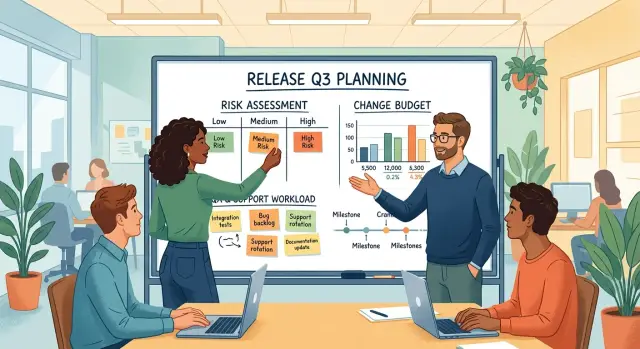
Table of Contents
Why release pace breaks down
Release pace rarely breaks because a team ships often. It breaks when too many changes land together. A new billing flow, an auth update, a database change, and a UI refresh can each look manageable on their own. Ship them on the same day and each small issue starts depending on three others.
QA usually feels this first. Testers can find issues in a few hours, but engineers still need time to trace them, fix them, review the patch, and test again. When QA finds bugs faster than the team can close them, the release stops feeling controlled. It turns into a race to keep the list from growing.
Support sees the same overload from the user side. Tickets arrive at once: login failures, slow pages, broken settings, missing emails. If nobody set clear ownership before release, support has to chase answers across product, engineering, and operations. Users get frustrated, and the team burns time internally.
A fixed calendar date makes this worse. Once a launch date gets locked, teams often protect the date and sacrifice everything else. They squeeze in one more feature, one more migration, one more refactor. The release still goes out on time, but the team pays for it later with hotfixes, late nights, and confused customers.
A small SaaS team can hit this wall fast. Picture five engineers shipping a new pricing page, a checkout change, and a background job update in the same release. None of those changes sounds huge. Together, they can create payment bugs, stale data, and support tickets that nobody can answer quickly.
The limit is not coding speed. It is the team's ability to test, fix, explain, and recover. If support can handle 20 unusual tickets in a day and QA can retest three risky fixes before the day ends, shipping beyond that limit creates backlog right away.
That is why a change budget helps. It sets a hard limit on how much uncertainty can ship at once, based on QA and support capacity instead of hope.
What makes a change risky
A change gets risky when it can affect more people or more parts of the product than it first appears. The code change might be small, but the effect can reach many users, several teams, or a part of the product where mistakes are expensive.
Some areas need extra caution every time. Payments are one. Login is another. Core data belongs on that list too, because once data is wrong, cleanup takes much longer than the release itself. A small billing bug can trigger refunds, angry tickets, and days of manual fixes.
Risk also goes up when one piece of work spreads across several services or screens. A button change on its own is usually simple. A button change that also updates an API, touches a background job, changes analytics events, and needs a new setting in admin is a different story. More moving parts mean more chances for one part to drift from the others.
Testing matters, but teams often read coverage too loosely. If new code has little or no testing, QA has to carry the full load by hand. That slows the team down and still leaves gaps. Fresh code also hides edge cases because nobody has seen real users push it yet.
Common user flows need special care. If a release changes signup, checkout, search, onboarding, or the main dashboard path, even a minor bug can hit a large share of users. Support volume rises fast, and trust drops faster than it would with a bug in a rarely used settings page.
The warning signs are usually obvious. The change touches money, identity, permissions, or shared data. It needs updates in more than one service or screen. QA cannot rely on solid automated tests. A large number of users will hit it on day one. Rolling it back would be slow or messy.
Teams that use a change budget should treat these changes as expensive. One risky item in a release may be fine. Three at once is where steady shipping usually starts to crack.
How to set a simple change budget
A change budget works like a spending limit for release risk. Instead of asking whether one more feature can fit, count how much disruption QA and support can absorb in the next release. Most teams do better with a small cap than with a detailed scoring system nobody follows.
Keep the first version plain. If you are trying this for the first time, start with 3 points total. That number is low on purpose. It forces trade offs before release week gets messy.
A simple starting model is enough: high risk changes cost 2 points, medium risk changes cost 0.5 to 1 point, and low risk changes cost 0 to 0.5 points. Cap the release at 3 points total and leave 0.5 to 1 point unused as reserve.
That reserve matters more than teams expect. Bug fixes show up late. Support tickets pull people away. A release that spends every point has no room for surprise work, so the team starts cutting test time instead. That is usually where trouble starts.
Medium risk work does not need perfect math. Count it as half a point when the change is easy to test and easy to undo. Count it as one full point when it touches a busy screen, a payment flow, or anything that creates support tickets fast. The goal is not precision. The goal is a shared limit people respect.
Lower the budget when the team is stretched. If QA is catching defects late, if support is still busy with the last release, or if two engineers are out, reduce the cap for the next release. A 2 point release shipped calmly is better than a 4 point release that floods support for three days.
One small SaaS team might decide that each release can include only one risky backend change plus one medium risk UI update. If they also need to ship urgent bug fixes, they drop the UI work and keep the release lighter. That can feel slow in the moment, but it usually keeps the release train moving every week instead of forcing a rollback after one bad Friday.
The budget only works if people treat it as real. Once a release hits the cap, something moves to the next one.
Score changes before you schedule them
Put a short risk score on every ticket before it gets a release slot. Keep it simple enough that the team will actually use it. A 1 to 5 score works well, or three checks scored 0, 1, or 2 and added together.
If you use a change budget, this score keeps the budget honest. A release can include several low risk tickets, or one higher risk item, but not both piled together just because the calendar says ship.
Use the same three checks every time:
- How many users will notice the change right away?
- How hard is it to roll back if something goes wrong?
- How many support questions will this probably create?
A settings page text tweak might score low on all three. A billing flow update might look small in code, but still score high because users will hit it fast, rollback may be messy, and support will get questions the same day.
Engineering should not score work alone. Ask QA and support to score the ticket during planning, even if it takes only two minutes each. QA often spots testing gaps that developers miss. Support sees where users get confused, what wording triggers tickets, and which changes cause a flood of repeat questions.
When scores differ, do not average them too quickly. Talk about why. If engineering says a change is a 2 and support says it is a 4, that gap usually means the ticket is missing context. That is useful information.
Unclear work should move out of the main release. Put it behind a flag, trim the scope, or ship it in a smaller later release after the safer items go live. Teams get into trouble when they treat uncertainty like a minor detail.
One practical rule helps: if nobody can explain the likely user impact, rollback path, and support load in a few plain sentences, the ticket is not ready for this release. Score it later, after the team has made it smaller and clearer.
How to plan a release step by step
Pick the release date first, then cap the amount of risk that can fit inside it. Most teams do the first part and skip the second. That is how one release turns into a pile of unrelated changes, late testing, and support tickets nobody expected.
A release plan works better when you treat risk like a limited budget. If QA can fully test two medium risk items this week, and support can handle one rough rollout without falling behind, that is the limit. New work can wait.
- Put every possible change for the release in one short list. Include features, bug fixes, config changes, database work, and anything users will notice. Small teams often forget background changes, even though those cause plenty of release pain.
- Give each item a plain risk label: low, medium, or high. A copy change is usually low. A payment flow update is often medium. A schema change, auth update, or anything hard to undo is usually high.
- Fill the release until the risk budget is used up, then stop. If your limit is 6 and you already have two medium items and one high item, the release is full.
- Name one owner for testing, one for rollout, and one for support replies. Do not assume people will sort it out on release day. If support needs a short answer for customers, write it before the release starts.
- For every medium or high risk item, write one fallback plan. Keep it short. Roll back the code, turn off the feature with a switch, or use a manual workaround for a day. One clear fallback beats five vague ideas.
A small SaaS team might want to ship a new dashboard, a billing fix, a database migration, and a cleanup task in the same week. That looks efficient on paper. In practice, the billing fix and migration can eat the whole budget, so the dashboard waits.
This feels strict at first. After a few cycles, release days get quieter, QA catches more, and support deals with fewer avoidable surprises.
A simple example from a small SaaS team
A team of five has two items ready on Friday. One is a billing update that changes how invoices are generated and how failed payments appear in the admin panel. The other is a new dashboard with clearer charts and a few layout fixes.
Both changes matter, but they do not carry the same risk. The dashboard may confuse a few users at first, yet most problems stay small and easy to reverse. Billing is different. It touches money, invoice totals, email receipts, refund steps, and the support replies agents send when a customer says, "My charge looks wrong."
That is where a change budget helps. Instead of asking, "Can we ship both?" the team asks, "Can QA and support handle the worst day if both go wrong at once?" For a small team, the honest answer is often no.
QA maps the likely test load. The dashboard needs browser checks, mobile checks, and a quick pass on permissions. The billing update needs much more. Testers have to verify taxes, discounts, failed cards, retries, invoice PDFs, account credits, and edge cases around plan changes.
Support looks at it the same way. If the dashboard has an issue, they may answer a few "Where did this move?" tickets. If billing breaks, they may face urgent messages about double charges, missing invoices, or accounts stuck on the wrong plan. Those tickets take longer, and they upset customers faster.
So the team splits the work. They ship the dashboard first and watch it for a few days. QA gets clean feedback. Support handles small questions without a spike. The team fixes two minor UI bugs on Monday.
Then they ship the billing update the next week, when QA has time for deeper checks and support has updated scripts ready for common payment problems. Nothing magical happened. They just stopped stacking risky changes together.
That can feel slower for a day or two. In practice, it keeps releases calmer, support queues shorter, and rework lower.
Mistakes that overload QA and support
QA and support rarely crack because one obvious monster feature ships. They crack when a team bundles several different changes together, labels the release "small," and moves on.
One common mistake is treating every task as equally safe. A color tweak, a billing rule change, and a new onboarding step do not carry the same risk. If the team gives each item the same weight, the release plan looks neat on paper and messy in real life.
Another mistake is hiding risky work inside something that sounds minor. A ticket might say "small cleanup" while it also changes validation rules, error handling, or user permissions. QA then tests the visible part and misses the behavior shift underneath. Support feels that gap first, because users report "weird issues" that nobody expected.
Friday releases create a special kind of pain when teams save several half finished items for the end of the week. People rush to merge what almost works, skip careful checks, and hope they can sort out problems later. Later often means after users notice, when fewer engineers, QA people, and support staff are around.
A release also gets harder when the team changes help text and workflows at the same time. If buttons move, labels change, and the user steps also change, support loses its script. Even simple questions take longer to answer because the old instructions no longer match the product.
The same red flags tend to show up together: tickets sound small but change real behavior, several items still have loose ends, release notes stay vague, support sees the update only after code freeze, and nobody owns user replies on launch day.
That last point matters more than most teams admit. If nobody assigns launch support, everyone assumes someone else will watch the inbox, chat, or bug queue. Then the first hour after release turns into confusion.
A steadier team picks fewer risky changes, finishes them fully, and tells support exactly what changed. If one part of the release could confuse users, someone should own the answers before the release goes out.
Quick checks before release day
A change budget only works if the team checks it right before shipping, not only during planning. Release day gets noisy. A late bug fix, a missing test, or an unexpected support issue can push a safe release into a messy one.
Start with the budget itself. Count the risky items again and make sure the release still fits the agreed limit. If two medium risk changes quietly turned into high risk work during the week, treat that as a real change, not wishful thinking.
Then look at rollback. Every risky item should have a fast way back out. That does not mean a perfect recovery plan for every possible failure. It means the team knows which switch to flip, which deploy to restore, or which feature flag to turn off if users start hitting problems.
A short check before release catches most avoidable pain:
- Confirm that the release still stays inside the agreed budget.
- Check that each risky change has a rollback path someone tested or at least walked through.
- Make sure QA knows what changed, where to focus, and what would count as a release blocker.
- Make sure support has a plain summary of user visible changes.
- Pick one item that can slip to the next release if the day gets crowded.
Support often gets left out until the first ticket arrives. That is too late. If login flow, billing, permissions, or onboarding changed, support needs a few simple notes before launch. Write down what users may notice, what can go wrong, and the first answer support should give. Five clear sentences beat a long internal document nobody reads.
QA needs the same kind of clarity. Do not hand over a release and say, "test everything." Tell them where the sharp edges are. A focused QA pass is better than a broad but rushed one.
The last check is calendar pressure. If the day already has a sales demo, a migration, or an outage review, trim the release. Dropping one borderline item is usually cheaper than pushing QA and support past their limit.
What to do next
Start with the last three releases, not with theory. Look for the moments where people felt pressure: QA ran out of time, support saw a ticket spike, engineers shipped a hotfix at night, or someone had to cut scope late.
Count the stress in a simple way. Exact math matters less than seeing the pattern. Look at how many changes slipped testing and needed fixes after release, how many support tickets arrived in the first 24 to 48 hours, how often the team worked late to finish or repair a release, how many changes touched risky areas like billing, auth, or core data, and how often one release forced another cleanup release right after.
After that review, set a rough cap for the next cycle. Your change budget can start as one plain rule, such as "one high risk change plus two medium risk changes" or "no more than five risk points in one release."
Do not wait for a perfect scoring model. A rough budget that the team actually uses beats a detailed system nobody remembers on release day.
Write the rule down in one shared place. Product, QA, support, and engineering should all use the same limit and the same words for low, medium, and high risk.
That shared rule helps in planning meetings. When someone wants to add one more risky item, the team can point to the budget and decide whether to move it, split it, or add more test time.
Then watch the next two or three releases closely. If QA finishes calmly and support stays quiet, you can raise the cap a little. If support gets buried or engineers keep fixing production issues, lower it.
A small SaaS team can do this in one afternoon. Review three releases, write one rule, test it for a month, and adjust from real results.
Some teams need an outside review because their release process already feels crowded and hard to control. Oleg Sotnikov at oleg.is works with startups and smaller companies as a Fractional CTO, helping teams set practical release rules, improve delivery, and keep operations lean without slowing product work to a crawl.
Frequently Asked Questions
What is a change budget in a release?
A change budget is a hard limit on how much release risk you ship at once. It helps the team decide what fits in one release based on QA and support capacity, not just developer speed or a calendar date.
How many risky changes should we ship at once?
Start small. A good default is one high risk change or a couple of medium risk changes, with some room left for late fixes. If QA or support already feels stretched, cut that number down for the next release.
What usually counts as a high risk change?
Treat payments, login, permissions, and shared data as high risk first. Also mark a change risky if it touches several services, changes a common user flow, lacks solid tests, or feels hard to roll back.
How should we score a ticket before scheduling it?
Use three quick checks: how many users will notice it, how hard it is to undo, and how many support questions it may trigger. If a ticket scores high on two or three of those, move it up the risk scale.
Should QA and support help score release risk?
Yes. Engineers know the code, but QA spots test gaps and support knows where users get confused. When all three score the work together, the release plan gets more honest.
What should we do when a release goes over budget?
Stop adding work and move something out. Split the biggest item, hide part of it behind a feature flag, or push it to the next release. Once the budget is full, more scope usually means more cleanup later.
Why do Friday releases cause so many problems?
Teams often save half-finished work for Friday, rush the last merge, and lose time for careful testing. If something breaks, fewer people stay around to fix it, answer users, and watch the rollout.
What should we check right before release day?
Recount the risky items, confirm each one has a rollback path, and make sure QA knows where to focus. Give support a short note about what users will notice and what to say if problems show up.
How can a small team start using a change budget?
Look at your last three releases and find where pressure showed up. Then write one simple rule for the next month, like one high risk item plus two medium ones, and adjust after a few cycles.
When does it make sense to ask for outside help?
Get help when releases keep turning into hotfixes, late nights, or support spikes even after you trim scope. An experienced Fractional CTO can review your release flow, set a simple risk cap, and help the team ship more calmly.


