Release captain for AI-first teams on risky days
A release captain for AI-first teams keeps fast code drops under control by tracking scope, rollback choices, and team updates on high-risk release days.
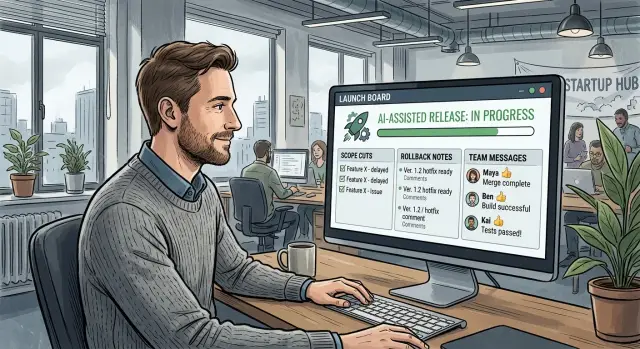
Table of Contents
Why risky release days get messy
Risky release days rarely fall apart because of one giant change. More often, the trouble comes from a pile of small ones that land at the same time. A renamed field, a quick migration drafted with an AI tool, a copied test fix, a late text change in the UI - each one looks harmless on its own.
Together, they clog the release window.
Teams that use AI heavily can produce code faster than they can absorb it. On a normal day, that speed feels great. On release day, it creates a traffic jam. Reviews get thinner, people merge "just one more thing," and nobody feels fully sure what changed in the last few hours.
Small changes also collide in ways that are easy to miss before production. One developer updates an API response. Another changes a front-end flow that still expects the old shape. A third adjusts logging or retries, which changes how failures appear. Nothing looks dramatic by itself, but the combined effect can confuse users, support, and the team watching metrics.
Mixed messages make the problem worse. Product says, "ship the fix." Engineering says, "wait for one more patch." Support reports customer pain with half the context. One person asks for a rollback, another says the issue only exists in staging, and someone else starts cutting scope without telling the rest of the group.
At that point, the problem is no longer only technical. The team can't decide.
The mess grows fastest when nobody owns the full picture. One person knows the database risk. Another knows what customers were promised. Someone else knows which changes can wait until tomorrow. If no one pulls that into one view, people act on fragments. Work gets duplicated, tests run against the wrong commit, and the rollback plan sits in a note nobody opens.
Small teams feel this even more. Everyone stays busy, but nobody watches the whole board. That's when a release captain stops looking like a nice extra and starts looking like basic safety.
What the release captain owns
A release captain owns clarity on a risky day. While everyone else fixes bugs, tests changes, and answers questions, one person keeps the release readable.
The first job is scope control. The captain keeps a short, current list of what still ships today and what doesn't. If a change depends on shaky tests, a late schema update, or behavior the team only saw work once, they cut it from the release. That can feel strict in the moment, but a small scope cut usually hurts less than a late rollback.
The second job is the rollback call. Engineers may find the bug, but someone still has to decide what happens next and say it clearly. If error rates rise, support starts seeing the same complaint, or the fix looks riskier than backing out, the captain calls the rollback and makes sure the whole team hears it.
They also own communication across the group. Product needs plain facts about what changed. Support needs a short note before customer messages start coming in. Engineers need one shared update, not five chat threads that disagree with each other.
The captain doesn't solve every problem. They make sure everyone works from the same facts.
A simple running note is enough. Keep track of what is still in scope, what moved out, what would trigger a rollback, who has been informed, and what decision was made at what time. That last part matters more than people think. By the next day, two smart people will remember the same moment in two different ways. A short written log prevents a pointless argument.
When one person should take the lead
Use this role when speed starts to hide risk.
It helps when several late changes pile up near the release window, especially if different teams are touching the same area from different angles. One team fixes a bug, another adjusts prompts or workflows, and a third updates tests or deployment settings a few hours before release. The work looks separate, but the release is now one shared problem.
The need gets stronger when changes touch billing, login, permissions, or data moving between systems. Those areas fail in expensive ways. A small auth mistake can lock users out. A billing bug can create support pain within minutes. A data flow change can look fine in staging and still break under real traffic.
One lead also helps when several teams depend on the same release. Product wants a feature live. Support needs a heads-up. Operations watches errors after deploy. If nobody owns the final call, each group fills the gap with guesses.
A few signs make the choice obvious. People keep asking whether a change is still in scope. Rollback steps get debated in chat instead of followed. One delay starts affecting several teams. The release includes changes customers will notice right away.
Skip the role for routine fixes with a clear owner and a small blast radius. If one engineer ships a small UI fix, tests pass, and nobody else depends on the deploy, adding a captain just adds noise.
A simple rule works well: if the cost of confusion is higher than the cost of one person coordinating, assign the role.
How to choose the right person
Pick the person who gets calmer when everyone else speeds up.
On a risky day, the job is not to sound confident. The job is to notice what changed, what must wait, and when to stop the train.
A good release captain understands both product and engineering. They don't need to write every line of code, but they do need to know what happens if the team cuts a feature, delays a migration, or rolls back one service while leaving another live. If they can't weigh user impact against technical risk, their calls will wobble.
The loudest person in the room is often the wrong choice. Some people create energy, but they miss details, skip follow-ups, or change direction every 20 minutes. Release days punish that fast.
Look for someone who stays steady when builds fail or deadlines slip, asks short direct questions, spots hidden dependencies, and makes a call once the facts are clear.
You also want one named owner for that day. Not a shared role. Not "we'll all keep an eye on it." When nobody owns release decisions, scope cuts drag on, rollback calls come late, and status messages split into three versions.
In a small team, the right pick is often a product-minded engineer, an engineering manager, or a founder who still understands the code and stays available all day. A founder jumping in and out of customer calls is usually a poor choice. A senior developer who hates saying no is also a poor choice.
Ask one question before you assign the role: who do people already trust when things get messy? Trust matters because the captain needs quick answers from design, support, product, and engineering. If every decision turns into a fight, the role breaks down.
How to run the day
Start before the deploy window opens. Pull the full release list into one shared view and mark the items most likely to hurt you if they go wrong. Code produced or expanded with AI tools can land fast, so treat anything with broad reach, weak tests, or risky data changes as suspect until proven otherwise.
From there, keep the day simple.
- Review the release list and sort each item into three buckets: safe, watch closely, or cut first if pressure rises.
- Confirm the rollback path before anyone ships. Name who can trigger it, how long it should take, and what signal means stop.
- Set one update rhythm for everyone. A short written check-in every 15 or 30 minutes works better than random pings across chat, email, and calls.
- Cut doubtful items early. If the upside is small and the risk is fuzzy, save it for the next release.
- Log every deploy, pause, rollback call, and reopen in one place with a timestamp.
The captain's updates should stay short and plain: "API deploy started at 10:05." "Search paused at 10:18 after a spike in timeouts." "Billing change removed from this release." People move faster when they don't have to decode status messages.
This also helps after the release ends. If a bug appears later, the team can trace what changed, what got cut, and who made each call. Speed is useful only when someone keeps control of scope, timing, and rollback decisions.
If you change one thing on your next risky day, make the record visible and put one person in charge of it.
A simple example from a small team
Picture a five-person startup shipping two changes on the same afternoon: a new signup flow and a pricing update. On paper, both look small. In practice, they touch the same forms, tracking events, and support replies.
One engineer uses an AI tool to draft tests for the signup flow. Another uses one to refactor shared validation code at the same time. The code passes review, but the team now has two moving parts in one release.
This is where a release captain earns their keep. The captain doesn't write more code. They decide what ships, what waits, and what everyone else needs to hear.
In this case, paid traffic is about to hit the new signup page at 3 p.m. Support needs a clear note before that happens because users will ask why the first screen looks different. The pricing change is less urgent. The old pricing can stay up for one more day.
So the captain makes a simple call: cut the pricing change and ship signup first.
They send one short update. New signup goes live today. Pricing stays the same for now. Support uses the prepared note for customer questions. If signup errors jump, the team rolls back to the old flow.
That one decision clears up a lot. Support doesn't have to guess what changed. Engineers don't split attention across signup bugs and pricing edge cases. The founder doesn't post mixed updates in three channels.
When traffic starts, the team watches only a few numbers: form errors, completion rate, and support tickets. If something breaks, they know exactly what to roll back. If the flow holds up, they can ship the pricing change later with a fresh check.
Small teams often think they can keep all of this in their heads. On a risky release day, they usually can't.
Mistakes that cause confusion
Chaos rarely starts with the big failure. It starts with small decisions that nobody owns.
One common mistake is letting engineers slip in side fixes because they look harmless. Someone notices a typo, a flaky test, or a tiny UI bug and adds "one quick patch" without a scope check. Ten minutes later, the team no longer knows which changes belong to the release and which ones came along for the ride.
Another mistake is treating rollback as a debate for later. Alarms fire, errors climb, and only then does the team start asking whether to revert, hotfix, or wait for more data. By then, users are already feeling it.
Split communication causes a different kind of damage. Product posts one update in Slack. Engineering replies somewhere else. Support repeats a third version in an incident room. Soon nobody knows which message is current, and people repeat old decisions because they missed the new one.
Late scope cuts are just as bad. Teams keep hoping a shaky feature will settle down after one more prompt, one more test run, or one more patch. That hope gets expensive. Late cuts waste engineering focus and confuse everyone who planned around the feature shipping.
The warning signs are usually obvious in hindsight: people keep asking whether something is still in scope, two people give different answers about rollback, support and engineering share different status notes, or a risky item remains in the release with no clear owner.
A simple rule helps: freeze scope early, name one rollback caller, and keep release updates in one place.
Quick checks before you ship
Before the first deploy, give one person clear control over three decisions: scope cuts, rollback calls, and release updates. If those decisions sit with two people, delays start fast.
Then do a short pre-ship check. Each risky change should have a written rollback path in plain language. Put release decisions in one shared place, whether that's a channel or a running document. Set stop rules before launch starts, such as pausing if sign-in breaks, error rates cross an agreed number, or the same severe customer issue appears twice. Prepare a short note for support, sales, or account teams so they know what changed, what users might notice, and who to contact if reports come in.
This doesn't need a long meeting. Ten focused minutes is often enough. The point is to remove guesswork while the team still has time to act.
A small team shipping a billing update might keep the new invoice screen but hold the retry logic for failed charges. The reason can be simple: the screen rolls back cleanly, but the retry logic touches state and takes longer to unwind. One scope cut like that can save an hour of confusion later.
If these checks aren't settled before launch, the release has already started badly.
What to do next
Set up a short review within a day of the release. People still remember what changed, what almost shipped, and what got cut under pressure. Write down every late change, every scope cut, who made each call, and what would have made that call easier.
Keep the note short. A one-page review beats a long postmortem nobody reads.
Then turn repeated choices into a small playbook. The captain shouldn't have to invent the rules every time AI-assisted code lands quickly. If the same questions come up in every release, decide them once and save the answer. That playbook might cover who approves last-minute cuts, when to roll back instead of patching forward, and which message goes to support, product, and engineering.
The goal isn't more process. It's less confusion on the next risky day.
If your team keeps improvising through AI-heavy releases, outside technical leadership can help for a while. Oleg Sotnikov at oleg.is works as a fractional CTO and startup advisor for companies moving toward AI-driven software development and automation. Sometimes a steady operator from outside the team is enough to make release days boring again.
Frequently Asked Questions
What does a release captain do?
A release captain keeps the day readable. They own the live scope, decide when to cut shaky changes, make the rollback call, and send one clear update so product, support, and engineering work from the same facts.
Do we need a release captain for every deploy?
No. Skip it for routine fixes with a clear owner and a small blast radius. Use it when late changes pile up, several teams touch the same area, or the release affects billing, login, permissions, or data moving between systems.
Who should be the release captain?
Pick someone who stays calm when pressure rises, understands both user impact and technical risk, and will say no when needed. In a small team, that is often a product-minded engineer, an engineering manager, or a founder who still knows the code and stays available all day.
Should the release captain still write code that day?
Usually no. The captain can answer questions and give context, but they should not vanish into coding for hours. The role works best when one person watches scope, timing, rollback signals, and team messages the whole time.
What should the captain write down during the release?
Keep one running note with what still ships, what moved out, what would trigger a rollback, who got informed, and when each decision happened. Short, plain entries work better than long writeups because the team needs facts fast.
How do we decide what to cut from scope?
Cut anything with small upside and fuzzy safety. If a change has weak tests, touches risky data, depends on a late patch, or only worked once, move it to the next release. A small scope cut usually hurts less than a rollback in front of users.
When should the captain call a rollback?
Make the call when error rates rise, the same customer complaint repeats, sign-in or billing breaks, or the fix now looks riskier than backing out. Set those stop rules before deploy starts so nobody argues about them under stress.
Why does AI-assisted code make release days harder?
AI tools let teams produce more code than they can review, test, and absorb on the same day. That speed feels good until release time, when small model-assisted changes collide and nobody feels sure what changed in the last hour.
How can a small team do this without adding a lot of process?
Keep it light. Spend ten focused minutes before deploy, put one person in charge, write the rollback path in plain language, and watch a few numbers that users will feel right away. Small teams do not need more meetings; they need less guesswork.
What should we do after a messy release?
Run a short review within a day. Write down the late changes, scope cuts, rollback moments, and who made each call, then turn repeated choices into a small playbook. If your team keeps reliving the same release mess, outside technical leadership can help steady the process for a while.