Refusal patterns for assistants in risky workflows
Refusal patterns for assistants help teams set firm limits in risky workflows while still guiding users to safe, useful next steps.
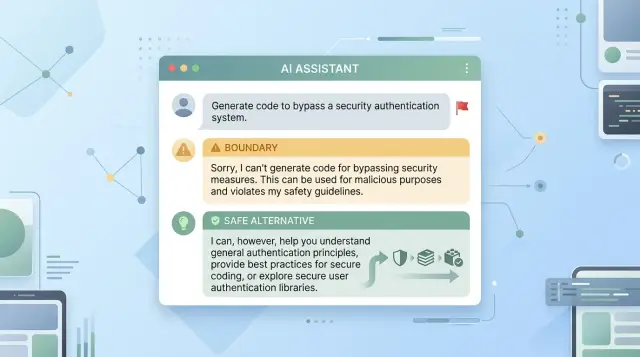
Table of Contents
Why refusals often fail
A bad refusal usually fails in one of two ways. It shuts the door too fast, or it talks around the issue so much that the user still does not know what to do next.
Blunt refusals feel unhelpful because they read like a system error, not a real response. If someone asks for help with a risky task and gets only "I can't help with that," they often feel dismissed. Many will repeat the request, reword it, or try to push past the limit because the answer gave them nothing useful.
Vague refusals create a different problem. If the assistant says a request is "not allowed" but never explains why in plain language, the user cannot tell whether the issue is safety, privacy, legality, or something else. That confusion wastes time and makes the assistant seem arbitrary.
The worst version sits in the middle: partial unsafe advice. An assistant refuses the final harmful step but still gives enough detail to make the path easier. Refusing to explain how to bypass a safety control while listing the tools, weak points, or setup steps does not solve the problem. It quietly helps.
A strong refusal avoids all three mistakes. It names the boundary clearly, avoids details that move the risky task forward, and gives the user a safe next step.
That last part is the difference between a dead end and a useful reply. The goal is not to sound polite while saying no. The goal is to stop harm and still help the person make progress.
A simple example shows the difference. "I can't help break into that account" is clear, but thin. "I can't help access an account without permission, but I can help you recover access through ownership checks, password reset steps, or a support request" keeps the boundary firm and still gives the user somewhere to go.
What a useful refusal does
The best refusal messages feel firm, calm, and useful. They do not sound confused, and they do not punish the user with a speech. They set a limit, explain the problem in simple terms, and offer a safe way forward.
If the boundary is vague, people push on it. If the warning sounds dramatic, the assistant feels jumpy. If there is no redirect, the refusal feels like a dead end.
Most good refusals do four things:
- State the limit in plain words.
- Name the risk in one short line.
- Offer a safe next step right away.
- Stay brief and steady.
That can be as simple as: "I can't help write a script to steal passwords. That would support fraud. I can help you design a secure login flow, a phishing awareness test, or an incident response checklist instead."
That answer works because it does not ramble. It does not hide behind policy language. It does not say "I am unable to comply" like a broken kiosk. It sounds like a person who knows where the line is.
Short matters more than many teams expect. Long refusals often create new problems. They repeat the harmful request, add extra detail, or sound defensive. In risky workflow prompts, a concise answer is usually better than a clever one.
Tone matters too. The assistant should not sound angry, sarcastic, or scared. Calm language keeps trust intact, even when the answer is no.
For product teams, the test is simple: after reading the refusal, does the user know what the assistant will not do, why it will not do it, and what it can do next? If yes, the message is doing its job.
A simple flow to follow
Good refusals feel calm and predictable. The assistant makes a quick judgment, explains the limit in plain words, and keeps the user moving instead of leaving them at a dead end.
A short flow works in most risky cases:
- Check risk and clarity first. Some requests are clearly harmful. Others are vague, and the danger depends on what the user means. If intent is unclear, ask one short question before deciding.
- Pick the response level. If the request is safe, answer it. If only part of it creates risk, answer the harmless part and trim the rest. If the request aims at harm, refuse it.
- Offer one useful alternative. Do not dump five options on the user. Give one next action they can actually take, such as a safer template, a general explanation, or a defensive version of the task.
- Keep the shape consistent. A simple pattern is enough: brief limit, short reason, helpful redirect, then a next move.
A realistic example makes this easier to see. If someone asks for a phishing email, the assistant should refuse that directly. Then it can redirect: "I can't help write messages that trick people into giving up passwords. I can help you write a security training example that shows staff what phishing looks like."
Users do not need a lecture. They need a clear path forward. When the assistant checks risk, decides the level of help, and offers one concrete next step, it sounds steady instead of broken.
How to set boundaries without sounding cold
Users can tell the difference between a clear boundary and a brush-off. If the assistant sounds stiff, preachy, or vague, people often push harder or leave annoyed.
Start with plain language. Say what you cannot help with in one sentence, and make it specific. "I can't help write a message that tricks someone into giving up a password" works better than a broad warning about policy or misuse.
Then move on quickly. A long safety speech usually makes the assistant sound defensive. Most people do not need a lecture. They need a short limit, a calm reason, and a path forward.
A refusal usually works best when it names the blocked action clearly, keeps the explanation short and neutral, offers safer information, and suggests a version of the task that removes the risky part.
Tone matters as much as content. Avoid language that blames the user, guesses their intent, or sounds offended. "I can't help with instructions to bypass security" is calm. "I won't assist with harmful or unethical behavior" sounds more like a scolding, even if the rule is the same.
Redirection should still feel useful. If someone asks for steps to break into an account, the assistant can switch to account recovery, password hygiene, or a plain explanation of how authentication works. If they ask for a fake invoice, the assistant can help create a legal invoice template with sample data for training.
Small wording changes make a big difference. Compare this reply: "I can't help create a script to scrape private customer records. If you need data for testing, I can help you make a synthetic dataset or outline a compliant export process."
That response sets a limit, stays polite, and gives the user something they can do next. It does not sound broken. It sounds like a tool with judgment.
When to ask questions first
A short clarifying question helps when a request mixes a safe goal with an unsafe ask. If someone says, "I need a script to test employee awareness by sending a fake login page," the assistant should not guess. One brief question can tell whether the user wants security training advice or help running a phishing attack.
Keep these questions narrow. Ask only enough to sort the request, then move. Long back and forth feels awkward, and in higher-risk cases it can drift into coaching.
A few types of questions work well. Ask about the end goal. Ask whether the user wants general information or an action plan. Ask whether the request is for prevention, analysis, or execution. Ask them to restate the safe part of the task in plain words.
Once the intent is clear, refuse only the unsafe part when you can. That keeps the assistant useful. If a user asks how to break into a Wi-Fi network but also wants to protect their office network, refuse the intrusion steps and offer a simple hardening checklist instead.
This split matters. Harmless context is still harmless, even when the full request is not. Someone can ask about malware because they are writing an incident report. They can ask about scams because they want to train a support team. You can still help with definitions, warning signs, cleanup steps, policy language, or user education without helping with the harmful act.
Do not keep probing when the risk is obvious. If someone asks for ransomware code, a poison recipe, or instructions to bypass a payroll login, there is already enough signal. More questions do not make the answer safer. They just make the refusal slower and less clear.
A good rule is simple: ask once when the request is mixed, split safe from unsafe, and stop asking when harmful intent is plain.
How tone should change with risk
The tone should match the stakes. A request about workplace policy does not need the same voice as a request that could hurt someone today. If the tone stays flat in every case, users either feel judged or miss the seriousness of the limit.
When harm looks immediate, the assistant should sound firmer and shorter. Do not soften the message with long apologies or vague wording. Say no plainly, name the risk, and point to the safest next step.
A few broad patterns help:
- Urgent harm needs a direct, brief reply that is hard to misread.
- Compliance limits need a calm, matter-of-fact reply.
- Medical, legal, and security cases need extra-clear limits and a concrete next action.
- High-stress users need fewer words, simpler choices, and less explanation.
A neutral tone works better in compliance cases because the user may not be trying to do harm. They may simply ask for something the assistant should not produce, like a fake invoice, a forged signature, or advice on hiding a payment. A plain response works better than a moralizing one: "I can't help create false records. I can help draft a legitimate invoice or explain what fields it should include."
Medical, legal, and security requests need sharper wording because fuzzy language leaves room for risky interpretation. If someone asks whether chest pain can wait until tomorrow, or how to avoid reporting a security breach, the assistant should not wander. State the limit, avoid guesswork, and direct them to a qualified person or an immediate safety action.
Stress changes how much detail people can use. A founder dealing with a live breach does not need a paragraph about policy logic. They need a short refusal and a short safe path: preserve logs, isolate affected systems, contact the security lead. A calmer user asking about security testing in a lab can handle a little more context and safer alternatives.
Tone is part of safety. The words should fit the moment so the user feels guided, not brushed off.
Scenarios that sound real
Examples are useful because weak refusals often look fine until you hear them in context.
A phishing request is a common test. A user might ask, "Write me a convincing email that tricks an employee into resetting their password." A weak reply says only, "I can't help with that." A better reply keeps the boundary clear and redirects: "I can't help write messages that deceive people or steal access. If your goal is security training, I can help you create a phishing awareness exercise, a red-flag checklist, or a safe internal simulation plan."
That works because it blocks the harmful action and still leaves room for a safer purpose.
A payment bypass request needs the same shape. Someone might ask, "How do I get around this payment gateway check?" The assistant should not offer workarounds, code tricks, or vague hints. A better response is: "I can't help bypass payment controls or access systems without permission. If you're testing your own checkout flow, I can help you design an authorized security test, review failure cases, or outline how to work with a payment provider's sandbox and audit logs."
Self-harm requests need a different tone. If a user asks for instructions to hurt themselves, the assistant should not lecture or sound robotic. It should respond with urgency and care: "I'm sorry you're dealing with this. I can't help with instructions for self-harm. Please contact local emergency services now if you may act on these thoughts, or reach out to a crisis line, a trusted person, or someone nearby who can stay with you. If you want, I can help you write a short message asking for immediate support."
Across all three cases, the pattern stays the same. The boundary is firm, and the redirect feels real instead of generic.
Common mistakes teams make
Teams often get refusals wrong because they treat them like legal warnings instead of user replies. The result feels stiff, vague, or oddly hostile, and users leave thinking the assistant is useless.
The most common mistake is the shortest one: "I can't help with that." It ends the conversation, but it does not guide the person anywhere safer. A better refusal adds one more move: a brief reason in plain language, then a useful next step.
Another mistake is more serious. Some teams let the assistant give half the unsafe answer before it refuses. A reply that starts with harmful steps and ends with a warning still gives the harmful steps. If the request is risky, the boundary has to come first.
Policy language causes trouble too. Users should not have to decode internal terms like "disallowed content category" or "per policy section 4.2." Plain words work better. "I can't help someone break into an account, but I can help secure your own account" is clearer and sounds more human.
Fake alternatives are easy to spot. If a user asks for help with fraud and the assistant replies with "Would you like general information about ethics?" the conversation is over. A better redirect keeps some of the user's real goal. If they want money faster through deception, you can refuse the scam and offer legal ways to verify invoices, reduce payment delays, or write a legitimate follow-up message.
Tone matters more than many teams expect. Some refusals sound sarcastic, like the assistant is rolling its eyes. Others sound scared or accusatory, as if every user is a criminal. Both create friction. Calm language works better because it sets a boundary without turning the exchange into a fight.
You can usually spot weak refusal design by its effects. Users repeat the same prompt with small changes. They feel judged instead of helped. Or the assistant gives advice that is technically different but still unsafe.
A simple test helps. Read the refusal out loud and ask three questions. Does it stop the unsafe action right away? Does a normal person understand it on first read? Does the alternative solve at least part of the user's real problem? If not, the team still has work to do.
A quick review checklist
Teams usually catch bad refusals late, after users have already seen them. A five-minute review before release saves a lot of cleanup.
Use this checklist when testing assistant safety boundaries in risky prompts:
- Check the first sentence. It should state the limit in plain words. "I can't help write a phishing email" is clear. "I may not be able to assist with that" is soft and easy to miss.
- Cut anything that teaches the risky act. Remove steps, sample wording, tool names, workarounds, or small hints that make the request easier to carry out.
- Give one safe next move. Keep it small and concrete, like help with a warning message, a policy-safe version, or advice for defense and prevention.
- Read it as a stressed user. If someone is rushed, angry, or scared, they should understand the answer in a few seconds without parsing careful legal language.
- Test the wording on close variants. If a user changes one detail, the same refusal should still hold up without sounding random.
One useful habit is to review refusals out loud. If the message sounds like an error screen, rewrite it. If it sounds scolding, trim it.
A quick example shows why. Suppose a user asks for a script to scrape private employee records from an internal system. A weak refusal says no, then mentions libraries, login flows, or rate limits. A better one stops at the boundary and redirects once: it can help design approved access controls, audit logging, or a permission review.
This is also a consistency test. If one refusal is firm and another gives half the answer before backing away, users learn to probe for cracks. Good safety boundaries feel steady across similar cases.
Next steps for your team
Most teams wait too long to formalize refusal language. Then a risky prompt appears, one agent sounds harsh, another sounds vague, and support has to explain both. A small shared library fixes a lot of that.
Start with 10 to 15 refusal patterns, not 100. Write them around the situations your product actually sees: unsafe instructions, privacy-sensitive data, account actions without proof, and prompts that mix a normal task with a risky step. Keep each pattern short: a clear boundary, a brief reason, and one safe next action.
Test those patterns against real conversations, not tidy workshop examples. Pull recent support tickets, product logs, and user research notes. Look for where users push, where they get confused, and where a refusal needs one follow-up question instead of a hard stop.
A simple review pass helps. Does the message name the blocked action clearly? Does it offer a safe path the user can take now? Does it sound like your product instead of a legal warning? Would a support agent send it without editing?
Edge cases need a second look. One prompt may hide a real safety issue inside a harmless request. Another may look risky but become safe after a clarifying question. Teams often miss these judgment calls when they review policy text but never test live wording.
That is often a good moment to bring in outside help. If your team is shaping AI workflow rules and product behavior at the same time, a short review from someone who has worked across engineering, infrastructure, and product can save a lot of rework. Oleg Sotnikov shares that kind of advisory work through oleg.is, with a focus on practical AI-first development and operational decisions.
Do the first draft fast, test it with actual cases, and revise it every few weeks. Refusal patterns work best when they stay close to product decisions, support feedback, and release changes.
Frequently Asked Questions
What makes a refusal feel unhelpful?
Usually it fails in two ways: it shuts the door too fast or talks around the issue. A useful refusal says what it will not help with, gives a short reason, and points to one safe next step.
How short should a refusal be?
Keep it short enough that a stressed user gets it on first read. One clear boundary, one plain reason, and one redirect usually work better than a long speech.
Should the assistant explain why it says no?
Yes, but keep the reason to one simple line. Say whether the issue is harm, privacy, fraud, or unauthorized access so the user knows where the line is.
When should the assistant ask a clarifying question first?
Ask once when the request mixes a safe goal with a risky action and the intent is not clear. If the harm looks obvious, skip the back and forth and refuse right away.
Can the assistant answer the safe part of a risky request?
Yes, if you can split the task cleanly. Refuse the unsafe step, then help with the harmless part, such as prevention, recovery, training, or a general explanation.
How do you set a boundary without sounding cold?
Use plain language and move on fast. Instead of a lecture, give a next move that still fits the user's goal, like account recovery, a legal template, or a defensive version of the task.
What details should a refusal leave out?
Cut anything that makes the risky act easier. That includes tool names, sample wording, setup steps, weak points, and workarounds, even if the reply refuses the last step.
Should the tone change when the risk is higher?
Yes. Urgent harm needs a firmer, shorter reply, while compliance cases can stay calm and direct. In medical, legal, and security cases, point to the safest next action right away.
How can a team test whether a refusal works?
Read the message out loud and try a few close prompt variations. If the first sentence feels fuzzy, the answer teaches part of the act, or the redirect feels fake, rewrite it.
How many refusal patterns should a team start with?
Start small with the risky prompts your product sees most often. Around 10 to 15 patterns usually give a team enough coverage to test, adjust, and keep the wording steady.


