Redux Toolkit vs Zustand vs Jotai in complex React apps
Redux Toolkit vs Zustand vs Jotai: a practical way to choose for complex React state based on team workflow, debugging needs, and changing business rules.
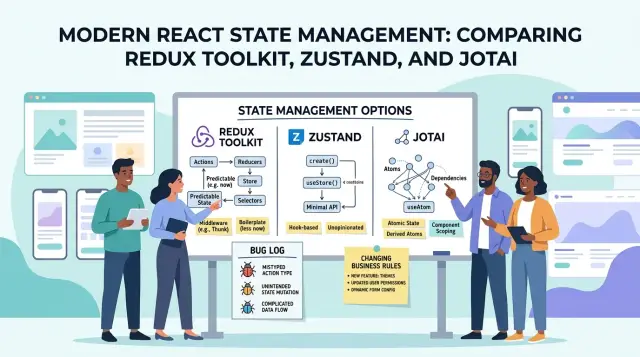
Table of Contents
Why this choice gets hard fast
State feels simple when an app has one form, one user, and one happy path. Then the app grows. A customer edits a profile on one screen, support opens the same account on another, and a background refresh pulls in new data at the worst possible moment.
That's where complex React state starts. Shared data moves across screens. Async requests finish out of order. Derived values need to stay correct. Business rules keep changing while the UI still has to feel responsive.
Simple demos hide most of this. A counter or todo list doesn't show what happens when one change affects a table, a detail page, a notification badge, and a permission check at the same time. A real app might update an order total, block an action for some users, and keep an unsaved draft alive after a refetch.
The hard part in choosing between Redux Toolkit, Zustand, and Jotai isn't the API. It's how each one behaves when real pressure shows up. The same state starts touching forms, lists, side panels, background sync, and server calls. Someone on the team needs to explain why state changed, in what order, and after which user action. Then the rules change again.
Shared data spreads quietly. A filter on one screen changes a chart somewhere else. A role update changes which buttons appear in three different places. What looked tidy in a demo can get messy after a few months, especially when two developers solve the same problem in different ways.
That's why teams get stuck on this choice. They're not picking a tiny utility. They're picking how the app will carry growing rules, bugs, and everyday changes.
Start with the work, not the library
Teams often start with feature lists and GitHub stars. That's backwards. A better starting point is a plain map of the work your app already does.
Write down where state lives today. Check component state, context, form libraries, URL params, cached server responses, and any custom store you already have. A lot of apps feel messy not because the wrong library was chosen, but because nobody can say which state belongs where.
Then count how many screens touch the same data. If a user record appears in a table, details page, edit modal, audit log, and permissions panel, you already have shared state pressure. When the same data crosses several screens, a loose setup starts to crack.
Keep server data and UI state separate. Server data is orders, users, refunds, and anything you fetch and sync. UI state is open tabs, filters, selected rows, draft text, and whether a modal is open. Teams mix these two all the time, then blame the library when updates start feeling confusing.
A quick audit usually tells you more than any comparison chart:
- What comes from the backend
- What only matters on one screen
- What several screens edit or depend on
- What rules developers copied into multiple places
That last point matters a lot. If one refund rule lives in the order page, another in the admin panel, and a third in a button guard, the problem isn't just state. It's duplicated business logic. A state library can help, but only after you can see the duplication clearly.
This choice isn't really a style debate. It's a question of how much shared data you have, how often rules change, and how much manual coordination your team does today. Map that honestly and the answer gets clearer.
Redux Toolkit when rules pile up
Redux Toolkit fits best when state carries business rules, not just UI flags. If one user action can trigger permission checks, status changes, audit entries, and follow up requests, it helps to keep that logic in one obvious place.
Reducers work because they push the team to write the rule once. Instead of spreading "if the user can approve and the order is still pending" across components, hooks, and helpers, you keep that decision inside slice logic and selectors. When the rule changes, one file usually changes first, not six.
Action names help more than people expect. Names like "refundApproved," "roleChanged," or "invoiceLocked" give everyone the same language in code reviews, bug reports, and planning meetings. That sounds small, but it cuts confusion when product, support, and engineers talk about the same flow.
Redux Toolkit also tends to age better when many people touch the same process. Shared patterns make changes easier to review, and debugging gets less chaotic because actions and state updates leave a clear trail. In a complex app, that trace matters more than a tiny difference in setup speed.
There is a real cost. For small features, slices, selectors, and extra wiring can feel like paperwork. If a modal only tracks whether it's open and stores two form fields, Redux Toolkit is probably too much.
Pick it when rules change often and the team keeps adding exceptions. It usually makes sense when the hard part isn't storing data, but keeping business logic consistent after the fifth rewrite.
Zustand when speed matters more than structure
Zustand often wins the first month. You can create a store quickly, add a few actions, and ship a screen without much ceremony. That matters when a small team is still testing ideas and changing the product every few days.
The appeal is how direct it feels. You read state, call an update function, and move on. For filters, modal state, selected items, draft inputs, and small feature flags, that simple loop keeps people productive.
A startup admin panel is a good example. If the team is trying different order views, changing refund labels, and reworking an approval flow every week, a small Zustand store keeps the work light. Nobody has to stop and build extra structure before they learn what the product actually needs.
Trouble starts when one store becomes the place for everything. Orders, refunds, roles, audit notes, loading states, and async actions end up in the same file. The code still looks short, but the business rules get blurry. A developer changes one field and three screens react in ways nobody expected.
Zustand fits best when state stays close to one part of the app and the rules stay easy to explain. It works well for page filters, sort state, short lived wizard steps, local UI state around one feature, and admin tools that mostly read server data.
It gets weaker when your team needs a clear record of why state changed, who changed it, and what rule allowed that change. If refunds depend on account role, order age, fraud checks, and a manual review step, loose store logic can turn into guesswork.
Pick Zustand when speed matters more than structure and when one developer can explain the flow in a minute. If that stops being true, the store has probably outgrown its sweet spot.
Jotai when state splits into small pieces
Jotai often fits best when a screen feels like a control panel. Think filters, tabs, drawers, inline forms, selected rows, modal state, and a few computed values that depend on each other.
It works well because each atom can hold one small piece of state. A search box can use one atom, the active refund item another, and a permissions check a derived atom. That keeps unrelated parts separate, so changing a note field doesn't pull half the page into the update.
An admin page shows the appeal. Orders, refund reasons, user roles, open panels, and draft comments don't all belong in one big object. With Jotai, each part can stay close to the feature that uses it. Teams often move faster when they can add one new atom instead of reshaping a central store for every small UI rule.
Where Jotai starts to hurt
The same freedom can get messy. If refund rules live in one atom, role checks in another file, and totals in three derived atoms, the logic spreads out. After a few months, fixing one bug can mean tracing a chain of tiny pieces across the app.
That's the tradeoff. Jotai gives fine control, but it also makes it easy to scatter business rules too widely. When rules change across many screens, that gets tiring fast.
Jotai is usually a good choice when screens have many independent UI parts, features need tight local control, teams change screens in small steps, and most rules stay inside one feature area. If your app has lots of moving parts but only light cross app policy, Jotai feels clean and direct. If the rules start touching everything, the neat little atoms stop feeling little.
Debugging changes the answer
A state library can feel great for months, then one ugly bug changes your opinion. A refund fails after a role update, a modal reopen, and one extra click. At that point, clean syntax matters less than seeing exactly what happened.
Redux Toolkit usually wins when your team needs a clear event history. Actions happen in sequence, DevTools show the trail, and bug replay becomes realistic. If support says, "the user approved the order, changed a permission, then tried the refund again," a developer can inspect that chain instead of guessing from screenshots.
Zustand is faster to set up and often easier to read at first. The catch is traceability. You can add devtools, logs, and conventions, but many teams write updates in a direct style that gets harder to untangle later. Jotai has a similar weakness in a different shape. Small atoms keep code tidy, but when one bug crosses several atoms, the path isn't always obvious.
Support teams usually feel this before developers do. They don't need elegant state models. They need enough detail to reproduce a problem: what changed, in what order, and which screen triggered it. Clear event logs can save hours, especially when the same issue appears once a week and only for certain roles.
Ask a few blunt questions:
- Can your team see every state change in order?
- Can someone replay the bug without asking the user for a video?
- Do permissions, billing, or workflow steps affect each other?
- How often do two features break each other after a release?
If the answer is "often," Redux Toolkit is usually the safer pick. If bugs stay local and your team can reason about them from component code, Zustand or Jotai can still work well. Debugging isn't a side concern. It changes the cost of every future bug.
Choose in five steps
A toy counter app tells you almost nothing about real state problems. Use one feature your team already fights with, like orders that affect refunds, permissions, and audit logs. Real work shows where a tool feels clear and where it starts hiding logic.
- Pick one messy feature from production. Choose something with async requests, derived values, loading states, and role based behavior. If the feature already causes long Slack threads, it's a good test.
- Write down three recent bugs in plain language. "Refund total stayed stale after a role change" tells you far more than "state issue."
- Score how often the business rules change. If product keeps changing approval steps, edit limits, or role permissions, structure matters.
- Score how much bug replay matters. If QA, support, or finance often needs to answer "how did this happen?" you need a clear history of updates.
- Choose the smallest tool that still explains the flow. If a new teammate can trace state changes in ten minutes, that tool is probably enough.
This test is better than any feature checklist. Zustand often wins when the feature is busy but still easy to follow. Jotai works well when state breaks into many small connected parts. Redux Toolkit earns its extra ceremony when rules keep changing and your team needs to replay bugs instead of arguing about them.
If two options still look equal, pick the one that makes your ugliest feature boring to debug.
Example: admin app with orders, refunds, and roles
Picture an admin app for a mid size company. Support staff review orders, finance handles refunds, and managers see totals by team, region, and date range. Everyone uses the same filters, and the totals need to match on every screen.
That's where simple choices start to break down. If one screen updates a refund, another may need to recalculate totals, refresh permission checks, and hide actions that a basic agent shouldn't see.
Now add the messy part: refund rules change every month. One month, partial refunds need manager approval above a certain amount. Next month, digital goods follow a different rule. After that, VIP customers get exceptions. This is normal for business software.
For this case, Redux Toolkit is the safest fit. The state has a lot of shared effects, the rules keep changing, and mistakes cost money. A predictable flow helps more than a lighter API.
Orders, refunds, roles, and filters all affect each other. Shared totals appear in several places. Refund logic needs one clear home. When finance asks, "Why did this number change?" the team needs an answer they can trace.
Zustand can work if the team is small and the rules are still simple. It's easy to start with, but once refund policies spread across many store actions, the code can loosen up fast. Jotai is pleasant when state splits into many small, independent pieces. In this kind of app, that usually doesn't last long because totals, permissions, and refund rules connect too many parts.
For an app like this, pick the tool that keeps change under control. In an admin system with money, permissions, and shared reporting, Redux Toolkit usually creates fewer surprises six months later.
Mistakes teams make when picking
Teams often choose a state library the same way they choose a UI kit: they copy what looks popular, fast, or familiar from a demo. That usually backfires. The better pick depends less on trends and more on how your team already works.
A common mistake is picking by popularity instead of team habits. If your team likes explicit rules, code review checklists, and clear change history, a loose store can turn simple updates into guesswork. If your team prefers fast local changes and small files, a heavier pattern can feel like paperwork.
Some mismatches show up quickly. Teams use Zustand for pricing rules, permissions, or refund logic, then struggle when they need an audit trail for why a value changed. Teams put isolated UI state into Redux Toolkit even when it's only a modal flag, a selected tab, or a temporary filter. Teams split Jotai state into too many tiny atoms, then spend more time tracing dependencies than building features.
Another mistake is mixing reducers, direct setters, and atoms in the same app before the team agrees on a default style. A mixed approach can work, but only when everyone knows where each pattern belongs. Without that rule, every new feature becomes a fresh argument.
Imagine one developer stores server cache and business rules in Redux Toolkit, another keeps form steps in Zustand, and a third creates dozens of Jotai atoms for the same screen. The app may still run, but debugging gets slower, onboarding gets harder, and small changes take longer than they should.
Most teams do better with one default and a short list of exceptions. Reviews stay cleaner and state stays easier to follow.
Quick checks before you commit
Before you commit to a library, test one real user flow on paper. Pick something messy, like "refund an order, update stock, log the action, and refresh the dashboard." If a teammate can't trace that flow in a few minutes, the setup is already too clever.
Ask four plain questions:
- Can a new teammate follow one user action from click to state change to API call to screen update?
- Can support replay a bug from a customer note without guessing which hidden state changed first?
- Can you edit one business rule, such as "managers can approve refunds under $500," without touching five files?
- Can one screen load and work on its own, or does it quietly depend on state that some other screen created earlier?
These checks expose different weak spots. Redux Toolkit often passes the trace and replay tests because actions and reducers leave a clear trail. Zustand feels faster when the flow is simple, but a loose store can blur where a change started. Jotai can keep screens clean when state breaks into small parts, yet too many atoms can make cause and effect harder to follow.
A bad sign is when your answer changes depending on who explains the code. Another is when a small rule change sends someone searching through the whole app for side effects. That cost usually shows up during bug fixes and rushed releases.
If two options still look equal after this test, pick the one that makes bugs boring to track and rules easy to change.
What to do next
Stop comparing libraries in the abstract. Build one real feature with your current favorite and see how your team handles it under normal pressure.
Pick a feature with enough mess to be honest. A refund approval flow, a role based settings page, or a bulk edit screen works well because it mixes async requests, permissions, loading states, and business rules.
Keep the first move narrow. Don't migrate the whole app. Put the new state model around one route, one feature, or one bounded part of the UI so you can test it without dragging the rest of the codebase along.
Before you write code, make a short rules map. One page is enough. Write down what comes from the server, what is only for the UI, who can change each part of the state, which actions trigger side effects or need an audit trail, and which rules change often.
That small exercise clears up more confusion than another week of library debates. The choice usually gets easier once the rules are visible.
After a sprint or two, review the result with plain questions. Did bugs get easier to trace? Did new team members find the logic quickly? Did rule changes stay local, or did they leak through the app?
If you want an outside review before you commit, Oleg Sotnikov shares his Fractional CTO and startup advisory work on oleg.is and can help review a React architecture before a team starts a rewrite. Sometimes a focused architecture review is more useful than a full migration.
A small pilot, a written rules map, and an honest review will tell you more than any comparison chart.
Frequently Asked Questions
Which library works best when business rules keep changing?
Go with Redux Toolkit when one user action touches several rules at once. It fits apps where permissions, totals, audit logs, and follow up requests all need to stay in sync.
When is Zustand the better choice?
Pick Zustand when a small team needs to move fast and the flow stays easy to explain. It works well for filters, modal state, selected items, short lived drafts, and feature level UI state.
What kind of React screen fits Jotai best?
Jotai works well on screens with many small moving parts. If tabs, drawers, inline forms, selected rows, and a few computed values all change on the same page, atoms can keep those pieces separate.
Do I need Redux Toolkit for simple UI state?
Not usually. If you only track a modal, a tab, or a couple of form fields, Redux Toolkit often adds more structure than you need. Keep simple UI state local unless several screens depend on it.
Should server data and UI state live in the same store?
Keep them separate. Server data is what you fetch and sync, like orders or users. UI state is things like open panels, filters, draft text, and selected rows. Mixing them makes updates harder to reason about.
How much should debugging affect the choice?
It should matter a lot. If support, QA, or finance often asks how a value changed, Redux Toolkit gives you a much better trail. If bugs stay local to one screen, Zustand or Jotai can still be enough.
How do I know when a Zustand store has grown too large?
Watch for one big store that holds unrelated things like orders, refunds, roles, loading flags, and async actions. When one field change surprises three screens, the store has grown past the simple setup that made it nice.
Can I mix Redux Toolkit, Zustand, and Jotai in one app?
Yes, but set one default first. Then write a short rule for exceptions, like local feature state in Zustand or screen level atoms in Jotai. Without that rule, every new feature ends up with a different style and reviews slow down.
What is the best way to test the choice before a migration?
Start with one painful production feature, not a demo. Build a flow with async requests, derived values, permissions, and a few recent bug cases, then see how fast your team can trace changes and edit rules after a sprint or two.
Which library usually fits an admin app with orders, refunds, and roles?
For that kind of app, Redux Toolkit usually fits best. Orders, refunds, roles, totals, and shared filters affect each other, and mistakes cost money. A predictable update trail helps more there than a lighter API.


