Reduce outages by removing one dependency before buying tools
Want to reduce outages? Start by cutting one dependency from your request path, then decide if you still need more monitoring tools.
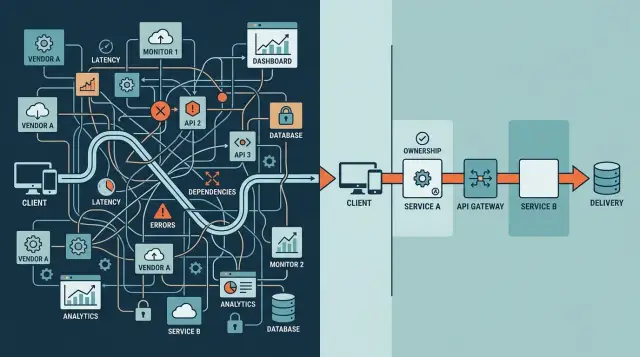
Table of Contents
Why more dashboards do not fix a fragile path
A single user action often passes through more systems than a team realizes. One click on "Log in" or "Place order" can touch a CDN, a web firewall, an app server, a session store, an auth service, a feature flag tool, a message queue, a database, and one or two outside vendors. If any step stalls or returns bad data, the user sees one thing: the app broke.
That is why extra dashboards often feel useful but change very little. They make a failure easier to watch. They do not remove the hop that failed.
Every added service creates another chance for a timeout, bad config, expired certificate, rate limit, network problem, or billing issue. The risk grows even when each service looks reliable on its own. A path with three steps usually fails in fewer ways than a path with nine. Obvious, yes, but teams still add tools faster than they remove dependencies.
Monitoring helps you see red lights sooner. It does not shorten the request path. If your login flow depends on a third-party identity check, a feature flag call, and a cache that must answer before the page loads, your uptime depends on all of them. Ten clean dashboards do not change that math.
Teams often confuse visibility with safety. They are not the same. An alert can tell you that service seven is timing out, but the user has already hit the error. A shorter path prevents the outage or limits the damage to a smaller part of the app.
Take a checkout page. It may call your app, a tax provider, a fraud tool, an inventory service, a promo engine, and a payment gateway before it shows success. If the promo engine is slow, the whole sale can fail even though payment works. A dashboard will show the slowdown. Removing the promo check from the live path, or making it optional, can save the sale.
If you want to reduce outages, count dependencies before you count tools. Uptime usually improves faster when you remove one fragile step than when you buy one more screen to watch it fail.
What a request path looks like in plain words
A request path is the full trip between a user's click and the answer that comes back. It is a chain of handoffs. The longer the chain gets, the more places can slow down, fail, or return something odd.
Picture a customer pressing "Pay now" in a web app. The request might move through a browser, an edge layer or load balancer, an API server, a database or cache, and one or more outside services for payments, email, or login. Sometimes a queue or webhook updates the final state before the app returns a result.
Most teams guess this path is shorter than it really is. One button can touch six or seven systems without looking complex on the surface.
Mark every third party in that flow. Payment tools, auth providers, email services, feature flags, analytics scripts, CAPTCHA checks, and cloud storage all count. If any one of them has a bad hour, your user still gets an error. The user does not care which vendor caused it.
Then look for the parts that hide trouble. Retries can double or triple traffic when a slow service starts timing out. Queues can push the failure a few minutes later, which makes the cause harder to spot. Webhooks can fail quietly if the sender thinks delivery worked but your app never processed the event.
Ownership matters just as much as the diagram. For each step, ask one direct question: who fixes this when it breaks? If nobody can answer fast, that step is already risky. A clear owner shortens outages. An unclear owner creates chat room confusion while customers wait.
A useful request path map should fit on one page and use plain labels: "User clicks buy," "API checks stock," "payment provider confirms," "order email sends." If you need a giant board to explain the flow, the system already has too many moving parts.
How to spot the dependency that carries the most risk
Start with one real user action, not a system diagram. Pick something ordinary, like logging in or placing an order, and trace every service that request touches before the user gets a response.
Write the path in plain words. A normal request might go through DNS, a CDN, an auth service, your app, a database, a feature flag service, and a third-party API. Count every outside vendor in that chain. Most teams guess low until they see the full path on one page.
Then ask which parts can stop the whole response. Some tools are annoying when they fail. Others bring the request to a halt. If your page cannot load because the flag service times out, that service is not a side tool. It is part of the main path.
A quick review helps:
- If this service fails, does the user wait or see an error?
- Can your team bypass it in less than an hour?
- Do you already have another tool doing the same job?
- Does anyone on your team fully understand how to change it?
That last question matters more than people expect. A dependency gets risky when nobody can patch it, turn it off, or replace it fast. This often happens with black-box services that only one former engineer understood, or with tools that need support tickets before anything changes.
Duplicate tools deserve extra suspicion. Two monitoring agents, two auth layers, or two queues often look safe on paper. In practice, they add config drift, more alerts, and one more thing to fail. If both tools do nearly the same job, keep the one your team can control and remove the other.
A small service dependency audit usually reveals one obvious target. It is often the vendor that sits in the middle of every request, blocks the whole response when it slows down, and cannot be changed by your team on a bad night. Remove that one first, and you often cut outages more than another dashboard ever will.
A practical way to remove one dependency first
Start with one customer action that happens every day. Pick something easy to count, such as log in, submit a form, or finish checkout. Do not start with the rare edge case that fails twice a month. Start where a small fix helps many people.
Take one sheet of paper and draw the full request path from click to success. Keep it ugly and honest. Write every step in order: browser, CDN, app, auth service, database, queue, email vendor, and anything else that touches that action. If a step can slow the request or return an error, put it on the page.
Now label each step with one of four choices: keep it if the action truly needs it, replace it if another step already does the same job, merge it if two tools split one small task, and remove it if nobody can explain why it is there.
That is request path simplification in practice. Fewer hops usually mean fewer chances to fail. Teams often find an easy win here. Maybe a feature flag service checks one setting that the app can read from its own database. Maybe an extra proxy adds logs and security checks that your main edge already handles.
Do not cut the busiest flow first. Test the shorter path in a low-risk area, or send a small share of traffic through it. Lean teams can do this fast, watch the result for a week, and roll back if needed.
Measure three things before and after the change: error rate, response time, and support tickets. Add a short release note so you know what changed. If errors drop, pages load faster, and support gets fewer "why did this fail?" messages, keep the shorter path. If not, undo it and test the next dependency on your page.
A realistic example of a smaller path working better
Picture a SaaS signup form. A user enters an email, picks a password, and clicks "Create account."
That one click often does far more than create an account. The app may write to its own database, call a fraud scoring vendor, send data to a CRM, fire an analytics event, create a profile in a support tool, and ask an email service to send a welcome message. On paper, each call looks small. In practice, the whole signup now depends on every one of them.
A common flow looks like this:
- Save the new user
- Check fraud risk with an outside API
- Create a contact in the CRM
- Send an analytics event
- Send the welcome email
Now imagine the CRM API starts timing out for 12 seconds. The user does not care about the CRM, but the request still waits for it. The signup button spins, then fails. Support gets tickets. The team opens dashboards and sees the timeout, yet the outage still hits users because the request path is too long.
The fix is often boring, and that is why it works. Keep only the steps the user needs right now: save the user, create the session, and show the dashboard. Everything else can happen after the response.
The shorter flow is simple: account save first, login second, background jobs later. The CRM update can run from a queue. The welcome email can send a few seconds later. Analytics can retry if the vendor is down. If the fraud check helps but is not needed for every case, the app can run it after signup and lock only suspicious accounts.
The difference is easy to feel. In the original flow, one vendor timeout blocks the whole action. In the shorter flow, that same timeout becomes an internal task to retry. The user still gets in.
This is how request path simplification reduces outages. You do not need perfect vendors. You need fewer vendors in the part of the system that faces the customer.
Monitoring still matters, but this change gives you something better than another alert. It gives you a path that keeps working when one service does not.
Mistakes that keep teams stuck
Teams that want to reduce outages often assume they have a visibility problem. So they buy another dashboard before they draw the full request path. That choice feels safe because a new tool is easier to approve than removing a dependency, but it rarely fixes the weak point.
Another common trap is keeping a vendor just because one team picked it years ago. Nobody owns the original decision anymore. The vendor still sits in login, billing, search, or email flow, and every request still waits for it. Old tools stay in place long after the reason for using them is gone.
Some teams put business rules inside a service they do not control. They may store pricing logic in an external workflow tool or route account checks through a third-party edge function. When that service slows down, the app looks broken and the team cannot patch the issue directly. They wait, guess, and refresh status pages.
Fallback chains create a different kind of mess. On paper, they look careful. In practice, they often turn one failure into a long trail of retries, cache misses, delayed jobs, and duplicate alerts. During an incident, nobody knows which step failed first.
These patterns often appear together:
- The team monitors ten hops but cannot name the main one.
- An old vendor remains because removing it sounds risky.
- Retry and fallback logic hides the real fault.
- Alerts reach many people, but no one owns the fix.
That last point matters more than most teams admit. Watching every metric does not help if the request crosses five systems and three teams before someone can act.
A shorter path is easier to explain, test, and repair. If one person cannot sketch a failed request in two minutes and say who fixes each step, the system is probably too crowded. That is where many teams stay stuck.
Where monitoring still helps
Monitoring earns its keep after you trim the path. Once a request has fewer hops, a small set of checks can tell you where trouble starts in minutes instead of sending people through six dashboards and three vendors.
When users say "login is broken" or "checkout hangs," you need proof of the first failing step. Good monitoring does that. It shows whether the issue starts at the edge, in your app, in the database, or in the one outside service you still depend on.
Start with user-visible signals
Most teams track too much and still miss the problem users feel. A better approach is to watch the flows people actually use and pick a few signals tied to those flows.
A practical set often includes success rate for the main action, response time at the first app endpoint users hit, error rate for the database or the outside API in that flow, and queue depth or job failures if users wait for the result.
These signals help because they point to the broken flow, not just to a busy server. Alert on failure patterns that block users, such as a checkout success rate dropping or a login request timing out for five minutes. Do not wake people up for every short spike in CPU or one failed background job that users never notice.
This is where lean monitoring tools make sense. Products like Sentry, Grafana, Prometheus, and Loki are useful when each alert answers a clear question and leads to one action.
Keep only dashboards that change a decision
A dashboard should help someone act. If a chart looks interesting but nobody uses it during an incident, it is decoration.
Use a simple rule for every dashboard: who opens it when something breaks, what decision they make from it, and what action they take next. If nobody can answer those questions, remove the dashboard or fold its one useful chart into another view.
Fewer screens make incidents calmer. People spend less time hunting and more time fixing.
Quick checks before you add another tool
Many teams buy another dashboard when the real problem sits in the request path. If your checkout, signup, or support form jumps through six services and three vendors, better charts will only tell you where it broke. They will not make it simpler.
Take one action a user cares about and trace every call it makes. Pick something plain, like "submit payment" or "create account." If that path looks crowded, you have a better chance of cutting outages by removing one step than by adding one more alert.
Ask a few direct questions:
- Can this action work with fewer external calls?
- Does each dependency have a clear owner inside your team?
- Can your team bypass or disable a failing vendor in minutes?
- Do two tools cover the same job?
- If one step slows down, can the user still finish?
This review does not take long. One engineer, one product person, and a whiteboard are often enough. Walk the path, mark every outside service, then circle the ones you could remove, merge, or turn off during trouble.
If you answer "no" to even two of those checks, pause the tool purchase. Remove or isolate one dependency first, then watch the path for a week. Fewer calls often mean fewer alerts, fewer support tickets, and shorter incident calls.
Next steps for a calmer system
Pick one request that hurts when it fails. A checkout call, login flow, customer portal load, or internal admin action is enough. Put 30 minutes on the calendar and trace that path from the first user click to the final response.
Write down every hop in plain language. Include the app, queue, cache, auth service, third-party API, CDN rule, and anything else the request touches. Most teams find at least one step that adds risk but gives little day-to-day value.
Then make one small cut. Remove one service that sits in the middle without solving a real problem. Merge duplicate checks that call two systems for the same answer. Move one fragile lookup closer to your app if you already own the data. Or turn off one optional step for a week and watch the result.
Do not try to redesign everything at once. If one change shortens the path and keeps the user experience the same, that is progress. It is often a better way to reduce outages than buying another dashboard.
After the change, keep notes for two weeks. Track how many alerts fired, how often the path slowed down, how long recovery took, and whether on-call work felt easier. Numbers help, but short notes from the team help too.
Write down two lists: what improved and what still hurts. That record makes the next decision easier. It also stops the usual argument where everyone remembers the outage differently.
If your team wants a second opinion, Oleg Sotnikov at oleg.is works with startups and small businesses as a fractional CTO and advisor. His work focuses on product architecture, lean infrastructure, and practical AI adoption, which fits this kind of dependency review well.
One shorter request path, documented before and after, gives you something better than another tool: proof.
Frequently Asked Questions
Why don’t more dashboards reduce outages?
Because dashboards show a failure after users already feel it. If one request depends on too many services, one slow step can still break login or checkout even when every chart looks clean.
What is a request path?
A request path is the full chain from a user click to the response your app returns. It includes your own app, databases, caches, queues, and every outside service the action touches.
How do I find the dependency with the most risk?
Start with one real action like login, signup, or checkout. Write every step in order on one page, then mark which steps can block the response and which ones your team cannot change fast.
Which dependency should I remove first?
Remove the step that blocks the user, adds little value in that moment, and has no fast bypass. Old vendors, duplicate tools, and optional checks often fit that pattern.
Should every vendor call stay in the live request?
No. Keep the steps the user truly needs right now, such as saving the order or confirming payment. Move side work like CRM updates, analytics, and welcome emails out of the live path when you can.
Is it better to move some work to background jobs?
Yes, if the user does not need the result before the page can finish. Queued work makes the path shorter and turns a vendor timeout into an internal retry instead of a user-facing error.
What should I monitor after I simplify the path?
Watch the signals users actually feel: success rate for the action, response time at the first endpoint, error rate for the database or outside API in that flow, and job failures when users wait on queued work. Those numbers help you act fast without drowning in charts.
Are retries and fallbacks still useful?
Retries help with brief hiccups, but they also create extra traffic and can make a bad hour worse. If you keep retries, keep them short, cap them hard, and make sure the user can still finish when a side service fails.
How can I test a shorter request path safely?
Change one common flow at a time and send a small share of traffic through the shorter path first. Compare error rate, response time, and support tickets for a week, then keep or roll back the change.
When does it make sense to ask a fractional CTO for help?
Bring in outside help when your team cannot name the full path, nobody owns the failing step, or old vendors sit in the middle of every request. A fractional CTO can map the flow, cut one risky dependency, and leave you with simpler monitoring and fewer surprises.


