Reduce AI rework before engineering with clearer briefs
Learn how product managers reduce AI rework by writing tighter constraints, adding better examples, and checking scope before engineering starts.
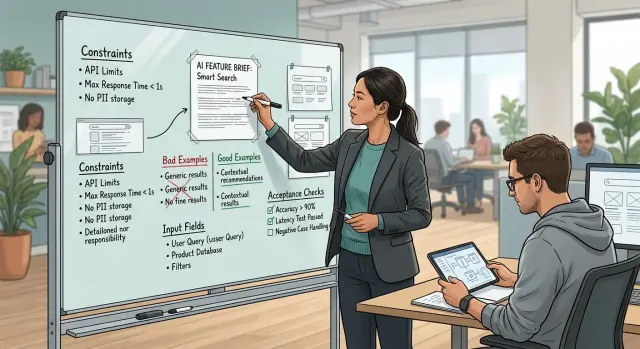
Table of Contents
Why AI work loops before coding starts
Most AI rework starts before anyone writes code.
A request sounds clear to the product manager because the full intent is already in their head. The engineer often gets a short note like "classify customer messages" or "make responses better." That sounds specific, but it leaves too much open.
Once a brief gets vague, people fill in the gaps. One person assumes the goal is speed. Another assumes accuracy. Someone else optimizes for lower cost, fewer false positives, or a friendlier tone. Each choice changes the prompt, the model, the data, and the way the team measures success.
Engineers do not leave gaps empty. They make reasonable guesses so work can move. That is normal. If the brief does not say which inputs matter, which mistakes are acceptable, or what a good answer looks like, the team has to invent those rules while building.
AI makes this worse because plausible output looks like progress. A first demo can sound fluent and still miss the real goal. The model may write neat summaries but skip the fields operations needs. It may sort requests into tidy groups but use labels the support team never uses. It may look good on five examples and fall apart on the next fifty.
That is where the loop begins. Product reviews the output and says, "almost." Engineering adjusts the prompt, adds examples, changes thresholds, or adds rules. The next round fixes one problem and reveals two more. None of it feels like a full rebuild, yet it can burn days before the real feature even takes shape.
Those extra rounds cost more than prompt edits. They delay API choices, UI decisions, test cases, and rollout plans. A weak brief can turn a one week spike into three weeks of back and forth. The fastest way to cut rework is usually the least glamorous one: define the job clearly before engineering starts.
What tighter constraints actually mean
Tighter constraints are not busywork. They are the cheapest part of the build because they stop the model, the product manager, and the engineer from making different guesses about the same feature.
Start with one plain sentence that defines the job. "Read inbound refund requests and label each one as approve, deny, or send to human review" is clear. "Use AI to help with customer operations" is so broad that everyone fills in the blanks differently.
Then name the exact input source. Say whether the model reads a support form, an email body, a CRM note, or a call transcript. If the source has messy fields, say which ones matter. A model given "ticket data" may see ten fields and latch onto the wrong one. A model given "subject line, first customer message, and account age" has much less room to drift.
Output rules matter just as much. Decide the shape before anyone builds it. One label, a short reason, JSON only, 40 words max, no markdown. Small limits do real work. If you leave length and format open, the first version often looks smart in a demo and then breaks when it hits a real workflow.
Refusal rules matter too. State what the system must ignore and what it must refuse. If the model should ignore signatures, previous agent replies, or personal details, write that down. If it must refuse account changes without identity checks, say so in plain words.
Good constraints do not make the model weaker. They make failure obvious. Engineers can turn each rule into a simple check, and product teams can review output without arguing about hidden assumptions.
Examples that remove guesswork
A vague note like "make the reply useful" creates extra rounds because each person reads it differently. Good examples close that gap fast. They show engineering what the model should return, how detailed it should be, and where the line is when an answer looks close but still fails.
Show the line between right and wrong
One strong sample does more than prove the task is possible. It shows the exact output shape and the standard you want.
Input:
"hi - i got charged twice for order 18473. need refund asap. also your receipt link is broken"

Strong output:
category: billing
priority: high
needs_human: yes
reason: Duplicate charge request with refund request and broken receipt link
This works because it uses an allowed category, sets priority for a real customer risk, and gives a short reason another person can check.
Now add one weak sample.
Weak output:
category: urgent
priority: high
reason: Customer has a problem
This fails in three places. "Urgent" is not one of the allowed labels, the reason says almost nothing, and it leaves out the human handoff flag. A weak example saves time because it tells engineers what to reject, not only what to accept.
Teams often use perfect samples. That is a mistake. Real inputs are messy, short, misspelled, and sometimes ask two things at once. If your brief uses polished demo text, the first test run will look worse than expected.
Use examples that match the real channel and the real mess: typos, mixed intent, missing order numbers or dates, copied thread text, and extra noise. If engineers will test on long email threads, do not hand them one line prompts from a mockup. Keep the samples close to the data the system will actually see.
A few grounded examples can remove days of back and forth before anyone writes production code.
How to write a short AI brief
A short AI brief should read like instructions, not a pitch. Start with one user action and one result. "When a customer sends a refund request, the model labels urgency and drafts a reply" is clear. "Use AI to improve support" is not.
Then name the exact inputs the model gets. Teams lose time when they assume the model can see more than it actually will. Write down the fields, the format, and any limits: message text, customer plan, last order date, language, and previous ticket status. If a field is missing, say what should happen.
A brief gets much easier to build when it includes simple checks before engineering starts. These checks should be pass or fail, not open to debate. That forces everyone to agree on what "good" means before the first prompt, workflow, or API call exists.
A useful one screen brief usually does four things:
- It describes the task in one sentence tied to a real user action.
- It lists every field the model receives, including optional fields.
- It adds three to five checks that define a correct output.
- It marks the step where a person can approve, edit, or reject the result.
Those checks can stay in plain language. For example: "If the message mentions fraud, the model must tag it high priority." "If confidence is low, the model must return 'needs review' instead of guessing." "The draft reply must not promise a refund unless the policy field says eligible."
Human review matters most at the edges. Say where a person steps in and what they can change. Maybe an agent reviews only low confidence cases. Maybe finance checks any refund above a certain amount. Maybe legal reviews replies that mention contracts. Put that in the brief so nobody treats review as an afterthought.
Keep the whole brief short enough to fit on one screen. If it spills into pages of edge cases, the team probably has not settled the basic behavior yet. A compact brief with fixed inputs, clear checks, and explicit review points usually leads to a much better first pass.
A simple example: support ticket triage
A support inbox is a good test case because the task sounds easy until real messages show up. The team wants AI to read each ticket and route it to one label: billing, bug, or account.
The trouble starts when the labels look obvious but the rules do not. One customer writes, "I was charged twice and now I can't log in." Another sends only "help." A third pastes a screenshot and leaves the message box empty. If nobody defines those cases before engineering starts, the team ends up rewriting prompts after every test batch.
A short brief should define each label in plain language. Billing covers charges, refunds, invoices, and plan changes. Bug covers broken behavior, errors, or features that do not work as expected. Account covers login, password resets, permissions, and profile access. If a ticket mentions more than one issue, the brief should say which one wins. A simple rule like "choose the issue that blocks the user first" works well if everyone agrees on it.
Fallback rules matter more than people expect. If the text is empty or unreadable and the brief says nothing, the model will guess. One version sends empty tickets to bug because the app "failed." Another sends them to account because the user needs help getting in. Both sound reasonable, and both create pointless debate.
Now compare two prompts. The vague one says, "Sort support tickets into the right department." The tighter one says, "Return one label only. Use billing for payment issues, bug for broken product behavior, and account for access issues. If a ticket mentions more than one issue, choose the one that blocks the user first. If text is empty, send it to human review."
The second prompt gives engineering something they can test. Ten sample tickets are enough to catch confusion early. If eight people on the team would label a ticket the same way, the AI has a fair target. If they would argue about it, the brief still needs work.
That is how teams cut rework. They do not keep tweaking wording after bad outputs. They define labels, edge cases, and fallback rules before the build starts.
Mistakes that create extra rounds
A lot of rework starts with one fuzzy sentence: "make it smarter." That sounds clear until engineering asks what the model should actually do better. Should it be more accurate, shorter, safer, more strict, or less strict? Replace vague goals with a target people can test. "Catch refund abuse without blocking normal customers" is useful. "Be smarter about refunds" is not.
Another common miss is stuffing everything into one block of text. Product rules, tone notes, legal limits, edge cases, and UI wishes often end up in the same paragraph. Then the model treats a style preference and a hard rule as if they matter equally. Engineering runs into the same problem. They cannot tell what must happen every time and what is simply nice to have.
A short split helps. Keep business rules separate from writing style, and keep both separate from UI notes. If a fraud check must always run, say that plainly. If the reply should sound calm and brief, put that in its own section.
Daily prompt edits create another loop. A PM sees one bad output, changes the prompt, gets a different bad output, then changes it again. After a week, nobody knows whether the issue came from the prompt, a missing rule, or a weak example. Fix the brief first. Prompts are much easier to tune when the task, limits, and expected output stay stable for a few days.
Teams also skip the examples that matter most: the bad ones. Good examples show the easy path. Bad examples show where the model drifts. Both matter. If you only include clean, easy cases, the first messy real case sends everyone back to revision.
A simple pattern works well. Show one strong example, one bad output and why it fails, and one edge case that almost breaks the rule. Then name the rule that wins if two rules clash. That last part saves a surprising amount of time. Real inputs rarely arrive in perfect shape. When a customer message is half complaint and half feature request, the brief should say how to choose. If it does not, engineering has to guess, and guesswork always comes back as extra rounds.
Quick checks before handoff
A short review before engineering starts can save a lot of wasted back and forth. Test the brief for clarity, not just completeness.
One easy rule works well: if one person cannot explain the task in a single sentence, the scope is still muddy. "Classify incoming support tickets by urgency and route billing issues to finance" is clear. "Use AI to improve support" is not.
Another useful test is consistency. Give the brief to two engineers and ask what they would build first. If their answers drift apart on inputs, outputs, or edge cases, the brief still leaves too much room for guesswork.
A quick handoff review can fit on one screen:
- Can someone describe the job in one plain sentence without adding extra context?
- Would two engineers produce roughly the same flow, output format, and failure behavior?
- Do the examples include a normal case, a messy case with missing or mixed signals, and a risky case where a wrong answer could cause harm?
- Did you state when the model should refuse, ask for human review, or pass the task to another system or person?
Examples matter more than many teams expect. One polished example is not enough. Real work is messy, and the model will see vague wording, partial data, duplicate fields, and odd user behavior. A brief that only shows clean inputs tends to fail on day one.
Refusal and escalation rules deserve extra attention. Teams often define the easy path and forget the moment when the model should stop. That creates trouble fast. If the model sees a possible legal complaint, a self harm signal, or missing account data, the brief should say exactly what happens next.
Acceptance checks help too, even if they stay simple. A good check sounds like this: "For urgent billing complaints with account details present, route to finance within the defined schema. If account details are missing, request them or send to a human queue." That gives engineering something concrete to build and test.
Ten extra minutes on these checks can save days of revision later. If the brief passes all four, the first build usually lands much closer to what the team meant.
What to settle with engineering early
Teams waste time when they start building before they agree on a few plain rules.
First, decide ownership after launch. Someone has to own prompt changes, and that should not stay vague. If product keeps changing wording every few days, engineering ends up chasing a moving target. If engineering owns prompt updates alone, product may complain about results without giving useful feedback. Pick one owner for prompt changes, one owner for logging, and one owner for approval. Even in a small team, names matter.
Next, agree on how you count wrong answers. A formatting miss is annoying. Routing a fraud report to the wrong queue is much worse. Treating every mistake as equal makes reviews noisy and hides the errors that actually block launch. Define a few simple categories, such as harmless formatting issues, wrong classifications, and risky actions. Then decide which category stops release.
It also helps to settle the test set early. If product reviews one batch of examples and engineering tests another, the team can argue for days without learning much. A small shared set of real examples, including messy ones, gives everyone the same target.
Finally, decide what stays frozen during the first test cycle. If the prompt, the rules, and the examples all change at once, nobody can tell what improved the result. Hold the task definition steady long enough to learn from the first round.
Next steps for a cleaner first pass
Start small. Pick one AI task with clear inputs and a narrow output, such as classifying incoming support tickets or drafting a reply from a fixed knowledge base. If the task changes shape every week, the team will spend more time arguing about behavior than testing it.
Put the whole brief on one page. That forces tradeoffs early. A good page is short but specific: what goes in, what should come out, what good looks like, and what the model must never do.
A simple draft usually includes four parts: the user need in one or two sentences, three to five real input examples, the expected output for each example, and acceptance checks that a human can verify quickly.
Real examples matter more than abstract rules. If support says a ticket tagged "billing" often hides a refund threat, include that case. If engineering knows the model only gets the latest message and not the full thread, write that down. Small details like these save rounds later.
Review the page with product, engineering, and support in the same meeting. Product keeps the scope tight. Engineering spots missing context, latency limits, and system constraints. Support catches edge cases that never show up in planning docs but appear every day in the queue.
Try to leave that review with clear answers to a few plain questions. What input will the model receive? What output format is required? Which mistakes are acceptable at launch, and which ones block release? If nobody agrees on those points, the first build will drift.
For small teams, an outside review before build starts can help. Oleg Sotnikov shares this kind of AI product and architecture advice through oleg.is, where he works as a fractional CTO and startup advisor for companies trying to adopt AI without wasting cycles on avoidable rework.
One page, one task, one review session. That is often enough to turn a messy first pass into something the team can test with confidence.
Frequently Asked Questions
What usually causes AI rework?
Most rework starts when the brief leaves room for guesses. Product, engineering, and support fill the gaps in different ways, so the first demo can sound good while missing the actual job.
How detailed should an AI brief be?
Keep it short, but make it specific. One screen often works best if it names the task, the exact inputs, the required output shape, a few pass or fail checks, and the point where a person steps in.
What should I put in the input section?
Write the exact fields the model will see, not a broad label like "ticket data." If the model only gets the subject, latest message, account age, and plan, say that plainly so nobody assumes extra context.
How do I define the output clearly?
Set the format before anyone builds. Say whether you want one label, a short reason, JSON only, a word limit, and any fields the model must ignore.
Do examples really make that much difference?
Yes, because examples remove guesswork fast. A few real samples show the level of detail, the allowed labels, and what counts as correct better than a vague sentence ever will.
Should I include bad examples too?
They do, because bad examples show where the model drifts. If you show a wrong output and explain why it fails, engineers know what to reject instead of polishing the wrong behavior.
When should the model hand work to a human?
Add human review at the edges, not everywhere. Low confidence cases, missing account details, fraud signals, legal risk, or any action that could affect money or access should go to a person.
How can I tell if the brief is clear enough before handoff?
Try a simple test with two people. If they describe different inputs, outputs, or edge case rules after reading the brief, you still have gaps that will turn into revisions later.
What mistakes create the most extra rounds?
Fuzzy goals create most of the churn. Phrases like "make it smarter" or daily prompt edits push the team into random tuning when the real problem is a missing rule, a weak example, or an unclear success check.
What should product and engineering agree on before building?
Settle ownership, error severity, the shared test set, and what stays frozen for the first test cycle. When product and engineering agree on those points early, they learn from the first round instead of arguing about moving targets.


