Read path first for database changes before switching writes
Read path first for database changes to compare old and new query results in production, catch mismatches early, and switch writes with less risk.
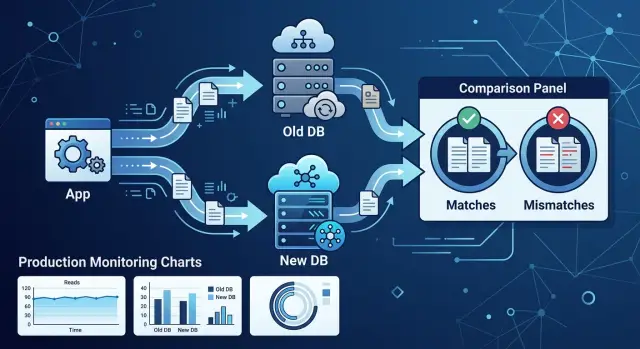
Table of Contents
Why write switches go wrong
Most write cutovers fail for a boring reason: test data is too clean. Your test suite may cover happy paths, known bugs, and a few ugly records. Production data has old defaults, partial imports, duplicate rows, nulls in strange places, and manual fixes from three years ago that nobody wrote down.
That gap matters more than teams expect. A new query can return the right shape and still return the wrong numbers. The response looks fine. Nothing crashes. But one join drops a row, one filter skips archived items that still count, or one rounding rule changes a total by a few cents.
These mismatches are easy to miss in code review. They look harmless until someone compares real results at scale. A customer balance ends up off by 1%. An order count misses a few edge cases every day. The system keeps running, so the bug hides in plain sight.
The problem grows after the write switch. Once the new path starts writing data, bad assumptions spread fast. New records inherit the wrong totals, downstream jobs copy them, and support starts getting complaints that are hard to trace to one release. Now you do not just have a code bug. You also have a data cleanup job.
That is why it helps to change the read path first. Let the new code read real production data while the old write path still owns the truth. Compare old and new query results on live traffic, find the drift, and fix it before the new path starts creating fresh mistakes.
Read checks do not remove all risk. They do block one common failure mode: trusting a new write path before you know it matches reality. That pause can save days of repair work and a lot of awkward explanations.
What read path first means
Do not point writes at the new schema in the first release. Keep the current write path exactly as it is so the system still stores data in the place that already works. That cuts risk fast. If the new design has a bug, you have not started creating bad data.
Start with reads. For the same request, run the old query and the new query against the new table, index, or shape. Compare the results behind the scenes, but keep sending the old result back to the user. Nothing changes in the UI, API response, or report.
This works well for a safe database migration because test data is neat and production data is not. Real traffic brings odd timestamps, half-filled records, rare filters, duplicate rows, and old data nobody thought about during planning. When the new query keeps matching the old one under real traffic, you learn far more than you would from a staging test.
Most teams roll this out in small steps. Start with a tiny traffic slice, such as internal users or 1% of requests. Run both reads for that slice and compare the outputs. Fix mismatches before you widen the slice. Move to broad traffic only after the mismatch rate stays low.
Users should not notice any of this. They keep seeing the trusted answer while your team checks whether the new path behaves the same way. If the new query fails or returns something odd, log the difference and keep serving the old result.
It feels slower at first. It usually saves much more time than a rollback, a repair script, or a long night spent figuring out why totals, counts, or statuses changed after release.
Choose the results to compare
Do not compare every column from every query. That creates noise, and noise hides the bug you need to catch. Compare the results that change a business decision, a user action, or a number someone will notice.
Start with risky queries. Money totals, taxes, discounts, refunds, and balances belong on the list. So do permission checks, visible records, counts shown to users, and status fields that trigger emails, renewals, or blocking rules.
A good comparison is small but meaningful. If a field does not change what the app does, skip it. Internal IDs, cache markers, and display only formatting often differ for harmless reasons.
An order query might return 25 columns, but only six drive real behavior: subtotal, tax, total, currency, payment status, and customer ID. Compare those first. If the old and new paths disagree on a note field or a display label, that is usually less urgent than a 1 cent total gap or a wrong status.
You also need rules for values that look different but mean the same thing. Decide that before you run shadow reads in production. Otherwise, your logs will fill with false alarms.
Write down a few simple rules:
- whether row order must match or only the final set
- whether null and empty string count as different
- how to round decimals and money values
- whether timestamps must match exactly or within a small window
- whether case changes, such as 'PAID' and 'paid', count as a problem
Be strict where users or finance teams will feel the result. Be looser where the app can safely ignore cosmetic differences.
Last, define a real mismatch in plain language before you start. 'Different total', 'missing visible project', or 'user count changed by more than one' are clear rules. 'Anything different' is not. If your team cannot explain why a mismatch matters, it probably should not block the migration.
How to run side by side reads
This approach works best when you keep the scope small. Pick one endpoint and one query family, not the whole app. If users hit /orders, start with the read that loads the order summary. Leave every other read alone until that one is clean.
Keep the user on the old path. Let the current query build the real response and send that response as usual. In the same request, run the new query in shadow mode with the same input, but do not let its result change what the user sees.
That matters because you get real production traffic, real filters, and real edge cases without making the release risky. If the new path is slow or wrong, the user still gets the known result from the old path.
Before you compare anything, normalize both results. Many false alarms come from harmless differences in shape, order, or formatting.
A short normalization pass often means:
- sorting arrays that have no natural order
- rounding money and percentages to the same precision
- applying one rule for null, empty strings, and missing fields
- removing generated timestamps or trace data
- mapping old and new field names to the same names
Then compare the normalized outputs and log only the parts that differ. Use a request ID so you can trace one mismatch from the API log to the database query and back to the user action that triggered it. Store a small sample payload from both sides when it is safe to do so, or mask sensitive fields first.
Do not chase every mismatch at once. Group them into classes. One class might come from rounding, another from a missing join, and another from rows returned in a different order. Fix one class, deploy, and watch the mismatch rate drop before you move to the next.
This pace feels slow. It saves time. Ten mixed bugs in one log stream are hard to reason about. One known bug class with a clear request sample is usually easy to reproduce and fix.
Once the mismatch rate stays near zero for that endpoint, move to the next query in the same family. Small wins build confidence and make the write switch much less dramatic.
What to log and watch
Raw error counts are not enough. You need enough detail to tell whether the new read path is wrong, slow, or wrong only for a small slice of traffic.
Start with simple counters on every side by side read. Count matches, mismatches, timeouts, and empty results for both paths. If the old query returns data and the new one returns nothing, track that separately from a value mismatch. Those cases usually point to different bugs.
A short checklist is enough:
- total side by side reads
- exact matches
- mismatches
- old path timeouts and new path timeouts
- empty results on each path
Latency matters as much as correctness. Measure both queries on the same request so you can compare them fairly. An average can hide trouble, so track p50, p95, and worst-case latency for each path.
When you compare old and new query results in production, save a small sample of failing pairs. Do not log every full payload if the data is large or sensitive. Log enough to inspect the real shape of the problem: request ID, tenant ID, feature flag state, query inputs, old result, new result, and a short diff.
Group mismatches before you panic
One global mismatch rate can fool you. A 0.5% error rate may sound small, but if all of it comes from one tenant or one query shape, you already know where to look.
Group results by tenant, feature flag, endpoint, query type, and any parameter that changes behavior. If the new path fails only when a discount is applied or only for accounts with older records, that pattern will show up fast.
Watch drift over time
Big spikes get attention, but slow drift is often worse. A mismatch rate that moves from 0.1% to 0.3% to 0.8% over three days can mean backfills are lagging, data freshness is off, or one job is falling behind.
Good dashboards help, but keep a plain text trail too. If you can see errors, latency, and request samples in one place, you can make the write switch from evidence instead of hope.
Example: moving order totals to a new table
Order totals are a good example because they look simple and still break in messy ways. The old code often calculates the total on every request by summing line items, then adding tax, shipping, discounts, or fees. That path can be slower, but teams trust it because it uses the same raw data every time.
The new design stores a precomputed number in a separate table, such as order_totals. A checkout page or admin screen can read one row instead of rebuilding the number each time. It sounds safer than it is.
Numbers split when real life gets involved. A refund may land an hour later. Tax may change after an address fix. A delayed event may update the new table after the customer already loaded the page. If one path sees those changes and the other does not, the same order shows two different totals.
This is where changing reads first earns its keep. Keep the current write path exactly as it is. Let the app keep using the old calculation for the number users actually see. Then, in production, run the new read beside it and compare the results for the same order.
For each mismatch, log enough detail to explain it. A small set of fields usually tells the story:
- order ID and customer ID
- old total, new total, and the exact diff
- refund, tax, and discount timestamps
- version or event sequence number for the new table
After a day or two, the pattern is often obvious. Maybe every bad row has a refund posted after the initial total was written. Maybe tax recalculation updates the order record but never refreshes order_totals. Maybe imported orders skip one background job.
That is the real win from side by side reads. You do not just learn that drift exists. You learn which orders drift, when it starts, and which event caused it.
Do not switch writes because most rows match. Keep writes on the old path until the drift stops, or until you can explain every remaining mismatch and fix it. If twelve orders still go out of sync after late refunds, the new table is not ready. A fast wrong number is still wrong.
Common mistakes that hide problems
A side by side read can look clean and still miss the bug that hurts you after the write switch. Most false confidence comes from bad comparison rules, thin traffic samples, or reading from different places at different times.
One common mistake is comparing raw JSON as text. If the old path returns fields in one order and the new path returns them in another, a string diff says 'different' even when both results mean the same thing. Compare normalized values instead: same fields, same types, same meaning.
Timezone and money rules cause nastier misses. A report that groups sales by day can shift rows around midnight if one system uses UTC and the other uses local time. Totals can drift by a cent if one path rounds each line item and the other rounds only at the end. Those are not cosmetic differences. They change invoices, refunds, and dashboards.
Where comparisons go bad
A few patterns hide bugs for longer than teams expect:
- reading the old result from a replica and the new result from the primary
- sampling only a small slice of traffic, often the easy daytime cases
- ignoring nulls, blank lists, or missing optional fields
- treating one clean day as enough proof to switch writes
Replica lag alone can make the old and new answers disagree for reasons that have nothing to do with your code. Or worse, both reads can match because they are stale in the same way. Keep the read sources aligned when you test.
Small samples miss the weird cases you actually need. Think refunded orders, guest checkouts, backfilled rows, daylight saving time changes, and very large amounts. If your product has weekly or monthly patterns, one day tells you almost nothing.
Run the comparison long enough to cross normal business cycles. Log mismatches with enough context to replay the request and inspect the source data. That is how you lower risk instead of just feeling better about it.
The teams that switch writes safely are a bit boring here. They compare business meaning, not raw text. They test enough real traffic to catch rare cases. They wait for stable results over time instead of trusting a lucky quiet day.
Quick checks before switching writes
A write cutover should feel a little boring. If the read first work went well, you already know how the new data behaves under real traffic. The last step is making sure the remaining risk is small, named, and easy to reverse.
Start with match rate. Do not look only at a quiet hour or one clean sample. Compare old and new results across normal traffic: busy periods, slow periods, retries, background jobs, and the odd requests that show up only a few times a day. If the match rate stays steady through all of that, you can trust it more than a short spike of perfect results.
Latency matters as much as correctness. A new query path that matches 100% of the time but adds 80 ms to a hot endpoint can still hurt the product. Check p50, p95, and timeout rates on the exact reads that depend on the new data. If the new path is close to your target on a quiet day but slips under load, wait.
Open mismatches should fit into known groups. Maybe rounding differs by one cent, archived records use an old status map, or a backfill skipped rows with broken source data. None of that is ideal, but it is manageable if the team can explain each group and estimate how often it happens. Unsorted mystery mismatches are a bad sign.
A short checklist helps:
- match rates hold steady during normal production traffic
- the new path stays inside your latency budget at real load
- every remaining mismatch falls into a named group with an owner
- the team can roll back with one flag, one config change, or one deploy
- support and product know which screens, numbers, and user reports need extra attention
That last point gets skipped a lot. Support should know what a bad order total, missing record, or delayed update looks like. Product should know which metrics may move for a few hours after the switch. When people know what to watch, they catch real issues faster and ignore noise.
Next steps for a safer rollout
Start with one change that can hurt users if it goes wrong. Do not begin with a full rewrite. Pick a table move, an index based query, or a new totals table, and add read comparisons before you touch the write path.
Keep the current system as the source of truth, run the new read in production, and compare the answers. If the numbers match often enough and the mismatches make sense, you have earned the right to plan the cutover.
A short rollout plan beats a vague one. Before the rollout window, write down the exact rule for switching writes. It can be as simple as this: switch only if error rate stays flat, mismatch rate stays under an agreed limit, and the team can roll back in one step.
Keep the plan visible and plain:
- name the person who makes the switch
- define the mismatch threshold that blocks the cutover
- set the rollback trigger in simple words
- note how long you will watch the system after the switch
During the switch, do not rely on memory. Keep your dashboards open, keep a few known sample records ready, and watch mismatches live. A small selected set helps because aggregate graphs can look fine while one customer account shows the real bug.
If you see a mismatch, stop and inspect it before you continue. A five-minute pause is cheaper than hours of cleanup after bad writes land in production.
Some changes deserve another set of eyes. If the rollout touches revenue, billing, inventory, or any workflow customers use every day, get a second review before the window starts. If you need outside help, Oleg Sotnikov at oleg.is works as a Fractional CTO and startup advisor on architecture, infrastructure, rollout risk, and practical AI based development environments.
One careful rollout gives you a template for the next one. Save the cutover rule, the dashboard set, and a few sample checks, then reuse them on the next risky change.


