Read models for admin screens without write domain bloat
Read models for admin screens keep support and ops pages quick by moving heavy lookups into simple query views that stay separate from write logic.
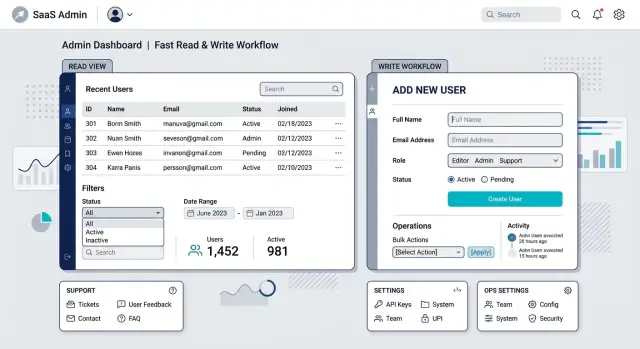
Table of Contents
Why admin screens slow down first
Admin screens often turn into the messiest pages in a product. One screen tries to show account details, recent orders, payment status, failed emails, audit logs, internal notes, and a pile of filters. It feels convenient at first. Then each extra panel adds another query, another join, and another reason the page takes five seconds to load.
Support and ops teams feel that pain before customers do. They usually do not need the system to replay every business rule. They need a fast answer: "Did the payment clear?" "Which address did we use?" "Why did this job fail?" "What changed yesterday?" If the page has to walk through the full write domain to answer those questions, simple checks get slow and fragile.
The write side of a system has a hard job. It protects rules, validates changes, and keeps data consistent. That matters when someone creates an order or edits a subscription. It is usually the wrong tool for a search box, a filtered list, or a detail page that support opens 200 times a day.
Slow admin pages cost more than a few seconds of waiting. A support agent loses focus while a search spins. An ops person runs the same filter twice because they think it failed. People open more tabs, hit refresh, and add load to a database that is already busy. Small delays pile up. Ten seconds across fifty lookups is real time, and it usually lands on the people handling urgent work.
A separate read path solves a narrow problem. Instead of asking the write model to answer every admin question, you prepare a simpler view of the data for the screens that need speed. That view can flatten the fields people search most, store the status labels they check first, and skip logic that only matters during writes. The screen reads from that path. The write side keeps doing write work.
People call this CQRS read models. The name matters less than the result. A read model gives support and ops a fast way to see the facts they need without dragging the whole domain into every search, filter, and detail page.
What a read model changes
A read model is a view shaped for the questions a screen needs to answer. It is not the source of truth, and it does not decide business rules. Its job is simple: return the right fields, in the right shape, fast.
That split matters because the write side and the read side do different jobs. The write side answers questions like "can this refund happen?" or "is this order allowed to ship?" The read side answers "what does support need to see right now?" Those jobs pull data in different ways.
When teams skip that split, admin screens start poking through the whole domain. A support page reaches into orders, payments, shipments, notes, flags, and audit logs through models that were never built for browsing. The result is familiar: slow queries, messy controller code, and domain objects stuffed with fields that only exist to satisfy one screen.
A narrow query path avoids that. You keep the write domain focused on state changes and rules. Then you build a small read path that can join tables, flatten data, cache totals, or store a precomputed view if needed. The domain stays easier to reason about, and the screen gets faster.
In many cases, one screen should have one model built for that screen. A refund review page might need the customer name, payment status, risk flags, and the last three support notes in one response. That does not mean the write domain needs a giant "admin order" object.
A good read model usually does four things:
- answers one screen or one workflow
- returns only the fields people actually use
- skips write rules that do not matter for display
- changes when the screen changes, not when domain rules change
You do not need a big architecture shift to get that benefit. Sometimes one extra table, one view, or one query object is enough to stop admin needs from leaking into the rest of the system.
Pick the screens worth separating
Start with the screens staff open all day. Think about support agents, finance teams, and ops people who keep the same pages open for most of a shift. If one of those pages is slow, the cost repeats all day.
Look for screens that do too much work on every request. Heavy filters, large joins, repeated lookups, and pages that pull data from several tables or services are better candidates than a settings page someone opens once a week. You want the pain to be obvious and frequent.
Support and ops pages usually deserve attention before reporting pages or edge case tools. When an agent waits even four or five extra seconds to answer a customer, ticket queues grow and people invent workarounds. That cost is easy to miss because it shows up as friction, not as one dramatic outage.
A simple example makes this clear. A support agent opens an order screen to check payment status, shipment state, refund history, and customer notes. If that page pulls from five places every time, it is a strong candidate for a separate query path. The write side can stay clean while the read side gives the agent one fast view.
Do not rebuild every admin page at once. That is where teams lose focus and turn a small fix into a long project. Pick one or two screens with obvious pain, improve them, and measure the result. If the new view cuts load time and saves staff time each day, move to the next screen.
Build one narrow query path
Pick one admin screen that already hurts. Maybe support opens a customer page and waits four seconds while the app joins six tables, checks permissions, counts related records, and sorts by the latest update. That is enough reason to split the read path.
Keep the scope small. One screen. One slow query. That makes the work easier to judge.
Write down exactly what the screen needs: which fields appear on the page, which filters people actually use, what sort order loads by default, how fresh the data needs to be, and how fast the page should respond. Most admin screens ask for far less than the write model can provide. Teams often pull full domain objects and trim them later in the controller or UI. That wastes time on every request.
Now build a read model for that screen only. Keep it boring. A single table, document, or cached projection is often enough. If the page shows customer name, last order date, payment status, and assigned agent, store those fields and stop there. Do not turn the read store into a second general database.
Feed that projection from facts you already trust. Domain events are a clean option if you already publish them with stable meaning. If you do not, update the read model directly when the write transaction commits. Both approaches can work. The important part is having one clear source, not a trail of patch jobs and mystery fixes later.
Then measure the page before and after. Track median response time and slow requests, not just one lucky local test. If the screen drops from 3.8 seconds to 180 milliseconds, the new query path earned its place.
That is when CQRS read models stop sounding abstract. You are not redesigning the whole system. You are giving one painful screen a short path to the data it needs and leaving the write domain alone.
Keep the read model small
A good read model stays boring. If an admin screen shows customer name, order total, payment state, last update, and a refund flag, store those fields and stop there. Do not copy the whole order aggregate into a second table just because it feels safer.
Most admin screens need two kinds of data: what people see and what they search. That usually means a few display fields, a few filter fields, and one stable row ID. Less data usually means faster queries, simpler rebuilds, and fewer strange bugs when the write side changes.
Precompute the parts humans actually use, not just raw facts. Support teams search for "paid," "late," "high risk," "3 items," or a customer full name. If the screen depends on counts, labels, or status text, calculate them ahead of time and store them in the read model. That saves the database from rebuilding the same answer on every page load.
Denormalized values are fine when they remove painful joins. Copy the shipping country, latest payment result, or account manager name if that lets the screen load in one query instead of five. Purity matters less than speed and clarity on an internal screen.
When the model starts to grow, ask four plain questions:
- Is this field visible on the screen?
- Can someone filter, sort, or search by it?
- Does it remove a slow join or repeated calculation?
- Is slightly stale data still safe for the team?
Refresh speed should match the job. A fraud queue may need updates within seconds. A finance export screen can lag a few minutes and nobody will care. Teams often create extra moving parts because they chase perfect freshness on screens that do not need it.
Small read models are easier to rebuild, easier to trust, and cheaper to run. If a field does not help someone make a decision on that page, leave it out.
Example: a support order screen
A support rep usually does not need the whole order aggregate. They need enough context to answer a customer in under a minute. If the screen pulls live data from several tables and rebuilds business rules on every search, it gets slow right when the queue gets busy.
Picture a customer who writes, "I was charged twice. Can you check order 18473?" The rep might search by order number first. On the next ticket, they may only have an email address. Later they may need a list of orders in "refund pending." One narrow read model can cover those paths without dragging write logic into the screen.
Behind that page, keep a small shape built for lookup. Store normalized email, public order number, current order status, and refund state so search stays fast. You can also precompute a short support summary such as "paid, not shipped, refund requested yesterday" instead of making the UI join payments, shipments, and refunds every time.
On the page itself, show the facts a rep needs for the first reply: customer name and email, order number and current status, payment status and refund state, order total, purchase date, last update, and a short shipment summary. That is enough for most conversations. A rep can answer, "I can see the payment cleared, the refund request is open, and nothing has shipped yet," without opening five tabs or waiting on extra queries.
When the rep needs to change something, the screen should stop there. Refund approval, address fixes, and item swaps belong in the write flow, where validation, permissions, and side effects already live. The read view can show an action that opens the proper workflow, but it should not try to edit the order itself.
That separation is the whole point. The support screen stays quick and easy to scan, and the write domain keeps the rules that protect the business.
Mistakes that create drift and confusion
The most common mistake is overbuilding. A team starts with one slow support screen, then copies half the domain into the read side because it might be useful later. Now they have two models with similar names, different rules, and twice the maintenance.
Restraint wins here. The read side should answer a small set of questions fast. If support only needs order status, payment state, last shipment event, and note count, store that and stop there.
Trouble grows when admin only filters leak back into the write domain. Search by partial email, filter by internal tag, and sort by last agent reply are screen concerns. They do not belong inside aggregates, commands, or business rules. Once the write side bends around admin queries, the core model gets much harder to understand.
Drift usually starts with vague update rules. Someone says the projection updates when an order changes, but nobody lists which events update which fields. Then a refund lands, an address changes, or an internal note gets deleted, and stale rows stay behind because nobody owned that case.
Write those rules down in plain English. List the events that feed the projection, say which fields each event updates, define when rows get created or removed, and set a freshness window for the screen.
That freshness window matters more than teams admit. Many admin screens do not need live data. A support agent can work fine with data that refreshes every 30 seconds, every minute, or on manual reload. If the screen is not for active trading, dispatch, or fraud response, do not promise instant updates just because it sounds good.
Small models also age better. Fields that looked smart during planning often go cold after launch. If nobody reads "campaign source" or "legacy account tier" after the first few weeks, remove them. Dead fields cause real damage. They add event handling, rebuild work, test cases, and strange mismatches when one value lags behind another.
A simple rule helps: if a field does not help someone make a decision on that screen, keep it out.
Quick checks before launch
Before launch, test the screen like a tired support rep, not like the engineer who built it. A faster admin page only matters if staff can open it, trust the data, and answer the customer quickly. If people still wait, retry searches, or ask where a number came from, the work is not done.
Run a short review before you ship:
- Make sure the page loads through one narrow query path. If the request still jumps across several services, joins too much data, or triggers extra lookups after render, the old bottleneck is still there.
- Check the filters against real support habits. Staff search with the words they already use in tickets and chats: order ID, email, company name, failed payment, or a stuck status.
- Give every field a clear source and refresh rule. Someone on the team should be able to answer two questions for each value: where does it come from, and when does it update?
- Write the stale data limit in one plain sentence. "Refund status can lag by up to 60 seconds" is clear. "It is eventually consistent" will confuse half the room.
One practical test catches most bad launches. Sit next to a support person while they handle three real cases. Watch what they search, which filters they touch, and when they leave the screen to check another tool. That short session tells you more than a week of internal debate.
If they solve common cases in one place, the query path is probably in good shape. If they skip half the page, trim it. If they keep opening raw tables or internal logs, the read model is still too thin.
A good admin screen feels almost boring. It loads fast, answers the common question, and makes support dashboard performance feel normal instead of fragile.
Decide your next move
Start with one screen that already wastes time every day. Pick the admin page support or ops opens most, where people wait for data, retry searches, or jump between tabs to answer a simple question. That gives you a clean test. If the new path helps there, you will see it quickly.
Keep the first version narrow. Do not rebuild your whole back office. Build one query path that answers one job well, like finding an order, showing payment status, recent events, and the last support note in one view. Small read models are easier to trust because the team can compare old and new results without guessing where the numbers came from.
After release, track three numbers for two or three weeks: page load time, search time from typing to usable results, and ticket handling time for the people who use the screen most. If those numbers do not move, the model may be too broad, too thin, or aimed at the wrong page.
Write one short rule before the next request arrives. Build a new read model only when a screen has slow queries, repeated joins, or a clear support cost that the write domain should not carry. That rule keeps teams from creating special tables for every complaint, and it protects write domain separation.
If your team is small, an outside review can save time. Oleg Sotnikov at oleg.is works with startups and smaller companies as a fractional CTO, helping teams clean up architecture, admin tooling, infrastructure, and practical AI assisted development without adding more process than they can maintain.
A good next step is modest: fix one painful screen, measure the result, and keep the rule simple enough that everyone can apply it.
Frequently Asked Questions
What is a read model for an admin screen?
A read model is a small data view built for one screen or workflow. It gives support or ops the fields they need fast, without pulling your full write logic into every search and detail page.
When should I separate an admin screen from the write domain?
Split the page when staff open it all day and it keeps waiting on joins, filters, counts, or calls to other services. If a slow page adds friction to common support work, build a separate read path for that screen first.
Do I need full CQRS to make this work?
No. You can start with one table, one database view, or one query object for one painful page. Keep the first version small so your team can ship it, compare results, and decide if it earns more work.
What data should go into the read model?
Put in only what people see, search, sort, or filter on that page. If a field does not help someone answer a question or remove a slow join, leave it out.
How fresh should the data be?
Match the refresh speed to the job. A fraud queue may need updates within seconds, while a finance screen can lag a minute or two and still work fine.
Should an admin screen change data through the read model?
Keep edits in the write flow. Let the read model show status and context, then open the proper refund, address change, or approval flow when someone needs to make a change.
How should I update the read model?
Update it from facts you already trust. If you already publish clear domain events, use them. If not, write to the read model right after the main transaction commits and keep the rules clear for each field.
Why do admin screens slow down so often?
Admin pages slow down when one screen tries to answer too many questions from the full domain. Extra joins, repeated lookups, audit data, and business rule checks turn a simple support check into a heavy request.
How do I know the new query path actually helped?
Measure page load time, search time, and ticket handling time before and after the change. If support finds answers faster and stops opening extra tabs, the new read path did its job.
Can a small team do this without overbuilding?
Yes, if they stay disciplined. Fix one painful screen, write down the fields and refresh rules, and stop before the read side turns into a copy of the whole domain.


