React libraries for multi-step wizards that branch
React libraries for multi-step wizards help teams build onboarding, import, and approval flows with draft saves, branching, and safe backtracking.
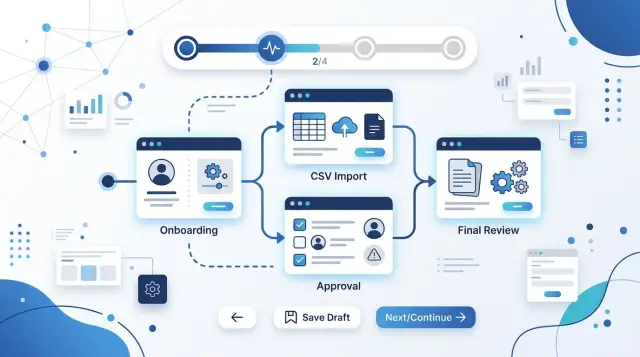
Table of Contents
Why these flows get messy fast
A wizard looks simple on a sketch. Step 1, step 2, step 3. Real products stop behaving that way as soon as one answer changes what the user should see next.
Onboarding flows branch because different people need different setup. A solo founder might skip team invites and approval rules. A larger company may need billing details, roles, security settings, and sign-off from someone else before they can finish. The path splits early, then splits again.
Import flows are even less predictable. The next screen depends on the file, the columns, duplicate rows, missing values, and what the app finds after a quick check. If the user uploads a clean CSV, the flow stays short. If the import has bad dates or unclear field matches, the wizard needs extra steps without feeling like a punishment.
Approval flows add time to the problem. One person starts the request, another reviews it, and someone may send it back with changes. Users leave in the middle, come back hours later, and expect the draft to still be there. That expectation is reasonable. If the form forgets their progress, support tickets show up fast.
Going backward causes a different kind of mess. A user changes an early answer, but the app still keeps data from later steps that no longer fit. Then validation blocks the form for fields that are hidden now. Some teams do the reverse and wipe too much, so the user has to re-enter work they already finished.
That is why these flows get brittle so quickly. You are not only managing pages. You are managing rules, saved state, timing, and the user's trust that the flow will not break when they change their mind.
What a good wizard tool needs to handle
Good wizard software keeps two things separate: step order and form rules. That sounds small, but it saves a lot of pain later. If the same code decides both "which screen comes next" and "which fields are valid," even a tiny change can break the whole flow.
That matters in React libraries for multi-step wizards because branching usually grows over time. A simple onboarding flow turns into "show this step only for contractors," then "skip this page for returning users," then "send managers to approval first." If those rules live in five different components, nobody trusts the flow after a few edits.
Draft saving should feel normal, not like a rescue feature. Users leave forms halfway through all the time. A good tool lets you save partial progress to local storage or your backend without weird workarounds, then restore the exact step and entered values when the user returns.
Conditional paths also need to stay readable. The tool should handle role-based branches, optional steps, and repeated checks without turning your wizard into a pile of if statements. A reviewer, a new hire, and an admin may all start in the same flow, but they should not all hit the same screens.
Error handling is where weak setups fall apart. When an import fails on step 4, users should see that error on step 4. When approval data is missing, the message should point to the approval step, not appear as a vague banner at the end.
A solid setup usually gives you four things:
- one place to define steps and branch rules
- form state that survives refreshes and retries
- step-level validation and server error mapping
- safe backtracking, so users can revisit earlier steps without wiping later answers
If a library cannot do those jobs cleanly, the wizard gets hard to change fast.
Tools people use for different jobs
Most teams get better results when they split the problem into parts. One tool manages form fields, another handles branching logic, and a small helper moves people between steps. That mix is usually easier to maintain than one giant wizard component.
React Hook Form is often the easiest starting point for large forms. It keeps rerenders down, so long onboarding or import screens feel faster. If users can save half-finished work, that lighter state model also makes draft save forms less awkward.
Formik still works well, especially when a team already uses it across the app. It is heavier, but the patterns are familiar to many React teams. Reusing one form approach can be more useful than switching tools just because something newer exists.
XState solves a different problem. It helps when the flow branches, waits for review, or changes after an approval decision. Instead of hiding rules inside nested if statements, you define states such as "draft", "submitted", "needs changes", and "approved". That makes approval workflow UI easier to reason about later.
For simple next-back movement, react-use-wizard is enough. If each step should have its own URL, a router is often the better pick. That makes backtracking less fragile and gives support teams a clearer way to reproduce bugs.
Validation should stay close to each step. Zod and Yup both work well for that. Zod is a nice match when you want TypeScript types from the same schema. Yup still fits many apps, especially if Formik is already in place.
A practical stack for React libraries for multi-step wizards often looks like this:
- React Hook Form or Formik for fields and errors
- XState for branching flows in React and approval states
- react-use-wizard or a router for moving between steps
- Zod or Yup for step-level validation
That split keeps each job small. When the flow grows from a basic signup to imports and approvals, small parts are easier to change without breaking everything.
How to choose one for your case
When you compare React libraries for multi-step wizards, do not start with stars or screenshots. Start with your actual flow. A tool that looks smooth in a demo can get messy fast once users pause, change answers, or return later.
Draw the happy path first. Then draw two messy paths beside it: one where a user stops halfway and comes back tomorrow, and one where a changed answer sends them into a different branch. If the tool makes those paths hard to model, it will fight you later.
Count every place where a person can pause, branch, or go back. An onboarding wizard may have a few conditional steps. An import flow often needs retries, file fixes, and partial progress. An approval workflow UI may send someone backward after comments or missing details. That count tells you whether a simple stepper is enough or whether you need stronger flow control.
Most teams get stuck because they expect one library to do everything. It is usually better to choose three parts on purpose:
- form state for inputs, validation, and dirty fields
- flow state for step order, branching rules, and backtracking
- storage for draft save forms, recovery, and resume later
That split keeps your choices clear. You might use one tool for fields, another for branching flows in React, and a separate place to store drafts.
Before you commit, build one real step from start to finish. Pick a step with conditional fields and draft save. Then test four things: save halfway, refresh the page, go back and change an earlier answer, and resume on the right step. That small test will expose a bad fit faster than a week of comparing features.
Making branching rules easier to follow
Branching logic gets hard to trust when it lives inside each step. One step sends users left, another step skips ahead, and a third quietly changes the next screen. After a few edits, nobody remembers why the flow works the way it does.
Put the rules in one place. That can be a single config file for simple flows, or a state machine when the path changes often. Both options beat scattered if statements across ten components.
Names matter more than people think. A rule called needs_manager_review is easy to read six months later. A rule called go_to_step_7 tells you almost nothing, and it breaks the moment someone inserts a new step.
This gets even more important in mixed flows. An onboarding wizard might skip payroll details for contractors. An import flow might skip column mapping if the file matches expected headers. An approval flow might send the request back for edits only when the amount crosses a limit.
Progress should reflect the user's path, not a fixed list of all possible screens. If you show 8 steps but the user only needs 5, the wizard feels broken. A simple progress label like "Step 3 of 5" usually works better than a rigid tracker with skipped items grayed out for no reason.
Teams also need a clear record of why the path changed. Store the decision, not just the result. "Routed to manager review because amount exceeded approval limit" is much more useful than "moved to review".
That audit trail helps with support, compliance, and plain old debugging. If a founder or CTO reviews the flow later, they can see the rule, the trigger, and the exact branch the user took without replaying the whole session.
Saving drafts without confusing users
Drafts only help when people trust them. If the wizard saves too late, restores the wrong screen, or stays vague about what it kept, users start over just to feel safe.
A good rule is simple: save after every completed step and after any meaningful change inside a long step. Typing one character should not trigger a big save every time, but changing an address, uploading a file, or picking an approval path should.
For draft save forms, store two things together: the field values and the user’s progress. Values tell you what they entered. Progress tells you where they can safely resume.
Save the last safe point
Do not send people back to the last screen they clicked. Send them to the last step that had valid data and a clear next action. That small choice prevents a lot of confusion.
Picture an employee import flow. A user uploads a CSV, maps columns, then opens the review step before fixing three missing fields. If they leave and come back, dropping them into review feels broken. Restoring them to column mapping, with their earlier work intact, makes sense right away.
This usually means each step needs its own status, such as:
- not started
- in progress
- complete
- needs attention
That status is often more useful than a raw step number.
Users also need feedback. A tiny message like "Saved 10 seconds ago" does more than a generic success toast. It tells them the system is still working and reduces the urge to click "Next" three times.
If a wizard saves drafts across devices or long sessions, show what you restored. One short line is enough: "We restored your draft from the approvals step." If some data is old or no longer valid, say that clearly and point to the step that needs attention.
Silent saving is fine. Silent restoring is where trouble starts. People need to know what came back, when it was saved, and where they should continue. That keeps backtracking calm instead of turning a normal pause into a support ticket.
Letting people go back without breaking the flow
Going back is where many wizard flows fall apart. A user changes one answer near the start, and now half the later steps may be wrong, half may still be fine, and the form has to tell the difference. Good React libraries for multi-step wizards make this easier, but the real win comes from clear rules about what stays, what resets, and what needs a fresh check.
When an earlier answer changes, re-run the rules for every later field that depends on it. Do not wipe the whole form. If someone switches from "single approver" to "team approval," you may need to reset the approval path, but their project name, notes, and due date can stay.
A simple reset policy keeps users calm:
- Recheck later answers that depend on the changed value
- Clear only fields that no longer fit the new path
- Keep files, notes, and basic profile details if they still make sense
- Ask before removing approval comments, import mappings, or other work that took time
That last part matters more than teams expect. If a user spent 15 minutes mapping import columns, they will not forgive a silent reset. Show a short warning first. Say what will be removed, what will stay, and why.
Uploaded files need the same care. If the file still matches the updated path, keep it. If the change makes the file invalid, mark it for review instead of deleting it at once. The same goes for comments in approval steps. People often need those comments even when the route changes.
Backtracking also works better when the UI shows where the flow changed. A small note like "2 answers need review" is enough. Users do not need drama. They need to know what changed, what survived, and how to finish without starting over.
A simple example with onboarding, import, and approval
Picture a React onboarding wizard for a B2B app. The user enters account and company details, then stops because they need a tax ID from a coworker. If the form saves a draft after each step, they can come back tomorrow and continue from "Import data" instead of starting over. React Hook Form can manage the fields, while a small store like Zustand keeps the current step, completed steps, and draft ID.
Next, the user uploads a CSV. The app maps columns such as "Company name" and "Billing email" to the right fields. Two columns fail. A good wizard keeps the file, the partial mapping, and the error notes in the draft. That way the user fixes only the broken parts. They can also go back to company details if needed without losing the import work.
The branch happens after mapping. Low-risk cases go straight to review. Higher-risk cases, such as missing legal data or a large first order, go to manager approval. This is where XState or another state machine helps. Instead of hiding rules inside click handlers, you keep a small set of states such as:
- draft
- fixing import
- waiting for approval
- ready to review
- submitted
After the manager approves, the app should return the user to the next unfinished step, not to the start. If the review page is next, open that page with the saved data already filled in. If the manager rejects the case, send the user back to the step that needs attention and show one clear reason.
That small detail matters. When people backtrack and see their data intact, they trust the wizard. When approval drops them on step 1 with half the form blank, support tickets start.
Common mistakes that turn wizards into support tickets
Most support tickets come from broken state rules, not ugly screens. Even good React libraries for multi-step wizards will feel painful if the flow logic lives inside scattered UI components.
A common mistake is tying step order directly to what each component renders. That works for a straight form, then falls apart when onboarding splits by role, an import flow skips mapping for known files, or an approval step appears only above a limit. Keep the flow map separate from the screen code, or one small condition will send users to the wrong step.
Another problem is validating the whole wizard on every screen. Users should not see errors for steps they have not reached yet. If someone is uploading a CSV, the mapping step should not complain about a missing approver from the final screen. Validate what the user can fix right now, then run cross-step checks when they move to the next branch or submit.
Teams also treat "Back" like undo. Users do not mean the same thing. Back should usually change the screen, not delete uploads, erase mapped columns, or reset a choice that took five minutes to make. If you need a destructive action, label it clearly and keep it separate.
Draft save forms cause a different mess when teams save without version checks. A user opens the wizard in two tabs, or a manager edits the same draft later, and the older copy wins by accident. Add a revision ID or timestamp, and warn people before one draft overwrites another.
Skipped steps need tracking too. If the app hides a review step, store why it skipped it. Then when a value changes, you can recalculate the path and explain what happened. Without that record, support teams waste time guessing whether the flow followed a rule or hit a bug.
A short checklist before release
Release is the worst time to discover that a user loses a draft after logging in on a second laptop. Multi-step flows look fine in a happy-path demo, then fail when real people stop halfway, change their mind, or ask a teammate what a question means.
Run the flow like a tired user, not like the person who built it. Close the tab, refresh the page, switch devices, skip a step, then go back and change an earlier answer. If the wizard still makes sense, you are close.
- Start on one device and resume on another. The user should land on the right step with the right data, not a blank form or an old version.
- Ask someone from support, sales, or operations to explain each branch in plain language. If they cannot say why a user goes left instead of right, the logic is too hidden.
- Test skipped steps on purpose. Then reverse a decision that changes the path, such as switching from "manual review needed" to "auto-approve." Old fields should clear or update in a predictable way.
- Refresh during every awkward moment: after a draft save, during an upload, and after adding approval notes. Those states should survive without duplicates, missing files, or mixed-up comments.
A small scenario helps. In onboarding, a company user selects "team account," uploads a document, leaves, and finishes later on a phone. In an import flow, the user changes the file type and the mapping step should reset cleanly. In approvals, a manager rejects, then reopens and approves. Each path should keep a clear history.
If your team cannot explain the branches on a whiteboard in two minutes, the UI is still too clever.
What to do next
Pick the flow that burns the most time each week. That is usually a new-user onboarding path with role-based steps, a CSV import with cleanup screens, or an approval flow with handoffs. If a bad wizard costs your team hours every week, fix that one first.
Do not try to model every branch on day one. Build one branching path and one resume-later path first. That gives you a real test: can users leave, come back, and still understand where they are and what happens next?
A good first pass is small:
- one happy path
- one branch with different next steps
- one draft save that restores cleanly
- one back button rule that does not lose data
That is enough to expose most weak spots in React libraries for multi-step wizards. You will see fast whether the tool handles branching flows in React without turning state into a pile of conditions.
Keep the tool set narrow. If your hard cases are step order, validation, and draft save forms, you may only need a form library plus a small state machine. If you also have approvals, permissions, and audit history, add only what covers those cases. Extra tooling makes debugging slower, and wizard bugs are already annoying enough.
Write down the rules in plain language before you code them. For example: "If the import has missing emails, send users to review. If the manager rejects the request, return to edits with comments kept." When a rule reads clearly, the UI usually does too.
If the messy part is React state, approval rules, or save-draft architecture, Oleg Sotnikov can review the flow design in a focused CTO consultation. A short review often catches the expensive mistakes early, before the wizard turns into a maintenance job.


