React Suspense adoption without rebuilding your app
React Suspense adoption can start small: add it route by route, use it where loading states help, and avoid the debugging traps that slow teams down.
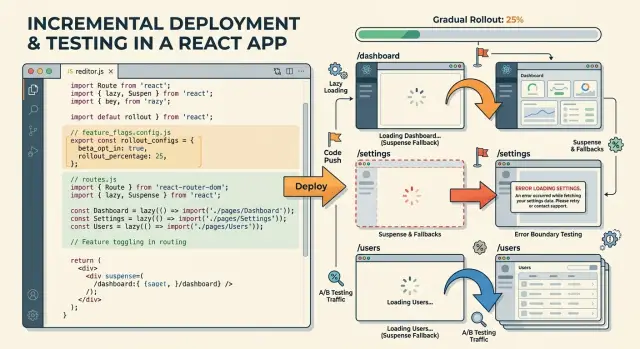
Table of Contents
Why teams hesitate to add Suspense
Most teams do not avoid Suspense because they dislike new React features. They avoid it because the app already works. Data loads, screens render, and users finish their tasks without much trouble.
That matters more than people admit. If a page already fetches data and renders fine, there is no obvious reward in changing the loading model. Teams look at their current code, see a few loading flags and some conditional rendering, and decide that leaving it alone is safer.
A full rewrite is the next fear. Many developers hear "Suspense" and assume they need to rebuild the whole app around it. That assumption stops a lot of React Suspense adoption before it starts. In most cases, a full rewrite is the wrong move anyway. It costs time, creates risk, and pulls attention away from work users will actually notice.
The user experience can also get worse fast. One bad fallback, placed too high on the page, can hide content that was already visible a moment ago. A stable screen suddenly flashes a spinner or a blank panel. Even if the wait is short, the page feels broken. Users do not care that the boundary worked as designed. They care that the screen jumped.
Debugging is another real reason teams hesitate. Suspense moves the loading behavior into boundaries, so the source of a problem is less obvious. A developer can no longer follow a simple "isLoading" flag through props and state. They have to work out which boundary caught the pause, which component triggered it, and whether the issue came from data fetching, lazy code, or both.
That change in mental model is where many teams slow down. The app may not be more fragile, but it can feel harder to reason about during a bug hunt.
So the hesitation is usually practical, not stubborn. If the app is stable today, no team wants to trade clear behavior for a nicer pattern on paper. They need proof that Suspense can improve one route without making the rest of the app harder to trust.
Where Suspense helps right now
React Suspense adoption pays off fastest when you use it in places that already make users wait a second or two. You do not need to rebuild your app or move every loading state at once. Start where the delay is obvious and the page can still stay useful while one part catches up.
A good first step is route-level code splitting. When a user opens a heavier route like analytics, billing, or settings, Suspense can hold that route while the rest of the app shell stays steady. The header, sidebar, and navigation do not need to blink out. That alone makes the app feel calmer.
Suspense also works well for side panels, drawers, and tabs that load extra data only after a click. Think about a customer page with a main profile on the left and an activity feed in a side panel. Users can read the profile right away while the activity feed loads a spinner or skeleton. That is a clean tradeoff because the delayed part is useful, but not urgent.
Another strong fit is any page section users expect to load after the first screen. Product recommendations, audit logs, comments, team activity, and similar blocks fit well inside their own Suspense boundaries. If that block appears a little later, most people do not mind. They already started using the page.
Keep the parts people need to act on outside the fallback. A checkout form, login form, search box, or page header should stay visible and stable. If Suspense hides the whole page and swaps in a fallback, users lose context. That usually feels worse than a plain old loading state.
A simple rule helps: if a user can wait for it, wrap it. If a user needs it to understand the page or finish a task, leave it outside.
For many teams, this route by route rollout works better than a big rewrite. One dashboard tab or one slow route is enough to prove the idea before you spread Suspense boundaries further.
Where debugging still gets harder
Suspense can clean up loading code, but it also moves the waiting logic away from the place you usually inspect first. A page may look simple in JSX while the real loading path runs through a lazy import, a child component, and a data call buried lower in the tree. That is where React debugging gets less direct.
Nested Suspense boundaries often cause the most confusion. A route boundary may show a full-page fallback, while a smaller boundary inside it handles a comments panel or a chart. If the screen flickers or stalls, you may need to trace the render tree by hand to find which component actually suspended. The fallback you see is not always the component that caused the wait.
Small updates can also feel messy. You change a filter, switch a tab, or sort a list, and the fallback flashes for a split second even though the request finishes fast. Users see a jumpy page. Developers see a bug that is hard to reproduce. In many cases, the boundary sits too high, so a tiny update hides more UI than it should.
Errors add another layer. The loading UI may live in one file, the error boundary in another, and the fetching logic somewhere else. When a request fails, you jump across files to understand one user action. Plain local state is often easier to read because loading, error, and content stay together.
Network waterfalls get harder to spot too. A child component cannot start its request until React renders that part of the tree. If several children suspend one after another, the route feels slow even though no single request looks terrible. This happens a lot when teams add Suspense boundaries without checking request timing in the browser.
A few habits help. Log when each fallback appears during development. Keep boundaries close to the part that can wait. Store loading and error code near the same feature folder when you can. After each new boundary, open the network panel and check whether requests start together or in sequence.
If a spinner appears and nobody on the team can say which component triggered it, the boundary is too broad.
How to roll it out one route at a time
Treat Suspense as a local change, not a new app architecture. Start with one route that users open often, feels slower than it should, and is easy to roll back. A profile page, reports screen, or settings area is usually safer than checkout or onboarding.
Measure the route before you change it. Check how long it takes before people see the first useful content, how long placeholders stay on screen, and whether users leave before the page settles. If your team tracks real user metrics, use them. If not, a few manual timings and session recordings are still better than guessing.
Then update one area on that route. Lazy load a heavy chart, or put a Suspense boundary around a data-heavy panel. Leave the rest of the page on the current loading pattern. That smaller change makes React debugging much easier because you can tie any new glitch to one boundary instead of several moving parts.
A practical route by route rollout looks like this:
- Choose one route with clear slowdown and low business risk.
- Record current load time and user-visible waiting.
- Add Suspense or lazy loading to one slow section only.
- Keep other routes and other sections on the old pattern for now.
- Watch real user behavior for a few days before you copy the change elsewhere.
That last step matters more than most teams expect. A route can look fine on a fast laptop and still feel awkward on a mid-range phone, especially when a fallback flashes in and out. Watch for repeat refreshes, abandoned sessions, and support messages about content "jumping" or buttons moving.
React Suspense adoption gets less risky when each rollout answers one plain question: did this route feel faster without confusing people? If the answer is yes, move to the next route with the same narrow scope. If the answer is no, undo the change, adjust the boundary, and test again. Small wins stack up faster than a big rewrite.
How to place boundaries without breaking the page
A good Suspense boundary should hide waiting, not the whole page. If the header, navigation, and page title already loaded, keep them on screen. People feel less lost when the frame of the page stays steady and only the delayed part changes.
Most teams make the first boundary too large. They wrap the entire route, show one big spinner, and turn a normal delay into a full-screen blank state. That feels worse than the old loading pattern.
Put the boundary around the content block that may wait. A product table, comments panel, chart area, or profile details card is a better target than the whole screen. Users can still read the title, use navigation, and understand where they are.
Simple placeholders work better than fancy loaders. Match the final layout as closely as you can. If the page will show three cards and a sidebar, the fallback should keep that shape. The page stops jumping, and people do not need to re-scan the screen when data arrives.
A small rule helps a lot:
- Keep shared chrome outside Suspense
- Wrap slow content, not stable content
- Use placeholders with the same size and spacing
- Put an error boundary next to each Suspense boundary
- Stop before the page turns into a grid of tiny loaders
That last point matters. Many tiny boundaries look clever in code, but they often make the page feel noisy. You get flicker, more moving parts, and harder debugging when one small piece fails or reloads at the wrong time. In most cases, one boundary per meaningful section is enough.
Pair each Suspense boundary with an error boundary nearby. If the data load fails, users should see a clear local error instead of losing the entire route. A chart can fail without taking down the header and the rest of the dashboard.
If you are unsure where to draw the line, ask one plain question: what can load later without making the page feel broken? Start there. Then test the route on a slow connection. If the page still feels stable, the boundary is in the right place.
A simple route example
Start with an account settings route. It usually has three tabs: Profile, Security, and Billing. Most people open Profile first, change a name or email, and hit Save. That makes Profile the part you should render right away.
Billing is often heavier. It may pull payment history, invoices, tax fields, and a billing SDK. Instead of making the whole route wait for that work, keep the page shell visible and load Billing only when the user opens that tab.
A small Suspense boundary around the billing panel is enough:
function SettingsRoute() {
  const [tab, setTab] = useState("profile");

  return (
    <AccountLayout>
      <Tabs value={tab} onChange={setTab} />

      {tab === "profile" && <ProfileForm />}
      {tab === "security" && <SecurityPanel />}

      {tab === "billing" && (
        <Suspense fallback={<BillingSkeleton />}>
          <BillingPanel />
        </Suspense>
      )}
    </AccountLayout>
  );
}
The fallback should stay small. Show a skeleton only inside the billing panel, not across the full page. Keep form labels, tab names, and the Save button on screen so the route still feels solid. If someone is editing their profile, they should never lose context because a different tab is still loading.
This is why route by route rollout works well. You change one route, one panel, and one loading state. If something goes wrong, you know where to look. React Suspense adoption gets much easier when the first step is narrow enough to debug in a few minutes.
After release, watch how people move between tabs. If almost nobody opens Billing, stop there. You already made the route feel faster without extra work. If many users jump to Billing right after Profile, then prefetch the Billing tab after the first paint or when the cursor moves toward that tab.
That pattern scales well. Keep the first view stable, delay the expensive panel, and add more Suspense boundaries only when real usage shows they will help.
Mistakes that create extra work
Teams usually make Suspense harder than it needs to be. The extra pain rarely comes from React itself. It comes from changing too much at once, or hiding too much of the page behind one fallback.
A common mistake is wrapping an entire route in a single boundary. The page then disappears every time one part waits for data or code. Users lose the header, filters, and other stable UI, even when only the main panel needs a loader. That feels slow, and it also makes bugs harder to trace because the whole screen keeps swapping states.
Another one is keeping old loading flags everywhere while adding Suspense on top. You end up with isLoading checks in components, route loaders, and fallback UIs all fighting each other. One part shows a spinner, another shows skeletons, and a third still renders stale content. React Suspense adoption works better when each route has one clear loading story instead of three half-migrated ones.
Error handling often gets pushed off until later. That sounds harmless, but it creates ugly failures after release. A route that suspends also needs a clear error path. If data fails to load, users should see a useful message in the part that broke, not a blank page or a frozen spinner.
Placeholders can also cause more trouble than they save. Fancy skeletons look nice in a demo, but they become a problem when they shift the layout. If the fallback is much shorter or taller than the real content, buttons move, text jumps, and the page feels unstable. Simple placeholders that keep the same rough shape usually win.
The last mistake is changing many routes in one pass. You lose your baseline, so every bug turns into a guessing game. Was it the new boundary, the data fetch, the cache, or a reused component from another route?
A safer pattern is boring, and that is why it works:
- Change one route at a time.
- Keep most of the layout outside the fallback.
- Remove old loading logic when Suspense takes over.
- Add an error state before release.
- Compare the route against the old version before you move on.
If one route still behaves oddly in React debugging, stop there and fix it. A slow rollout is usually faster than cleaning up five routes at once.
Quick checks before you ship each route
React Suspense adoption gets easier when each route passes a few plain checks. The route should feel stable while data loads, not half-finished or confusing. If people need to stop and figure out what is happening, the route is not ready.
- Keep the route usable while content waits. Leave navigation, filters, tabs, and back buttons active when you can. A user should still move through the app instead of staring at a frozen area.
- Show the page identity early. Users should see the page title, main heading, and primary action before every detail arrives. On an account page, that might mean showing "Billing" and "Update plan" first, then loading charts and tables after.
- Make the fallback fit the final layout. If the placeholder takes far less space than the loaded content, the page jumps. That feels rough, and it can trick your team into chasing the wrong bug.
- Decide where errors appear. If one request fails, name the exact part of the screen that shows the error and the parts that still work. This matters more than teams expect, because unclear error placement makes React debugging slower.
- Compare real timings before and after. Check the route on a normal laptop and on a throttled connection if possible. Look at how fast the first useful content appears, how long until the main action works, and whether the screen shifts while loading.
A short screen recording helps a lot here. Watch the route once before the change and once after it. You will catch blank gaps, layout jumps, and odd retry behavior much faster than you will in a code review.
One failing check does not mean Suspense is wrong for that page. It usually means the boundary is too wide, the fallback is too generic, or the route tries to suspend too much at once. Keep the old loading state for that route, shrink the boundary, and test again.
Next steps for a calm rollout
After one route works, resist the urge to spread Suspense everywhere. Most teams create extra work when they copy a pattern before they understand why it worked on that first route.
Write down the few patterns your team will reuse. Keep them plain: where a boundary sits, what fallback it shows, how data loads, and what counts as a good error state. A short note in your repo or internal docs can stop the same debate from happening again next week.
Then treat each new route like a small release, not a broad refactor. Move to the next route only when the current one feels boring. Loading should look right, errors should make sense, and the team should know how to debug the route without guessing.
A short checklist helps:
- note why each boundary exists
- record the fallback users will see
- write down the failure cases you already hit
- mention which logs or tools helped you find them
That last point matters more than it seems. Suspense can still blur cause and effect, especially when loading, retries, and nested components interact. A short debugging note for each boundary gives the next person a faster way in.
React Suspense adoption gets easier when the team keeps the rules simple and the scope small. If one new route suddenly needs a new data flow, cache behavior, rendering split, and team handoff, pause there. That is no longer just a UI change.
If the rollout starts touching app architecture, data ownership, and team process at the same time, outside help can save a lot of churn. A professional consultation with Oleg Sotnikov as a Fractional CTO makes sense before you scale the pattern across the app. He works with startups and small teams on software architecture, production systems, and AI-first development, so he can help separate a local Suspense issue from a wider design problem.
A calm route by route rollout often feels slow for a week. Then it saves months of cleanup.


