Business logic in React hooks: move rules into domain code
Business logic in React hooks often starts small, then spreads across screens. Learn what belongs in hooks, what to move out, and how to refactor safely.
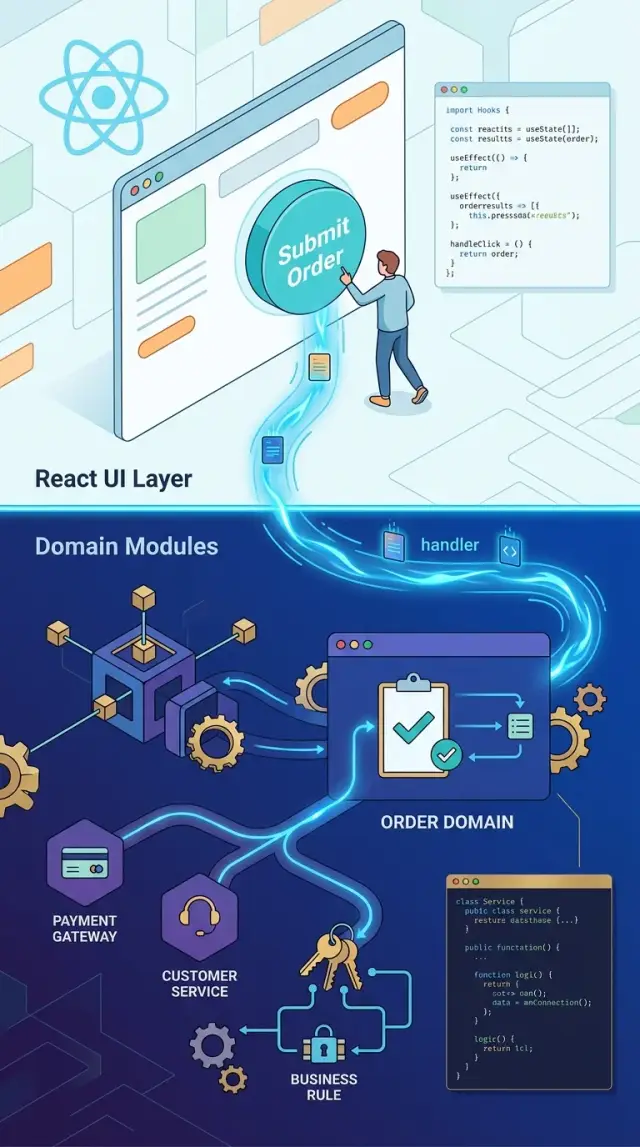
Table of Contents
Why hooks get messy fast
A hook usually doesn't get messy on day one. It starts with one small rule: hide a button, block a discount, or pick a default value based on the user type. That feels fine because the screen already has the data and the hook already controls the interaction.
The trouble starts when the rule is not really about the screen. It's about the business. A checkout hook decides that wholesale buyers need a larger minimum order. A profile hook decides that only paid accounts can change a team setting. Once that rule lands inside a hook, the next screen often copies it instead of sharing it.
Then change gets expensive. Product updates the minimum order amount, adds a country exception, or creates a new account tier. Now the same rule lives in several hooks, usually with small differences. One screen gets updated. Another gets missed. A third gets a quick fix that almost matches the others.
That's how domain rules spread through React hooks without anyone planning it. The hook ends up mixing UI state, network calls, loading flags, form behavior, and business decisions in one place. Reading it gets slow because every change forces you to answer two different questions at once: "How does this screen behave?" and "What is the rule?"
Testing gets worse too. If the rule lives in a hook, even simple checks often need rendered components, mocked providers, and user events just to confirm a pricing condition or permission rule. A small policy test turns into a UI test. Those tests run slower, break more often, and hide the real problem when they fail.
You can usually spot this early. One product rule shows up in multiple hooks, or one small business change touches files across checkout, account settings, and admin screens. That isn't a React problem. It means shared rules ended up in the place where a user clicks instead of the place where the rule belongs.
What a hook should do
A React hook works best when it stays close to the screen. It reads props, form values, and local UI state, then turns that into simple values and actions the rest of the app can use.
A good hook handles interaction. It tracks what the user typed, which option they picked, whether a request is still running, and what the component should show right now. Those are UI concerns. They belong near the component because they change with the screen.
The actual decision should live somewhere else. A hook can pass plain data to a shared function such as calculateDiscount, canSubmitOrder, or getUpgradeMessage. That function returns a result, and the hook turns that result into something the component can render.
This split makes the code easier to read. It also makes testing less annoying. You can test shared domain logic with simple inputs and outputs, without rendering React or mocking click events. Then you test the hook for UI behavior, which is a much smaller job.
Async work still fits naturally in the hook. The hook can start a request, keep isLoading, store an error, and expose a retry action. That's all about timing and screen state. The hook does not need to know why a customer qualifies for free shipping or why an account should be locked after a failed check.
What the component usually needs back is simple: data ready to display, flags like loading or disabled state, actions like submit or retry, and any error text the UI should show.
If a hook starts deciding prices, permissions, eligibility, or workflow steps, it's doing two jobs. That's where refactoring gets painful. Keep the hook focused on interaction, and move the rule itself into domain modules. The result is simpler screens, fewer repeated checks, and logic you can reuse without copying it across the app.
What belongs in domain modules
Domain modules should hold the rules that must stay true no matter where a user clicks. If a customer gets 10% off after spending $100, that rule belongs in plain code, not inside a hook. The same goes for free shipping thresholds, trial eligibility, upgrade limits, refund windows, and other decisions that shape how the product behaves.
A simple test helps: can this rule run without React? If the answer is yes, move it out. A hook can ask for data, react to user input, and call the rule. The rule itself should live in a shared module that any screen, API handler, or background job can use.
That usually includes price calculations, validation for orders and state changes, permission checks based on role or account type, and date checks like renewal periods or trial expiration.
Status changes belong there too. Suppose an order can move from "pending" to "paid" only if payment cleared and stock is still reserved. That isn't a UI concern. The screen may show the button, but the rule decides whether the change is allowed.
Pure functions are the safest way to write this code. They take input, return a result, and don't depend on React state, browser APIs, or hidden globals. That makes them easy to test and easy to reuse. A function like canApplyDiscount(cart, customer, today) is much clearer than a hook that mixes fetch logic, button state, and discount rules in one file.
This also matters as the product grows. A checkout page, an admin panel, and a mobile app may all need the same answer about pricing or access. Shared domain logic keeps those answers consistent. If the rule changes, you update one function instead of hunting through hooks and hoping every screen still agrees.
A checkout rule in the wrong place
When useCheckout decides discount eligibility, free shipping thresholds, and tax rules, it stops being a UI helper. It becomes a rule engine with React wrapped around it.
The problem usually appears when a second screen needs the same answer. The cart page might use useCheckout to show the total, while the admin page builds its own summary for support staff. One team updates the discount rule. The other forgets. Now the customer sees one total, and the admin sees another.
This drift is common because hooks feel convenient. The cart already has state, coupon input, selected address, and API calls, so adding one more rule looks harmless. A few weeks later, shipping is calculated in one hook, tax is adjusted in another screen, and nobody fully trusts the final number.
The better split is simple. Let the hook gather inputs and react to user actions. Let a pure function decide the order summary.
const summary = calculateOrderSummary({
  items,
  coupon,
  shippingAddress,
  customerType,
})
calculateOrderSummary can return the subtotal, discount, shipping cost, tax, and final total. Both the cart page and the admin page call the same function, so they stay aligned when rules change.
Testing gets much easier too. You don't need to mount React, click buttons, or wait for effects just to check whether a coupon works with a taxable item. You pass data in and check the result.
That makes room for tests people often skip: whether free shipping applies only after the discount, whether tax changes by state, whether gift cards affect shipping tax, and whether admin edits use the same pricing rules as the cart.
The hook still has a clear job. It can manage form state, loading flags, and when recalculation should happen. The domain function owns the business decision.
That split sounds small, but it prevents a nasty class of bugs. If pricing rules live in shared modules, every screen gets the same answer. When the next checkout rule changes, you update one place and move on.
How to move logic out without breaking screens
When hooks start carrying too much business logic, the safest fix is small and boring: move one rule, check behavior, then move the next one. Most broken screens come from changing too much at once.
Read the hook line by line and mark every if, early return, and derived value. Then translate each one into plain English. "Show a spinner while data loads" is a screen concern. "Users on a paused plan cannot create a new project" is a business rule. That gives you a clean map of what stays and what should move.
Next, group the rules by business meaning, not by where they happen to sit in the hook. Billing rules should live together. Access rules should live together. This helps when the same check appears in two or three hooks with slightly different names. Those copied checks are usually the first sign that you need shared domain code.
Move only one rule into a pure function first. For example, a hook that controls a billing page might decide whether a customer can pause a subscription. Put that decision in a function such as canPauseSubscription(account, plan, invoiceStatus). Keep it plain. It should take inputs and return an answer.
After that, the hook gets thinner. It should mostly read data from state, props, or queries, call the domain function, expose the result to the component, and handle UI-only state such as loading or local input.
Once that first rule works, search for copied versions in other hooks and replace them. This is where domain modules start to pay off. One rule lives in one place, and every screen gets the same answer.
Add tests around the new module before you move the next rule. Test business cases, not React behavior. If a paused account with an unpaid invoice cannot pause again, write that case down in code. Keep the old screen tests for a while too. They act as guard rails during the refactor.
If a move feels risky, that's usually a sign the hook still owns too many jobs. Split less. Check behavior. Then keep going.
Common mistakes during the refactor
When teams pull logic out of hooks, they often move too much. A hook still owns UI timing: loading state, retries, cache reads, and network calls. Domain code should answer questions like "can this order ship today?" not "which query library should fetch it?"
Another common mistake is passing React state setters into functions that are supposed to be pure. Once a rule helper can call setError or setStep, it stops being reusable. It now depends on React, and tests get awkward fast. A better shape is plain input and output: pass order data in, get a decision back.
Hidden side effects cause even more trouble. A helper named calculateDiscount should not write to local storage, fire analytics, or trigger a refetch. That kind of surprise makes bugs hard to track because the function says one thing and does three others.
Checkout code makes this easy to see. If free shipping depends on cart total and customer type, keep that rule in a domain module. Let the hook call the rule, then update screen state from the result. Don't let the rule helper fetch the user profile or change form state behind the scenes.
Teams also create one giant utils file and dump every extracted rule into it. That looks tidy for about a day. Then it turns into a junk drawer. Group code by domain instead: pricing, checkout, permissions, subscriptions. If two rules are about different business ideas, split them.
One more mistake wastes a lot of time: renaming files, changing imports, and rewriting logic in one commit. When something breaks, nobody knows whether the bug came from the move or from the new code. Split the work. Move code first without changing behavior. Run tests and click through the screen. Rename only after the new location feels right. Refactor the logic after the move is stable.
It feels slower, but it usually saves time. Small changes are easier to review, easier to test, and much easier to undo when a screen starts acting strange.
A quick check before you keep logic in a hook
The fastest test is simple: ask whether the rule still matters when React disappears. If the answer is yes, the rule doesn't belong in the hook. Hooks should deal with state, effects, and user interaction. The moment a hook decides what a customer can do, what they should pay, or which status wins, you're writing domain code in the UI layer.
Reuse is another clear signal. Imagine a discount rule that blocks a coupon when the cart contains a subscription. That rule may show up on the cart page today, but the same decision can affect checkout, admin tools, order previews, or mobile screens later. If another screen could need the same answer, put the rule in a shared module and let each hook call it.
Testing is a strong filter too. If you can test the rule with plain inputs and outputs, React adds no real value to that test. A function like canApplyCoupon(cart, coupon) is easy to check with a few examples. A hook test needs rendering, setup, and more moving parts. When a rule does not need the browser, keep it out of browser-facing code.
Pay close attention when the rule touches money, permissions, or status. Those areas change often, and small mistakes hurt. A tax rule, a refund limit, an access check, or an order state transition should live in code the whole product can trust. Hiding those decisions inside one hook makes them easy to miss and hard to audit.
There is a maintenance test as well. If one policy change would force you to edit two or three hooks, the rule is already scattered. Bugs usually split along the same lines. One screen gets fixed, another keeps the old behavior, and support tickets follow.
A hook can still compose the result. It can call domain modules, store the returned data, and wire it to the UI. That keeps React code short and keeps the rule in one place, where you can read it, test it, and change it without hunting through screens.
What changes after the split
Once you pull rules out of hooks, product changes stop leaking across the app. A pricing rule, access check, or checkout condition lives in one domain file, so the next update happens once instead of in three screens and two side panels. That alone removes a lot of quiet bugs.
Teams usually feel this first when product asks for a change that sounds small but isn't. "Free shipping starts at $75 instead of $50" should be easy. It turns into a scavenger hunt when rules are spread through the UI. After the split, one function changes, and every screen that uses it gets the same answer.
Web and mobile also stop drifting apart. If both apps call the same domain function, they follow the same rules for discounts, limits, or eligibility. The button may look different on each platform, but the decision behind it stays the same. That matters more than many teams admit.
QA gets a cleaner target too. Instead of checking every edge case by clicking through several flows, they can test the rule itself with clear inputs and expected outputs. A tester can ask, "What happens if the cart has a gift card, a coupon, and a blocked item?" and get a direct answer from the domain code before the full screen test even starts.
Daily impact on the code
Hooks get shorter, and shorter hooks are easier to trust. A new developer can open a hook and quickly see what it really does: read state, call APIs, handle loading, respond to clicks. They don't need to decode tax rules or subscription limits mixed into the same file.
Code reviews get better too. People can discuss the rule in one place and the UI behavior in another. If a bug appears, the team can ask a simpler question: is the rule wrong, or is the screen using it wrong?
The codebase also gets less fragile. Reusing a domain module is safer than copying a condition from one hook to another and hoping nobody edits only one version later. Over time, that's the difference between a codebase that resists change and one that absorbs it without drama.
What to do next in your codebase
Start with one hook that people avoid touching. You know the type: it fetches data, tracks UI state, checks user permissions, applies pricing rules, and quietly decides what the screen should allow. That is usually where the problem starts.
Read that hook from top to bottom and mark every line that answers a business question. Ask plain questions as you go: Can the user do this? Should this item be hidden? Does this order qualify? If the answer depends on product rules rather than button clicks or loading state, move it out of the hook.
A small refactor is enough to begin. Pick one busy hook, mark each business decision inside it, extract one rule into a shared domain module, add a few tests around that rule, and keep the hook as the place that wires data to the screen.
Don't wait for a full rewrite. Moving even one rule into a domain module changes the shape of the code. The next developer can find it faster, test it faster, and reuse it in another screen without copying conditions.
Checkout flows are often a good first target. If a hook decides whether a discount applies, whether a customer can use store credit, or whether express shipping should appear, those checks belong in shared domain code. The hook can call canUseStoreCredit(order, customer) or getAvailableShippingOptions(order). That's much easier to read than five inline condition blocks mixed with useEffect and local state.
Tests matter before you go wider. Add them around the rule you extract, even if the tests are small. That gives you room to clean up the next hook without guessing whether you changed behavior.
After one or two passes, patterns usually show up. Maybe every screen has pricing checks in hooks. Maybe permission rules live in components. Once you spot the repetition, write a simple team rule and use it in code review.
If you want a second set of eyes, Oleg Sotnikov at oleg.is works with startups and small teams on product architecture and Fractional CTO advisory. This kind of frontend boundary work often gets easier when someone reviews the codebase and sets a clear rule for where UI logic ends and domain logic begins.
Frequently Asked Questions
How can I tell if logic belongs in a hook or in domain code?
Ask one simple question: would this rule still matter if React disappeared? If yes, move it into domain code. Keep the hook for screen state, user input, loading, errors, and actions.
What should stay inside a React hook?
A hook should handle interaction. It can read props, local state, form values, query results, and expose values like isLoading, disabled, submit, or retry. It should not decide pricing, permissions, or order status rules.
What kinds of logic belong in domain modules?
Put any rule there that must stay true across screens. Discount rules, shipping thresholds, access checks, renewal dates, refund windows, and state transitions all fit better in plain functions that take input and return a result.
Why does business logic inside hooks cause so many problems later?
Because hooks sit close to the screen, teams often copy the same condition into other hooks instead of reusing one rule. After a few product changes, one screen shows one answer and another screen shows a different one. That drift creates bugs and slows down changes.
What is the safest way to refactor a hook that has too much business logic?
Start small. Pick one rule, extract it into a pure function, keep the hook calling that function, and check that the screen still behaves the same. After that works, replace copied versions in other hooks and add tests around the new domain function.
Should async requests stay in hooks?
Keep the request flow in the hook. The hook should fetch data, track loading, store errors, and handle retries. Let domain code answer the business question once the hook has the data it needs.
How should I test things after I split the logic?
Test domain rules with plain inputs and outputs first. A function like canApplyCoupon(cart, coupon) should not need rendered components or click events. Then keep a smaller set of hook tests for UI behavior such as loading, error display, and action wiring.
Where should pricing, permission, and status rules live?
Move them into domain code. Those rules affect money, access, and workflow, so you want one source of truth that every screen can call. The hook can still use the result to show or hide buttons and messages.
What mistakes do teams make when they extract logic from hooks?
Teams often move too much at once or let extracted helpers keep React state setters and side effects. A pure domain function should not call setState, write storage, fire analytics, or fetch data behind your back. Keep it plain and predictable.
Which hook should I clean up first?
Start with a hook that people avoid changing. Checkout, billing, and account screens often mix local state with product rules, so they give you quick wins. If one policy change forces edits in several hooks, clean up that area first.


