React data fetching libraries for admin apps compared
Compare React data fetching libraries for caching, retries, mutation flows, and stale data rules so you can pick a better fit for admin apps.
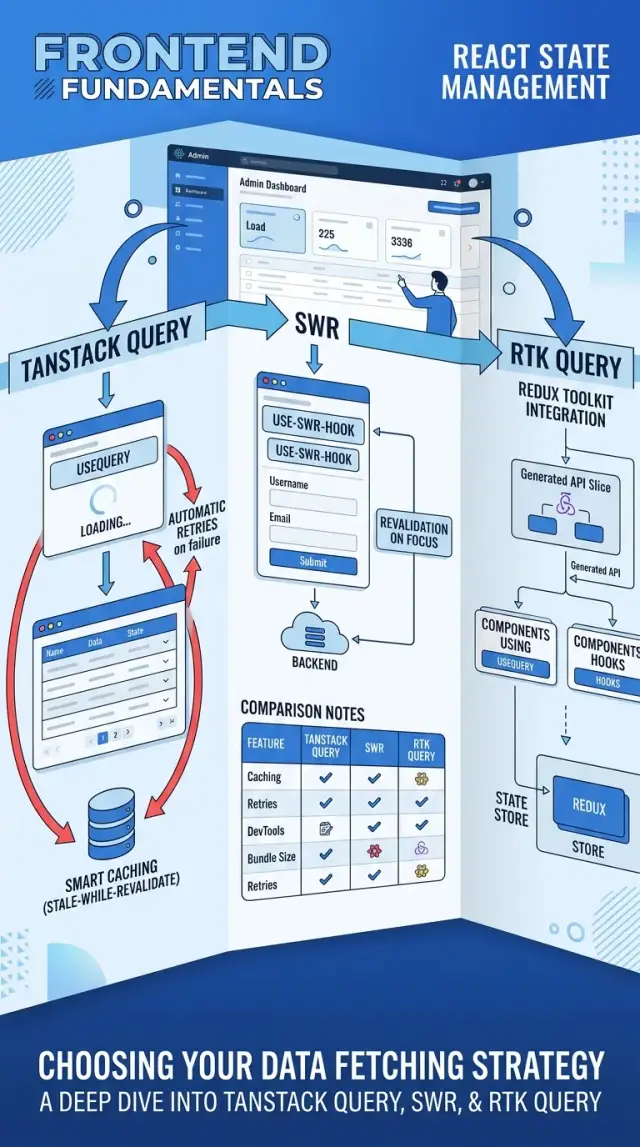
Table of Contents
Why loading bugs keep happening
Admin apps often ask for the same data more than once. A table loads customers, a filter panel loads the same customer list for options, and an edit dialog fetches that record again after it opens. If each component owns its own request, cache, and loading flag, the screen drifts out of sync fast.
That is why these bugs feel random. One part of the page updates. Another still waits. A third shows data from a minute ago. The backend may be fine, but the UI tells three different stories.
Saving usually exposes the problem. Someone changes an order status, clicks Save, gets a success message, and still sees the old status in the table. The request worked, but the app did not replace or refresh every copy of that data. Old values stay on screen because no one gave the app a clear rule for what becomes stale after a mutation.
Retries can make diagnosis harder. Automatic retries help with short network issues, but they also hide the first failure. A bad token, a broken endpoint, and a slow connection should not all look the same after three silent retry attempts. Teams then chase a "loading bug" when the real issue is auth, error handling, or retry settings.
Admin screens add one more layer of mess. The table has a spinner. The filter drawer disables inputs. A dialog shows "Saving...". A details panel refreshes in the background. When each part follows different rules, users lose trust because the page feels unstable.
A simple customer screen shows it clearly. The user edits a tag in a dialog and closes it. The dialog refetches. The table does not. Then the user changes a filter, the table fetches again, and the new tag suddenly appears. That is the kind of bug React data fetching libraries are supposed to prevent, but only if the team picks clear caching, retry, and mutation rules.
What to compare before you pick
Most teams look at popularity first. For an admin app, that is usually the wrong filter. The bugs people remember are not about stars on GitHub. They come from stale rows, duplicate requests, retry loops, and forms that save but leave the screen out of date.
When you compare React data fetching libraries, start with cache behavior. Ask how long data stays fresh, when it turns stale, and whether two screens can reuse the same result without extra work. In admin apps, that matters a lot. A users table, a user detail page, and an edit form often touch the same record in different ways.
Then check failure behavior. Retry defaults sound harmless until a flaky endpoint gets hit three times, a toast appears three times, and the user clicks Save again. Some teams want aggressive retries for reads but almost none for writes. The library should make that split easy.
Mutation flow is the next filter. Create, edit, and delete actions should feel boring. You want clear helpers for optimistic updates, invalidating old data, and rolling back if a save fails. If that part feels clumsy in a small test, it will feel worse across twenty screens.
A quick trial screen tells you more than a feature list. Build one page with a table, a detail drawer, and an edit form. Then check these points:
- Does the list update after an edit without a manual refresh?
- Can you control retries for reads and writes separately?
- Do focus, reconnect, or remount events refetch at the wrong time?
- Can two parts of the app share cached data cleanly?
- Do the devtools help your team see cache state and request timing?
Team fit matters too. A package can be smart and still slow your team down if the mental model is hard to learn. Good devtools often save more time than one extra feature, especially when loading bugs only show up on busy admin screens.
Where TanStack Query fits
TanStack Query fits admin apps that talk to the server all day. If your UI has user tables, order lists, detail panels, filters, and edit forms, it gives you the control that lighter React data fetching libraries often skip.
Its biggest strength is cache behavior. You can set how long data stays fresh, when the app should refetch, and how many times a failed request should retry. That matters in real screens: a slow analytics page may deserve two retries, while a dropdown for form input should fail fast so the user can move on.
It also handles mutation flows well. If someone changes an invoice status, you can update the row right away, refresh the detail view after save, or roll back the change if the request fails. That cuts down on a common admin bug: the save worked, but half the screen still shows old data.
TanStack Query usually feels right when:
- the app has many list and detail screens that reuse the same records
- users open the same items more than once in a session
- inline edits, toggles, and bulk actions need optimistic updates
- each screen needs its own stale time and retry rules
There is a catch. You need a clear query key plan from the start.
If the team names queries loosely, cache invalidation turns into guesswork. A simple pattern like ["users", "list", filters] and ["users", "detail", id] keeps things readable and makes stale data rules much easier to manage.
For growing admin products, that structure is often worth the extra setup. Teams that care about fewer loading bugs, cleaner retries, and predictable refresh behavior usually do well with it.
Where SWR fits
SWR works best when your admin app mostly reads data and only changes it now and then. Its API is small, so a team can pick it up fast and keep screens consistent without much setup. If you want one of the simpler React data fetching libraries for lists, detail views, and profile pages, SWR is easy to like.
Its revalidation rules are also easy to remember. SWR can refresh on focus, on reconnect, or on an interval, and those defaults match a lot of dashboard use cases. A support dashboard, for example, might refresh when the agent returns to the tab, so counts and status labels stay fresh without extra code.
That simplicity has a tradeoff. When mutations get busy, you often write more of the flow yourself. You can still update the cache after a save, revalidate a record, or patch the UI first and correct it later, but the path is less guided than in tools built around heavier mutation handling.
SWR is a good fit when your app looks like this:
- mostly read screens with filters, tables, and detail panels
- content views that need fresh data but not complex local workflows
- small admin tools where one or two people maintain the frontend
- teams that want clear stale data rules without lots of moving parts
It starts to feel thin when one action changes many parts of the UI at once. Think of an order screen where editing a shipment affects the order summary, inventory counts, activity history, and badges in the sidebar. SWR can handle it, but you will likely write more custom cache updates and more guardrails around retries, race conditions, and optimistic changes.
For lighter dashboards, that is often a fair trade. You get predictable reads, simple revalidation, and less library surface area to manage.
Where RTK Query and Apollo fit
Among React data fetching libraries, RTK Query usually makes sense when Redux already holds your app together. If your admin app stores auth, filters, permissions, and UI state in Redux, keeping server data in the same setup feels simpler. You avoid one more mental model, and your team debugs fewer moving parts.
RTK Query helps most after write actions. Admin apps do this all day: create a record, edit a field, delete a row, change a status. Tag invalidation lets you mark related data as stale so the right tables and detail views refresh without a pile of manual refetch calls. That is a good match for screens with lists, drawers, and edit forms.
A simple example makes it clearer. Say a support admin updates a ticket priority from "low" to "urgent." With RTK Query, the mutation can invalidate the ticket item and the ticket list, so both views refresh with one rule instead of custom code in three places.
Apollo fits better when GraphQL is the center of the app, not a side choice. If your backend already uses GraphQL for most reads and writes, Apollo gives you tools that match that shape well. Its cache works best when queries, mutations, and fragments all follow clear rules across the codebase.
Both tools ask for stricter habits than SWR.
- RTK Query wants consistent endpoint definitions, tags, and store setup.
- Apollo wants cache policies, fragment discipline, and careful mutation updates.
- SWR feels lighter, but it gives you fewer built-in rules for complex admin flows.
That extra structure is not bad. For a larger admin app, it often prevents messy data bugs later. For a small internal tool, it can feel like more setup than you need.
How to choose with one trial screen
Most React data fetching libraries look fine in a small demo. The differences show up when one screen has a list, a detail view, and an edit form that all touch the same record.
A good trial screen for an admin app could be a users page. Start with a table of users, open one user in a side panel, then edit that user in a form. That gives you enough surface area to test reads, writes, cache updates, retries, and stale data without building half the product.
Build the same screen in each library you want to compare. Include the states people actually hit: an empty table, first load, load error, save in progress, save success, and save failure. If one tool needs extra flags and manual cleanup for every state, that matters more than a polished API on day one.
Then force the awkward moments. Switch tabs and come back. Turn your network off for a few seconds, then reconnect. Move away from the route and return. Watch whether the screen refetches when it should, and whether it flashes old data or keeps the page calm.
Failed saves tell you a lot. If the save breaks, the form should keep the user's changes, show a clear error, and avoid putting bad data into the list or detail panel. Some tools make this easy. Others leave you wiring rollback logic by hand.
Keep short notes while you test:
- how many lines the screen took
- how many loading and error branches you had to manage
- whether cache updates felt obvious or fragile
- what happened after a failed save
- where your team stopped and argued about behavior
That last point matters. React data fetching libraries are not just about caching. They shape how your team thinks about server state every day. If one trial screen already feels messy, a larger admin app will feel worse.
Mutation flows in real work
When an admin saves a change, the app has to answer two questions fast: do we update the screen right away, and do we fetch fresh data after that? Small edits often work well with a cache patch. If a user changes an order note or toggles an "active" switch, you usually know exactly what changed.
Refetching makes more sense when the server may change more than one field. A status update might also change timestamps, permissions, totals, or audit history. In that case, patching the cache can leave one part of the screen correct and another part stale. That is how loading bugs sneak in.
A simple rule helps:
- Patch the cache for small, local changes you can predict.
- Refetch after actions that trigger server-side business rules.
- Show form validation errors next to the field that caused them.
- Show network failures as a general message with a retry path.
Those error types should never share the same treatment. If a form says an email is invalid, the user needs field-level feedback and their typed values must stay in place. If the request fails because the network drops, the form data is usually fine. The app should keep it, show that saving failed, and let the user try again.
Duplicate submits cause a lot of messy state in admin apps. A fast double click can create two invoices, two comments, or two role changes. Disable the submit button as soon as the request starts. If the action matters a lot, send an idempotency token or request ID too, so the server can reject duplicates.
Optimistic updates are useful, but only when you can undo them cleanly. Changing a label from "draft" to "published" is often safe. Deleting a record, charging a card, or assigning a user to a paid plan is riskier. If rollback is hard, skip the instant UI trick and wait for the server response.
Stale data rules for admin apps
Admin apps rarely need one cache rule for everything. A sales dashboard, an invoice form, and a monthly report all age at different speeds. If you use the same stale time everywhere, people either see old numbers or get constant refetches they did not ask for.
Shared dashboards usually need short stale times. Teams refresh them often, and several people may change the same records during the day. If a support agent closes a ticket, the open-ticket count should catch up soon. Waiting five or ten minutes feels wrong on screens like that.
Longer stale times work better for pages where people read or edit for a while. A long form is the clearest case. If the app refetches while someone tabs between fields or switches windows, it can reset values, move focus, or change validation messages. That is a fast way to annoy users.
I would split admin screens into a few buckets:
- Counts and status badges: refresh often, because small changes matter.
- Tables: use a medium stale time, then refetch on filters, paging, or manual refresh.
- Detail pages: keep data stable during edits, then refetch after save.
- Reports: use long stale times unless people expect near-live numbers.
Focus refetch sounds nice in demos, but it can interrupt real work. Someone copies a value from Slack, comes back to the tab, and the page suddenly reloads. For read-only screens, that is fine. For edit screens, I would usually turn focus refetch off and refresh after a mutation instead.
This is where React data fetching libraries start to feel different in practice. The good ones let you set rules per screen instead of forcing one global habit. That matters more than benchmark claims, because admin apps live or die on whether people trust the numbers and can finish a form without the UI jumping around.
A simple admin app example
Picture a support team working in an order dashboard all day. They open the orders list, update statuses in bulk, inspect one order, issue a refund, and check who changed what. This is where React data fetching libraries stop being a theory problem and start affecting daily work.
Say an agent selects 40 orders and clicks "mark as packed." The list should show the new status fast, but it also needs a fresh server check right after. If the UI only updates local state and skips a refetch, someone will trust stale data and act on the wrong order. TanStack Query and RTK Query usually feel comfortable here because cache invalidation after a mutation is direct and predictable.
Now the agent opens one order. That page often needs customer info, shipping details, payment state, and line items. Reusing cached customer and shipping data saves extra requests and makes the screen feel calm instead of jumpy. If those records are already in cache from the list or a previous detail page, the app can show them at once and quietly refresh them if needed.
The refund form has a different job. It must not hide server errors behind a generic toast. If the backend says "refund amount exceeds captured payment" or "refund already processed," the form should show that message right near the input. Good mutation handling matters more here than raw fetch speed.
Audit history is the least urgent piece. People want it updated, but they do not need the whole page to freeze while it reloads. A background refetch works better. The page stays usable, the history catches up a moment later, and no one loses their place.
That mix of needs is common in admin apps. One screen asks for fast cache reuse, strict mutation feedback, and selective freshness rules at the same time.
Common mistakes
Even good React data fetching libraries will feel broken if you wire them the wrong way. In admin screens, small mistakes spread fast because people jump between tables, filters, forms, and detail views all day.
A single page spinner is one of the most common problems. If the users table, stats cards, and audit log all wait behind one loading state, people lose useful context. It is better to keep old data on screen where it still makes sense and show loading only on the part that changed.
Retries cause trouble when teams treat every failure the same way. A failed GET request after a brief network hiccup can deserve a retry. A failed form submit with a bad email, missing field, or permission error does not. If your app retries those requests anyway, it can repeat the same bad action, fire duplicate toasts, and confuse users who already need to fix the form.
Broad invalidation is another easy trap. A user edits one row, and the app invalidates every list, count, and detail query tied to that resource. The result is familiar: tables flash, filters reset, and half the page refetches for no good reason. Target the changed record first, then refresh larger collections only when the screen truly needs it.
Fast navigation exposes weak request handling. A user opens Order A, clicks to Order B, and the slower response from Order A arrives last. If you do not cancel or ignore stale requests, the screen can briefly show the wrong data. That bug looks random, which makes it harder to trust.
TanStack Query vs SWR or RTK Query matters less than these habits. Pick the tool that matches your team, then set rules for retries, invalidation, and cancellation before the app grows.
Quick checks and next steps
Before you roll a library across an admin app, test one screen that people use every day. A user list with edit form is usually enough. It shows how the library handles reads, saves, cache updates, retries, and stale data without turning the test into a full project.
Use a short checklist during that pilot:
- Save one record and check whether the list refreshes without a full page reload.
- Trigger a failed form submit and confirm the UI shows the server error in the right field or message area.
- Make sure retries stop for validation errors and permission errors, but still happen for brief network failures.
- Write one short note that explains stale time and refetch rules in plain English.
- Keep the pilot small before you spread the choice across the rest of the product.
That note matters more than people expect. If a teammate cannot explain when cached data stays on screen, when it refreshes in the background, and what event triggers a refetch, the team will keep arguing about "random" loading bugs.
This is where many React data fetching libraries look fine in demos but get messy in real admin work. The trouble usually starts after the first mutation: save succeeds, the detail view updates, but the table still shows old data. Or the form keeps retrying a request that should fail fast and let the user fix an input.
A one-screen pilot gives you real answers fast. It also shows whether the library fits your team, not just the docs.
If this choice will affect delivery speed, hiring, or the way your team builds internal tools, Oleg Sotnikov can review the tradeoffs and help as a fractional CTO. That kind of outside check is most useful before a broad rollout, when changing course is still cheap.


