React error boundary monitoring for calmer debugging
React error boundary monitoring helps teams catch UI crashes, show safe fallback screens, and keep useful context so support can fix issues faster.
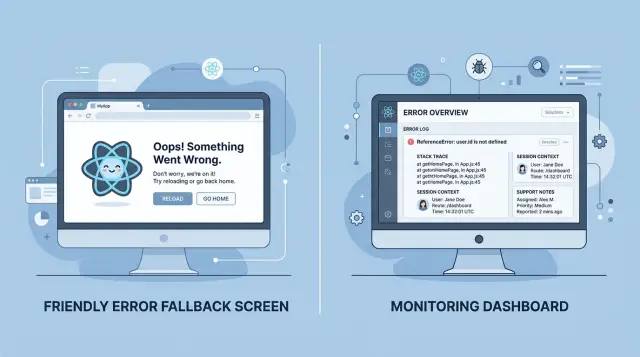
Table of Contents
Why small React crashes turn into big support issues
A React app can fail in a very small place and still cause a very large mess. One broken widget, a bad state update, or a rendering error in the wrong spot can wipe out an entire screen. To a user, it does not look like "one component failed." It looks like the product stopped working.
Picture a billing page with a payment summary, coupon box, invoice details, and a "Pay now" button. If the coupon widget crashes and the page has no safe boundary around that area, the user may lose the whole screen. They cannot finish the task, and support gets the complaint even though the bug started in one small part of the UI.
The next problem is timing. Users usually hit the crash before anyone on the team knows it happened. They refresh the page, click back, or try again in another tab. By the time support hears about it, the first failure is gone from view. The user only remembers that "something broke," which is honest but not very useful.
A reload often makes things worse. It can clear the state that triggered the problem, remove the exact sequence of clicks, and hide the first error behind a second one. Now the team chases a symptom instead of the real bug. That turns a five minute fix into a slow back-and-forth between support, engineering, and the user.
This is why React error boundary monitoring matters in production. The crash itself is only half the problem. The bigger issue is missing context. If the team cannot see which screen failed, what the user was doing, and what changed right before the error, every report turns into a detective story.
Support feels that pain first. Instead of sending one clear note to engineering, they ask follow-up questions, wait for screenshots, and try to rebuild the path by hand. The user gets frustrated, the team loses time, and a small frontend bug starts looking much bigger than it really is.
Calmer debugging starts when the app fails in a controlled way and keeps enough context to explain the failure later.
What an error boundary catches and what it misses
A React error boundary stops one broken part of the screen from taking down everything around it. If a billing widget crashes while React renders it, the boundary can swap that area for a safe fallback and keep the rest of the page usable. That matters more than many teams expect. A user who can still move around the app often stays calm. A user who sees a blank screen usually opens a support ticket.
Put boundaries around parts that fail for different reasons, not only around the whole app. Billing, account settings, dashboards with many third-party charts, and complex forms are common trouble spots. If you wrap only the app root, one small bug can still replace the whole interface with a generic error view.
What it catches
Error boundaries catch errors that happen while React renders, builds child components, or runs lifecycle code in class components. In plain terms, they catch the sort of failure that happens when a component tries to read missing data, renders invalid state, or crashes while building the UI.
The fallback should do more than say "Something went wrong." Give the user a clear next step. A good fallback usually includes:
- a plain message
- a retry button
- a safe way back, like "Go to dashboard"
- a short support code or error ID
That small bit of structure helps both the user and the support team.
What it misses
Error boundaries do not catch every frontend problem. They do not catch click handler errors, failed async work, timer callbacks, or promise rejections that happen after render. If a user clicks "Pay now" and the handler throws, the boundary will not save you.
Handle those cases where they happen. Use try/catch inside event handlers, report rejected promises from your data layer, and listen for unhandled errors at the app level. If a request fails, show an inline error near the action instead of waiting for a boundary that never fires.
React error boundary monitoring works best when you combine both layers. Let boundaries protect the screen during render. Catch async and user-action failures closer to the button, form, or API call that caused them. That split gives users a safer path and gives support a cleaner story about what broke.
Picking packages that fit the job
Start with one boundary package and one monitoring tool. That is enough for most teams, and it keeps React error boundary monitoring easy to understand when something breaks at 4 p.m. on a Friday.
For the boundary itself, react-error-boundary is a good default. It gives you a small, clear wrapper for fallback UI, reset logic, and error callbacks. You do not need to build your own class component unless you have a very odd setup.
For browser errors, Sentry and Bugsnag both do the job well. Sentry usually gives you more depth if your team wants stack traces, release tracking, breadcrumbs, and wider app monitoring in one place. Bugsnag often feels simpler to set up and easier to read for teams that mainly want frontend error tracking without a lot of extra knobs.
The better choice is often the one your team will actually check every day. If support lives in one dashboard and engineering lives in another, errors sit around longer than they should.
A lean setup often looks like this:
react-error-boundaryfor local fallback UI and retry actions- Sentry or Bugsnag for captured browser errors
- release tags tied to each deploy
- one issue ID that support and developers can share
- alerts sent to the same place the team already watches
Session replay can help a lot, but only if your privacy rules allow it. Watching the clicks before a crash can save 20 minutes of guesswork. It can also capture things you should not store, so mask inputs, review consent rules, and keep replay off for pages with payment or sensitive personal data unless you have a clear policy.
Release tags matter more than many teams expect. When an error shows the exact version that caused it, you can stop guessing which deploy started the problem. Pair that with a visible issue ID in the support process, and a bug report becomes actionable instead of vague.
Use fewer tools at first. A boundary, one error tracker, and clean release labeling solve most real problems. Add replay, extra alerts, or custom tracing only after the team feels the pain of not having them.
How to wire the full flow
Put an error boundary where failure would block a task, not only at the top of the app. A single app-wide boundary is better than nothing, but it makes debugging messy and gives users a rough experience. Most teams do better with boundaries around route screens, high-risk forms, and heavy widgets like charts, editors, or payment panels.
When a component crashes during render, the boundary should do two jobs at once. First, it should show a fallback UI that keeps the user calm and gives them a next step. Second, it should send the error to your monitoring package with enough context to make the report useful.
That context matters more than people think. If support only sees "TypeError on frontend," they still have to guess what happened. Send a small, consistent set of fields with every boundary error:
- release version
- route name
- user role
- error ID from the monitoring tool
- a short tag for the failing area, like "billing-form" or "reports-chart"
Keep the fallback UI simple. Tell the user that one part of the page failed, not that the whole account is broken. Give them one or two clear actions: retry the widget, reload the route, or go back to a stable screen. If the failed area handles money, forms, or account changes, I would also save any draft input before offering retry. That alone can cut a lot of angry support messages.
React error boundary monitoring works best when the error ID appears in the fallback message. Support can ask, "What error ID do you see?" and jump straight to the event. That saves time for everyone.
A clean flow usually looks like this: the widget crashes, the boundary logs the event, the fallback UI appears, the user retries or moves to a safe screen, and support gets the same ID and route details in the ticket. When teams skip any one of those steps, debugging slows down fast.
If your app already uses release tracking and session context, wire those into the boundary from day one. Oleg often pushes this kind of setup in AI-augmented delivery because small bits of context beat long guessing sessions every time.
What support needs on every error
Good React error boundary monitoring matters only if support can tell who hit the problem, where it happened, and what the user did seconds before the app broke. A stack trace alone rarely answers the first support question: "Can we reproduce this?"
Start with location and environment. Save the current route, app version, browser name and version, device type if it changes behavior, and the feature flags active for that session. A crash on "/billing/invoices" behind one experimental toggle is a very different issue from the same message on a public dashboard.
The action right before the crash often saves the day. Record one or two recent UI events in plain language, such as "clicked Pay now" or "opened invoice PDF". Keep it short. Support does not need a movie of the whole session, just the last step that likely triggered the fault.
A clean error record usually includes:
- where the user was: route, screen name, app version, browser
- what just happened: last click, submit, or API action name
- who was affected: user ID or account ID, but only if your policy allows it
- how often it repeats: an error fingerprint that groups duplicates into one thread
- what not to keep: passwords, tokens, card fields, message bodies, and raw form inputs
Grouping matters more than many teams expect. If 200 people hit the same null reference, support needs one issue with a rising count, not 200 separate alerts. Good grouping also keeps engineers from chasing the same bug under slightly different stack traces.
Privacy needs the same care as debugging. Send identifiers only when you have a clear reason and permission to do it. Mask or drop secrets before the payload leaves the browser. If a form contains billing details or personal notes, keep field names if they help, but remove the entered values.
This is where many teams trip up. They log the error message, maybe the stack, and nothing else. Then support asks the user for screenshots, browser details, and steps to reproduce. That back-and-forth can burn a day.
Oleg often pushes teams toward lean operations, and the same idea fits support data: collect the few details that answer real questions, drop the rest, and make every report easy to group and act on.
A simple example from a billing page
A billing page is a good place to test your setup because small failures feel big to users. If someone opens Billing to download an invoice or update a card, even a short crash can look like a payment problem.
Picture a page with three parts: current plan, saved card, and invoice history. The API sends a bad response for the saved card block, and the React component tries to read a field that is missing. That one render error can break the billing panel.
With an error boundary around that panel, the rest of the app still works. The top navigation stays visible, the user can open account settings, and other pages are fine. Only the broken area swaps to a simple React fallback UI.
The message should stay plain. Something like "We couldn't load your billing details right now" is enough. Add a Retry button, and make it do one clear action: refetch the data or remount the failed part.
That small change does two jobs at once. Users do not get trapped on a blank screen, and support gets time to fix the issue without a wave of confused tickets.
What gets logged
When the boundary catches the crash, frontend error tracking should send more than the stack trace. It should include the error ID, app release, route, and the last user action, such as clicking "Change plan" or "Download invoice".
Keep the context useful but safe. A masked customer ID, browser version, and whether the retry worked are often enough. You do not need to send full billing data to understand the bug.
This is where React error boundary monitoring starts paying off. A support agent can ask for the error ID shown in the fallback message, search for it, and see the exact failure with the release number and last click attached.
Support can then answer with something specific instead of guessing. They might say the error happened after a failed billing API response on the current release, confirm that no charge was affected, and offer a workaround while the team fixes the component. That kind of reply is faster, calmer, and much easier for users to trust.
Mistakes that slow debugging down
A lot of teams add error handling, then wonder why support still feels blind. The usual problem is not missing tools. It is using them in a way that blurs the real failure.
One app-wide boundary is a common example. It catches crashes, but it also turns very different problems into the same event. A broken billing widget, a failed settings form, and a bad dashboard chart all look alike. Support gets one generic report, and users get dumped into the same fallback screen. Smaller boundaries around risky areas give you cleaner signals and a softer failure.
Alerting can go wrong just as fast. If every warning becomes a high-priority issue, the team stops paying attention. A noisy inbox trains people to ignore the one event that actually hurts users. Save urgent alerts for crashes, payment failures, login loops, and repeated errors across many sessions. Lower-level issues can stay in dashboards or daily review.
React error boundary monitoring also falls apart when reports arrive without context. A stack trace helps, but support usually needs more than that. They need to know where the user was, what action happened just before the crash, and who hit the problem.
A useful error report often includes:
- the route or screen name
- a user ID or session ID
- the last action, such as clicking "Pay now"
- app version and device type
Without that, engineers spend half the time trying to recreate the scene instead of fixing the bug.
Vague fallback text makes things worse. "Something went wrong" is better than a blank screen, but only by a little. Tell users what they can do next. Give them a retry button, a safe path back, or a short note that the page hit an error and their work may not have saved. Calm language helps, but clear options help more.
Mobile gets ignored too often. A fallback that looks fine on a laptop can hide the retry button under the keyboard, push the message below the fold, or trap the user in a broken scroll area. Test those screens on an actual phone, not just a resized browser window.
When teams split boundaries by feature, trim alert noise, attach user session context, and test the fallback UI on small screens, debugging gets faster and support replies get a lot more precise.
Quick checks before each release
A release can look fine in staging and still break in one place no one touched during review. Five quiet minutes before rollout can save hours of confused support chat later.
The check is simple: force one real failure, watch how the app reacts, and make sure the error report tells a useful story. If your team uses React error boundary monitoring, this is the moment to prove it works under pressure, not just on a happy path.
Run the same short pass on every release:
- Trigger a test crash on each main route. Use a small throwaway component or a debug flag so you can see whether the boundary catches the error on pages people visit most.
- Look at the fallback screen as a user would. People should still reach home, reload, sign out, or move to another safe page without getting trapped.
- Open the alert or issue that gets created. Check that it shows the release version and environment name clearly. "Production" and "staging" should never look the same in a noisy inbox.
- Hand one fresh issue to support and ask them to reproduce it from the report alone. If they cannot tell what page failed, what the user clicked, or what browser they used, the report is too thin.
- Review the stored data before you ship. Error tools often grab more than teams expect, including form values, URLs, and user details. Mask what you do not need.
Small gaps matter. A clean fallback UI is useless if it removes navigation. A perfect stack trace still wastes time if nobody can tell which release caused it. Teams also forget privacy until a report captures an email address or billing note that never needed to leave the browser.
One rule helps: every captured error should answer four plain questions. Where did it happen? Which release caused it? What was the user doing? Can support act on it without asking engineering first?
If one answer is missing, fix that before the release goes out. That is usually a faster win than adding another monitoring tool.
Next steps for a calmer setup
A calmer setup starts small. This week, put one error boundary around the part of the app that breaks most often, then connect one monitoring tool to it. That gives your team one clean path for capture, one fallback screen for users, and one place to look when support gets a complaint.
Do not add five dashboards and twenty alerts on day one. First fix the crash path that hurts users most. If a broken billing form, settings page, or checkout step keeps throwing, make that flow safe first. One repaired path usually cuts more support noise than another round of alert rules.
Keep the handoff simple:
- Show a short fallback message that does not blame the user.
- Give users one safe action, such as reloading the page or going back to the dashboard.
- Include an error ID users can copy.
- Send the error, route name, release version, and user session context to monitoring.
- Give support a two-line script so they ask for the error ID first.
Support does not need a long playbook. A short script works: "Please send the error ID from the message on your screen and tell us what you clicked right before it happened." That one habit saves time because engineering can match the report to the exact event instead of guessing from screenshots.
If you already have React error boundary monitoring in place, resist the urge to widen it everywhere at once. Watch the first boundary for a week. See which errors repeat. Fix the noisy ones. Then add the next boundary where users get stuck most often.
Some teams want a second set of eyes before they expand the setup. Oleg Sotnikov can review your React error flow, monitoring setup, and support handoff in a consultation. That fits best when your team needs a practical fix and a clear owner for the next steps.
A calm production setup is not fancy. Users stay on a safe screen, support gets an error ID, and engineers keep enough context to reproduce the bug.


