React auth libraries for protected routes and tenant switching
React auth libraries differ on route guards, token refresh, and tenant changes. Compare patterns that keep login simple and state resets clean.
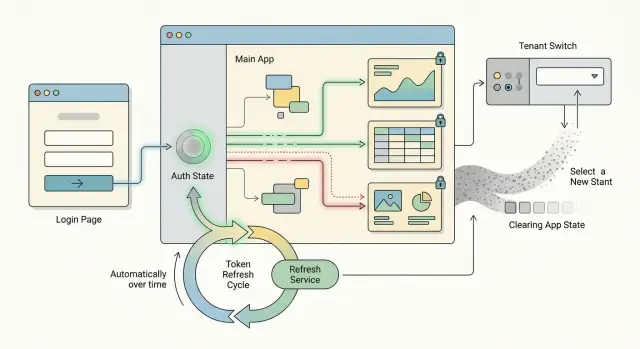
Table of Contents
Why auth gets messy in real apps
Auth looks easy in a demo. Real apps add shared layouts, background requests, expired sessions, and more than one workspace. That is why many teams start with a simple login flow and end up patching odd bugs for weeks.
A common problem starts with the app shell. The header, sidebar, and cached page data often stay mounted while the user moves between public and private pages. So even if a route changes, parts of the old session can still hang around. A signed-out user may still see a company name in the sidebar for a moment. A signed-in user may hit a public page that still tries to load private data.
Tokens make it messier. People do not log in and then sit still. They keep clicking, typing, and opening tabs while the access token quietly expires. If refresh logic runs too late, requests fail at random. If it runs too often, the app can spam the backend or overwrite good state with bad state. Many React auth libraries help with this, but they cannot guess how your app should behave when a refresh fails in the middle of a form.
Tenant switching adds another layer. A user moves from workspace A to workspace B, but the screen still shows A's project list for two seconds. That sounds small. It is not. Users notice it fast, and it can create real trust problems when names, counts, or permissions belong to the wrong tenant.
Redirects cause their own class of bugs. One guard sends the user to login. The login page sees a session cookie and sends them back. The original page checks stale state, decides the user is still blocked, and redirects again. Now the user is stuck in a loop that feels like the app is broken.
The hard part is not login itself. It is deciding what must reset, what can stay, and when the app should stop pretending the old session is still valid. A small mistake there spreads across the whole UI.
What a route guard should check
With React auth libraries, most route bugs start when the guard decides too early. A good guard does less guessing and more waiting. It should know whether the app is still checking the session, whether the user is signed in, and whether that user can open this page.
If the app has not finished reading the session yet, do not redirect. That split second matters. Many apps send people to the login page on first load, then pull them back a moment later when the token appears. It feels broken, even when the session is valid.
A short loading state fixes that. Keep it plain and brief. "Checking your session" is enough. If it lasts more than a few seconds, something else is wrong.
The guard should also remember where the user wanted to go. If someone opens /billing from a saved bookmark, they should land on /billing after login, not on a generic dashboard. That small detail makes private routes feel normal instead of fragile.
Role checks belong in the guard too. Signed in does not always mean allowed. A manager may open an admin page by mistake, or a support user may try a tenant settings screen they should not see. In those cases, send them to a page they can use, or show a clear "no access" screen. Do not let the page load first and fail later.
A simple guard usually checks five things:
- Is auth still loading?
- Is there a valid session?
- Does the session belong to the current tenant?
- Does this user have the right role?
- Where should the app send them after login or denial?
Picture a user who refreshes the page while on an invoices screen. The guard waits, confirms the session, checks that the selected workspace still matches, and then opens the page. If any one of those checks fails, the app should respond once, clearly, and without flicker.
How common React auth approaches differ
If you compare React auth libraries side by side, the biggest difference is not the login form. It is how much control you get after login, when protected routes in React, token refresh patterns, and tenant switching start to collide.
SDK-first setups are the fastest way to get moving. You get login screens, callback handling, and basic session checks with less code. That is a good fit for a small app or a team that wants a working sign-in flow this week. The trade-off shows up later, when you need to clear app data on tenant switching or stop old requests from using the last tenant's token.
State-store patterns give you more room. You keep auth data in a store, usually with React context, Zustand, Redux, or a small custom layer. This takes more setup, but resets get easier because you decide what happens when a user logs out, refreshes a token, or jumps to another workspace. If your app has shared caches, background fetches, and tenant-specific data, this extra control often pays for itself.
Server session setups move part of the problem out of the browser. Instead of handling raw access tokens in client code, the browser sends a secure session cookie and the server deals with refresh logic. That usually means less token work in the frontend and fewer chances to leak auth state into local storage. It also means you need backend support, and local development can feel a bit heavier.
Custom wrappers sit at the other end. They take longer to build, but they fit odd tenant rules that off-the-shelf packages do not handle well. For example, if one user can switch between two companies and each company needs separate permissions, cached queries, feature flags, and API headers, a thin wrapper around your auth provider can save a lot of cleanup code later.
A simple way to choose:
- Pick SDK-first if your app has basic login and a small team.
- Pick a state-store pattern if resets and tenant switching matter.
- Pick server sessions if you want the browser to handle less token logic.
- Pick custom wrappers if your rules do not fit a standard package.
Team size matters too. A two-person startup usually needs the setup that is easiest to reason about at 2 a.m. A larger app with many screens and shared data needs the setup that makes auth state reset boring and predictable.
How to handle token refresh
Token refresh should live in one place. Put it in your auth client or API layer, not inside every fetch call or screen. When refresh logic spreads across the app, small timing bugs turn into random logouts, duplicate requests, and hard to trace tenant mixups.
A simple rule works well: if the access token expires, one part of the app tries to refresh it, and everything else waits. That waiting step matters more than most teams expect. If five requests fail at the same moment and all five try to refresh, you can overwrite tokens, race the logout flow, or hit rate limits for no good reason.
A small request queue fixes that. The first failed request starts refresh. The next failed requests pause until that refresh finishes. If refresh succeeds, they retry once with the new token. If refresh fails, they do not keep trying.
That last part saves a lot of pain. Refresh failure should mean one clear thing: sign the user out, clear auth state, and send them to login. Do not keep looping in the background. Do not retry forever. Do not let stale tenant data stay in memory after the session is already dead.
Tenant switching needs the same guardrails. When the user changes workspace, cancel any in-flight refresh, clear the old tenant context, and block queued requests from replaying under the wrong tenant. A token that was valid for tenant A should never refill the app state for tenant B.
A good refresh flow usually does four things:
- stores one refresh promise globally
- retries queued requests once
- stops all refresh attempts after logout or tenant change
- clears auth and cached user data when refresh fails
Logs help more than people think. Record when the token expires, when refresh starts, how long it takes, and why it fails. If users say, "I get kicked out every 20 minutes," those timestamps usually show the bug fast.
Oleg often focuses on this kind of central control in AI-first and production systems for a reason: one boring, well-defined refresh path is easier to trust than clever auth code scattered across the app.
How to switch tenants without mixed data
Tenant switching often breaks trust faster than login problems do. A user moves from one workspace to another, and for a moment they still see the old invoices, old filters, or even the wrong admin actions. One bad flash like that is enough to make the app feel unsafe.
The fix is mostly about order. When the user picks a new tenant, stop work from the old one first, then load the new one.
A safe switch usually follows this order:
- Cancel requests that still use the old tenant context.
- Clear cached queries tied to the old tenant.
- Reset local state such as forms, tabs, search text, and selected filters.
- Fetch the new tenant profile and permission rules before showing tenant data.
If you skip the first step, an old API response can arrive late and overwrite fresh state. That is how mixed data sneaks in. Most apps need request cancellation through AbortController or a client with built-in cancellation.
Cache clearing matters just as much. If you use React Query, SWR, or your own cache, scope entries by tenant ID and remove anything that should not survive the switch. Shared reference data can stay, but tenant-specific lists, reports, and dashboards should go.
Local state causes smaller but very visible bugs. A filter like "Status: Overdue" from Tenant A can make Tenant B look empty, even when data exists. Reset form drafts, selected rows, table sorting, wizard steps, and any store data held in Redux, Zustand, or React context.
Permissions need their own fetch. Do not assume the user's role stays the same across tenants. Someone can be an admin in one workspace and read-only in another. Load those rules early, then render actions only after the app knows what the user can do.
Show the active tenant in a place people notice right away. A clear label in the header is usually enough. If the app has similar workspace names, add an ID, team name, or color marker so users can confirm where they are before they edit anything.
A short loading state during the switch is fine. Showing nothing for 400 milliseconds is better than showing the wrong customer's data for 100.
A step-by-step setup that stays simple
Most auth problems start when state lives in too many places. One part of the app tracks the user, another tracks the token, a third tracks the current tenant, and none of them reset together. Keep it boring. Boring code breaks less.
A simple setup for React auth libraries usually looks like this:
- Put one auth provider at the app root. It should answer basic questions for the whole app: who is signed in, is the session still loading, and which tenant is active.
- Keep session data in one store. Store the current user, active tenant, access token status, and a loading flag. Do not spread this across local component state.
- Protect private pages with a small guard component. The guard should wait until loading ends, then either render the page or send the user to login.
- Handle refresh in one API client. When a request gets a 401, the client should try one refresh flow, update the session store, and retry once. Every screen should use that same client.
- Write one reset function and use it everywhere. Logout should call it. Tenant switching should call it too, then set the new tenant and refetch fresh data.
That last step matters more than most teams expect. Tenant switching is not a tiny state update. It is a controlled wipe. Clear cached queries, selected records, open tabs, form drafts, and any in-memory permissions. If you skip even one of those, users can see data from the wrong workspace for a moment. That is enough to lose trust.
The route guard should stay small. The API client should own refresh. The session store should own auth state. Each piece has one job.
If you want a good smell test, try this: log in, open a private page, switch tenants, then hit refresh in the browser. If the app shows the right tenant, the right data, and no old flash of content, your setup is probably in good shape.
A realistic example: one user, two workspaces
A consultant signs in once and starts in Client A. The app loads saved reports, the last filter set, and the role data for that client. Everything looks fine until the consultant uses the header menu to switch to Client B.
This is where tenant switching usually breaks. If the app keeps cached data from Client A for even a second too long, Client B can open with the wrong report list, the wrong sidebar options, or a role that no longer applies. A user might see an "Admin" button from Client A even though they only have viewer access in Client B.
A safer flow is boring, but it works:
- update the active tenant first
- stop or pause requests tied to the old tenant
- clear tenant-scoped caches, filters, and role state
- fetch the fresh bootstrap data for Client B
The order matters. If you fetch new records before you clear old state, the screen can mix both clients. That bug is easy to miss in testing because it often lasts only a moment, but users notice it.
Protected routes in React should check more than "is the user signed in?" They should also check whether the current URL belongs to the active tenant. If the consultant is still on a Client A route after switching, the guard should block that page and send them to a safe Client B page, such as the dashboard or report index.
A small example makes the risk clear. Say the consultant was viewing /client-a/reports/q2 with filters for "overdue" and "priority high." After switching to Client B, those filters may still exist in memory. If the app reuses them, Client B can open to an empty screen or, worse, show data shaped by Client A rules.
Whatever React auth libraries you use, keep one rule simple: anything tied to a tenant must reset when the tenant changes. User identity can stay. Workspace data should not. That split keeps login smooth and stops mixed state from leaking across clients.
Mistakes that cause stale sessions
Stale sessions usually start with one simple bug: the app resets only part of auth state. A user logs out, switches tenant, or gets a new role, but old data stays in memory, local storage, or another tab. Then the app shows the wrong workspace, the wrong menu, or data from the previous tenant.
A common mistake is keeping tenant data outside the same reset path as the token. If the token lives in one store, the active tenant in another, and cached API data somewhere else, a tenant switch can leave one piece behind. Use one reset action that clears auth, tenant selection, permissions, and cached user data together.
Startup logic often causes another bug. The app reads storage, starts a session check, and redirects to login before it knows whether the user is still signed in. People bounce between screens or see the wrong page for a moment. A route guard should wait until it knows the auth state. A short loading screen is better than a fast, wrong redirect.
Refresh logic breaks in a less obvious way. If several API calls fail at once and each one starts its own refresh request, they race. One request writes a fresh token, another writes an older result, and now the app is half logged in. Use one shared refresh promise or a small queue so every failed request waits for the same refresh result.
Old tabs cause quiet trouble too. If a user changes roles or switches tenants in one tab, the others can keep using stale claims and stale cached data. Sync auth events across tabs with a storage event or BroadcastChannel, then force a reload or sign-out when the session changes.
The last trap is mixing auth state across React context and local storage. Context says one thing, storage says another, and the app trusts whichever one loads first. Pick one live source of truth. Treat storage as a saved snapshot, not as a second auth system. That one choice prevents a lot of "it only breaks after refresh" bugs.
Quick checks before you ship
Auth bugs hide in ordinary moments: a bookmarked URL, a form left open too long, a second tab that still looks alive. Even solid React auth libraries leave these cases to your app, so a quick happy-path test is not enough.
Run a short manual pass before release. It takes minutes, and it catches the sort of bugs users remember for weeks.
- Open a private page from a copied URL while signed out. The app should send the user to login, then return them to the same page after sign-in. If it drops them on a generic dashboard, your protected routes in React feel clumsy right away.
- Start editing a form, then let the access token expire. The app should refresh in the background or ask the user to sign in again without wiping the text they already typed.
- Change tenants while filters, search text, or selected rows are still on screen. The old tenant state should disappear at once, and the new tenant should load with fresh data only.
- Open the app in two tabs and sign out in one. The other tab should notice fast and lock down private data instead of pretending the session still works.
- Force a refresh failure and read the logs. You want a clear trail: refresh started, refresh failed, user signed out, reason recorded. Do not log raw tokens or personal data.
Tenant switching deserves extra suspicion. Mixed data often slips in through client caches, query libraries, and remembered UI state. A user moves from Workspace A to Workspace B, but the screen still shows old filters or a cached record title for a second. That second is enough to break trust.
I prefer one strict rule: tenant change means full auth state reset for anything scoped to that tenant. Clear cached queries, cancel in-flight requests, reset local store slices, and then fetch again. It is a little blunt, but it prevents weird half-old screens.
Refresh failures also need plain logging. If the refresh token expired, say that. If the server rejected the tenant context, say that. If the client kept retrying every few seconds, your logs should make that obvious. When a bug report says, "I got kicked out while saving," you want the answer in one search, not after an hour of guessing.
Next steps for a setup that stays manageable
Most auth problems start as small shortcuts. A team adds a route guard, then a refresh hook, then a tenant switcher, and six weeks later nobody knows which part should clear state or send the user back to login.
Write the rules down while the setup is still small. One page is enough. Define what happens on login, logout, token expiry, silent refresh failure, and tenant switching. Be plain about it: which data stays, which data resets, and which screen the user should see next.
A short checklist helps:
- Decide which layer owns redirects.
- Decide which layer stores tokens.
- Decide who clears cached data.
- Decide what must reset on tenant switch.
- Decide what happens when refresh fails twice in a row.
This matters because React auth libraries often solve only part of the problem. One library may handle sessions well, while your data cache and router still hold old tenant data. If ownership is fuzzy, bugs keep coming back.
Tests should lock down reset behavior before the app grows. Add a few simple flows that run end to end: login, open tenant A, switch to tenant B, log out, log in again. Check that the app clears cached queries, local state, and any tenant-scoped settings. These tests save real time later because auth bugs rarely stay in one screen.
If your team keeps hitting odd cases, stop patching and review the design. A short architecture review can uncover the usual weak spots: token refresh running in two places, redirects split between the router and the auth provider, or stale cache surviving a tenant change.
That kind of review is often cheaper than another sprint of fixes. Oleg Sotnikov does this work as a Fractional CTO, and a focused review of auth flow decisions can help before those decisions spread across the product. Even one outside pass can make the setup simpler: one owner for auth, one owner for data reset, and fewer surprises when users switch accounts or workspaces.


