React admin panel libraries without losing control
React admin panel libraries save setup time, but some box you into their patterns. Compare generators, headless tools, and data layers before you commit.
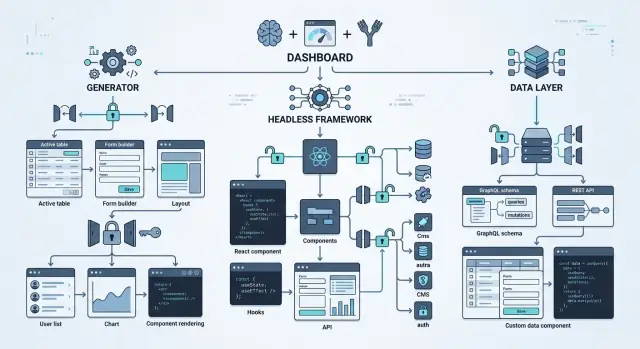
Table of Contents
Why teams get stuck with admin tools
Teams usually pick an admin tool when time feels tight. They need tables, filters, forms, and roles this week, not next month. A generator or ready-made framework can turn raw API data into a working back office in a day, and that speed is hard to ignore.
The problem starts when the first demo looks better than the real fit. Simple CRUD screens are easy to generate. Real work is rarely simple CRUD. A support team may need a refund form that changes by country, account type, and approval level. An operations team may need one screen to pull data from three services and block edits unless a billing check passes first.
That is where many teams get stuck. The tool handled the easy 80 percent, so everyone assumed the last 20 percent would be small. It often takes more time than the first setup. Developers end up fighting the tool's form model, routing rules, or data flow instead of building the business logic they actually need.
A small SaaS team can feel this fast. Two engineers ship an internal panel in a week and everyone is happy. Three months later, finance asks for audit history, support asks for bulk actions with guardrails, and the founder wants custom dashboards. If the tool allows only its own way of doing things, every change starts to feel expensive.
Teams want speed now, but they also want room to grow. That is the tension behind most admin tool mistakes. The wrong choice rarely fails on day one. It starts to hurt when the product gets real rules, real edge cases, and real pressure to change without a rewrite.
The three approaches in plain words
Most React admin panel libraries fall into three groups. They can look similar at first, but they solve different parts of the job.
Generators start with a model, schema, or database shape and create screens for you. You point them at your resources, and they give you lists, edit forms, filters, and basic actions fast. This is the quickest way to get an internal tool on screen. The tradeoff is simple: the more code they create for you, the more you need to work around their assumptions later.
Headless admin frameworks take a different path. They give you structure, not finished screens. You still build the UI with your own components, but the framework handles the boring glue like routing, auth rules, resource setup, forms, or permissions. That usually feels slower on day one, but it keeps more control in your hands when the admin panel stops looking like standard CRUD.
Data layers sit even lower. They do not try to be an admin panel. They fetch data, cache it, sync updates, and help with mutations and loading states. If your app already has its own design system and page structure, this can be enough. You write more of the admin UI yourself, but you avoid handing the shape of the app to a library.
A lot of teams mix these approaches. That is often the sensible choice.
- A generator can help you ship the first version.
- A headless framework can keep the app organized.
- A data layer can handle server state across the whole product.
That mix matters because React admin panel libraries do not always need to own the whole stack. Sometimes the best setup is a small generator for routine screens, plus a data layer and your own UI for the parts users touch every day.
Where generators help and where they push back
Generators save a lot of time when your admin area is mostly tables, filters, forms, and basic role rules. You connect them to a schema or API, and you can get a usable internal tool much faster than building every screen by hand. For teams under pressure, that first version can arrive in days, not weeks.
They fit best when the data looks clean and predictable. Users, products, invoices, tickets, and orders often map well to create, read, update, and delete screens. In that sort of setup, many React admin panel libraries also make permissions easier early on, so support staff, managers, and admins can see different actions without a huge amount of custom code.
A generator usually feels right when most of the admin work looks like this:
- show a list
- filter and search records
- edit fields in a form
- apply simple role rules
- reuse the same patterns across many resources
The pushback starts when your workflow stops looking like plain CRUD. Maybe a refund needs manager approval, an audit note, and a fraud check. Maybe a form depends on data from two services and changes as the user moves through it. You can still force that into a generator, but the neat scaffold often turns into wrappers, overrides, and patches that nobody enjoys touching later.
Visual changes are usually the easy part. Colors, spacing, and component styling often stay manageable. Logic changes are harder. Once you need custom validation across several records, multi-step actions, or unusual state rules, the generator's built-in assumptions start to fight you.
That is the real cost to watch. A generator can save the first 60 percent of the work, then make the last 40 percent slower than it should be. If your admin panel is mostly standard data entry, that trade is often worth it. If your team expects custom flows to grow over time, the fast start can get expensive.
Where headless frameworks keep more freedom
Headless frameworks give you less magic and more control. They cover the boring admin work, but they do not take over your whole app. You keep your React components, your routing, your styling, and the way screens fit into the rest of the product.
That matters when the admin area is part of a real product, not a side project. Many teams want internal screens to use the same design system, auth flow, and API rules as the customer app. Headless admin frameworks usually fit that better than all-in-one tools because you add pieces instead of accepting a full preset.
A common setup looks like this:
- keep your existing router
- choose your own table and form components
- plug in auth the same way the main app does
- connect the data layer to your API
The trade-off is clear. You spend less time fighting defaults later, but you spend more time wiring things at the start. That wiring is not glamorous. Someone has to decide how forms submit, how permissions work, how errors show up, and how shared patterns stay consistent.
Still, that is often a better deal for teams that plan to live with the code for years. If your product has unusual workflows, custom approval steps, or screens that mix admin tasks with product features, headless tools bend more easily.
Picture a SaaS team that starts with a simple customer list. Six months later, they need support tools, usage controls, team roles, and a billing exception flow. With many React admin panel libraries, that is where the built-in assumptions start to pinch. With a headless approach, the team already owns the component choices and page structure, so change feels like normal product work.
Long-term control improves when the team writes and keeps its own patterns. The framework helps, but your app still feels like your app.
What a data layer solves and what it does not
A data layer helps when your admin area already lives inside a real product, with custom screens and odd business rules. It gives your team one way to fetch data, cache it, refresh it after edits, and avoid duplicate requests. That sounds small, but it saves a lot of repeated code.
A common example is a SaaS app with customer pages, billing screens, support notes, and usage reports. Those screens often share the same records in different places. A good data layer keeps them in sync, so one update does not leave half the UI stale.
It usually gives you a few practical wins:
- one pattern for reads and writes
- cached results instead of constant refetching
- refresh rules after create, edit, or delete actions
- cleaner loading and error handling
That matters even more if your team already built custom product pages. In that setup, React admin panel libraries that try to own the whole interface can feel heavy. A data layer fits more gently. You keep your screens and add order under the hood.
What it does not do is just as important. A data layer will not design your forms. It will not choose table layouts, bulk actions, or filters. It will not decide how permissions should work across roles, or what an approval flow should look like. You still need to build those parts yourself, or bring in another tool for them.
That tradeoff is often worth it. If your team already has a component library, the pairing feels natural. Your buttons, tables, drawers, and form fields stay consistent with the rest of the app. The data layer handles the network work, while your UI stays yours.
That split gives you more control over time. You write a bit more at the start, but you avoid the mess of fighting a generator every time a screen stops being standard.
Escape hatches to check before you commit
A good admin tool saves time on the easy screens and gets out of your way on the odd ones. That second part matters more than most teams expect. Trouble rarely starts with a user list or a settings form. It starts when one screen needs a custom approval flow, a strange filter, or a chart beside an editable table.
Before you adopt any of the React admin panel libraries, try to break the happy path on purpose. Swap out the default table. Build one form with your own validation setup. Add a page that does not look like CRUD at all. If the tool fights you there, the cost shows up later.
Check five things before you commit:
- Replace a core UI part, such as the table or form, without rewriting half the page.
- Own the routes and layouts so the admin area fits your app.
- Call a plain REST or GraphQL endpoint directly when one screen needs custom logic.
- Build a hard page without the built-in CRUD flow.
- Keep your design system, spacing, buttons, and form patterns unchanged.
Page state deserves extra care. You should decide whether filters live in the URL, whether tabs survive refresh, and how unsaved edits behave. If the tool owns those choices too tightly, simple work turns into glue code.
One blunt test works well: build the ugliest page in your backlog first. For a SaaS team, that might be a billing screen with invoices, plan changes, usage charts, and a manual credit form on one page. If your stack lets you mix custom components, direct API calls, and your own layout without hacks, you still have room to grow. If not, you are renting convenience and paying for it later.
How to choose step by step
Start with the next three months, not the full roadmap. Write down the screens you expect to ship soon: user list, billing review, audit log, support tools, internal settings, or anything else that is real. This keeps the test honest. A tool can look smooth in a demo and still slow you down on the pages your team actually needs.
Next, split those screens into two groups. Some are plain CRUD: list, filter, create, edit, delete. Others are awkward: nested forms, custom approval flows, role-based actions, live updates, or pages that mix several data sources. That second group matters more than most teams admit. If a lot of your admin work lives there, React admin panel libraries should earn their place, not just promise speed.
A small test works better than a long feature checklist:
- Pick one easy screen that is almost textbook CRUD.
- Pick one ugly screen with custom layout or strange data rules.
- Build both as short spikes with the same developer.
- Time the custom work, not just the fast setup.
- Count how much code you write once you break the defaults.
Do not judge the tool by the first clean page. Judge it by the first annoying one. That is where long-term control shows up. If your team needs wrappers, hacks, or duplicated logic just to get one odd screen working, you will pay that cost again and again.
A good choice feels boring in the right way. The easy page is fast, and the ugly page stays possible without fighting the framework. If both tests pass, you probably found something your team can live with.
A simple example from a SaaS team
A small SaaS company has one admin area for two groups with very different needs. Support agents need fast access to users, subscriptions, refunds, and internal notes. Finance needs exports, approval steps, and a clear trail of who approved what.
The team starts with one of the faster React admin panel libraries because they want working screens this week, not next month. That choice pays off right away. They get user lists, filters, detail pages, and basic edit forms with very little code.
Then refunds get messy. A refund is not just a form with a submit button. Some refunds need manager approval. Some need a finance check first. Some need a note before anyone can continue. The generator can create the screen, but the rule-heavy flow starts to fight the tool. The team keeps adding overrides, custom actions, and special cases until the simple part no longer feels simple.
A headless admin framework usually handles this better. The team still gets auth, routing, resource hooks, and common admin patterns, but the odd flow stays in regular React code. They can build a refund panel as a normal component, open a custom modal, run approval checks, save notes, and show a warning if the request breaks a policy. Nothing feels trapped inside a template.
A data layer makes the most sense when the product already has its own UI pieces. If the company already uses shared tables, drawers, forms, and buttons across the app, they may not want another admin UI on top. In that case, a data layer can handle fetching, cache updates, retries, and mutations, while the team keeps the screens consistent with the rest of the product.
That is why many teams mix approaches. They use a generator for plain user management, keep unusual finance flows in a headless setup, and lean on a data layer when they already have enough UI built.
Mistakes that cost time later
A clean demo fools teams all the time. They pick a tool because the generated table, form, and sidebar look polished, then hit trouble on the first odd screen: bulk edits with approvals, mixed data from two APIs, or a workflow that changes by user role. Screenshots do not show that pain.
Another common miss is treating every admin page like plain CRUD. Real back offices rarely stay that simple. One screen may need draft states, audit history, file processing, or pricing rules that run before save.
The worst mess starts when developers tuck business rules inside library-specific hooks, decorators, or config objects. It feels tidy for a month. Later, the team cannot test that logic outside the UI or reuse it in another app.
A few warning signs usually show up early:
- You need adapters everywhere just to use your own API client.
- A custom screen breaks the layout because the library owns too much.
- Upgrades change form behavior you did not touch.
- Permissions, fetching, and UI stay tangled in one place.
Migration cost grows quietly. A small internal panel can become a large part of the product, and then every library choice gets expensive. If React admin panel libraries sit at the center of routing, state, forms, and data access, replacing one piece may mean rewriting half the app.
Teams also lose time when one admin tool starts shaping the whole front end. You add it for internal screens, then copy its patterns into customer-facing pages because it feels faster that week. Six months later, the app follows the tool instead of the product.
A better default is simple: keep domain logic in your own code, keep data access easy to swap, and treat the admin library like a helper, not the boss.
Quick checks before adoption
Pick one screen that usually causes trouble. A good test is a page with filters, a table, row actions, and one odd business rule. If a tool handles that screen only after hacks, wrappers, or hidden overrides, the cost will show up again on every other screen.
For React admin panel libraries, five quick checks tell you more than any feature list:
- Build one ugly, real screen from your product, not a demo CRUD page.
- Ask a new developer to trace one button click from UI to API and back.
- Write a page test with your normal test setup, not a library-specific harness.
- Move one page out of the tool into plain React and see what breaks.
- Decide where custom code lives before the second screen gets built.
That second check matters more than teams expect. If a developer cannot answer "where does this data come from?" in a few minutes, the library is hiding too much. Hidden magic feels fast in week one and slow in month six.
Testing is another good stress test. You should be able to render a page, mock data, click a button, and assert the result without learning a special testing style just for the admin layer. If the tool demands its own setup for everything, it starts owning your app.
Removal cost is the last sanity check. You do not need a full migration plan, but you should know how a page would survive without the library. If routing, forms, and data access are tightly fused to one package, leaving later will hurt.
One rule helps avoid mess: agree early on what stays inside the library and what lives in normal app code. If the team argues about that after a few pages, stop and set the boundary first.
Next steps for a stack you can live with
Pick one admin slice and ship that first. A user table, invoice view, or support queue is enough to test the fit. A full rewrite hides problems until you have already spent too much time on them.
This small trial tells you how the tool behaves when your team adds real rules, odd fields, and permissions. Many React admin panel libraries look flexible in a demo, then get awkward when the screen stops being basic CRUD.
Write down the boundary early. Be plain about where the library stops and where your code starts. If a teammate joins later, they should see answers to simple questions: who owns routing, forms, caching, auth checks, and table state?
A short note is usually enough:
- use the library for scaffolding and common views
- keep business rules in app code
- keep API types and data mapping outside the UI layer
- avoid library-specific patterns in shared components
Then use it for a real month. Demos are polite. Production work is not. After four weeks, review what felt easy, what took too many workarounds, and what your team avoided touching. That review matters more than feature grids.
Watch for two warning signs. First, simple custom screens take longer than they should. Second, removing the library already feels scary. If either shows up early, the cost usually grows later.
If your team wants a second opinion, Oleg Sotnikov can help compare generator, headless, and data-layer options against your actual product plan. That kind of review is most useful before the admin grows into a second app with its own hidden rules.
A stack you can live with does not need to do everything. It just needs to help today without trapping the next version of the product.


