RAG update budgets for docs, policies, and tickets
RAG update budgets help you refresh docs, policies, and tickets at the right pace, so your AI stays current without wasting compute.
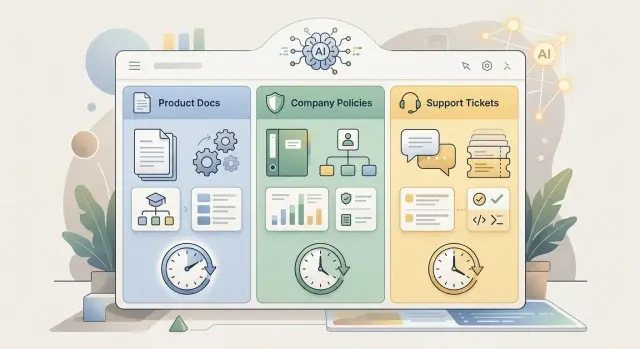
Table of Contents
Why one refresh schedule fails
A single refresh timer looks tidy, but it breaks fast in a real RAG system. Different sources age at different speeds.
Product docs might change once a week after a release. Policies can stay untouched for a month, then change after one approval. Support tickets can shift every hour as new bugs, workarounds, and customer reports come in.
If you refresh everything every hour, you waste money on content that barely moved. The system keeps parsing, chunking, embedding, and indexing the same policy pages, setup guides, and archived notes. The work repeats even when nothing useful changed.
That waste adds up. Teams think they paid for freshness, but most of the bill came from reprocessing stable content. The budget that should cover fast-moving sources gets spread across pages that did not need attention.
The opposite plan fails too. A shared daily or weekly refresh cuts cost, but it leaves live information stale. Support tickets are usually where this hurts first. A team might find a workaround at 10 a.m., while the assistant keeps answering with yesterday's advice until the overnight job runs.
That gap damages trust faster than most teams expect. People can forgive a missing detail in a long help article. They do not forgive an answer that ignores the latest incident note, refund rule, or bug status.
Picture a customer asking why checkout fails. The product docs still describe the normal flow. The policy page still looks fine. Recent tickets, though, show a payment provider issue and a temporary fix. If all three sources refresh once a day, the assistant misses the only fresh fact that matters.
One shared timer creates two problems at once: higher cost for slow-changing content and stale answers for fast-changing content. Teams spend more, yet the knowledge base still drifts out of date.
Sort sources by change speed
Treat each source as its own group. Product docs, internal policies, support tickets, and changelogs do not change for the same reasons, so they should not share one rule.
Start with what people actually edit. Product docs often change when the team ships or rewrites a feature. Policies usually move slower because legal, security, or HR teams review them before publishing. Support tickets move fast, but much of that motion is noise. A new ticket may matter for search today. A closed ticket from six months ago may never need another pass.
A practical first pass is simple:
- Slow: policies, archived docs, old release notes
- Medium: product docs, help center articles, changelogs
- Fast: open support tickets, bug reports, incident notes
Do not guess if you can measure it. Check edit history for each group over the last 3 to 6 months. Count how often files, pages, or records changed. If product docs changed 40 times last month and policies changed twice in a quarter, the difference is obvious.
It also helps to note who updates each source. Owners usually tell you as much as the content type. A docs team may batch edits once a week. A compliance lead may only publish after a review cycle. Support staff may create or close tickets all day. Once you know those habits, timing gets easier to predict.
Some teams add one more test: how expensive a stale answer would be. A slightly old changelog summary is annoying. An outdated refund policy can create real problems. That does not make the policy fast-moving, but it can justify tighter monitoring when it does change.
This step saves money because you stop treating quiet sources like live feeds. It also improves answer quality. The system pays attention where facts move most and leaves stable material alone until someone actually changes it.
Decide what deserves the budget
A refresh budget is not about fairness. Spend it where stale facts reach customers fastest.
If your assistant answers buyers, users, or support agents, the sources behind those replies come first. The goal is simple: fewer wrong answers in places people notice.
Product docs often belong near the top of the list because people read them before opening a ticket. If a setup step changed yesterday, an old chunk can send someone in the wrong direction within minutes. Policies need just as much care when they affect refunds, access, privacy, billing, or legal promises. One outdated rule can do more damage than ten stale help pages.
Support tickets need a different filter. A closed ticket from last year may add very little. A cluster of similar tickets from this week can matter a lot, especially after a release, outage, or pricing change. Look for patterns, not just volume. Ten repeated questions about one bug tell you more than a hundred unrelated old tickets.
For most teams, a simple ranking works:
- First tier: product docs, pricing rules, active policies
- Move current support themes into that tier when a new issue spreads
- Keep moderate-risk internal reference material on a daily or weekly plan
- Put archived docs, old projects, and long-closed tickets on a monthly or manual plan
Risk matters as much as change speed. A privacy rule that changes twice a year may still need immediate refresh when it does change. A rarely used feature guide can wait longer even if someone edits it often.
If you are unsure, ask one blunt question: what content would you hate to see quoted back to a customer after it became false? Fund that first.
Build a refresh plan step by step
Start with a plain inventory. List every source your system reads: product docs, release notes, internal policies, FAQ pages, support tickets, incident notes, and any shared folder people quietly rely on. If nobody owns a source, mark that too. Unowned content goes stale fast.
Start with source groups
Do not plan page by page yet. Group sources by how people use them and how quickly they change. Product docs may shift every few days, policies may stay stable for weeks, and ticket content can change all day.
Then set the oldest acceptable age for each group. This is where refresh schedules stop being guesswork. If support answers start looking wrong after two hours, write that down. If policy text can stay accurate for a week, write that down too.
A planning sheet usually needs only five fields:
- Source group
- Owner
- Max acceptable age
- Normal refresh cadence
- Urgent refresh trigger
Match cadence to risk
Choose the cheapest cadence that still stays inside the age limit. Daily may work for docs. Weekly may fit policies. Hourly, or faster, may make sense for ticket indexing if agents and customers depend on recent cases.
Keep one rule outside the normal schedule. Some updates should trigger a refresh right away. A product release, pricing change, legal edit, or new security rule should not wait for the next batch job.
This is where many teams waste compute. They refresh everything every night because it feels safe. Usually it is not. A better plan spends more on fast-moving facts and less on slow-moving text.
Review the plan on a fixed rhythm, such as once a month. Products change. Teams change. Yesterday's quiet source can become today's source of bad answers. If one group keeps causing stale replies, tighten that schedule first instead of increasing refresh frequency everywhere.
A simple example with docs, policies, and tickets
A small support team often has three very different sources in its stack. Product docs change when the team ships something new. Company policies change less often, but one missed update can create a bad answer. Support tickets move all day, and old summaries go stale quickly.
That is why fixed timing rarely works. If every source shares one schedule, you either waste compute on slow content or let fast content drift out of date.
A simple plan might look like this:
- Check product docs once a day, with an extra refresh after releases
- Review policies once a week, and also refresh when someone edits or approves a policy
- Rebuild ticket summaries every few hours so the assistant sees recent issues, workarounds, and status changes
Picture a SaaS company on a normal week. On Monday, the team ships a small update to billing and account settings. A daily check catches the new help articles and updates the index before too many users ask the same question.
Later that week, legal changes a refund rule. That document does not need constant reprocessing, but it does need a weekly review plus an alert-based refresh when someone changes the policy. If the assistant keeps an old rule for even two days, support can give the wrong answer.
Tickets need the fastest cycle. A bug may open at 9 a.m., get a workaround at noon, and close by 4 p.m. If ticket summaries refresh only once a day, the assistant may suggest a fix that already failed or miss the workaround agents are using right now.
Run a plan like this for two weeks, then compare answer quality and compute cost. If frequent policy refresh barely changes outcomes, slow that source down. If ticket-based answers still miss recent events, speed that source up.
Use change signals, not just timers
Good refresh planning depends less on a clock and more on proof that something changed. A nightly job sounds neat, but it wastes compute on quiet sources and misses urgent updates that land right after the job runs.
Start with the signals each source already gives you. Product docs often include publish dates, version numbers, and edited fields. Those signals tell you more than a fixed schedule because they point to actual change, not just the passage of time.
A simple rule works well for docs: if the version changes, refresh the page and the sections that depend on it. If only the edited date changes, inspect the diff before reindexing everything. A typo fix does not deserve the same budget as a rewritten setup guide.
Release notes need their own trigger. When a release note appears, refresh the related docs, changelog summaries, and any answer snippets tied to the affected feature. That keeps search results aligned with current product behavior instead of waiting for the next batch.
Policies need stricter signals. Do not refresh because someone opened a draft or saved a comment. Refresh when the source system marks a policy as approved, published, or replaced. That keeps retrieval aligned with rules people must follow, not half-finished text nobody should see.
Support tickets are different. Indexing every reply burns money fast and fills the index with repeated back-and-forth. A better pattern is to collect fresh tickets, group them into themes, and index the stable parts:
- Issue summary
- Product area
- Final resolution
- Confirmed workaround
- Date of the latest confirmed fix
This cuts noise and still captures new problems. Ten tickets about the same login bug should become one solid knowledge item, not ten near-duplicates.
If you run a lean team, this matters even more. Oleg Sotnikov often works with companies on reducing waste at the architecture level, and refresh logic fits that same mindset. Spend compute where facts change fast. Leave slow-moving sources alone until a real signal says otherwise.
Timers still help as a safety net. Use them for periodic checks, then let change signals decide what actually gets refreshed.
Mistakes that waste compute
Most teams waste budget on jobs that run too often, touch too much data, or index content that adds no new facts. If refresh costs feel high, the cause is usually simple: the pipeline reacts to activity, not real change.
One common mistake is rebuilding the full index after a tiny edit. A one-line fix in a product doc should update that chunk, not trigger new embeddings for every page in the collection. Full rebuilds make sense after a parser change, chunking change, or schema change. They do not make sense for a typo, a date change, or one added paragraph.
Support content wastes money for a different reason. Teams often treat closed tickets and active incidents as if they have equal value. They do not. Live incidents can change by the hour, so they may need near-real-time indexing. Closed tickets usually become history. Refresh them less often, archive them, or keep only the parts that solve repeat issues.
Duplicate content is another quiet leak. The same answer often appears in product docs, help articles, internal runbooks, and copied ticket replies. If you index all of it, you pay several times for the same meaning and make retrieval noisier. Pick one source as the canonical version, then downrank or skip the copies.
Small failures pile up too. A parser can fail, return empty text, or turn a table into nonsense. If the pipeline indexes that output anyway, you spend compute on junk and lower answer quality at the same time.
A few checks catch most of this:
- Compare hashes or change markers before re-embedding anything
- Skip documents with empty output or very low text length
- Flag parser failures for review instead of silently indexing them
- Merge or drop near-duplicate pages before they hit the index
The cheapest refresh job is the one you never run. If a document barely changed, or changed in a way users will never ask about, leave it alone.
Quick checks before you automate
Automation usually goes wrong for ordinary reasons. Nobody owns the source. Nobody knows how old the data can get. Nobody notices bad answers until users complain.
A small checklist fixes most of that before you spend time on jobs, queues, and indexing rules.
Start with ownership. Each content group needs one person or one team that can answer a plain question: "Is this still correct?" Product docs might belong to product or support. Policies usually belong to legal, HR, or operations. Tickets often belong to support. If ownership is fuzzy, stale content stays in the index because everyone assumes someone else will handle it.
Then set a maximum age for each group. Do not use one number for everything.
- Product docs might allow a 7-day delay if releases are weekly
- Internal policies may need refresh within 24 hours of approval
- Open support tickets may need updates every 10 or 15 minutes
- Closed tickets can wait much longer, or stay out of retrieval entirely
That age limit gives you a real budget. Without it, teams usually over-refresh cheap content and under-refresh the material that changes every day.
You also need an emergency path. If a pricing rule changes, a security issue appears, or a policy gets corrected, someone should be able to force a refresh quickly. This does not require a huge system. One manual job, one admin action, or one script can be enough. What matters is clarity: who triggers it, what gets refreshed, and how long it takes.
Track three numbers together: cost, freshness, and answer quality. Cost alone can push you to slow refresh too much. Freshness alone can push you into waste. Answer quality shows whether the extra spend helps users at all.
A simple test works well. Pick one doc set, one policy set, and one ticket set. Run the schedule for two weeks. Check how much you spent, how old retrieved chunks were, and whether answers improved or got worse. If one number improves while the other two get worse, adjust before you automate more.
Next steps for a lean RAG workflow
Most teams need less machinery than they think. Start with only three source groups: product docs, internal policies, and support tickets. Give each group a basic rule, then watch real answers for a week before adding anything else.
A small starting plan is often enough:
- Product docs: refresh once a day, or right after a release
- Policies: refresh when someone approves a change, with a weekly fallback check
- Tickets: refresh every few hours, or only for open and high-volume issues
That already covers most of the value. It also keeps compute spend tied to change speed instead of treating every source the same.
Before you add webhooks, diff pipelines, or automatic priority scoring, review stale answers by hand. Pull a short sample of bad responses and ask three plain questions: which source was wrong, how old it was, and whether a refresh would have fixed the answer. You will often find that one noisy source causes most of the trouble.
Keep the plan small enough for one person to understand and run. If one person cannot explain the schedules, triggers, and failure checks without opening five tools, the setup is already too big. Simple plans age better, and when they break, people can usually fix them.
A weekly review is enough for many teams. Check refresh volume, compute cost, and how many wrong answers came from stale content rather than weak retrieval or poor prompts. If the stale-answer count stays low, keep the system as it is. More automation is not a prize.
If your team wants a practical second opinion, Oleg Sotnikov at oleg.is works with startups and small companies as a fractional CTO and advisor. A short review can help when the system grew too fast, costs keep rising, or nobody is sure which updates still matter.
The best outcome is pretty boring: fewer stale answers, lower spend, and a refresh plan one person can keep running on a busy day.
Frequently Asked Questions
Why is one refresh schedule a bad idea for RAG?
One shared schedule creates two bad outcomes. You spend money reprocessing stable content like policies and old docs, and you still miss fast changes in tickets, incidents, or recent workarounds.
A better default is simple: refresh each source based on how often it changes and how much damage a stale answer can cause.
Which content should I refresh most often?
Support tickets, bug reports, and incident notes usually need the fastest cycle because facts can change within hours. Product docs often fit a daily check, while policies usually work on a slower schedule with an immediate refresh when someone approves a change.
If a source reaches customers or support agents quickly, give it more of the budget first.
How should I group my sources?
Start with three groups: slow, medium, and fast. Archived docs and old release notes often sit in the slow group, product docs and changelogs fit the middle, and open tickets or incident notes sit in the fast group.
Use edit history from the last few months if you have it. That gives you a schedule based on real behavior instead of guesses.
How do I choose the right max age for each source?
Set the oldest age you can tolerate before answers start looking wrong. If support replies break after two hours, use that as the limit. If policy text stays accurate for a week unless someone approves a change, use that instead.
This gives you a practical target for each group instead of one rule for everything.
Should policies refresh less often than support tickets?
Yes, in most teams they should. Policies usually move less often, so a weekly check often works, but you should also refresh right after approval or publication.
Tickets are different because active issues can change several times in one day. If your assistant relies on recent cases, give tickets a much shorter cycle.
What events should trigger an immediate refresh?
Trigger an immediate refresh after a product release, pricing change, published policy update, security rule change, or a new incident that affects users right now.
Do not wait for the next batch when the answer could become false today.
Do I need webhooks and diff pipelines from the start?
No. Most teams can start with a small plan: daily docs, approval-based policy refresh, and ticket updates every few hours for open or high-volume issues.
Run that for a week or two and inspect bad answers by hand. Add more automation only when you see a clear gap.
How do change signals reduce compute waste?
Timers tell you when to check, but change signals tell you what actually changed. Version updates, publish dates, approval states, and real diffs help you avoid reindexing content that did not change in any useful way.
That cuts waste and keeps the budget focused on fresh facts.
What mistakes waste the most compute?
Stop rebuilding the full index for tiny edits. A typo fix or date change should update one chunk, not every page in the collection.
You should also cut duplicate content, skip empty parser output, and move old closed tickets to a much slower plan or out of retrieval if they no longer help.
How can I test whether my refresh plan actually works?
Pick one doc set, one policy set, and one ticket set, then run your schedule for two weeks. Track three things together: spend, how old retrieved content was, and whether answers improved.
If cost drops but answers get worse, slow down less. If freshness improves but nobody gets better answers, you are probably refreshing the wrong source too often.


