RAG source maps for policy and support content cleanup
Learn how to use RAG source maps to trace answers to doc owners, fix update paths, and stop old policy or support text from outranking current guidance.
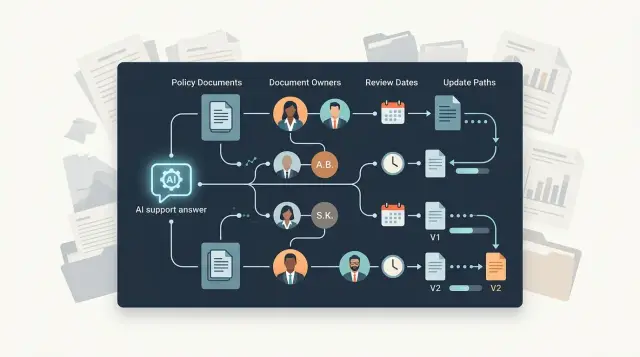
Table of Contents
Why bad answers keep showing up
Bad answers rarely come from one dramatic failure. They usually come from old text that never left the system.
A support team updates a policy page, but an older PDF still sits in the index. A help article gets rewritten, but the copied version in an internal wiki stays untouched. Six months later, the assistant finds both. If the old version has more matching phrases, it can win.
This happens a lot with policy and support content because the same rule often lives in several places. One sentence may appear on a public page, in a canned reply, inside a CRM macro, and in a training doc for agents. Someone updates one copy and forgets the rest. Over time, those copies drift apart in small ways that confuse both staff and retrieval systems.
The model does not know which version your team meant to trust. It sees patterns, phrasing, and overlap. Familiar text often beats newer text if it appears more often, sounds more direct, or was split into cleaner chunks during indexing. Newer does not always win.
The problem gets worse when nobody owns the document after it goes live. A refund rule changes, but no one checks every place where that rule appears. The stale version keeps spreading because agents reuse old replies, managers paste older macros, and the index keeps pulling from both.
Teams usually notice late. The first signal is often a customer saying, "Your bot told me something different yesterday." By then, the wrong answer may already be in chat logs, email threads, and saved replies.
A source map helps because it makes each answer traceable. You can see where a sentence came from, who owns that source, and what needs to change when the policy changes. Without that map, stale knowledge tends to stay quiet until it reaches a customer.
What a source map should record
A source map only works if it answers one simple question fast: where did this answer come from, and who can fix it?
Document titles are not enough. You need enough detail to trace a response back to one source, one owner, and one update path.
Start with every document that can feed an answer. That includes policy pages, help articles, internal notes, macros, saved replies, PDFs, release notes, and old migration copies. Teams often forget copied text in chat tools or CRM templates, and that old text keeps resurfacing.
A practical map should record the source name, where it lives, one clear owner, the last review date, the event that should trigger a review, the topic it covers, and whether it is approved, reference-only, or retired.
Ownership matters more than most teams expect. If nobody can approve a change, stale text usually stays in place.
Where stale text usually enters
A retriever does not know which sentence is alive and which one died three policy versions ago. It only sees text that looks relevant. If an old page still mentions the right product name, plan, or error code, that page can outrank the newer source.
Archived material often causes trouble first. Teams move an old policy into an "archive" folder, but they leave the title, headings, and plain language intact. Search still finds it. If the newer document uses shorter wording or fewer repeated terms, the archive can win even when it is wrong.
The second leak is copy and paste. One refund rule might exist in a help center article, an internal wiki, a PDF for partners, a support playbook, and a training deck. After one update, maybe two copies change and three do not. The system then pulls whichever copy matches the question best, not whichever copy the policy owner approved last.
Support tools add another path for stale text. Macros, saved replies, chatbot snippets, and CRM templates often live outside the main docs stack. Support teams rely on them every day, so they stay in use long after a policy changes. A single outdated macro can keep feeding bad phrasing into tickets, summaries, and future knowledge exports.
Wording drift between teams
Product, support, and legal teams often describe the same rule in different words. Product notes may say "trial ends after 14 days." Legal text may say "service access expires at the close of the promotional period." Support may shorten that to "your plan stops in two weeks."
All three lines point to the same idea, but retrieval treats them as separate sources. If one version skips an exception or keeps an old limit, the answer starts to wobble.
Formatting creates stale entries too. Teams upload screenshots, exported PDFs, release notes, and meeting notes into the same index. Those files may contain temporary decisions that never became policy, yet they still look official because they include dates, names, and internal language.
A source map makes these differences visible. It shows which text comes from a live policy, which comes from a convenience copy, and which should never answer a customer question at all.
How to assign owners and update paths
Source maps only work when every topic has one named person who can say, "this is the final text." If three teams share that job, old wording sticks around because nobody wants to overrule anyone else. One owner per topic sounds strict, but it saves time and cuts bad answers fast.
Pick one decider
The owner does not need to write every draft. That person approves the final wording, rejects outdated text, and decides which source wins when two documents disagree. For a refund policy, legal may define the rule, support may suggest simpler wording, and product may add edge cases. One person still needs to make the final call.
Shared ownership usually fails in a boring way. Support edits a help article, product updates the app copy, legal revises a PDF, and your system keeps retrieving all three. The model then mixes them into one answer. Users get a polished response, but parts of it are wrong.
A simple split works well in many teams. Support can update help center phrasing and common customer questions. Product can update feature behavior, limits, and in-app steps. Legal can approve policy rules, exceptions, and compliance wording. The topic owner decides what gets published as the source of truth.
Build the update path
Write the update path in plain language. Start with a draft, send it to the people who review facts, then publish it in the one place your retrieval system treats as primary. If the old version lives elsewhere, mark it outdated or remove it from retrieval. Otherwise, stale text still wins because it has more copies.
Keep the path short. Draft -> review -> approval -> publish -> retire old versions is enough for most teams. If a change needs five approvals, people will skip the process and patch random documents instead.
For every topic, add three fields to the map: owner name, update path, and last approved date. When an answer looks suspicious, you can check who owns it, where it came from, and whether anyone approved the current wording recently. That turns content cleanup from guesswork into routine work.
How to build the map step by step
Start with real customer questions, not with your document library. Pull the top questions from support tickets, chat logs, email, and search queries. If ten people ask about cancellations every week, map that first. A source map built around live questions is easier to use and much harder to ignore.
Then trace each answer back to every document the bot may quote or paraphrase. That includes policy pages, help center articles, saved support replies, internal notes, PDFs, and old migration docs still sitting in the index. Most teams miss the copied text hiding in older files. That is often where bad answers begin.
A simple workflow works well: write the customer question in plain language, list every source that contains a full or partial answer, pick one source of truth, and mark the rest as supporting, outdated, or blocked. Then add the owner, next review date, and the event that should trigger an update.
The owner should be the person who can approve a change, not just the person who uploaded the file. For a refund answer, that may be someone in finance or legal. For account access, it may be support or product. If nobody owns the answer, stale text stays in the system because nobody feels responsible for fixing it.
Review dates help, but update triggers matter more. A date catches slow drift. A trigger catches sudden changes such as a pricing update, new contract terms, or a revised support process. Use both.
Before launch, test the bot with conflict on purpose. Feed it two documents that disagree and check whether it follows the approved source or grabs the older wording because it appears in more places. This is where the map becomes useful. It shows what the bot should use, who must fix it, and which stale document needs to leave the retrieval pool.
A simple example with refund policy answers
A customer gets charged twice after a billing error and asks the support bot for a refund. The bot replies with confidence: refunds are allowed only within 14 days. It sounds certain, but it is wrong.
Two documents caused the problem. The help center article says customers have 30 days to request a refund for billing mistakes. An old PDF, exported months ago for an internal training pack, still says 14 days. When retrieval finds both, stale text can beat the policy the company actually follows.
Before the fix
Without a source map, both files look similar to the bot. They use the same words - "refund," "billing," and "days" - so the old PDF keeps showing up in answers. Support agents may miss the conflict until a customer pushes back or finance reviews the case.
A map adds context the model cannot infer on its own. It says which document is active, who owns it, when the team last reviewed it, and what should happen to older copies. In this case, the help center article points to the current policy owner, such as the billing or support manager who can confirm the live rule.
After the fix
The team updates the PDF entry in the map so it no longer acts like a live policy source. They can archive it, remove it from policy retrieval, or tag it as historical only. Any of those choices is better than letting an abandoned file answer customer questions.
Now the bot retrieves the help center article first and uses the 30-day rule. If the model still pulls the PDF for background text, the map warns that the file is outdated and should not override the owned policy page.
That change does two useful things. Customers get the right answer, and the support team knows who must update the rule next time it changes. A small ownership field and a clean update path often fix more bad answers than prompt tuning does.
Mistakes that keep old text alive
Old text rarely survives by accident alone. Teams keep feeding it into retrieval, let too many people edit the same answer, and stop checking results after the business changes.
The usual failures are predictable. Teams index every file they can find, so a PDF from last year, a draft in a shared folder, and a copied help article all look usable unless someone blocks unreviewed content before ingestion. Several teams edit the same policy answer in different places, so support changes a macro, legal updates an internal guide, and marketing rewrites website copy. Retrieval then finds three versions that all sound official.
Retired documents often stay in the same collection as live ones. The model has no reason to ignore an old page, especially if it is longer or uses the exact words customers type. Then nobody reruns tests after pricing or policy changes. The source text changed, but the chunks, prompts, and retrieval settings did not. Old answers slip back in through that gap.
Clean citations can make this worse because they create false trust. A tidy footnote only shows that the model found a source. It does not show that the source is current, approved, or owned by the right team.
This gets worse in busy companies. Someone copies a paragraph into a help center article to fix a support issue fast, then forgets it. Months later, that copy wins because it is easier to retrieve than the real policy page.
A good source map makes stale text lose by default. Live documents need a clear owner, review date, and status. Retired documents need a flag that keeps them out of normal retrieval, not a folder rename that nobody remembers.
If your team cannot say who approved a sentence, that sentence should not answer customer questions. The rule sounds strict, but it prevents a lot of avoidable confusion.
Quick checks before you trust the answers
A RAG system can sound confident even when it pulls the wrong page. Before you trust any answer, run a small test set against facts you already know are current.
Start with ten common questions from support or policy work. Pick questions with one clear answer, such as billing terms, refund windows, account closure rules, or shipping cutoffs. If the system misses easy cases, it will struggle even more on edge cases.
Use a short checklist while you test:
- Compare each answer to the current approved answer, not to what "sounds right."
- Check whether the answer points to the correct source document, not just any related document.
- Confirm that the named document owner still handles that topic today.
- Flag any source that has no review date or appears in two slightly different versions.
- Remove one outdated document from retrieval and run the same questions again.
That last check tells you a lot. If answer quality improves after you remove one old file, the system was giving stale text too much weight. That is often the fastest way to spot a bad source map.
Ownership matters more than many teams expect. A policy may still exist in the knowledge base, but the person who wrote it may have changed roles months ago. When nobody owns a document, nobody fixes it, and old wording keeps winning.
Review dates expose weak spots fast too. If half your support articles have no clear review date, your team has no clean way to tell current guidance from leftovers. Duplicate documents cause the same problem. The model sees both, then mixes them into one answer that sounds neat and ends up wrong.
Source maps only help if they stay close to real work. Test them like an operator, not like a demo. Ask ordinary questions, check the cited source, confirm the owner, and remove one stale file as a trial. If the answer changes for the better, you found a problem worth fixing before users see it.
What to do next
Start small and make it real. Pick one policy area that already causes confusion, such as refunds, account access, or billing exceptions, and map only that area this week. One focused pass will show you where old text hides, who updates what, and which answers still pull from the wrong place.
Do the ownership work before you touch prompts or ranking. If no one owns a document, stale text will keep beating the truth. A better prompt cannot fix a page that nobody reviews.
A good source map should answer three plain questions: who owns this text, where does the current version live, and what else must change when the policy changes? If you cannot answer those three questions for a source, it is not ready to feed an assistant.
For most teams, the review routine can stay simple. Update the source document first when a policy changes. Then check support macros, help articles, and internal notes for the old wording, retest the common questions tied to that policy, and record the change date and owner in the map.
Keep the routine boring and easy. If it takes an hour and needs three approvals, people will skip it. If it takes 10 minutes and fits into the normal support or product workflow, it has a much better chance of sticking.
A simple example makes the point. If your refund policy changes from 14 days to 30 days, the job is not done when legal updates one document. The help center, support snippets, chatbot knowledge, and internal playbooks all need the same change, and the map should show exactly who handles each step.
After one policy area is clean, run the same method on the next one. You do not need a giant cleanup project first. A few well-mapped policy areas usually improve answer quality faster than weeks of retrieval tuning.
If this turns into a broader support workflow or AI architecture problem, Oleg Sotnikov at oleg.is works with teams on AI-first software operations and Fractional CTO support. That kind of outside review is most useful when you already have one mapped area, one clear failure, and a few real examples of bad answers.
Frequently Asked Questions
What is a source map in a RAG system?
A source map is a simple record that shows where an answer came from, who owns that source, when the team last approved it, and what should trigger an update. It helps you trace bad answers back to one document instead of guessing.
Why does stale content keep winning over the current policy?
Retrieval ranks text by relevance, overlap, and chunk quality, not by which version your team trusts most. If old wording appears in more places or matches the question more directly, it can beat the newer source.
Which documents should I include in the map?
Map every place the assistant can pull from, not just your help center. Include policy pages, internal docs, PDFs, macros, saved replies, training files, release notes, and old migration copies that still sit in the index.
Who should own a topic in the source map?
Give each topic one person who can approve the final wording and settle conflicts between documents. Teams can suggest edits, but one named owner needs to decide which source counts as the truth.
Do I need review dates if I already have document owners?
Review dates help you catch slow drift, but triggers catch sudden changes faster. Use both, and tie triggers to real events like pricing updates, contract changes, or a new support process.
How should I handle old PDFs and archived documents?
Do not let archived files act like live policy sources. Remove them from retrieval, tag them as historical, or move them to a place your assistant cannot use for customer answers.
What about support macros and saved replies?
Treat macros, saved replies, and CRM templates like first-class sources. Support teams use them every day, so outdated text there can keep spreading wrong answers into tickets and future exports.
Can prompt tuning solve this by itself?
No. A better prompt cannot fix bad source material. If the system still retrieves old text, the model can package it neatly and still give the wrong answer.
How do I test whether the source map actually works?
Start with ten common questions that already have one clear approved answer. Then check whether the bot cites the right source, names the right owner, and improves after you remove one outdated document from retrieval.
Where should I start if our documentation is a mess?
Begin with one messy policy area, like refunds or account access, and map that fully before you touch the rest. That small pass usually shows where copied text lives, who needs to own it, and which stale files still slip into answers.


