Queue library vs workflow engine for real business flows
Queue library vs workflow engine often looks like one choice. Learn when retries and dead letters work, and when approvals or handoffs need more control.
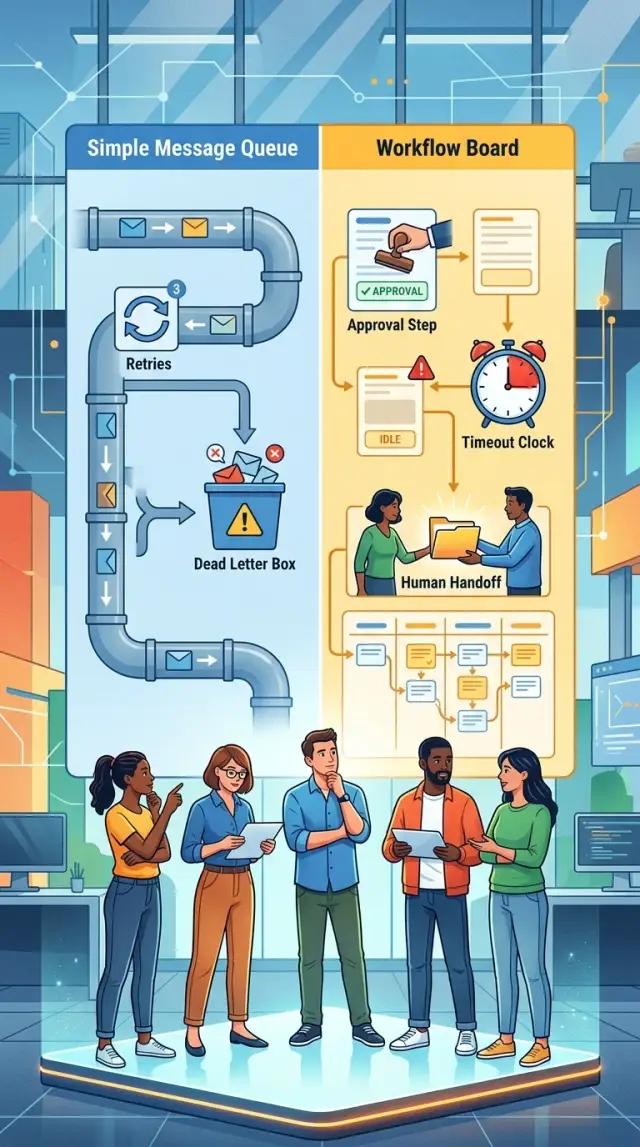
Table of Contents
Why this choice gets messy fast
At first, the difference looks small. A queue hands a job to a worker, the worker does it, and then the system moves on. If something fails, you retry it or push it to a dead letter queue for later review. That works well when each job is short and follows one clear path.
A workflow tool does a different job. It remembers where each case is, what already happened, what should happen next, and who or what needs to act. It can pause for hours or days, wait for a message, branch after a decision, and continue without losing context.
Teams usually get stuck when one job quietly turns into a process. It may start as something simple, like "check a submitted form." Then someone adds one rule: if the data looks odd, send it to a manager. After that comes another rule: if the manager does not respond in 24 hours, remind them. Then one more: if the customer uploads new documents, restart the review.
The code may still sit behind a queue, but the problem has changed. The worker is no longer just doing work. It is tracking state, waiting on people, handling deadlines, and making business decisions. That is work a plain queue was never meant to own.
This is where retries and dead letters stop being enough. A retry helps when an email service is down for 30 seconds or a payment API times out. It does not answer questions like: did a person already approve this, should the case wait until tomorrow, or does someone need to step in before a deadline passes? Dead letters catch failures. They do not describe the normal path of a process with pauses and exceptions.
Long waits make the design harder. If a task might sleep for three days, you need a clear record of why it is waiting and what should wake it up. Manual review makes it harder again. Once people get involved, you need status, history, ownership, and a rule for what happens when nobody acts.
That is why the queue library vs workflow engine choice gets messy fast. The real split is not between two pieces of software. It is between moving isolated jobs and running a business process with memory, timing, and decisions.
When a queue library is enough
A queue library works well when each task is short, independent, and easy to rerun. Good examples are sending receipt emails, resizing uploaded images, or syncing a customer record to a CRM after someone signs up. One event triggers one job, a worker handles it, and the system moves on.
This is the simple side of the queue library vs workflow engine choice. If the job does not need a person, does not wait for a long business timer, and does not branch into a chain of decisions, a queue is often enough. Simple tools are easier to run, easier to debug, and cheaper to keep around.
Retries solve many real failures. Third-party APIs go slow. A mail provider times out. The database drops one connection. If the job usually finishes in a few seconds, a couple of retry attempts with a short delay often fix the problem without any drama.
When retries do not help, send the job to a dead letter queue. That keeps bad jobs out of the main flow and gives the team a clear place to inspect them later. The rest of the work keeps moving, which matters more than people expect once traffic picks up.
A queue also works best when each job stays small. One job should do one thing. If it fails halfway through, you should feel comfortable running it again. That often means adding a simple guard so the same email does not go out twice or the same record does not sync twice.
A small online store is a good example. A customer uploads a product photo, the app creates a few image sizes, and then it pushes the file metadata to another system. If the image service has a brief issue, the job retries. If it keeps failing, the app places the job in a dead letter queue and someone checks it later. No approval step. No human handoff. No need to track a long state history.
A queue is a good fit when most failed jobs need patience, not process. If a worker can try again, succeed, or park the job for review, you probably do not need more machinery.
When you need a workflow tool
A queue can retry work and send failed jobs to a dead letter queue. That solves delivery problems. It does not solve business decisions that unfold over time.
The shift usually happens when the flow has memory. A payment release may wait for a manager. A contract change may sit for two days. A support case may need a person to review documents, then hand control back to software. If that state lives only in scattered messages, teams start guessing what happened and what should happen next.
A workflow tool helps because it keeps the whole process in one place. It knows the current step, who owns it, what deadline applies, and what happens if nobody responds.
Where queues start to break down
Approval steps are the clearest sign. If money, access, or customer-facing changes need a human yes or no, you need more than retries and dead letters. You need a record of who approved, when they approved, and what the system should do after that decision.
Long waits are another sign. Queues are fine for work that should run now or soon. They get awkward when a process must pause for hours or days without losing context. Teams often patch this with delayed messages, extra tables, and custom timers. That works for a while, then turns into a pile of edge cases.
Timeouts and escalations also push teams toward a workflow engine. If a manager does not answer in 24 hours, the task may need to move to someone else. If a customer never uploads a document, the case may need to close itself. Those rules are part of the business flow, not just job delivery.
Human handoffs matter most. Software can create a task, but a person may need to read notes, attach a file, or choose between two paths. After that, software may send an email, update a system, or trigger billing. A workflow tool handles that back-and-forth without losing state.
Common signals look like this:
- One process mixes automated steps and human decisions
- The flow can pause for a day or longer
- Deadlines, reminders, or escalations affect the outcome
- You need an audit trail that non-engineers can understand
- Teams keep adding custom status fields to track progress
In the queue library vs workflow engine decision, this is usually the line: if the job is only about getting code to run, a queue is enough. If the job is about moving work across people, rules, and time, use a workflow tool.
A simple way to choose
The fastest way to settle the queue library vs workflow engine debate is to draw the real process, not the tidy version people describe in meetings. Put every step on one page from the first trigger to the final result. If the flow still looks simple after that, a queue may be enough. If it turns into a chain of waits, decisions, and exceptions, you are looking at workflow territory.
Start with the path a normal request takes. Then add the parts teams usually forget: waiting for another system, trying again after a failure, asking a person to review something, pausing for a deadline, and sending the work somewhere else if nobody responds. Those are the points where basic job queues start to feel awkward.
A quick test helps:
- Write each step in order, using plain language.
- Mark every place where the process waits on time, a person, or another service.
- Circle each retry and note what happens if it keeps failing.
- Count every split where the process can go down a different path.
The count matters. One background job that sends an email, creates a PDF, or syncs a record is usually a good fit for a queue. Each job does one thing, succeeds or fails, and can retry a few times. Dead letter handling covers the leftovers, and that is often enough.
The picture changes when the process needs memory. Say a sales contract needs legal approval over $10,000, finance approval over $25,000, and a manager reminder after 48 hours. Now you need to know who approved what, when the clock started, what happens if someone ignores the task, and how the flow resumes after a handoff. You can build that on top of queues, but you will spend a lot of effort tracking state that a workflow tool already understands.
A practical rule
Choose a queue when the work is isolated and short-lived. A job goes in, a worker handles it, and retries clean up temporary failures.
Choose a workflow tool when the process stays alive over time. If people need to see status, deadlines matter, steps branch often, or humans step in, you want a system that tracks the process itself, not just the next job.
If your diagram needs notes in the margins to explain what happens after a delay, approval, or timeout, that is usually the answer. The process has already outgrown a simple queue.
Example: handling a refund request
Picture a common case. A customer asks for a refund because an order arrived days late, and the team needs to decide fast without losing track of the request.
The flow often starts in a simple way. The system checks the order status, confirms that payment went through, and looks for any shipment or delivery updates. If one of those checks fails because another service is slow, a queue job can retry a few times. If it still fails, the job can move to a dead-letter queue so someone can inspect it.
That part fits a queue library well. It is mostly machine work, and the system only needs clear retry rules.
The shape changes when money and people get involved. Say refunds under $50 go through automatically, but larger refunds need a support lead to approve them before finance sends the payment. Now the system must remember who approved, who is still waiting, and what happens if nobody responds.
A realistic refund flow might look like this:
- The app creates a refund case after it verifies the order and payment.
- Small refunds go straight to payment.
- Large refunds wait for support approval.
- After approval, finance sends the refund.
- A timer sends reminders, then closes stale cases after a set period.
A queue can still run each step, but the team has to build a lot around it. Someone needs to store the current state of the case, track deadlines, prevent double payouts, record approval history, and handle the awkward cases. For example, what if finance gets the task after the request already expired? What if support rejects the refund after two reminders? What if the customer sends a new message and reopens the case?
That is where a workflow tool starts to make more sense. It keeps the whole refund request in one place, including waiting periods, approval workflow steps, audit history, and timeouts and human handoffs. The code can stay focused on business rules instead of glue logic.
This is why the queue library vs workflow engine choice often becomes obvious once you map one real process. If the refund is just "check, retry, pay," a queue is fine. If the refund can pause, wait for people, branch by amount, and expire on a timer, you are already dealing with business process automation, not just background jobs.
Mistakes teams make
Teams rarely get the queue library vs workflow engine choice wrong on day one. They get it wrong a few months later, when a simple background job grows into a business process with approvals, waiting periods, and exceptions.
The first mistake is turning the whole process into one giant job. A team starts with something small, like "create invoice and send email." Then they add checks, retries, status updates, approval rules, and fallback paths. Soon one worker does ten different things, holds too much state in memory, and fails in ways nobody can untangle quickly.
That design looks fast at first. It is also brittle. If step seven fails, the team has to guess what already happened, what should retry, and what must never run twice.
Another common mistake is using retries for work that needs a human decision. Retries are fine when a service times out or a database connection drops. They are the wrong tool when finance must approve a refund, a manager must review a request, or support must ask a customer for missing details.
A queue does not know the difference between "try again in 30 seconds" and "wait until a person decides." Teams often fake that difference with more code, more flags, and more scheduled jobs. That usually becomes messy fast.
Context loss is another problem. A worker restarts, a deployment rolls out, or a container disappears, and part of the process state goes with it. Now the system remembers that a job existed, but not why it paused, who touched it last, or what deadline was attached to it.
You can spot this when people start checking logs to answer business questions. If someone asks, "Why is this request still pending?" and the answer lives in scattered logs instead of clear workflow state, the design is already fighting the team.
Teams also bury deadlines and reminders in custom code. They add little timers everywhere:
- send a follow-up after 24 hours
- escalate after 3 days
- cancel after 7 days
- notify a manager if nobody responds
Each rule seems harmless. Together they turn into a hidden workflow engine, except it has no clear timeline, poor visibility, and too many edge cases.
A better approach is simpler than it sounds. Keep queues for short, technical work like sending emails, resizing images, or retrying temporary failures. Move business steps into a workflow tool when the process must wait, track time, keep history, or hand work to a person.
If your team keeps adding status flags, reminder jobs, and one-off timeout code, you are probably no longer building a queue consumer. You are rebuilding workflow logic by hand.
Quick checks before you decide
Most teams can answer the queue library vs workflow engine question with four plain checks. If you answer "yes" to one of them, pause before you build the flow as a simple background job.
A queue works well when a worker can pick up a task, try it, retry it, and either finish or send it to a dead letter queue. Trouble starts when the work needs to wait, show status, or involve a person.
- Ask how long the process can sit idle. If it may wait for hours, days, or a week, a worker should not stay busy that whole time. A workflow tool is better at parking the state, waking up later, and handling timeouts cleanly.
- Ask whether people need live visibility. If support, finance, or operations must see where a request sits right now, a queue alone often feels blind. You usually end up adding status tables, admin screens, and extra logic around it.
- Ask whether a person can pause, approve, reject, or resume the work. The moment a human can change the path, the flow stops being "just a job in the background." That is where approval workflow steps start to matter.
- Ask whether you need an audit trail. If someone will later ask who approved the change, when they did it, and what happened next, you want that record built into the process, not patched on after the fact.
A small refund flow makes this easy to picture. If every refund under $20 gets checked by rules and paid out right away, retries and dead letters may be enough. If larger refunds need a manager's approval, expire after 48 hours, and move to another person when the manager is away, you are already in workflow territory.
Teams often ignore one more detail: timeouts and human handoffs are not edge cases. They show up in onboarding, finance checks, support escalations, contract reviews, and account changes. If those cases are common, a queue can still work, but you will spend more time building process tracking than solving the business problem.
If you are unsure, sketch one real request from start to finish. Mark every wait, every decision, and every human touch. If the diagram looks like a conversation instead of a single job, pick the workflow tool.
Next steps for your team
Pick one process that already causes real pain. A refund request, an account review, or a supplier approval is better than a giant diagram with every possible branch. Teams usually get stuck when they try to model the whole company at once.
Write down the normal path first. Keep it plain: what starts the flow, who does the next step, and what counts as done. Then add one failure path that happens often, such as a timeout from a payment service or a request waiting too long for approval.
A short note like this is enough to make the queue library vs workflow engine decision much clearer:
- What event starts the work
- What result you expect at the end
- Who steps in if the flow stalls
- How long each wait can last
- What happens after retries fail
If you cannot answer the human and timing parts in one page, a workflow tool is usually the safer bet. If the work still looks like "do task, retry a few times, send to dead letter if it fails," a queue is often enough.
Do not throw away queues just because you adopt a workflow tool. Queues still fit small background jobs well. Sending emails, resizing images, clearing caches, or syncing logs do not need approval screens, timers, and audit trails.
That split keeps systems easier to run. Let the workflow tool handle long-running business steps with state and handoffs. Let queues handle short background work that should run and finish without people touching it.
One more rule saves a lot of wasted effort: test the flow with real cases from the last month. Old support tickets and failed requests tell you more than a whiteboard session. You will spot where customers wait, where staff step in by hand, and where retries already solve the problem.
If the process affects revenue, billing, customer support, or contract handling, a second opinion is worth getting before the team commits to a tool. Oleg Sotnikov can review one business flow as a fractional CTO, point out where a queue is enough and where a workflow engine will save trouble later, and help you choose a setup your team can actually maintain.