Queue vs cron job: when a scheduled task is enough
Confused about queue vs cron job? Learn when a scheduled task is enough, when retries need a queue, and how to avoid extra moving parts.
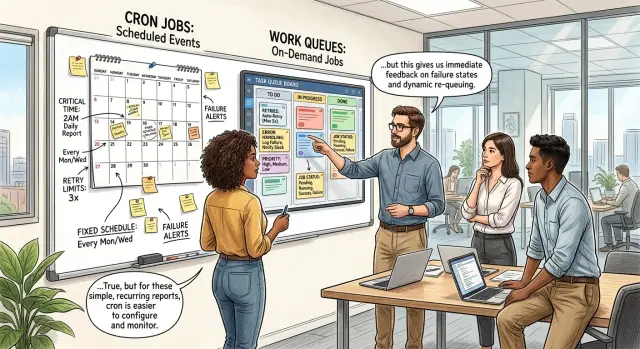
Table of Contents
Why background work gets confusing
Most teams start with one small task. Send a daily email. Clean up expired records at night. Import a CSV every hour. A plain cron job feels obvious, and often it is.
Then the task stops being plain. The email API times out once a week. The import runs longer than expected and overlaps with the next run. Someone asks for retries, but only for some errors, and only three times. What looked simple turns into a reliability problem.
That is usually where the confusion starts. Instead of asking, "What does this job need right now?" teams jump to tools they have seen elsewhere. Most arguments about a queue vs cron job do not begin with scale. They begin with one annoying failure and the fear of missing work.
A queue can solve real problems, but it also adds moving parts. You need workers, storage, monitoring, retry rules, and some way to inspect stuck jobs. Someone has to own all of that. For a small team, that overhead can cost more than the original task ever saved.
Cron has limits too. It does not track each job as its own item, and it does not naturally handle delayed retries, backpressure, or detailed per-item status. Teams get into trouble when they expect cron to behave like a job system, or when they bring in a full job system before they actually need one.
A common example is a product that sends one billing reminder every morning. At first, a scheduled task is enough. Later, some messages fail, users need separate retry logic, and support wants to see what happened to each reminder. That is the moment to stop and look at the real need, not the fashionable tool.
The goal is simple: pick the smallest setup that handles timing, failures, and retries without forcing the team to babysit infrastructure. If cron does that, stop there. If it does not, add a queue for a clear reason.
What cron jobs actually do
Cron is a schedule. It tells a server to run a command at a fixed time, like every hour, every night at 2:00, or every Monday morning. The job starts because the clock says so, not because a new item arrived.
That makes cron a good fit for work that repeats on a known rhythm. Think of tasks like clearing old temp files, sending a daily summary email, rebuilding a search index overnight, or importing a partner's CSV every morning. The timing is clear, and the task itself does not change much from one run to the next.
Cron works best when you can answer two questions without much debate: "When should this run?" and "What should it do each time?" If both answers stay stable, cron is often enough.
One detail matters more than people expect: cron usually reruns the whole job, not one item inside the job. If a script processes 5,000 records and fails at record 4,200, cron will usually start the script again on the next run unless your code saves progress. That is fine for many jobs, but it is very different from a queue that tracks each item separately.
For a small product or internal tool, cron is easy to reason about. You can look at the schedule, read the script, and understand what happens next. There are fewer moving parts, fewer dashboards, and fewer failure modes to untangle at 3:00 a.m.
Many teams move away from cron too early. If the job runs on a clear schedule, handles a full batch at once, and does not need per-item retries or instant execution, cron is often the calmer choice.
What queues actually do
A queue is a waiting line for work. Your app adds jobs to that line, and workers pick them up and run them. Each job is its own task: send one email, resize one image, sync one customer record, or generate one invoice.
That separation is the point. A queue handles lots of small tasks without turning them into one big batch. Workers process jobs one by one, and if you need more speed, you run more workers. The app stays responsive because it hands work off instead of doing everything inside the request.
Queues also make failures easier to handle. If one job fails because an API times out or a file is broken, the system can retry that one job while the rest of the line keeps moving. You do not need to rerun a whole script just because one item had a problem.
This is where queues usually beat a scheduled task. They give you control at the job level. You can track status for each job, retry only what failed, delay a specific job, or move failed work aside for review.
Queues help most when work arrives all day instead of on a neat schedule. Orders come in at 9:03, 9:17, and 9:18. Webhooks arrive in bursts. Users upload files whenever they want. A queue absorbs that uneven flow and lets workers process tasks as capacity opens up.
The trade-off is obvious: more infrastructure, more settings, and more things to monitor. Still, when background work arrives constantly and each task needs its own handling, a queue is usually the cleaner tool.
Use cron when the task stays predictable
A cron job works well when the work is boring in the best way. It runs on a fixed schedule, does the same thing each time, and does not need minute-by-minute control. For jobs like nightly reports, daily cleanup, or a morning summary email for your team, that simplicity is a strength.
Cron is often enough when users will barely notice one missed or delayed run. If last night's cleanup starts at 2:20 instead of 2:00, or a report arrives after breakfast instead of before, nothing breaks. You can inspect the run, fix the issue, and start it again.
Cron also fits jobs that you can rerun from the start without making a mess. A script that rebuilds daily stats, removes expired temp files, or refreshes cached data is usually fine to run twice. That matters a lot. If rerunning the task can create duplicate charges, send the same email twice, or overwrite something important, cron starts to feel shaky.
Volume matters too. Cron is comfortable when the amount of work stays small and fairly steady. A cleanup task that deletes a few thousand old records each night is predictable. A process that might handle ten items one day and fifty thousand the next usually needs more control than a simple schedule gives you.
Cron is a good fit when most of this is true:
- The task runs on a clear schedule.
- One delayed or missed run is annoying, not harmful.
- You can rerun the full task safely.
- The amount of work does not swing wildly.
- You want fewer moving parts to maintain.
A small product team might use cron to generate a sales report every night, archive logs once a day, and clear abandoned sessions every hour. That setup is cheap to run and easy to understand. Many teams should stay there longer than they think.
If the task starts needing per-item retries, strict ordering, or fast reaction to events, cron stops being the simple answer. Until then, simple is usually better.
Add a queue when failures and timing matter
A queue starts to make sense when work shows up at random because users trigger it. A cron job wakes up on a schedule and asks, "What should I do now?" That is fine for predictable housekeeping. It gets awkward when uploads, payments, exports, or webhook calls arrive all day and you want each one handled soon after it appears.
Random timing is often the first clear signal. If ten jobs arrive this minute and none arrive for the next hour, a queue can absorb that burst and hand work to workers one item at a time. With cron, you either wait for the next run or start building extra logic that imitates queue behavior anyway.
Failure handling is the next reason. Suppose a cron task loops through 500 records and the 137th one times out. If the script stops there, the rest wait for the next schedule. Even if the script continues, you now need custom tracking for what failed, what succeeded, and what to try again. A queue treats each item as its own unit, so one bad job does not block the others.
That matters even more when retries differ by job type. A temporary API timeout might deserve another try in 30 seconds. A failed email can wait five minutes. A broken image conversion might need three attempts and then a manual check. Queues are good at this because each item can carry its own retry count, delay, and next attempt time.
Use a queue when these problems show up often: work arrives at uneven times, one failed item should not pause the rest, retries differ by job, order matters, or delayed execution matters.
A small SaaS team sees this with invoice processing. One customer uploads a single PDF. Another uploads 200 files at once. A queue lets the system process each file separately, retry the ones that hit OCR errors, and keep the rest moving. If the team later needs to preserve order for follow-up steps, the queue already fits that model.
Once each job has its own timing, status, and retry path, a queue is usually the simpler choice, even if it looks heavier at first.
How to choose step by step
Most teams can make this call in ten minutes if they answer a few plain questions. The goal is not to predict every future need. The goal is to pick the smallest tool that handles the work you have now.
Start by naming the job in one sentence and saying what starts it. A nightly invoice export that runs at 2 a.m. is different from an email that should send right after a user signs up. If time or user action triggers the work, write that down first.
Then estimate volume during a busy hour, not an average day. Ten jobs per hour and ten thousand jobs per hour lead to very different choices. A cron task can handle a surprising amount of work if the batch is small, the timing is loose, and one slow run does not block the next.
These questions usually make the answer clearer:
- What starts the job: a schedule, a user action, or another system?
- How many jobs arrive when things get busy?
- If something fails, do you rerun the whole batch or only one item?
- Does a user wait for the result right now?
- What pain do you have today: missed timing, duplicate work, or hard-to-track failures?
The retry question usually settles it. If you can rerun the whole batch without harm, cron is often enough. If one failed item needs its own retry, delay, or separate failure handling, a queue starts to make sense.
User waiting time matters too. If someone clicks a button and expects a result in seconds, you need tighter control over timing and failures. That often pushes teams toward tracked background jobs instead of a simple scheduled batch.
This decision gets overcomplicated when teams build a queue because it feels more serious, then spend weeks managing workers, retries, and monitoring for work that a small cron script could have handled.
Start small. Use cron first when the task is predictable, the batch is safe to rerun, and nobody waits on each item. Add a queue only after real pain shows up in logs, support tickets, or missed work.
A simple example from a small product team
Picture a five-person SaaS team with two background tasks. Every Monday morning, the product sends a weekly summary to all active accounts. It also emails each customer an invoice when a billing cycle closes. Both jobs run in the background, but they should not use the same setup.
Weekly summaries fit cron well. The schedule is fixed, the batch size is usually predictable, and the job can run at one planned time each week. If the send starts ten minutes late, that is usually fine. If something goes wrong, the team can rerun the summary job for everyone without much risk.
That is a good place to keep things boring. One cron job wakes up on schedule, gathers fresh numbers, builds the email, and sends the batch.
Invoice emails are different. Each invoice belongs to one customer, one payment, and one accounting record. If one send fails because the email provider times out or the customer address has a temporary issue, the team should retry that single invoice. They should not rerun every invoice email from the whole batch.
A queue helps because each invoice becomes its own job. The system can track whether job 1842 succeeded, failed, or needs another try. It can retry only the failed item, wait between attempts, and keep a clear error log.
The split is practical:
- Weekly summaries are scheduled batches, and slight delays are acceptable.
- Invoice emails have separate outcomes and need separate retries.
That is the difference in plain terms. Use cron for work that stays predictable and can be rerun as a whole. Use a queue when each item has its own outcome.
That keeps the system easier to run. The team does not need workers, retry rules, and job states for every scheduled task. They add that machinery only where it solves a real problem.
Mistakes that add extra moving parts
A lot of teams add background machinery too early. They feel a slow task, assume they need a queue, and end up with more code, more failure cases, and more things to watch at 2 a.m.
The easiest mistake is building a queue for a job that runs once a day and does not need second-by-second timing. A nightly import, a cleanup script, or a report generator usually fits cron just fine. If one task starts at 1:00 a.m., runs for a few minutes, and finishes before anyone notices, a queue is often extra weight.
Another mistake is hiding bad code in the background instead of fixing it. Moving a slow task out of the request path can help the user experience, but it does not make the task cheaper or safer. If the job still locks tables, burns API credits, or takes 40 minutes because of poor queries, the problem stays. It just becomes harder to see.
Duplicate protection gets skipped more often than teams expect. A timeout happens, someone clicks again, or a deploy restarts a worker, and now the same email, invoice, or sync runs twice. Background jobs need an idempotency check, even in a small system. Without it, a simple retry turns into customer support work.
Retries can also go bad fast. A retry rule without limits can create a loop that floods your database or hammers another service all night. Set a small retry count, wait longer between attempts, and mark the job as failed when it keeps breaking. Then let a person inspect it.
Before you pick tools, measure the real job volume. How many jobs run per hour? How long does each one take? What happens if one job fails once? Do jobs need strict order? Can the same job run twice without damage? That short check clears up a lot of debate.
Teams that work with an experienced CTO often find they needed better limits and cleaner code, not a bigger stack.
Quick checks before you build
A few plain questions can save weeks of setup and cleanup. Teams often add moving parts too early because they design for rare failures before they understand the everyday job.
Start with duplicates. If the task runs twice, does anything break, or does the system land in the same state anyway? A nightly sync that updates product data is usually fine if it repeats. A task that sends invoices, charges cards, or triggers customer emails needs more care.
Then look at the shape of failure. Sometimes one bad item can wait until the next scheduled run and nobody cares. In other cases, one failed record needs its own retry while the rest keep going. That is often the point where a queue becomes easier to justify.
Timing matters too, but only if people feel it. If a report starts 15 minutes late and nobody notices, cron is probably enough. If users expect near-immediate follow-up after they click a button, late starts feel broken even when the job eventually succeeds.
Order is another quiet trap. Some work can happen in any sequence. Other work depends on arrival order, like processing status updates where the newest event should not run before the older one. When order matters, simple scheduling starts to feel clumsy.
The last check is the least technical and often the most honest: who will support this next month? If one person on the team has to inspect failures, rerun jobs, and explain what happened, the setup should stay simple enough for that person to handle without a rescue mission.
The pattern is usually pretty clear:
- If duplicate runs are harmless and late starts are acceptable, cron is often enough.
- If each item needs its own retry or processing order matters, a queue usually fits better.
- If support already feels heavy for the team you have now, do less, not more.
That last point gets ignored. A clever system is expensive when nobody wants to touch it on a busy Tuesday morning.
What to do next
Make the choice smaller than it feels. Most teams do not need to solve "queue vs cron job" in the abstract. They need to look at the jobs they already have and sort them by how they start, how often they fail, and how much delay the product can tolerate.
Start with a simple inventory. Put every background task on one page. If a task runs on a fixed schedule, put it in one group. If a user action or system event starts it, put it in another. That alone clears up a lot of confusion.
Then test each task in a practical way. Break it on purpose. Retry it. Delay it. Run it twice and see what happens. Write down the real cost of each option, not just cloud cost. Include setup time, alerts, dashboards, and who gets called when it fails.
Teams often skip that step, and that is where bad decisions start. A cron job can look fine until one failed run blocks a customer task for six hours. A queue can look smart until the team spends more time caring for workers, retries, failure buckets, and monitoring than the product itself.
Support burden matters more than people admit. A simple scheduled task that your team understands is often better than a queue nobody wants to own. Small products win by staying boring where they can.
If your team still cannot agree, a short outside review can help. Oleg Sotnikov at oleg.is works with startups and small businesses on lean architecture, Fractional CTO support, and practical AI-first development. That kind of review is useful when background systems start getting heavier than the product actually needs.
Write the list, run the failure test, and decide with evidence. That gives you a setup your team can still live with six months from now.
Frequently Asked Questions
When is cron enough?
Use cron when the task runs on a fixed schedule, the work stays fairly steady, and you can rerun the whole batch without causing damage. Jobs like nightly cleanup, daily reports, and weekly summaries usually fit well.
When should I add a queue?
Move to a queue when each item needs its own status, retry, or delay. Queues help most when uploads, webhooks, payments, or emails arrive throughout the day and one failed item should not block the rest.
Do I need a queue just to handle retries?
Not always. If you can rerun the whole task safely, cron often handles retries with simpler code. Use a queue when one item needs a different retry rule from the others or when retries must happen soon after failure.
What if my cron job overlaps with the next run?
First, stop the overlap. Add a lock so the next run does not start while the current one still works. If long runs happen often and the workload changes a lot, a queue usually gives you better control.
How do I avoid duplicate work?
Make every job safe to run twice. Check whether the email, invoice, or sync already ran before you do it again. That one check saves a lot of support pain whether you use cron or a queue.
What if users expect the result right away?
Users notice delay more than teams expect. If someone clicks a button and expects a result soon, hand that work to a tracked background job instead of waiting for the next cron window. A queue usually fits better there.
Does processing order change the choice?
Order matters when one job depends on an earlier one. Status updates, follow-up steps, and multi-step processing often need that control. A queue handles ordered work more cleanly than a scheduled batch.
How much extra work does a queue add?
A queue adds workers, storage, retry rules, monitoring, and failure handling. That overhead makes sense when it solves a real problem. For small teams with predictable jobs, cron often costs less time and attention.
Can I use cron and a queue in the same product?
Yes. Many teams use both. Keep scheduled batch work on cron and send per-item work like invoice emails or file processing through a queue.
What should I check before I build anything?
Start with a simple inventory of your background tasks. Write down what starts each job, how often it runs, what happens if it fails, and whether you can rerun it safely. That usually makes the choice clear fast.


