Queue partitioning for noisy tenants in shared systems
Queue partitioning for noisy tenants keeps one big import from slowing every customer. Learn simple patterns, mistakes, and checks for shared systems.
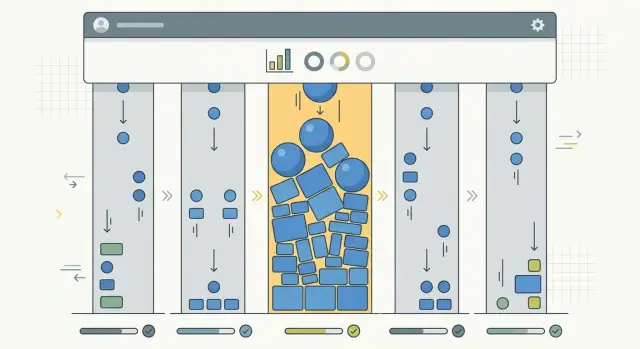
Table of Contents
What goes wrong in a shared queue
A shared queue is one line for background work. Your app puts jobs into that line, and workers pull them off in order. Those jobs might be CSV imports, email sends, report updates, or data syncs.
That feels simple, and early on it often works. Trouble starts when every customer shares the same line even though their workloads are nothing alike.
Picture a normal morning. Most customers create small jobs that finish in a few seconds. Then one customer starts a bulk import and drops 20,000 records into the queue. If each record creates more work, that single import can flood the line in minutes.
Workers don't know which jobs matter most to other customers. They just take the next item. So a tiny sync for Customer B sits behind a wall of import jobs from Customer A.
That's why small jobs end up waiting behind long ones. The system may still have enough CPU and memory. The bottleneck is often the line itself. One customer creates too much work at once, and everyone else waits.
A shared queue also hides the problem until users complain. The app can still look "up," while the background work that keeps it fresh starts to lag. Pages load, but the data is old. Actions succeed, but the follow-up work finishes much later than people expect.
Users feel that delay in obvious ways. Syncs that used to finish in seconds now take minutes. Email notifications arrive late or out of order. Dashboards show stale numbers because refresh jobs are stuck. Imports look frozen even though workers are still busy.
This does more than slow things down. It breaks trust. A user clicks "import," sees no progress, refreshes the page, and assumes the system failed. Another user checks a dashboard and makes a decision from stale data.
The hardest part is that one heavy customer can slow everyone else without doing anything wrong. They may just be larger than the rest, or they may start their work at the same time every month.
That's the real problem. In a shared system, fairness doesn't happen by accident. If all jobs enter the same line, the biggest wave usually wins and smaller tasks pay the price.
A shared queue is fine for light, steady traffic. Once customers have very different job sizes, one line stops being simple. It starts being fragile.
Signs one customer slows everyone else
This problem rarely looks like a full outage. The system stays up, workers stay busy, and dashboards can even look healthy at first glance. Customers don't say "everything is down." They say a sync, email, report, or small import suddenly took ten minutes instead of thirty seconds.
The timing usually gives it away. Slowness shows up at the same hour every day, or during the first few days of each month, when one large account starts a batch import. A shared queue can absorb normal traffic, then one customer drops in a huge wave of jobs and everybody behind them waits.
You can often see the pattern in the queue itself. Queue length jumps right after one account starts an import. The age of the oldest job rises. Small jobs that should finish almost right away now sit in line much longer, even though they need very little work.
That mismatch matters. When fast jobs wait far longer than usual, the issue often isn't worker speed. It's queue order. Workers are active, but they're spending most of their time on one tenant's backlog.
Support tickets have a familiar shape too. People report random slowness, delayed processing, or "stuck" background tasks. They don't all complain at once, and they usually can't point to one broken feature. The system still works. It just makes the wrong customers wait.
A few numbers tell the story when you look at them together: queue depth after large imports start, oldest job age during those spikes, wait time for tiny jobs like notifications or small syncs, jobs created by each account during the slow period, and how many different customers actually finish work each hour.
One metric on its own can mislead you. Five busy workers can sound fine until you notice that four spent the last twenty minutes on the same customer's import. Most customers see no progress even though the worker pool never goes idle.
If you tag jobs by tenant, the pattern gets much clearer. One account's volume lines up with a queue spike, small jobs slow down, and complaints arrive in the same window. At that point, the queue isn't overloaded in general. One customer is filling the lane for everyone else.
When to split tenants
Don't split tenants because one bad day felt painful. Split them when one customer's work behaves so differently that a shared queue stops being fair.
This usually starts to matter when per-customer job volume and job shape stop looking alike. A customer who sends 500 normal jobs is very different from a customer who uploads a 2 million row import that turns into 40,000 background tasks.
Start with work created per customer, not total site traffic. Overall traffic can look healthy while one account quietly fills the queue with long-running jobs. If you only watch total requests, you'll miss the pattern that hurts everyone else.
Job type matters as much as job count. A hundred email sends, a hundred PDF renders, and a hundred CSV import tasks don't put the same load on workers. Group tenants by what they ask the system to do, how large those jobs are, and sometimes by plan if some customers pay for faster processing.
Keep small customers together when their behavior looks similar. That's easier to run, and it avoids wasting workers on too many tiny partitions. Most tenants don't need their own lane.
Large importers are different. If the same customer sends repeated bursts every week or every month, give that customer a separate lane before the next wave. You're not punishing them. You're preventing one predictable spike from becoming everybody else's outage.
It's usually time to split when one customer creates far more jobs than a typical customer, their jobs run much longer than the queue average, the burst repeats on a schedule, other customers wait even though their own volume stayed flat, and support tickets show the same pattern after each import cycle.
Set the threshold before the next incident. Pick a rule your team can measure without debate. For example, move a tenant to a separate queue if they regularly create more than 25% of queued jobs during a one-hour window, or if a single import produces jobs that run five times longer than the median.
Simple rules beat clever ones. If the threshold changes every time a big customer complains, queue design turns into politics instead of operations.
One more thing: don't split by customer name alone. Split by repeatable behavior. Sometimes several mid-size tenants with the same batch pattern belong together, while one very large importer needs a lane of its own.
How to partition the queue step by step
Queue partitioning works best when you start with a map, not new infrastructure. If you split queues before you know which jobs cause the pain, you'll usually end up with more moving parts and the same delays.
Start with the jobs and the tenants
First, write down every background job that uses the same worker pool. Include imports, exports, syncs, email sends, image processing, and report generation. Teams often miss small jobs that look harmless on their own but pile up during busy hours.
Then measure three things for each job type and each tenant: how long jobs run, how much work they do, and when they arrive in bursts. A tenant that sends 5,000 tiny jobs in ten minutes can cause the same trouble as one tenant that sends 50 very large jobs.
If your data is messy, keep it simple. Average run time, p95 run time, queue wait time, and jobs per hour by tenant are usually enough to show who creates most of the backlog.
Create lanes before you create rules
Once you know the pattern, split traffic into at least two lanes. One lane handles normal traffic and should stay fast for most customers. The other lane handles heavy imports or other bursty work that can wait a little longer.
Then cap each lane with its own worker limit. This matters more than the split itself. If heavy jobs can still grab every worker, you didn't isolate anything.
A simple rollout is enough at first:
- Keep your current default queue as the normal lane.
- Add a second queue for heavy imports and batch jobs.
- Reserve a fixed number of workers for each lane.
- Route only the noisiest job type first.
- Watch queue wait time and worker use for a few days.
Start with plain routing rules. Send import jobs above a size threshold to the heavy lane, or move jobs from a tenant that crosses a burst limit into that lane. Avoid scoring models at the start. Simple rules are easier to explain and easier to fix.
After real traffic hits the system, watch wait time per lane, not just total throughput. A healthy setup keeps normal traffic predictable even during a large import wave. If the heavy lane grows forever, give it more workers or tighten the routing rule. If the normal lane sits half empty, move a little more work back.
Good partitioning is rarely perfect on day one. It gets better when you watch real bursts and adjust in small steps.
A simple example: monthly CSV import wave
Picture a shared SaaS system on the first business day of the month. One finance customer uploads a CSV with 500,000 rows. That file doesn't just land in a table. The system checks each row, looks for duplicates, updates related records, and sends notifications when the import finishes.
That one upload can create a huge pile of background jobs. Half a million rows can easily turn into far more tasks once validation, dedupe, and notifications all run as separate jobs. If every customer shares the same import queue, that batch can fill the line for hours.
Now look at smaller customers. One uploads 300 rows. Another sends 120. A third imports 900 invoices. Their work is light, but they still sit behind the finance batch because the queue treats all imports the same.
Users don't care that the system is still processing jobs. They see a spinner that barely moves. They see late emails. They assume the product is slow or broken.
A better setup moves that finance account into its own import lane. Its large monthly batch still runs, but it no longer blocks everyone else. The normal import lane keeps a small, steady worker pool for regular customers, so everyday uploads finish in a reasonable time.
In practice, that often means one queue for the finance customer's monthly import jobs, one queue for normal customer imports, and, if needed, a separate path for unrelated jobs like notifications.
That's queue partitioning in its simplest form. You're not trying to make every job equal. You're making sure one customer's spike doesn't set the pace for everyone.
The big finance import may still take a while, and that's fine. It's big work. The win is that a 300-row upload from a small customer no longer waits 45 minutes behind a file it has nothing to do with.
This setup also gives you cleaner control. If the finance batch grows next quarter, you can tune that lane alone. Add more workers there, split the file into smaller chunks, or schedule it for a quieter window. The rest of the system can keep moving at the same steady speed.
A good result is easy to spot: small imports finish in minutes again, support complaints drop, and the monthly wave becomes one isolated event instead of an all-day slowdown.
Mistakes that make partitions fail
Partitions help only when they match real load. A common mistake is creating too many lanes and giving each one too few workers. Then one lane sits mostly idle while another grows for hours.
A smaller setup usually works better. If you have four worker processes, creating twelve queues often makes things worse. Start with a few lanes that reflect real traffic patterns, then add more only when the numbers justify it.
Another mistake is routing by customer name, plan label, or gut feeling. Load changes. A customer who looks quiet most of the month can become the heaviest tenant during a single import wave.
Use measured load instead. Look at job count, average run time, payload size, database writes, and retry history. That gives you a better split than rules like "Customer A always goes to the heavy lane."
Retries cause more damage than people expect. One broken import job can fail fast, requeue fast, and flood the same lane again and again. The partition exists on paper, but healthy jobs still wait behind repeated failures.
A few controls help a lot: set retry limits, add backoff between attempts, move poison jobs to a dead-letter queue or review lane, and track retry rate for each lane.
The queue isn't always the real bottleneck. Teams sometimes build careful partitions, then send every worker to the same database table, the same index, or the same write-heavy transaction path. In that case, the queue is organized, but the database still chokes.
If heavy customer imports all hammer one shared table, queue isolation won't save response times on its own. You may need batch size limits, write throttling, different storage paths, or a separate import staging table.
Poor monitoring is the last common failure. Without alerts, partitions can fail slowly and quietly. Support hears about it first, usually after the backlog has been growing for hours.
For each lane, watch wait time, backlog age, retry rate, jobs started per minute, and jobs completed per minute. If a heavy import lane falls behind, you should know before everyone else feels it.
Quick checks before release
Most queue splits look fine when traffic is calm. Problems show up when one customer dumps a huge batch of work into the system and everyone else still expects normal response times.
Before you ship, test the queue the way real users will stress it. Partitioning only helps if small customers stay fast while a heavy tenant hits the system hard.
A simple pre-release drill works well. Create one test tenant that sends a large import or a long backlog of jobs. At the same time, run several small tenants with short jobs that should finish quickly. Measure the jobs users notice first. If small email sends, report exports, or sync tasks miss their expected finish time, the split isn't doing enough.
Set a hard worker limit for each lane. Don't leave this fuzzy. If one lane can quietly grab extra workers, it will eat the pool again under load. Then force retries on the heavy lane and watch what happens. A retry storm should stay trapped there instead of spilling into the lanes that handle normal traffic.
It also helps to decide ownership before release. Write down who can reassign a tenant to another lane, when they can do it, and what approval they need. If nobody owns that decision, people will improvise during an incident.
Numbers matter here. A queue can look healthy in aggregate while small jobs get slower by ten or twenty minutes. Track wait time per lane, not just total throughput. If your dashboard only shows one system-wide average, you'll miss the problem until support tickets arrive.
Worker caps deserve extra care. Teams often set partitions, then keep a shared autoscaler or shared retry policy that breaks isolation. The lane names differ, but the behavior stays the same. If lane A can starve lane B through scaling rules, the split is mostly cosmetic.
Write one short runbook before release. Keep it plain. Include lane rules, worker caps, retry policy, and the person who can move a tenant after a traffic change. It's boring work, but boring checks prevent loud incidents.
What to do next
Don't split every queue on day one. Start with the import path that causes the most pain. For many teams, that's a monthly CSV or API import from one heavy customer that floods workers for an hour or two and pushes every other tenant into a slow line.
That narrow start gives you a clean test. You can compare wait times before and after the change, watch worker use, and see whether normal tenants recover faster. That's much easier than changing all background job queues at once and guessing which change helped.
A good next step is simple: pick one noisy path, usually bulk import, measure which tenants create the longest queue time or biggest job volume, move only the proven outliers to a separate partition, and leave everyone else on the default path until the data says otherwise.
Monthly review matters more than most teams expect. Tenant behavior changes. A customer that was quiet six months ago may now upload huge files every Friday, while last quarter's outlier may no longer need special handling. Check the numbers each month and adjust only when a pattern is clear.
Write down every rule you add. If tenant 184 goes to a separate import queue, note why, when the team added it, what metric triggered it, and what would let you remove it later. Without those notes, partition rules turn into old baggage that nobody trusts and nobody cleans up.
That documentation also helps during incidents. When latency jumps, the team can see which partition exists for a reason and which one should be merged back. A short note in the runbook or ticket history can save an hour of guessing.
If you want a second opinion, Oleg Sotnikov at oleg.is reviews queue design, worker limits, infrastructure bottlenecks, and rollout trade-offs as part of his Fractional CTO and startup advisory work. That kind of review helps when queue partitioning is only one part of a bigger multi-tenant performance problem.
Small changes usually win here. Fix the loudest import path, review the numbers every month, and keep the rules easy to explain. If a rule needs a long story, it probably needs another look.


